
On this page
A pricing page is where your highest-intent visitors decide whether to buy, and it is often the least optimized page a company owns. People who reach it are already interested. They have read the marketing, watched a demo, or heard about you from someone they trust. Then they meet three columns of features, a row of prices, and a block of fine print, and a measurable share of them leave without clicking a thing.
Pricing pages respond to a small set of well-studied levers: how many plans you show, where you place the one you hope people pick, how you display the number, and whether you have ever tested any of it. Most of those levers come straight out of published research on how people choose, and most cost nothing but attention to fix.
This guide covers what separates a converting pricing page from a leaking one, how many plans to show, how anchoring and the decoy effect steer plan choice, how to frame and display the price, how to test changes without gambling your revenue, and the mistakes that quietly cap most pricing pages.
What makes a pricing page convert?
A pricing page converts when a good-fit visitor can find the plan that matches their need, see exactly what it costs, and reach the buy button in seconds, with no hidden fee or unanswered objection standing in the way. Everything else on the page is in service of those three jobs.
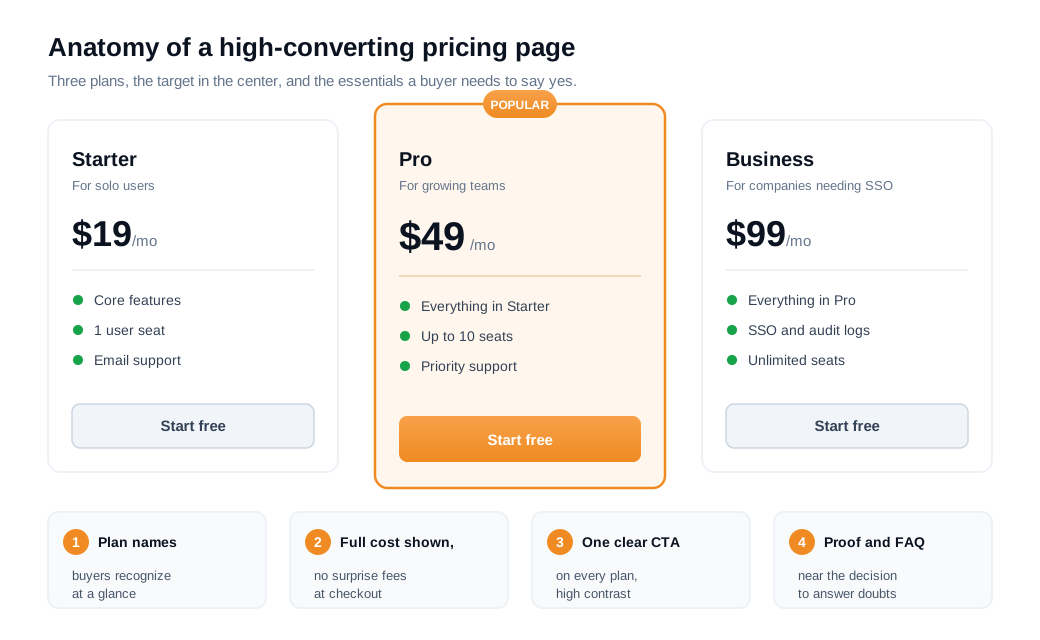
Start with clarity of fit. Name and describe plans so a visitor can self-select in one read ("for solo users," "for growing teams," "for companies that need SSO and audit logs"), rather than forcing them to decode feature lists. A short, scannable comparison of what each plan includes does more work than a long one, because the goal is a fast decision rather than an exhaustive spec sheet.
Then remove surprises about cost. Baymard Institute's checkout research found that 48 percent of US online shoppers have abandoned an order specifically because extra costs like fees and shipping were too high, which makes unexpected cost the most common reason cited for abandonment as summarized in Baymard's conversion research. The lesson carries straight to a pricing page: surface every cost the buyer will face, including per-seat pricing, add-ons, overage charges, and what happens after a trial, before they have to hunt for it.
The rest of a converting pricing page is objection handling. A visible, high-contrast call to action on every plan. Social proof near the decision (logos, a short testimonial, a security badge). And a focused FAQ that answers the questions that actually stall a purchase: Can I cancel? What counts as a seat? Am I charged when the trial ends? The fastest way to learn which objections matter is to read what hesitating visitors ask in a live chat on the pricing page itself, because those transcripts name the exact doubt a dashboard will never show you.
How many plans should you show?
Show three plans in most cases, because three is enough to serve distinct segments while staying under the point where added options start to suppress decisions. More choice attracts attention, then quietly kills action.
The clearest evidence comes from a field study by Sheena Iyengar and Mark Lepper. At a grocery-store tasting booth, a display of 24 jams drew more browsers than a display of 6, roughly 60 percent versus 40 percent of passing shoppers stopped. The purchase numbers ran the other way. Shoppers who saw six jams bought at about 30 percent, while shoppers who saw twenty-four bought at about 3 percent, a tenfold difference in conversion. More options felt appealing and made choosing harder.
Three plans also lets you use position deliberately. In a series of experiments, Valenzuela and Raghubir documented a "center-stage effect": people assume the option placed in the middle of a lineup is the most popular one, and that inferred popularity pulls them toward it in the Journal of Consumer Psychology. Put the plan you want most buyers on in the center column, and the layout itself nudges them there.
Three tiers is the common convention in SaaS for the same reasons, often with a fourth "contact sales" enterprise option that carries no listed price and so does not add to the visible choice load as FastSpring notes in its pricing guidance. Two plans tends to push buyers toward the cheaper one and wastes the center position. Five or more starts to look like the jam table.
How does anchoring affect plan choice?
Anchoring means the first or highest number a visitor sees becomes a reference point that reshapes how every other price feels, which is why the order and framing of plans can change what people buy even when the plans themselves stay the same. A $99 plan makes a $49 plan look moderate. Shown alone, that same $49 can look expensive.
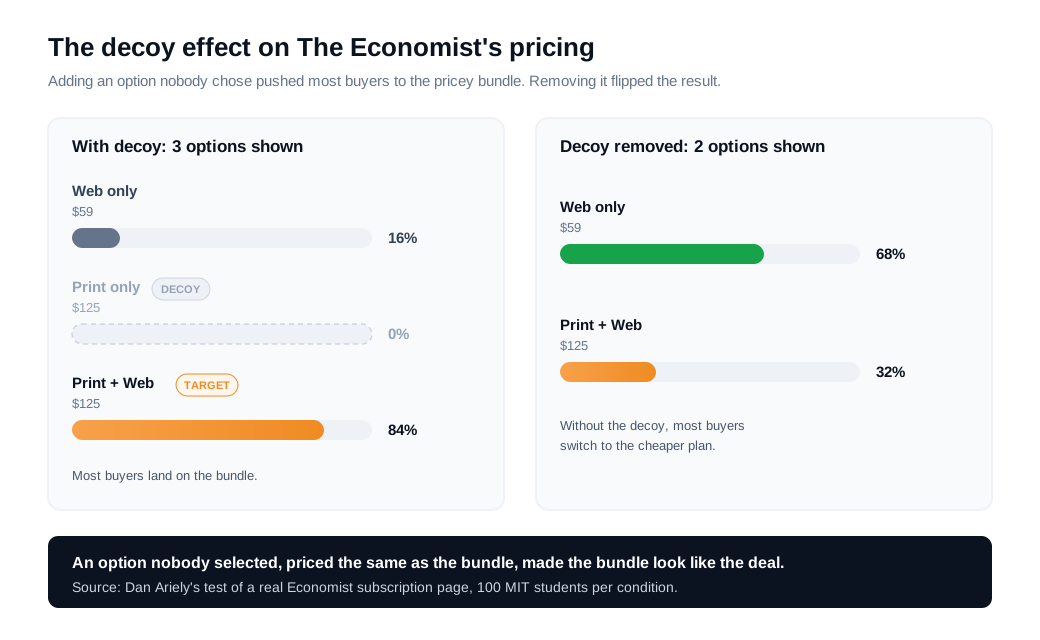
The most cited demonstration is Dan Ariely's analysis of a real Economist subscription page. It listed three options: web-only for $59, print-only for $125, and print-plus-web for $125. When Ariely tested these on 100 MIT students, 16 chose web-only, nobody chose print-only, and 84 chose the print-plus-web bundle. He then removed the print-only option that no one had picked and ran it again. With that decoy gone, 68 people chose the cheap web-only plan and only 32 chose the bundle as recounted in CXL's roundup of pricing experiments. An option nobody wanted, just by sitting next to the bundle at the same price, moved the majority toward the expensive choice.
That is the decoy effect, a specific use of anchoring. A carefully placed option that is clearly worse than your target plan makes the target look like the obvious value. You do not have to manufacture a fake decoy to use anchoring honestly. Listing your highest plan first, or showing a crossed-out full price next to a discounted one, sets a reference that makes your intended plan feel reasonable.
Here is a worked example. Suppose a SaaS tool sells Basic at $19, Pro at $49, and Business at $99, and it wants most teams on Pro. Anchoring high, by presenting Business first or by highlighting its $99 price prominently, makes Pro's $49 read as the sensible middle. Put Pro in the center column, label it "Most popular," and you have stacked anchoring and the center-stage effect on the same plan.
How should you frame and display the price itself?
Frame the price in the smallest honest unit and strip out every surprise, because the way a number is shown changes how expensive it feels even when the total is identical. The arithmetic stays the same. The perception moves.
Break large numbers down. "$49 per month, billed annually" lands more softly than "$588 per year," even though a buyer pays the same. Baymard's research also finds that breaking a mid-range price into installments, shown as something like "4 payments of $24.75," can lift conversion by making the cost feel manageable in its product-page usability work. Per-user tools should show the per-seat number and make the total obvious once a team size is entered, so nobody feels tricked at checkout.
Take a $600 annual plan. Shown as "$600 per year" it reads as a big commitment. Shown as "$50 per month, billed annually" the same plan feels like a small recurring line item, and placing a crossed-out "$70 month-to-month" beside it anchors the annual rate as a discount.
Handle the billing toggle with intent. Most SaaS pricing pages default to annual billing with the monthly price shown for comparison, because annual improves cash flow and retention, and the annual-versus-monthly contrast is itself an anchor that makes the discounted annual rate look like a deal. Whatever you default to, show both prices clearly and never bury the number a buyer will actually be charged.
The unglamorous half of framing is transparency. Every fee, overage, seat minimum, and post-trial charge should be visible on the page. A price that looks great until a surprise appears at checkout produces the exact abandonment Baymard measured, and it erodes the trust that makes someone comfortable buying without talking to a person first.
How do you test pricing page changes?
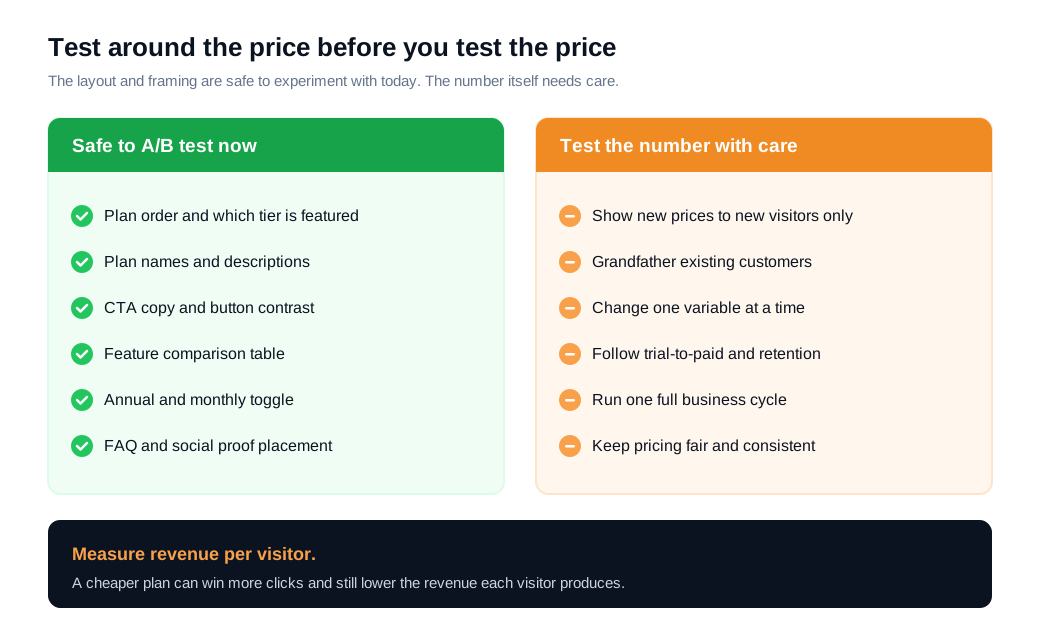
Test a pricing page the way you would test any high-stakes page, with one change at a time measured against revenue per visitor, and test the layout and framing around the price before you ever test the number itself. Conversion rate alone can mislead you here, because a cheaper option can lift signups while lowering revenue.
Start with everything that is not the price. Plan order, plan names, the highlighted tier, the CTA copy, the comparison table, the FAQ, and the annual toggle can all be A/B tested with no change to what you charge and no risk to existing customers. HubSpot's own guidance points out that reorganizing how pricing information is presented, with identical prices, can lift revenue on its own, and that testing the actual number is where the trouble starts in its guide to price testing.
Testing the price itself carries real hazards. Showing different prices to different visitors creates fairness problems if two customers discover they pay different amounts for the same thing, and it leaves existing customers anchored to an old number. The safer pattern is to test new pricing only on new customers and grandfather current ones onto their existing plan, the approach HubSpot describes for its own migrations. That keeps your renewal base untouched while you learn.
Measure past the first click. A pricing change can lift trial signups and then quietly lower trial-to-paid conversion or 90-day retention, so a subscription business has to follow the cohort downstream before calling a test a win. For a company that treats its site as an inbound sales channel, the pricing page is a prime place to test, because small lifts land on visitors who are already close to buying. If your own pricing page has never been through a single structured test, that is usually the highest-return experiment available to you.
What are the most common pricing page mistakes?
The most common pricing page mistakes are hiding the true cost, offering too many or too few plans, burying the plan you want people to choose, and never testing any of it. Each one is easy to fix once you can see it.
Hidden costs top the list, because unexpected fees are the most common abandonment trigger in checkout research and the same logic governs pricing pages. Too many plans triggers the choice overload the jam study captured, while two plans wastes the center position and pushes buyers down. Placing your target plan on the far edge throws away the center-stage effect. Vague, feature-only plan names force visitors to decode instead of self-select. And the quietest mistake is treating the pricing page as finished, leaving the single highest-intent page on the site to run for years without one experiment.
Optimizing a pricing page: FAQs
Should you show prices or hide them behind "contact sales"?
Show prices whenever you can, and reserve "contact sales" for a genuine enterprise tier. Buyers strongly prefer transparent pricing, and hiding every number forces a form-and-wait step that loses the visitors who wanted to buy today. A common pattern keeps two or three self-serve plans with listed prices and a top enterprise plan gated behind a conversation, which serves both self-serve and high-touch buyers without hiding the whole page.
Should annual or monthly billing be the default?
Default to annual for most subscription products, with the monthly price shown alongside for comparison. Annual billing improves cash flow and retention, and the contrast between the two prices makes the discounted annual rate feel like a deal. The rule that matters is clarity: show both numbers plainly and make it obvious which one the buyer is choosing.
Do free trials or freemium convert better on a pricing page?
Neither wins universally, so the answer depends on how quickly a user reaches value and how much of your product you can give away. A free trial suits products where value is obvious within days, while freemium suits products with a low marginal cost and a natural upgrade trigger. Whichever you use, state the terms on the pricing page (trial length, what the free tier includes, whether a card is required) so the offer removes friction instead of adding a question.
Key takeaways
- Make fit, cost, and the buy action instant. A converting pricing page lets a good-fit visitor self-select a plan, see the full cost with no surprises, and click through in seconds.
- Three plans is the reliable default. Enough to serve distinct segments, few enough to avoid the choice overload the jam study measured, and structured so the center-stage effect favors your target plan.
- Anchoring and the decoy effect steer choice. Order and framing change what people buy even when the plans stay the same, as Ariely's Economist experiment showed by moving the majority with a single unwanted option.
- Frame the price in the smallest honest unit. "$49 per month, billed annually" beats "$588 per year," and every fee, seat minimum, and post-trial charge belongs on the page in plain sight.
- Test around the number before you test the number. Layout, plan order, and framing can be A/B tested safely against revenue per visitor, while price changes should run on new customers only.
- The pricing page is usually the least-tested high-intent page you own. That gap makes it the highest-return experiment on most sites.
TAGS

Written by
Nilas MylerCo-founder & CTO, Glimpze
Nilas is the co-founder and CTO of Glimpze, an inbound sales tool that turns high-intent website visitors into live conversations. A former SEO consultant for some of the largest companies in Denmark, he writes about speed-to-lead, inbound sales, and conversion rate optimization — the technical and operational mechanics of turning traffic into pipeline.


