
On this page
Every product has a path it wants people to walk. Land on the pricing page, start a trial, verify an email, finish setup. On paper that path looks obvious. In the analytics it rarely holds together, because real visitors branch off, double back, and quit at the steps you assumed were easy.
A user flow is how you get that messy reality onto a single diagram you can read. Draw the steps and decisions in order, and the friction that costs you signups stops being a hunch. It becomes a box you can point at and fix.
This guide covers what a user flow is, how it differs from a user journey, the main types, how to map one step by step, how flows expose drop-off points, and how to optimize the path once you can see it.
What is a user flow?
A user flow is a diagram of the exact sequence of steps, screens, and decisions a person moves through to complete one specific task in your product. It starts at an entry point, such as a homepage, a search result, an email link, or a push notification, and it ends at a goal like a confirmed order, a saved file, or a completed signup. Everything in between is the path.
The Nielsen Norman Group describes user flows as one of the core tools teams use to plan and evaluate how people accomplish goals. Figma's design resource library frames a user flow as the step-by-step route through an app or site to finish a single task. The common thread is focus. One flow tracks one goal, which keeps the diagram readable and honest.
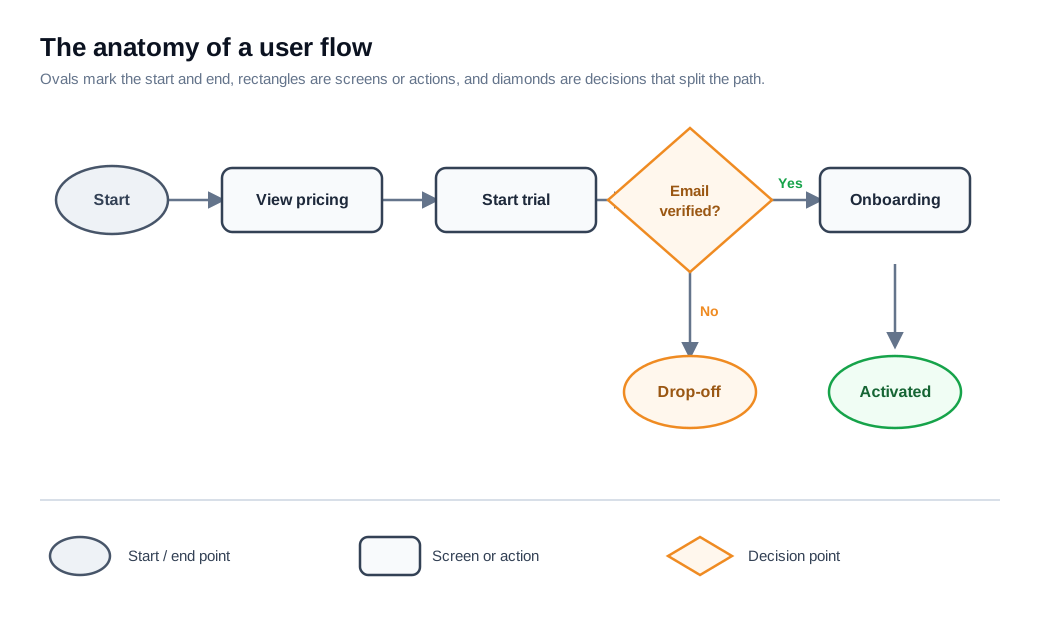
Flows are usually drawn as flowcharts with a small, standard set of symbols. Ovals or circles mark where a task starts and ends. Rectangles represent screens or actions, like "enter email" or "view cart." Diamonds mark decision points where the path splits, each followed by branches such as "yes" and "no." Arrows connect them in the order a person actually moves.
Because a flow is built before any screen is designed, it is cheap to change. You can catch a dead end, a redundant step, or a broken decision on paper, long before it ships as code that visitors abandon.
What is the difference between a user flow and a user journey?
A user flow zooms in on the clicks and screens for one task, while a user journey zooms out to the whole relationship a person has with your product across channels and over time. The two get mixed up because both describe how someone reaches a goal, yet they answer different questions.
The Nielsen Norman Group draws the line by scope, purpose, and format. A user journey, often drawn as a journey map, tracks phases, emotions, pain points, and touchpoints, from a first ad impression through post-purchase support. It reads like a story about the experience. A user flow is a mechanical map of interface steps, closer to an engineering diagram than a narrative.
Use a journey map when you want to understand how someone feels about the whole experience and where the big gaps sit. Use a user flow when you need to design or fix the specific screens that move a person from one point to the next. Most teams build a journey map first to find the moments that matter, then draw detailed flows for the moments worth optimizing.
What are the main types of user flows?
Most teams work with three types: task flows, wireflows, and screen flows, ordered by how much interface detail each one carries. Which one you reach for depends on how far along the design is and who needs to read the diagram.
A task flow is the simplest. It shows a single path that every user takes the same way, with no branching, such as "find product, add to cart, pay, confirm." Task flows are useful early, when you want the skeleton of a process before you worry about edge cases.
A wireflow, a term the Nielsen Norman Group coined, combines wireframes with flowchart arrows. Instead of a plain rectangle, each node shows a rough sketch of the screen, so the diagram captures both the layout and the movement between screens. Wireflows work well for mobile, where a single screen often holds the whole action.
A screen flow does the same thing with high-fidelity mockups instead of wireframes. It is the most detailed and the most expensive to change, so it usually comes last, when you present a near-final interface to stakeholders or engineers. UXtweak's guide walks through all three with examples if you want to see them side by side.
How do you map a user flow?
You map a user flow by fixing a single goal, listing the entry points, laying out each step and decision in order, then checking the diagram against how people actually behave. The process is more discipline than tooling. A whiteboard or a stack of sticky notes works as well as dedicated software.
Start with the goal. Name the one task the flow describes, stated from the user's side ("subscribe to the plan," not "increase revenue"). A flow that tries to cover several goals at once becomes unreadable, so split anything broad into separate diagrams.
Know who is walking the path. A first-time visitor and a returning power user hit different steps, so decide which persona this flow represents before you draw a box.
List the entry points. People arrive from many places, so either start the flow where those paths converge or draw separate flows for meaningfully different starts. Pick one clear beginning.
Lay out the steps in order. Working left to right or top to bottom, place a rectangle for each screen or action a person takes. Then add decision diamonds wherever the path can split, with a labeled branch for each answer. Mark the success exit and, just as important, the error and abandonment exits, since those are where you will hunt for problems later.
Validate against real behavior. The diagram is a hypothesis until you compare it with analytics or watch a few session recordings. People will surprise you by skipping steps, looping back, or leaving through a door you did not draw.
How do flows reveal drop-off points?
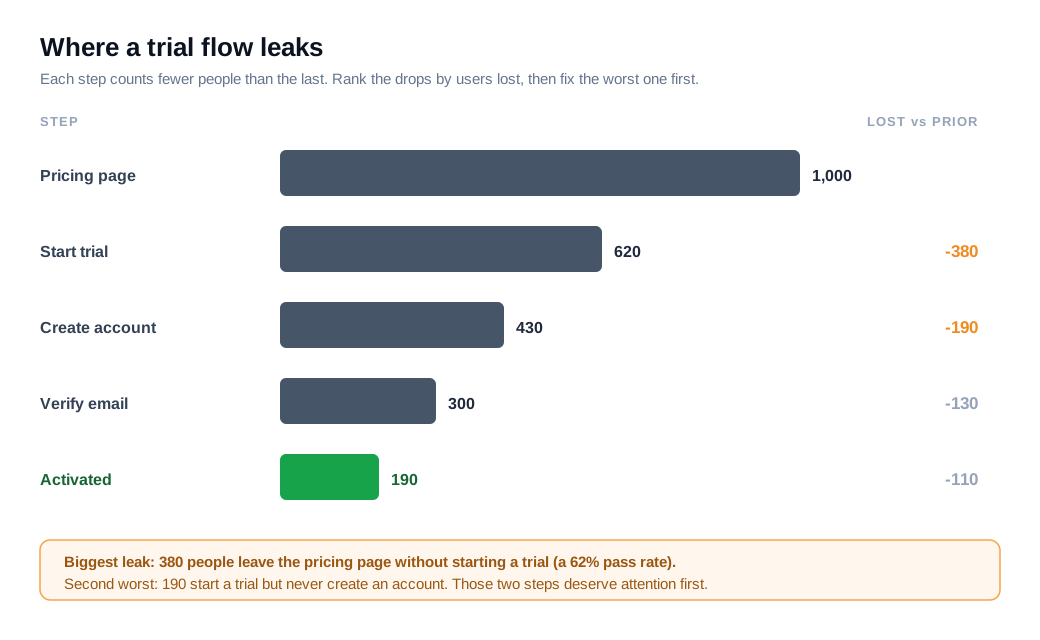
A flow reveals drop-off points by turning each step into a measurable stage, so you can attach a conversion number to every arrow and see where the count collapses. Once the steps are named, your analytics tool can count how many people enter each one and how many reach the next, which is the essence of funnel analysis.
Work an example. Say 1,000 people land on your pricing page in a week. 620 click "start free trial." 430 create an account. 300 verify their email. 190 finish onboarding and reach the product. Each arrow now has a pass rate: 62%, then 69%, then 70%, then 63%. The worst single leak is the first one, where 380 people leave the pricing page without starting a trial. The second worst is the 190 who start a trial but never create an account.
That is the whole point of the diagram. Without it, "our trial conversion is low" is a vague complaint. With it, you can say two specific steps are bleeding, rank them by lost users, and decide where a fix is worth the most.
Big-ticket flows show how expensive these leaks get. Baymard Institute puts the average documented online cart-abandonment rate near 70%, and its usability testing traces much of that to fixable steps rather than genuine loss of interest. In Baymard's cart and checkout usability research, 48% of people who abandoned a checkout said extra costs like shipping, taxes, and fees showed up too late in the flow. That is a drop-off point with a name and a cause, which is exactly what a flow is built to surface.
When you spot a step where people stall rather than leave outright, a live channel can help you learn why. A tool like live chat lets a rep step in at the exact screen where the count falls off and ask what is missing, turning a number on a chart into a sentence from a real visitor.
How do you optimize a flow?
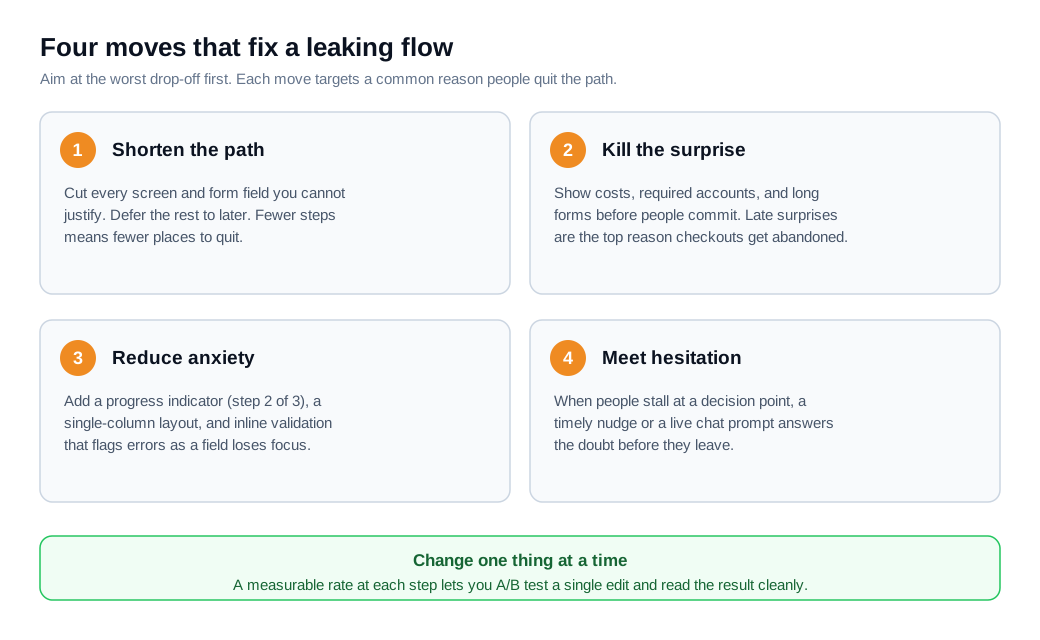
You optimize a flow by cutting steps and fields on the critical path, removing surprises before the decision point, and re-testing one change at a time. The diagram tells you where to aim; optimization is what you do once you know the leak.
Shorten the path. Every extra screen and form field is another place to quit, so remove anything you cannot justify and defer the rest to later. Baymard reports an average checkout of around five steps and found that fixing checkout usability alone could raise conversion by roughly 35% for a typical large ecommerce site, mostly by trimming and clarifying those steps. The detail lives in Baymard's checkout flow guidance.
Remove the surprise. If a cost, a required account, or a long form is going to appear, show it before people commit, not after. Late surprises are what turn a promising flow into an abandoned one.
Reduce anxiety on multi-step tasks. A clear progress indicator ("step 2 of 3"), a single-column layout, and inline validation that flags an error the moment a field loses focus all help people finish. These are small changes with steady returns.
Meet hesitation with help. Some drop-offs come from doubt rather than confusion, and a well-timed nudge closes the gap. Proactive outreach nudges can trigger at a decision point where people commonly stall, offering a prompt or an answer before they leave. Pair that with a clean welcome message flow at the entry point and you shape the path at both ends.
Change one thing at a time. Because a flow gives you a measurable rate at each step, you can A/B test a single change and read the result cleanly. Batch five edits together and you will never know which one moved the number.
Key takeaways
- A user flow is one task on one diagram. It maps the exact steps, screens, and decisions from a single entry point to a single goal, drawn with ovals, rectangles, and decision diamonds.
- Flows and journeys answer different questions. A journey map tells the emotional story across time and channels, while a flow is the mechanical map of screens for one task.
- Map before you build. Fix the goal, pick the persona, list entry points, lay out steps and decisions, then validate the diagram against analytics and session recordings.
- Named steps become measurable steps. Attaching a pass rate to each arrow turns a vague "conversion is low" into a ranked list of exactly where people leave.
- Drop-offs are often fixable friction. Baymard ties much of the roughly 70% cart-abandonment average to specific steps like late-appearing costs, rather than lost interest.
- Optimize on the critical path, one change at a time. Cut steps, kill surprises, add progress cues, and meet hesitation with timely help, then A/B test each change on its own.
TAGS

Written by
Nilas MylerCo-founder & CTO, Glimpze
Nilas is the co-founder and CTO of Glimpze, an inbound sales tool that turns high-intent website visitors into live conversations. A former SEO consultant for some of the largest companies in Denmark, he writes about speed-to-lead, inbound sales, and conversion rate optimization — the technical and operational mechanics of turning traffic into pipeline.


