
On this page
A shopper pulls out their phone on a lunch break, taps an ad, and lands on your product page. They like the item and add it to the cart. Then the page stalls for a few seconds, the checkout opens a form with a dozen fields, the keyboard slides up and hides half the screen, and they close the tab. That shopper was ready to buy, and the phone lost the sale.
Most of your traffic now behaves like that shopper. Mobile drives the majority of ecommerce visits, yet it converts at roughly half the desktop rate, so the biggest pool of buyers is also the leakiest. The gap is well measured and mostly fixable, and closing even part of it moves more revenue than any tweak to a desktop experience that already works.
This post covers what a good mobile conversion rate looks like, why mobile trails desktop, how to speed up your store, how to simplify mobile checkout, how to test the experience on real phones, and how live help recovers the highest-intent mobile shoppers before they leave.
What is a good mobile ecommerce conversion rate?
A good mobile ecommerce conversion rate is roughly 2 to 3 percent, and clearing about 3 percent puts a store ahead of most retailers, though the honest benchmark still depends on your industry, price point, and traffic mix. The single number matters less than where you land once you compare against stores that sell what you sell to visitors who arrive the way yours do.
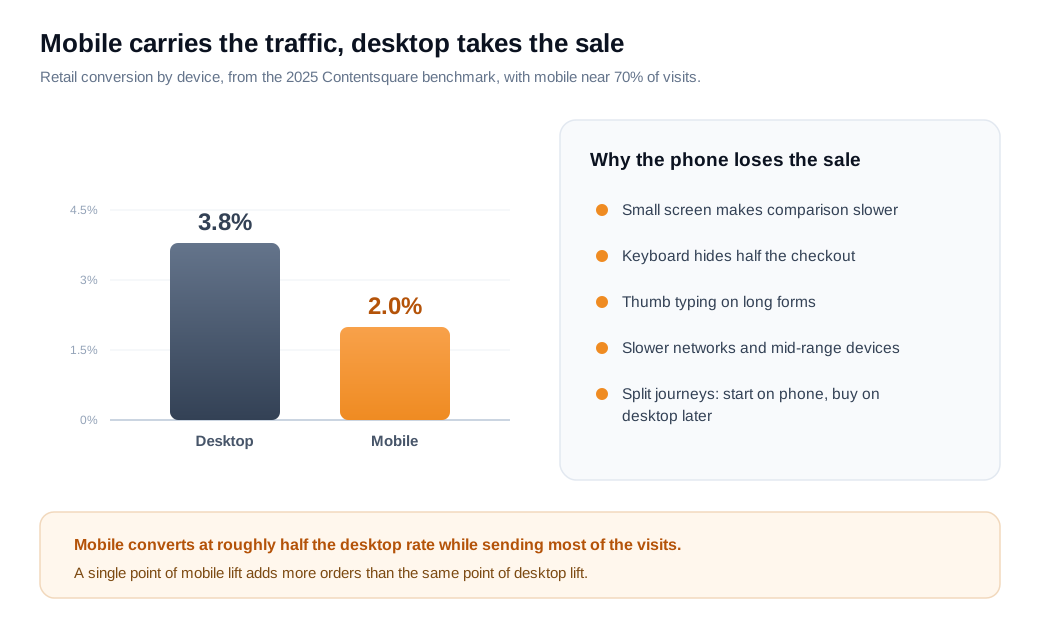
Contentsquare's 2025 benchmark, built from tens of billions of retail visits, put mobile conversion near 2.0 percent against roughly 3.8 percent on desktop. That near two-to-one gap holds across most panels, even as mobile has grown to around 70 percent of ecommerce traffic and now a majority of online sales.
The share is why the mobile rate deserves its own scoreboard. A store that reads a healthy 3 percent blended figure can be hiding a 1.8 percent mobile rate propped up by a strong desktop minority. Because most visits are on phones, a single point of mobile lift adds more orders than the same point on desktop, so the mobile number is the one worth watching first. Set your target against your own mobile baseline rather than a global average, then work on the biggest leak.
Why is mobile conversion lower than desktop?
Mobile conversion is lower than desktop mainly because the phone is a harder place to browse, compare, type, and trust, even though phone shoppers arrive with real intent. The device adds friction at every step that a large screen, a physical keyboard, and a fast connection remove on desktop.
Start with the screen. A phone shows one product at a time, makes side-by-side comparison slower, and squeezes long checkouts into a narrow column where the on-screen keyboard covers half the view. Baymard's usability testing found that mobile shoppers often lose the overview of a page and treat each form field as a separate, isolated task, which drags out any checkout that asks for more than the basics.
Then there is context. Mobile sessions are frequently quick browsing between other things, on slower networks and mid-range devices that render pages later than a laptop on office wifi. Many journeys split across devices as well: a shopper discovers an item on their phone, then finishes on a desktop later, which credits desktop with a conversion the phone actually started. Add typing a card number and a shipping address with one thumb, and the same store loses a larger share of phone shoppers than desktop shoppers for the identical product.
None of this means phone shoppers are worth less. The mobile experience simply has to work harder to earn the same order, and the three levers that do the most work are speed, checkout, and timely help. The rest of this post takes them in that order.
How do you speed up mobile stores?
You speed up a mobile store by cutting page weight and render time until the main content appears in under about 2.5 seconds, the point at which Google's Core Web Vitals rate loading as good. That 2.5-second target for Largest Contentful Paint is the same on mobile and desktop, yet far harder to hit on a phone, which is exactly why so many mobile stores lose people at the door.
The stakes are steep and well documented. Google's research shows that 53 percent of mobile visits are abandoned when a page takes longer than three seconds to load, and that the probability of a bounce climbs about 32 percent as load time grows from one to three seconds. Speed maps directly to money. A Google-commissioned study by Deloitte Digital, Milliseconds Make Millions, analyzed more than 30 million mobile sessions across 37 brands and found that a 0.1-second improvement in load time lifted retail conversions by about 8 percent and increased what retail shoppers spent by nearly 10 percent.
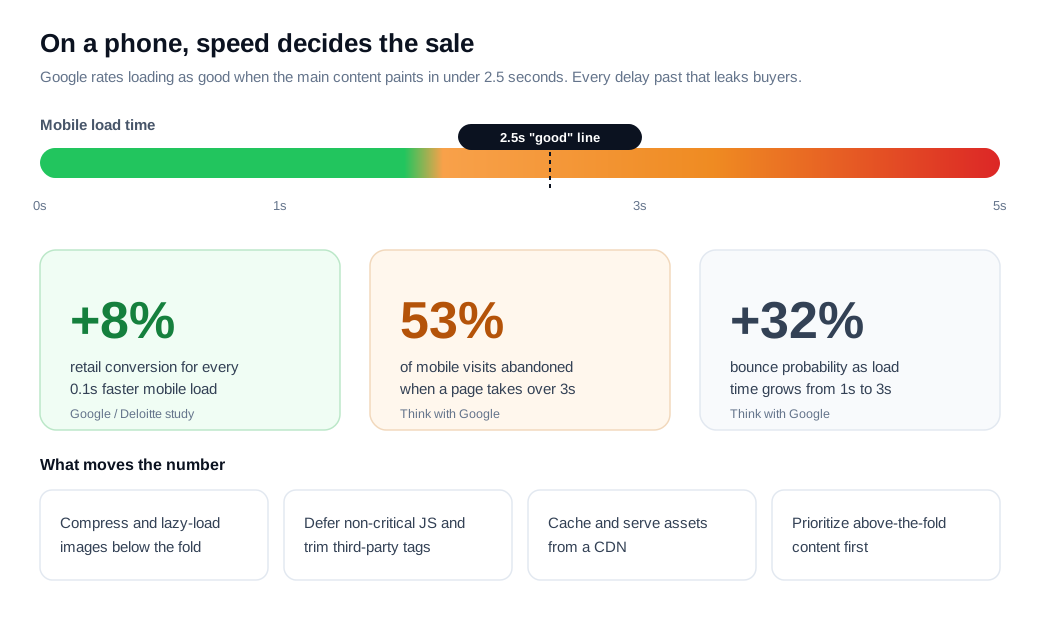
The tactics that get you there are unglamorous and reliable. Compress and correctly size images, then lazy-load anything below the fold, since images are usually the heaviest thing on a product page. Defer or remove non-critical JavaScript and trim third-party tags, because each analytics, review, and chat script competes for the same limited mobile CPU. Cache aggressively and serve assets from a CDN so repeat visits are near-instant, and prioritize the above-the-fold content so the first screen paints before the rest arrives. Every tag you add carries a cost, so audit them the way you audit ad spend and drop the ones that do not earn their weight.
How do you simplify mobile checkout?
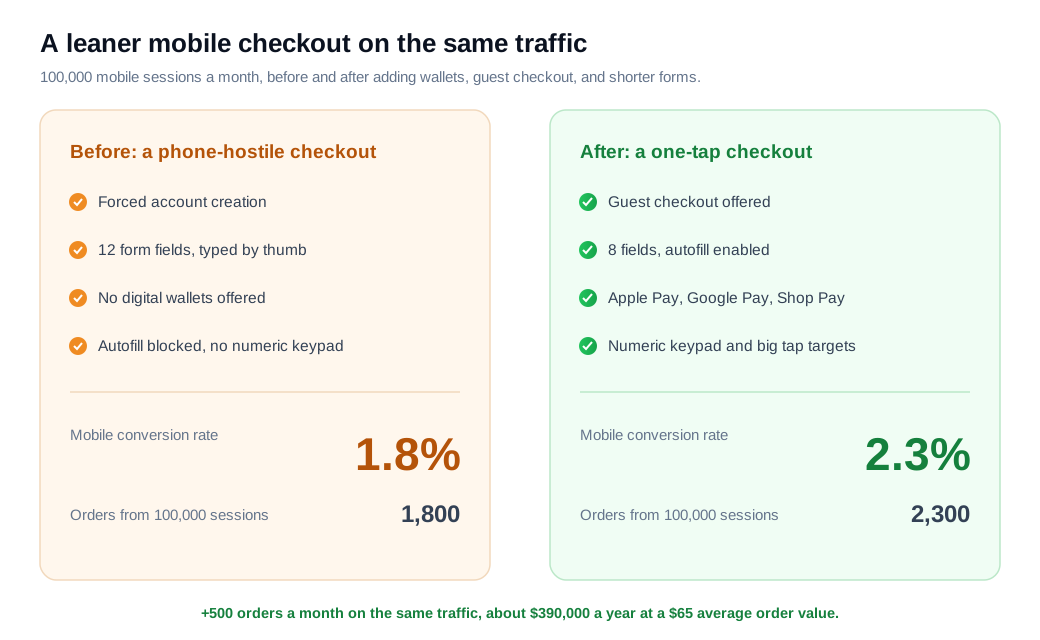
You simplify mobile checkout by cutting it to the fewest fields and steps the order actually needs, offering guest checkout, and adding one-tap wallets so a shopper never types a card on a phone. Baymard's checkout research found the average checkout carries about 11.8 form fields across 5.2 steps when roughly 8 fields would do, and every extra field costs more on a phone than on a desktop.
Guest checkout comes first, because forcing account creation is one of the top reasons shoppers quit and one of the easiest frictions to remove. Then cut the form itself: combine fields, drop anything optional, use a single full-name field, and let the billing address default to the shipping address. Turn on browser autofill and address auto-complete, and confirm you are not disabling them with autocomplete="off", a common mistake Baymard flags. Small mobile details compound here too, like large tap targets, a single-column layout, inline error messages, a visible progress indicator, and triggering the numeric keypad for number-only fields such as the postal code and card number.
The biggest single mobile win is the digital wallet. Apple Pay, Google Pay, and Shop Pay replace the entire address-and-card form with a fingerprint or a face scan, which removes the exact friction that sinks mobile checkout. Shopify reports that Shop Pay lifts conversion by about 9 percent on average across checkouts, and the effect tends to be largest on mobile because that is where typing hurts most. Show the wallet buttons high in the flow, above the manual form, so a returning shopper can finish in a tap.
Here is the arithmetic on an ordinary store. Say 100,000 mobile sessions arrive each month and convert at 1.8 percent, which is 1,800 orders. You add express wallets, switch on guest checkout, and cut the form from 12 fields to 8. The mobile rate climbs to 2.3 percent, so you now ship 2,300 orders from the same traffic. That is 500 more orders a month, and at a $65 average order value it is about $390,000 a year in additional revenue with no extra ad spend.
How do you test the mobile experience?
You test the mobile experience by pairing lab tools that measure speed and layout with real-device testing and analytics that show where phone shoppers actually drop off. No single tool tells the whole story, so run three layers together and act on what they agree on.
The first layer is lab measurement. Run Google Lighthouse or PageSpeed Insights against your key templates to score Largest Contentful Paint, interaction latency, and layout shift, then read the field data from the Chrome User Experience Report to see how real visitors experience the site rather than a clean test server. Fix the specific opportunities each report lists, one at a time, and re-test after each change so you know what worked.
The second layer is real devices on real networks. Emulators and a fast laptop hide the problem, so open your store on a mid-range Android phone over a throttled 4G connection and try to buy something. Tap through the whole flow with one thumb, watch for the moment the keyboard covers a field you still need to see, and time how long the product page takes to become usable rather than merely visible. Nothing surfaces mobile friction faster than completing your own checkout on a slow phone.
The third layer is behavioral data. Split your analytics by device so the mobile funnel is never buried inside a blended average, and use session replay or funnel reports to find the exact step where phone shoppers leave. Then run any A/B test on mobile traffic specifically, since a layout that lifts desktop can easily hurt a phone. Keep to one change per test, because bundled changes tell you the direction moved without telling you which fix moved it.
How can live help lift mobile conversion?
Live help lifts mobile conversion by answering the one question that would otherwise freeze a phone shopper, before the small screen and the effort of typing push them to abandon. A high-intent visitor stuck on a sizing question, a delivery date, or a payment that keeps failing is the most expensive person to lose, and on mobile they give up faster because everything takes more effort.
The fix is to reach that shopper while they are still on the page. A tool like live chat that appears when someone hesitates on a product or checkout page lets a rep or an assistant clear the blocker in a sentence or two, which suits a phone far better than a long email thread the next day. For a higher-value or more complex order, a quick video call or screen share can walk a shopper through the decision without asking them to type anything at all.
This is the core of an inbound sales motion applied to a phone screen. Treat a stalled high-intent mobile checkout as a live signal and offer help right then, keeping it low-key and genuinely useful rather than pushy. The aim is to remove the last bit of doubt at the moment it matters, and mobile shoppers reward the store that clears the doubt instead of waiting to email them about it.
Key takeaways
- Mobile converts at about half the desktop rate, near 2.0 percent against 3.8 percent, yet carries most of your traffic, so the mobile number deserves its own scoreboard rather than hiding inside a blended average.
- The phone adds friction at every step. Small screens, thumb typing, slower networks, and split-device journeys all suppress mobile conversion, so the experience has to work harder to earn the same order.
- Speed is the first lever. Aim for the main content in under 2.5 seconds; Google's data shows a 0.1-second improvement lifted retail conversions about 8 percent, while a load over three seconds loses more than half of mobile visits.
- Cut mobile checkout to the essentials. Offer guest checkout, trim toward 8 fields, enable autofill, and add one-tap wallets like Apple Pay and Shop Pay, which remove the typing that sinks phone orders.
- Test on a slow phone, not a fast laptop. Combine Lighthouse and Core Web Vitals field data with real-device testing on 4G and device-split analytics to find where mobile shoppers actually drop off.
- Answer the blocking question live. Offering help the moment a phone shopper hesitates recovers high-intent sessions that a next-day email never would.

Written by
Nilas MylerCo-founder & CTO, Glimpze
Nilas is the co-founder and CTO of Glimpze, an inbound sales tool that turns high-intent website visitors into live conversations. A former SEO consultant for some of the largest companies in Denmark, he writes about speed-to-lead, inbound sales, and conversion rate optimization — the technical and operational mechanics of turning traffic into pipeline.


