
On this page
- What is screen sharing in sales calls?
- When should you share your screen on a sales call?
- How do you use screen sharing effectively in sales calls?
- What are the most common screen sharing mistakes?
- How does interactive screen sharing beat passive sharing?
- What do you need to share your screen on a sales call?
- Key takeaways
- Sources
A prospect is fifteen minutes into a call with your rep and finally says the words you were waiting for: show me. The rep clicks Share, a slide deck fills the screen, and twenty narrated minutes later the buyer says they need to run it past the team. The deal goes quiet.
That handoff, from talking about the product to showing it, is where a lot of live sales calls are won or lost. Screen sharing is the tool that makes the showing possible, and plenty of reps use it in a way that works against them. This guide covers what screen sharing means in a sales context, when to reach for it on a call, how to run it so the buyer stays with you, the mistakes that flatten a demo, and why letting a buyer touch the product beats making them watch.
What is screen sharing in sales calls?
Screen sharing in sales calls is the practice of broadcasting your screen, or a single application window, to a prospect during a live call so they can see your product, a document, or a workflow instead of only hearing you describe it. It is the mechanism behind almost every remote software demo.
Technically, screen sharing streams a video of what is on your display to everyone else on the call. It runs inside video meeting tools like Zoom, Microsoft Teams, and Google Meet, and inside lighter web widgets that start a call straight from a website. Because it sends pixels rather than page data, the viewer watches but cannot click, and that one-way quality matters later when we get to interactive sharing.
Two related tools sit nearby and get confused with it. Screen recording, through something like Loom or Vidyard, is a demo the buyer watches later on their own time with no live rep. Co-browsing shares the buyer's own browser tab so a rep can guide them through it. Plain screen sharing is the live, rep-driven version, where the buyer sees the rep's screen in the moment and reacts to it in real time.
Screen sharing became a default sales skill as buying went remote. McKinsey's B2B research describes a stable rule of thirds, where roughly a third of buyers prefer in-person meetings, a third prefer remote human contact over video or phone, and a third prefer digital self-service, with interest in the digital options edging up over time. When a buyer picks the remote option, a shared screen is usually how the product gets shown. The same research found that more than half of B2B decision makers would switch suppliers after a poor cross-channel experience, so the quality of that shared-screen moment carries real weight.
When should you share your screen on a sales call?
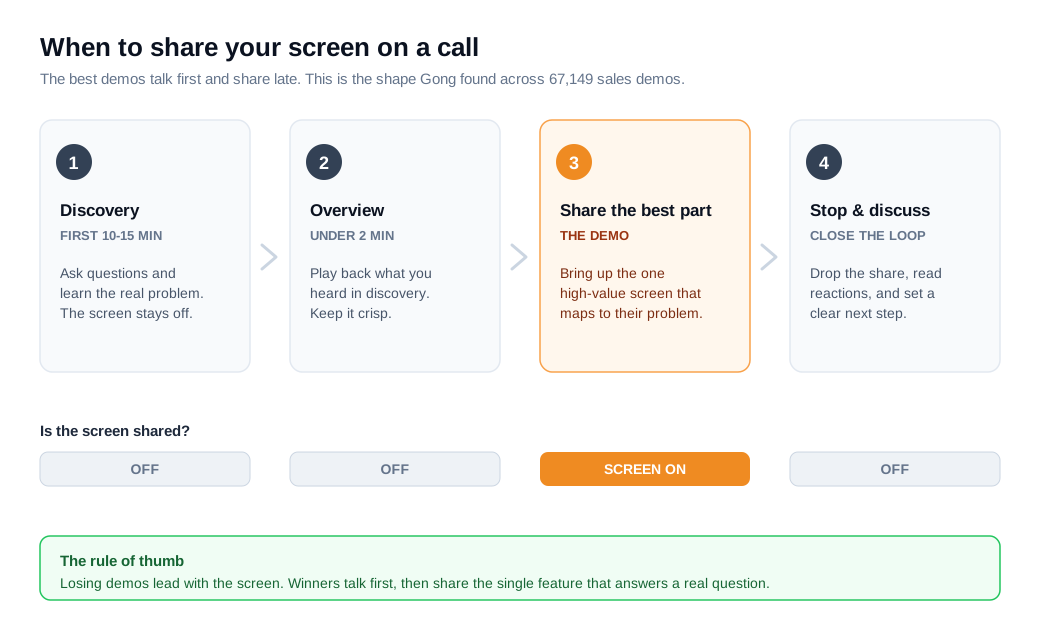
You should share your screen after you understand the buyer's problem, which on most calls lands in the back half rather than the opening minutes. The instinct to open with a screen and start touring features is the single most common way to lose the room.
A useful default: spend the first ten to fifteen minutes in conversation, learn what the buyer is actually trying to fix, then share to show the one thing that maps to it. CrankWheel, a screen-sharing tool built for sales, recommends exactly this sequence of talk first, share to show a feature, then stop sharing to discuss.
The signal that it is time to share is a specific question you can answer better by showing than by saying, something like "how would this handle our approval flow?" That is your cue to bring up the exact screen that answers it, and nothing else.
Gong's data supports the same shape from the other direction. Its team analyzed 67,149 sales demos run over screen-sharing platforms and found that the strongest demos open with a short contextual overview, no longer than about two minutes, that plays back what the rep heard in discovery, then go straight to the most valuable capability rather than building toward a big reveal at the end. Leading with the highest-value part, tied to the buyer's stated problem, correlated with the best outcomes.
How do you use screen sharing effectively in sales calls?
You use screen sharing effectively by showing less, pausing often, and tying every screen you share to a problem the buyer already told you they have. The goal is a dialogue with a visual aid rather than a broadcast.
A few habits separate a demo that lands from one that drifts:
- Share one window, not your whole screen. Sharing a single application window keeps notifications, other tabs, and your desktop out of view, and it keeps the buyer's attention on the one thing that matters.
- Talk in short bursts. Gong found that losing demos contain long, uninterrupted monologues that can run up to 106 seconds, while winning demos break the same content into shorter stretches that invite the buyer to jump in. Silence from the buyer is a warning sign, not a green light.
- The pattern matters more than the ratio. Reps naturally talk more during a demo than during discovery, and Gong puts the demo talk-to-listen ratio near 65/35. The ratio itself barely separates winning demos from losing ones. What separates them is whether the talking comes in interactive bursts or one long push.
- Show the buyer's use case. Configure the screen to reflect their data, their team, or their workflow where you can, so they see themselves in the product rather than a generic sandbox.
- Stop sharing to talk about what they saw. When you finish showing a capability, drop the share and return to faces so you can read reactions and hear objections while they are fresh.
None of this is complicated, and that is the point. The reps who lose the room are usually doing more, not less: more features, more talking, more screen time.
What are the most common screen sharing mistakes?
The most common screen sharing mistakes are workflow habits rather than security failures: sharing the whole desktop, letting notifications pop, dumping every feature, and narrating over a buyer who has gone silent. Each one is easy to fix once you name it.
- Sharing the entire display. Microsoft's own guidance lists this among the top screen sharing mistakes, because your whole screen exposes private messages, unrelated tabs, calendar invites, and downloads to the buyer. Share a single window instead.
- Live notifications. A Slack ping or a text preview that slides in mid-demo breaks the moment and can leak something private. Turn on Do Not Disturb or a focus mode before the call starts.
- Feature dumping. Showing every capability you have is information overload, and it buries the two or three things the buyer actually cares about. Show what maps to their problem and skip the rest.
- Leading with the screen. Sharing before you have run discovery means you are demoing to a problem you have not confirmed. Talk first, share second.
- Monologuing. The 106-second uninterrupted pitch is the demo-killing version of this. If you have talked for a minute without a question, stop and ask one.
- Making the buyer a spectator. A demo where the buyer never touches anything and never gets asked a question is the passive default that the next section takes apart.
How does interactive screen sharing beat passive sharing?
Interactive screen sharing beats passive sharing because a buyer who clicks through the product themselves remembers it and can sell it internally, while a buyer who only watches tends to forget the specifics and stall. The difference is the gap between watching someone drive and driving yourself.
Passive sharing is the standard setup: the rep shares, the rep clicks, the buyer watches a stream of someone else's screen. Interactive sharing hands over some control, whether by letting the buyer take the mouse in a live call, walk through a shared workflow together, or explore a clickable version of the product on their own. When a person does the clicking, they build a memory of the path, and they are far more likely to describe it accurately to the colleagues who were not on the call.
Psychologists call the underlying effect the generation effect: people remember information they helped produce better than information they simply received. A buyer who navigates the product is generating the memory, and an interactive demo you leave behind lets them keep doing it after the call, on their own time, with the colleagues who hold the budget.
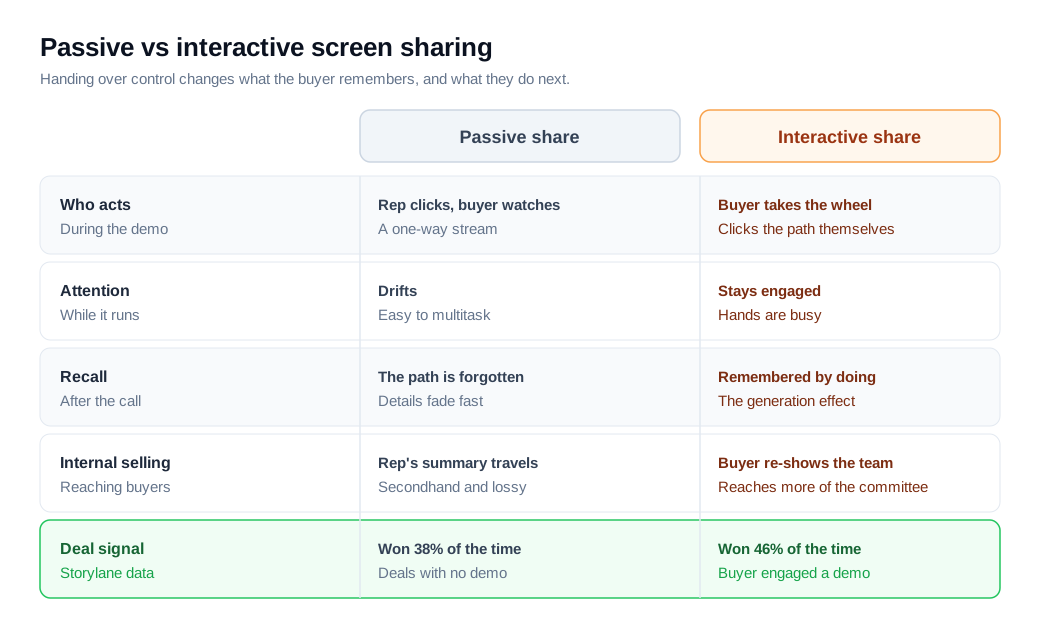
The pipeline data points the same way. Storylane analyzed roughly 68,000 deals across more than twenty anonymized B2B software pipelines and found that deals where the buyer engaged with an interactive demo won 46% of the time, against 38% for deals with no demo, a result that held in 14 of the 20 pipelines. Interactive-demo deals also reached about 60% more of the buying committee. This is vendor data and correlation, so treat the exact numbers as directional, but the direction is consistent with everything Gong found about interaction on live calls.
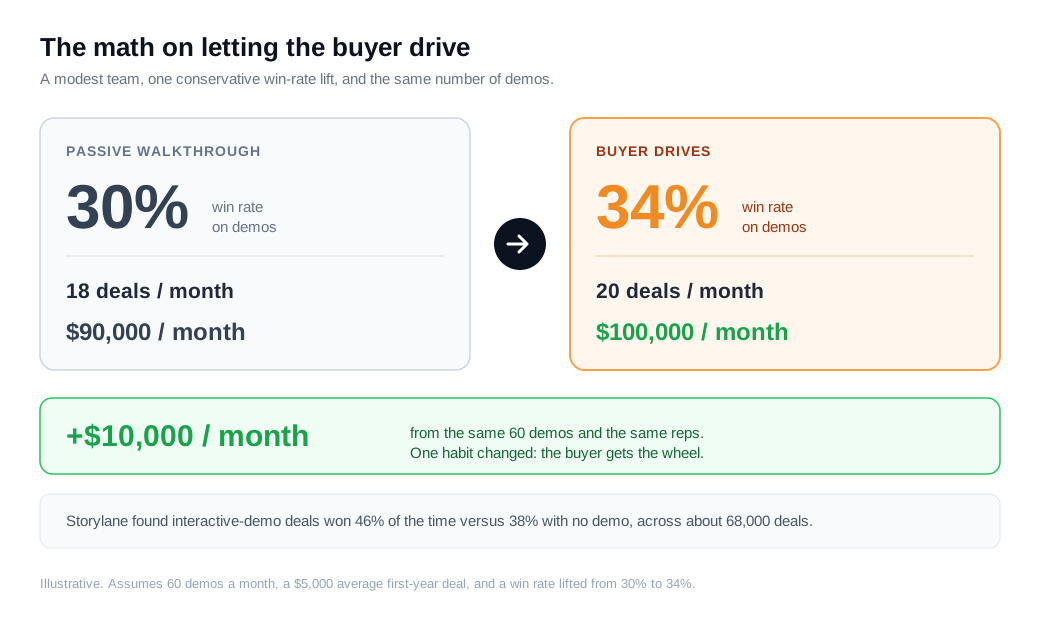
Here is the math on a modest team. Say your reps run 60 product demos a month and currently win 30% of the deals that reach a demo, which is 18 deals. If the average new deal is worth $5,000 in first-year value, those demos produce about $90,000 a month. Now suppose that moving from a passive walkthrough to a demo where the buyer drives lifts your win rate by even a quarter of the gap in the pipeline data, from 30% to 34%. That is roughly 20 deals instead of 18, about $100,000, an extra $10,000 a month from the same reps and the same 60 demos. Halve the assumption and the change still pays for the tooling.
What do you need to share your screen on a sales call?
You need three things: a low-friction way to start a share, the discipline to share a window instead of a screen, and a channel that lets the buyer interact rather than only watch. The first is a solved problem, so most of the work is in the second and third.
For scheduled calls, the video meeting tools most teams already run (Zoom, Teams, and Meet) handle screen sharing fine. The harder case is inbound, where a high-intent visitor is on your pricing page right now and interest fades with every hour of scheduling round-trips. There, a widget that lets the visitor jump into a live call with screen share on your site removes the wait, and a buyer who opens in live chat can escalate to a shared screen the moment the conversation needs one. For teams whose job is turning site traffic into pipeline, that instant path sits at the center of an inbound sales motion, and platforms like Glimpze bundle the widget, routing, and one-click video into a single install so the shared-screen moment happens while the buyer still cares.
Whatever tool you use, the winning move is the same. Share late, share narrow, and hand the buyer the wheel.
Key takeaways
- Screen sharing means showing the product live. It streams your screen or a single window to a buyer on a call, and it is how nearly every remote software demo actually happens.
- Share late, after discovery. Spend the first ten to fifteen minutes learning the problem, then share to show the one capability that maps to it. Gong's 67,149-demo analysis found the best demos lead with the highest-value part rather than a slow build.
- Talk in bursts. Losing demos contain uninterrupted pitches of up to 106 seconds. Break the talking into short stretches and pause for the buyer to react.
- Most mistakes are workflow, not tech. Sharing the whole desktop, live notifications, and feature dumping do more damage than any bug. Share one window with notifications off.
- Let the buyer drive. Storylane's data shows deals with an interactive demo won 46% of the time versus 38% with none, and interactive deals reached more of the buying committee. A buyer who clicks remembers and champions.
- Match the tool to the moment. Meeting apps cover scheduled calls, and for inbound a widget that starts a live call with screen share on the page keeps the moment warm.
TAGS

Written by
Daniel SemeckyCo-founder & CEO
Daniel is the co-founder and CEO of Glimpze. He spends his days talking to revenue teams about how to catch high-intent visitors before they bounce, and writes about inbound sales, lead conversion, and building a motion where marketing and sales actually share a number.


