
On this page
- Why do video calls close better than phone or email?
- How do you prepare for a video sales call?
- How do you build rapport on camera?
- How do you keep a distracted buyer engaged on a video call?
- How do you present and demo effectively?
- How do you drive next steps?
- What does a strong video sales call look like in numbers?
- Key takeaways
- Sources
You join the video call two minutes early, camera on, deck loaded. The buyer joins with their camera off, a muted "hey, can you hear me," and a browser tab you can almost hear them typing into. You have maybe ninety seconds before they decide whether this call earns their full attention or just runs as background noise while they clear their inbox.
Selling on a video call is closer to hosting than presenting. The screen takes away the room, the handshake, and the hallway small talk, and hands you a webcam, a shared screen, and a buyer who can multitask without you ever knowing. Reps who run a video call like a phone call with a face lose the room. The ones who design it as a conversation close more.
This post covers why video calls outperform phone and email, how to prepare, how to build rapport on camera, how to hold a distracted buyer's attention, how to present and demo, and how to drive a real next step before you hang up.
Why do video calls close better than phone or email?
Video calls close better because a visible face carries the signals people actually use to build trust, and it hands you the live reactions you need to adjust while the deal is still in motion. A phone call gives you tone and nothing else. Email gives you neither.
The data is direct. Gong recorded and analyzed 121,828 web-based sales meetings and found that win rates ran 96% higher when the buyer turned their own camera on, and that closed deals used webcams 41% more often than lost ones, as shown in its analysis of video's impact on remote sales. Seeing the buyer lean in when a point lands, or glance away when price comes up, is the feedback that lets a good rep change course before an objection hardens.
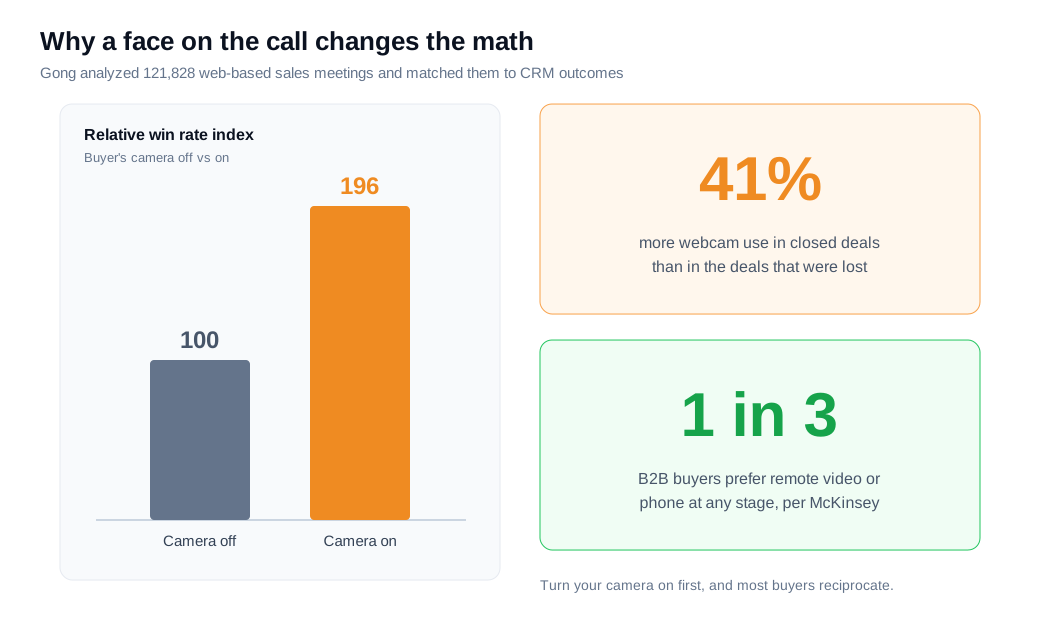
Buyers already expect to meet this way. McKinsey's research on B2B buying describes a steady rule of thirds, where at any stage of the journey roughly a third of buyers prefer in-person contact, a third prefer remote video or phone, and a third prefer digital self-service, and it names hybrid selling as the dominant model going forward in The Future of B2B Sales Is Hybrid. The video call is how you cover that middle third well.
There is a catch worth naming early. The same screen that lets you read a buyer also lets that buyer disappear behind a black tile and answer email while you talk. Everything below is built to keep that from happening.
How do you prepare for a video sales call?
Prepare for a video sales call by doing the account research, writing a shared agenda, planning your discovery questions, and testing your tech, all before you hit Join. A call that opens with "so, tell me about your business" wastes the one advantage you spent effort to earn.
Start with research. Read the CRM history to see what has already been said, then check the buyer's LinkedIn for a recent post or company announcement you can reference by name. Vidyard's guide on running a strong sales discovery call makes the point that specific, genuine research is what separates a warm opener from a cold one.
Plan your questions with a number in mind. Gong's analysis of 519,000 sales calls found that the discovery sweet spot sits between 11 and 14 questions, in its data on discovery calls. Fewer than that and you miss the nuance, and more starts to feel like an interrogation. Senior executives are the exception, where the best calls average closer to four questions because they tire of repeated discovery.
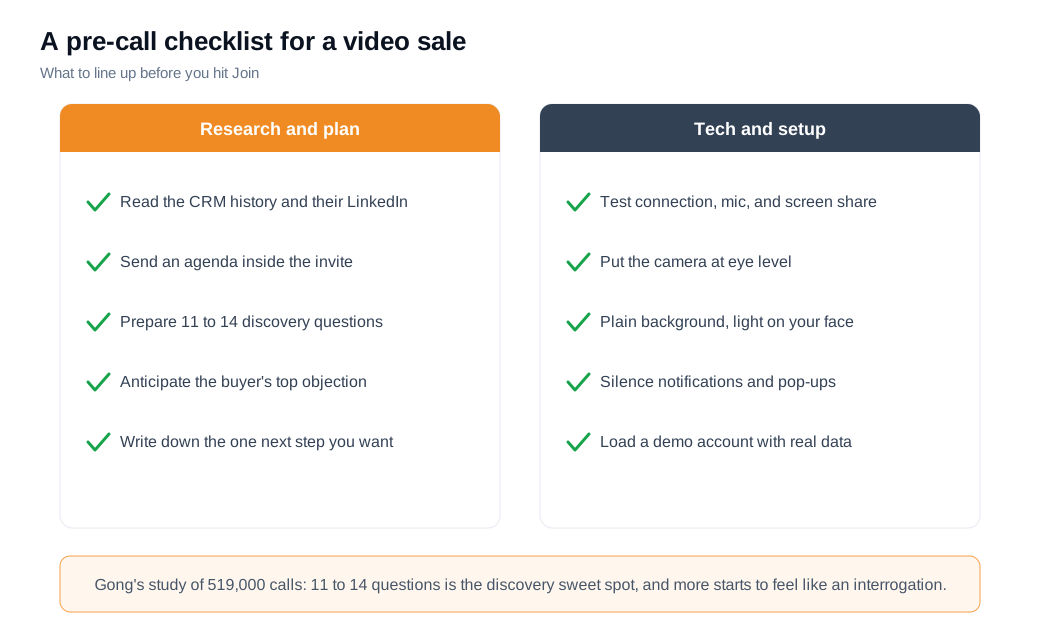
Then remove the ways a call goes wrong before it starts. Put the agenda in the invite so both sides agree on the shape of the meeting. Test your connection, microphone, and screen share, raise the camera to eye level, sit against a plain wall with light on your face, silence notifications, and load a demo account with realistic data. None of this closes a deal on its own, but a frozen screen or a missing slide during the one minute you had the buyer's attention can end the call before it starts.
How do you build rapport on camera?
Build rapport on camera by turning your own camera on first, looking into the lens instead of the screen, mirroring the buyer's pace, and opening with small talk that is specific rather than generic. Warmth is harder to transmit through a webcam, so you have to be deliberate about it.
Go on camera before you ask the buyer to. People reciprocate what they see, and a rep who is visibly comfortable on video sets the tone for the other person to switch their camera on too. The guidance in the sales-i piece on selling through a screen is blunt about this: flip your webcam on, and your customer usually follows.
Then fix where you look. On a video call, eye contact means looking into the camera lens, not at the face on your monitor, which feels to the buyer like you are looking slightly past them. Sybill's rundown on eye contact in sales calls suggests aiming for eye contact around half to two-thirds of the time, matching the buyer rather than staring them down.
Mirroring does the quiet work. Subtly matching the buyer's pace, tone, and energy signals that you are tuned to them, and Pipedrive's guide to sales mirroring stresses that the effect depends on keeping it subtle. If they take a beat to think, give them the beat instead of rushing to fill it. Open with one genuine, specific observation from your research, then move into the agenda you both already agreed on.
How do you keep a distracted buyer engaged on a video call?
Keep a buyer engaged by assuming they are tempted to multitask and designing the call so they cannot quietly drift, with frequent hand-offs, their own data on the screen, and questions that require a real answer. On video, disengagement is invisible until the deal goes cold, so you plan against it.
The temptation is well documented. A survey compiled in Zippia's meeting statistics found that 92% of employees admit to multitasking during meetings, with 69% checking email and about half doing unrelated work. A muted mic and a small video window make it easy to hide. Your job is to make the call more interesting than the inbox.
Trade the floor often. Gong's call research found that interactivity, measured as how often the speaker changes, predicts win rate on its own, and that a rep with the right talk-to-listen ratio but half the speaker switches still underperforms, per its work on the talk-to-listen ratio. Two long monologues lose to six short exchanges. Ask a question in the first few minutes, use the buyer's name, and pass the floor back constantly.
Put their world on screen, not your logo slide. When the buyer is looking at their own data, their own workflow, or a mockup of their use case, staying present is easier than tabbing away. A generic overview invites a wandering eye. A specific, personal screen holds it.
How do you present and demo effectively?
Present effectively by talking less than instinct tells you to, narrating outcomes instead of clicks, and keeping any single stretch of talking short. The reflex on a video call is to fill silence with product features, and that reflex loses deals.
The numbers set the target. Gong's analysis of more than 100,000 sales calls found the best-converting talk-to-listen ratio sits near 43:57 in the buyer's favor, while lost deals drift toward 64% rep talk time, and top reps keep any continuous stretch of talking under about 76 seconds. If you have been talking for a minute and a half straight, you have already lost the room.
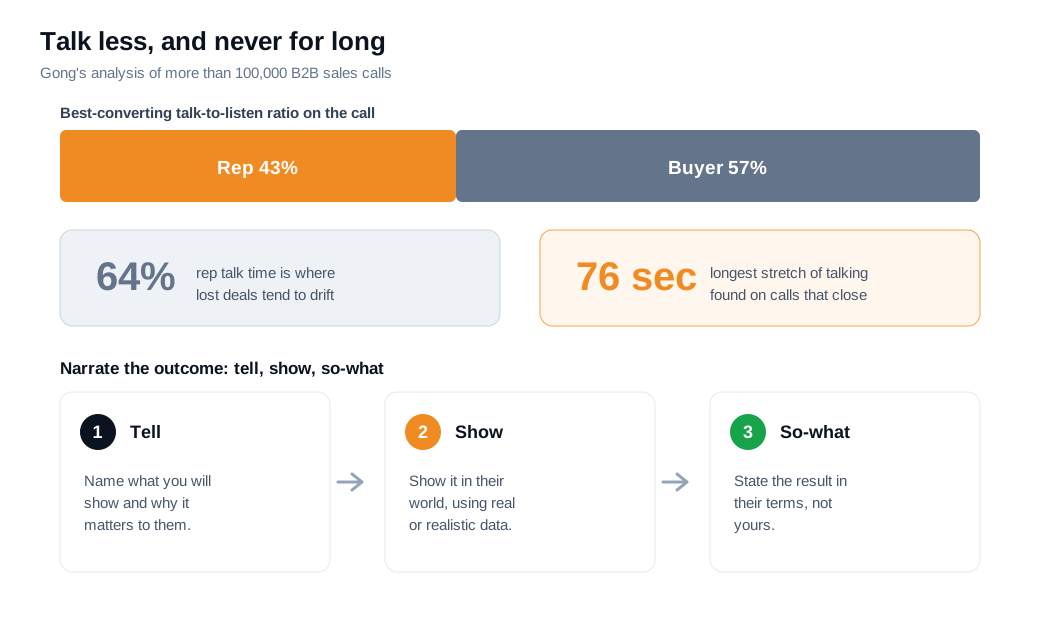
Narrate the outcome, not the interface. The rhythm that works is tell, show, so-what. Say what you are about to show and why it matters to this buyer, show it with their own data or a realistic version of it, then close the loop by naming the result in their terms: "so instead of your team rekeying every lead by hand, that record is already routed and waiting." Skip the settings tour. Every screen that does not tie to their stated problem dilutes the one that does.
Timing matters as much as technique. A buyer who is comparing your pricing page right now is telling you exactly what they care about, and a tool like live video calls with screen share on your site lets a rep open a conversation and demo the one relevant workflow while that intent is still hot, rather than booking a call for next week when the urgency has cooled. If the buyer prefers to start small, pairing it with live chat on your website lets them open with a low-commitment message and step up to video once a rep is on the line.
How do you drive next steps?
Drive next steps by naming the specific next action out loud and booking it on a shared calendar before the call ends, rather than promising to send some times later. "We will circle back" is where momentum goes to die, and the data on this is one-sided.
Closers spend real time here. Gong's tips for successful sales calls found that top reps spend about 12.7% more time, roughly four extra minutes, discussing next steps than reps who lose, and that a follow-up with a specific time-and-date proposal books a meeting more often than an open-ended one. The next step is part of the call, not an afterthought you email about tomorrow.
Speed protects the momentum you just built. Harvard Business Review's audit of 2,241 companies found the average first response to an inbound lead took 42 hours, and that firms replying within an hour were about seven times likelier to reach a decision-maker, in The Short Life of Online Sales Leads. Enthusiasm decays the same way after a call. A held calendar slot for the technical review beats an email thread that reopens a scheduling negotiation exactly when interest is highest.
Close with a short, same-day recap your champion can forward to the rest of the buying group: the problem in their words, the outcome you showed, the agreed next step with a date, and who owns what. When these calls grow out of a live website conversation, wiring up routing and notifications so the right rep is alerted the moment a high-intent visitor appears is what makes a same-day, sometimes same-minute, next step realistic for an inbound sales team rather than aspirational.
What does a strong video sales call look like in numbers?
A strong video sales call shows up as a higher share of calls that end with a booked next step and a rising win rate on video-touched deals, and the math compounds fast. Here is a worked example.
Take a rep who runs 30 discovery-and-demo video calls a month. Cameras are often off, the rep talks about 65% of the time, calls end on "I will send some times," and roughly 20% of these deals eventually close, which is about 6 deals. Now rebuild the same 30 calls on the principles above. The rep goes on camera first so buyers reciprocate, holds the talk-to-listen ratio near 43:57, treats questions as engagement, puts the buyer's own data on screen, and books the next step live before hanging up. The close rate moves to 27%.
That is about 8 deals from the same 30 calls, so roughly two extra closed deals a month with no new pipeline and no added spend. Track two numbers to know it is working: the share of calls that end with a scheduled next step as the leading signal, since a call with no next step almost never becomes revenue, and win rate on video-touched deals as the outcome. Record your own calls and watch how much the buyer talked and how many questions they asked, because those soft signals move before the win rate does.
Key takeaways
- A visible face is the whole advantage. Gong's analysis of 121,828 web-based meetings found win rates about 96% higher when the buyer's camera is on, so go on camera first and get theirs on too.
- Prepare the call before you join it. Research the account, put an agenda in the invite, plan 11 to 14 discovery questions, and test your tech so a frozen screen never wastes the attention you earned.
- Build rapport deliberately. Look into the lens, mirror the buyer's pace, and open with one specific, genuine observation, because warmth does not travel through a webcam by accident.
- Design against the wandering eye. With 92% of people admitting they multitask in meetings, trade the floor often, ask early questions, and keep the buyer's own data on screen.
- Talk less and never for long. Aim for a talk-to-listen ratio near 43:57, keep any single stretch under about 76 seconds, and narrate the outcome with tell, show, so-what.
- Book the next step live. Name the specific action, put it on a shared calendar before you hang up, and send a same-day recap the champion can forward internally.
TAGS

Written by
Daniel SemeckyCo-founder & CEO
Daniel is the co-founder and CEO of Glimpze. He spends his days talking to revenue teams about how to catch high-intent visitors before they bounce, and writes about inbound sales, lead conversion, and building a motion where marketing and sales actually share a number.


