
On this page
A sales rep sends the same follow-up two ways. One is four tidy paragraphs of text the buyer skims and forgets. The other is a forty-second clip with the buyer's own dashboard on the opening frame and the rep's face in the corner, watched to the end on a phone in an elevator.
The words were identical. The medium was not, and only one version got a reply. That is the case for video email, and it holds up in the data once you get a short list of details right.
This post covers why video email beats plain text, how long the clip should run, what to actually say, which subject lines and thumbnails earn the open and the click, how to embed and preview the video so it plays for everyone, and how to measure whether any of it is working.
Why do video emails outperform text?
Video emails outperform text because they get opened, clicked, and answered at higher rates, and because a face and a voice carry trust that a paragraph cannot. The gains show up at every step of the funnel, from the subject line to the reply.
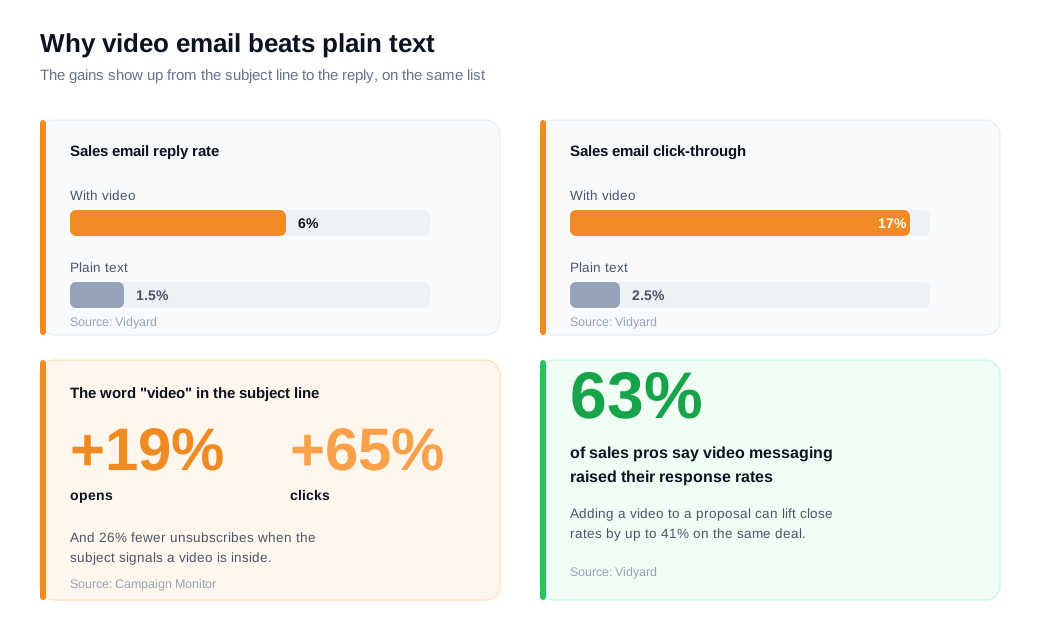
Start with email math. Vidyard, which sells video software and tracks how buyers respond to it, reports that plain sales emails land around a 2.5% click-through rate and a 1.5% reply rate, while emails with video reach roughly 17% click-through and a 6% reply rate. That is more than triple the replies from the same list. Vidyard also reports that 63% of sales pros say video messaging lifted their response rates, and that adding a video to a proposal can raise close rates by up to 41%.
The subject line moves too. Campaign Monitor, citing Wordstream data, found that putting the word "video" in an email subject line increased open rates by 19% and click rates by 65% while cutting unsubscribes by 26%. A buyer decides whether to open based on the subject and the sender, and the promise of a short clip reads as less work than another wall of text.
Under the numbers is a simpler point about trust. A recorded clip shows the buyer that a real person spent real minutes on their specific situation. Tone, pace, and a visible face let the buyer judge you the way people judge people, which text strips out. That is why a personalized video often gets a reply from a thread that three written nudges could not move.
How long should a sales video email be?
Keep a prospecting clip between 30 and 60 seconds, because viewer retention falls off sharply once you pass a minute. Length is the single easiest thing to get wrong, and the fix costs nothing.
Vidyard's guidance on video prospecting is blunt about the ceiling: over 60% of viewers will watch a sales video to the end if it runs under 60 seconds, and attention drops steeply after that. Wistia's data points the same way. Across the more than 13 million videos in its State of Video analysis, clips under one minute hold roughly a 52% average engagement rate, meaning viewers watch about half of them, and that share only shrinks as videos get longer.
Length should also change with the stage of the deal. A first cold touch earns 30 to 60 seconds and one idea. A post-demo recap that recaps what a live call covered and restates the agreed next step can run one to two minutes, because the viewer is warmer and already knows you. A technical walkthrough for a buyer deep in evaluation can run longer still, since a self-selected audience will sit through detail a stranger never would.
The rule that survives every stage is front-loading. Lead with your one key point in the first ten seconds, because that is the window where most viewers decide whether to keep watching. A clip that opens with thirty seconds of throat-clearing has already lost the people it needed most.
What should a sales video email actually say?
A sales video email should open with the buyer's own context, make exactly one point, and close with a single clear ask. Three moving parts, in that order, is the whole structure.
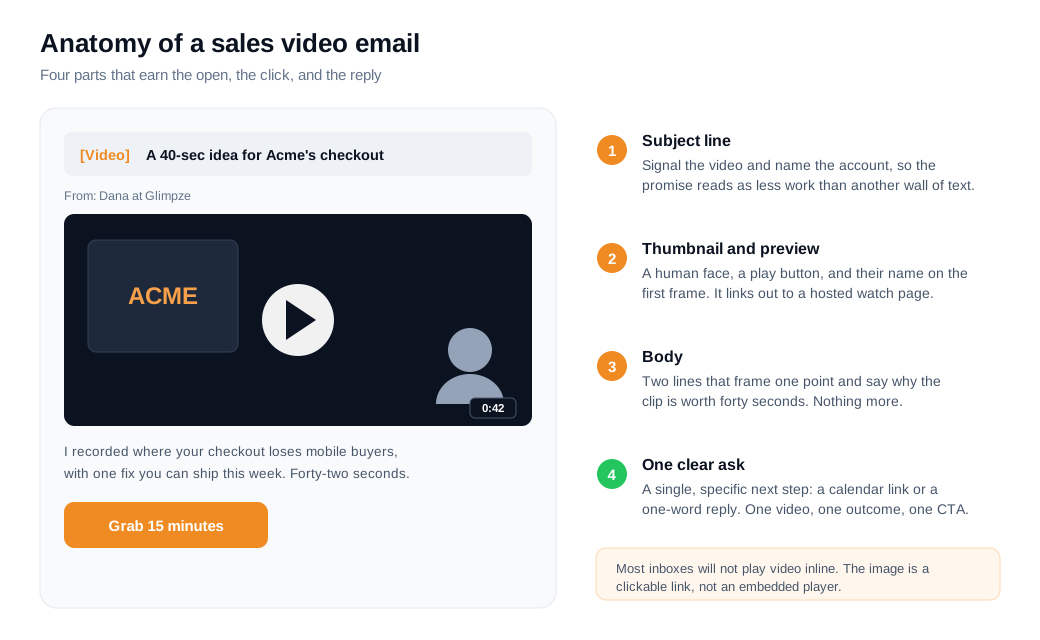
Open on the buyer, not on you. The strongest first frame shows something the prospect recognizes instantly: their homepage, their pricing page, their logo on a whiteboard behind you, or their name written on a sticky note. Vidyard's sales best practices push reps to appeal to the prospect in the first few seconds rather than opening with a company intro, because a personalized opening is what stops the scroll.
Make one point. A video email is a bad place to list five features. Pick the single reason this buyer should care, show it on screen if you can, and let the clip run short. Two lines of text around the thumbnail should frame what the video is and why it is worth forty seconds, nothing more.
End with one ask. Vague closers like "let me know your thoughts" die in the inbox. A specific ask does better: "reply with a yes and I will send three times for a fifteen-minute call," or a button that opens your calendar. One video, one outcome, one call to action. If you find yourself wanting two asks, you probably need two videos.
What subject lines and thumbnails work?
The subject lines that work name the video and speak to the buyer, and the thumbnails that work show a recognizable human face or the buyer's own screen with a play button on top. Both jobs are about earning a click, one in the inbox list and one inside the email.
For the subject line, signaling the video pays off. Campaign Monitor's figures for the word "video" in the subject line (a 19% lift in opens and a 65% lift in clicks) come from exactly this move. Many teams make it explicit by leading with a bracketed tag, so a subject reads like "[Video] a quick idea for Acme's onboarding." Pair the signal with real personalization. A subject that names the company or the specific topic ("Acme: a 40-second walkthrough of your checkout") beats a generic "quick video" every time. One caution: if every email you send screams "VIDEO," the novelty and the deliverability both fade, so reserve the tag for messages that actually contain one.
The thumbnail is the second click. Inside the email, the buyer sees a still image, and a good one does three things at once. It shows a human face, which reads as a person rather than a broadcast. It overlays a clear play button so the image looks clickable. And where possible it personalizes the frame itself, with the prospect's name on a whiteboard or their own website in the background, so the still proves the clip was made for them before they press play. An animated preview, a short looping GIF of the first couple of seconds, can lift click-through further because motion draws the eye, as long as the file stays light enough not to slow the email down.
How do you embed and preview video in email?
You do not truly embed a playable video in most email clients; you insert a clickable thumbnail or a short animated GIF that links to the video hosted on a landing page. Gmail, Outlook, and most other clients do not reliably support inline HTML5 video playback, so the working pattern is a still or animated image that carries the viewer to a hosted watch page in one tap.
Guides from video email tools like Sendspark and Mailmeteor land on the same recipe. Host the video somewhere it can play (your platform's share page, a landing page, or a video host), take a strong still frame, overlay a play button, and hyperlink that image to the hosted page. When the buyer clicks, the video opens in the browser where it plays everywhere and where you can track engagement. The animated preview is the same idea with motion: a short GIF of the opening seconds that loops in the inbox and links out to the full clip.
Protect deliverability while you do it. Never attach the raw video file, because a heavy attachment slows the send and trips spam filters. Keep any GIF light, ideally under about 500KB and treating 1MB as a hard ceiling, and keep the whole email lean so it loads fast on mobile. A static thumbnail with a play button carries essentially zero deliverability risk and is the safe default; reach for a GIF only when the motion is worth the extra weight.
Test the preview across clients before you scale a campaign. Send one to a Gmail account, an Outlook account, and a phone, and confirm the image renders, the play button shows, and the link lands on a page that autoplays or one-taps into the video. The gap between "looks great in my editor" and "renders in the buyer's inbox" is where most video emails quietly fail.
How do you measure video email results?
Measure four numbers in order, open rate, play rate, engagement, and reply or booking rate, then compare close rate on video-touched deals against everything else. Each number tells you where the funnel leaks, so you fix the right thing instead of guessing.
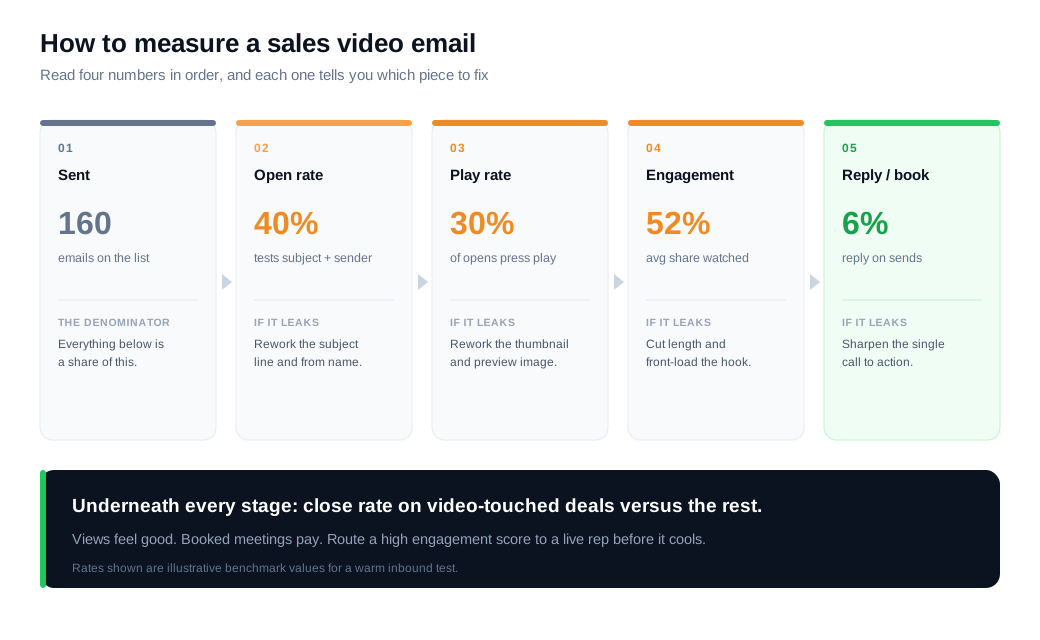
Open rate tests the subject line and sender. Play rate, which Wistia defines as plays divided by impressions, tests the thumbnail and the promise around it, since a buyer who opened but never pressed play was not sold by the still image. Engagement rate, the average share of the video watched, tests the content itself, and a viewer who reaches 90% is a warmer lead than one who bailed at ten seconds. Most video hosts also show a drop-off heatmap that marks the exact second attention fell off, so a cliff at the pricing mention tells you where to aim the follow-up. Reply or booking rate closes the loop by showing who acted.
Here is a worked example. A rep runs a two-week A/B test on 160 warm inbound leads, 80 getting a plain-text follow-up and 80 getting a video email. The text arm opens at 34% and replies at about 1.5%, which is roughly one reply. The video arm uses a "[Video]" subject line and opens near 40%, of whom about a third press play, and it replies at the 6% rate Vidyard reports for video emails, which is about five replies from the same 80 sends. If one in three replies becomes a booked meeting, the video arm produces one or two meetings against effectively zero from text, on the same list and the same hours. Run the test long enough to trust the counts, then keep the arm that books meetings rather than the one that collects plays.
Segment before you conclude, because a 40-second prospecting clip and a five-minute demo recap should never be judged on the same engagement bar. And treat a high engagement score as a live routing signal rather than a line in a weekly report. A buyer who just watched your demo to the end has raised a hand whose value decays by the hour, so the moment a hot reply lands, hand it to a rep fast through tight lead routing and notifications. The best next step is often not another email at all. Offering that warm buyer a way to start a live video call on your site in the moment, or to step up from a low-commitment live chat message once a rep is on the line, turns a watched clip into a conversation before the interest cools. On an inbound sales motion, that handoff is where video email quietly pays for itself.
Key takeaways
- Video email beats text on every step of the funnel. Vidyard puts video emails near a 6% reply rate against 1.5% for plain text, and Campaign Monitor found the word "video" in a subject line lifts opens 19% and clicks 65%.
- Keep the clip short and front-loaded. Aim for 30 to 60 seconds on a first touch, lead with your one point in the first ten seconds, and let length grow only as the buyer warms.
- Say one thing and make one ask. Open on the buyer's own context, make a single point, and close with a specific next step like a calendar link, not a vague "let me know."
- Win two clicks, the subject line and the thumbnail. Signal and personalize the subject, then show a human face with a play button and, where you can, the buyer's own screen in the frame.
- Do not embed, link. Insert a light thumbnail or GIF that opens a hosted watch page, never attach the raw file, and test how it renders in Gmail, Outlook, and on a phone.
- Measure open, play, engagement, and reply in order. Fix the leak each number exposes, compare close rate on video-touched deals, and route a hot reply to a live rep before the interest cools.
TAGS

Written by
Daniel SemeckyCo-founder & CEO
Daniel is the co-founder and CEO of Glimpze. He spends his days talking to revenue teams about how to catch high-intent visitors before they bounce, and writes about inbound sales, lead conversion, and building a motion where marketing and sales actually share a number.


