
On this page
- What is a sales dashboard?
- What metrics belong on a sales dashboard?
- How do you design a sales dashboard for reps vs leaders?
- How do you build a sales dashboard step by step?
- What tools can you use to build a sales dashboard?
- How often should you update a sales dashboard?
- How do you keep a sales dashboard actionable?
- Key takeaways
- Sources
Open most sales dashboards and you get a wall. Forty tiles, a dozen charts, three shades of red, and no idea what to do next. The manager who built it can read it, and nobody else opens it twice.
A good sales dashboard does the opposite. It answers a specific question the moment you glance at it, points to one action, and takes about five seconds to read. Most of that outcome is decided before you drag a single chart onto the screen, in the choices you make about what the dashboard is for and who has to act on it.
This post covers what a sales dashboard is, which metrics belong on it, how to design separate views for reps and leaders, the steps to build one, the tools you can use, and how to keep it actionable rather than decorative.
What is a sales dashboard?
A sales dashboard is a single screen that pulls your most important sales metrics into one live view so a person can check performance and decide what to do next. It sits on top of your CRM and reads from the same records your reps update every day: deals, stages, close dates, activities, and owners.
The word to hold on to is decide. A report lists what happened last month. A dashboard is built so that a glance turns into a decision, whether that decision is which deal a rep works next or whether a leader trusts the forecast. Clari's guide to sales dashboards frames the best ones as tools that go beyond reporting the past to help you see what is about to happen, which is the line between a wall of numbers and something a team actually uses.
Most dashboards are also filtered by role and refreshed automatically, so the person looking at one is seeing current data cut to their job. That combination, live data plus a tight focus, is what separates a dashboard people open every morning from a slide someone rebuilds by hand once a quarter.
What metrics belong on a sales dashboard?
The metrics that belong on a sales dashboard are the few that predict revenue and point to an action: quota attainment, pipeline coverage, win rate, sales cycle length, stage conversion, and pipeline velocity. Salesforce lists a similar core set of KPIs every sales team should track, and the pattern across good dashboards is the same short list showing up again and again.
Here is what each one tells you:
- Quota attainment: closed-won revenue against the target, so you know if the team is on pace.
- Pipeline coverage: open pipeline divided by quota, so you know whether there is enough to hit the number.
- Win rate: opportunities won divided by opportunities created, so you know how well the team closes.
- Sales cycle length: total days across closed deals divided by the number of deals, so you know how long cash takes to arrive.
- Stage conversion: the share of deals that advance from one stage to the next, so you know where the funnel leaks.
- Pipeline velocity: the speed at which pipeline turns into revenue, combining deal count, deal size, win rate, and cycle length.
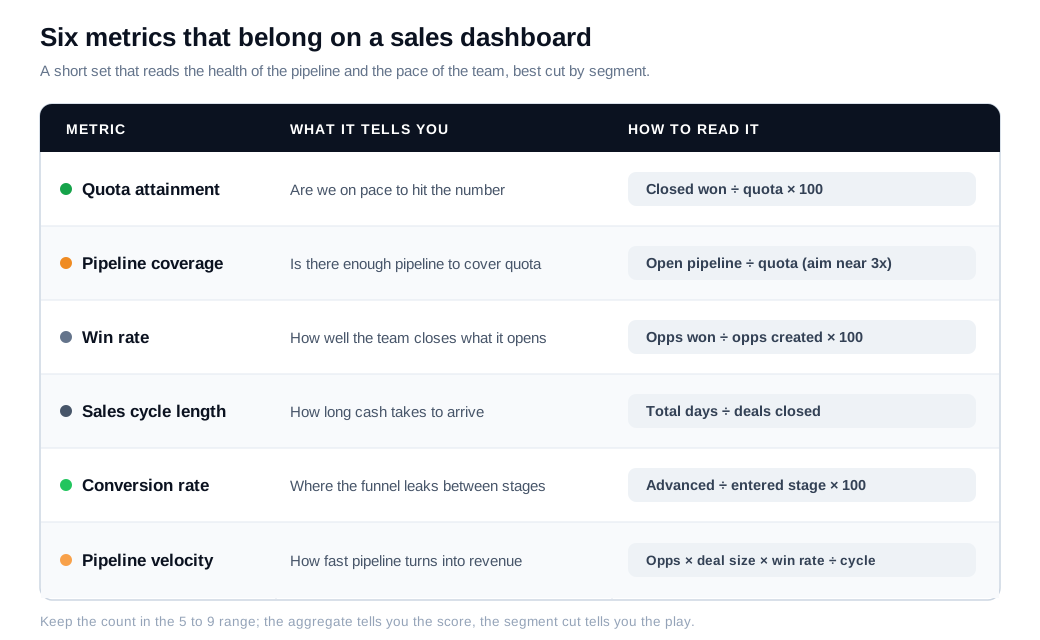
The temptation is to add more. Resist it. Yellowfin's dashboard design principles point out that people process only about five to nine items at once, yet most dashboards crowd in thirty or more metrics, which buries the signal that matters. If a number does not change a decision, it does not belong on the screen.
A worked example shows why pipeline velocity earns a spot. Say a team has 40 open opportunities, an average deal size of $12,000, a 22% win rate, and a 60-day sales cycle. Velocity is (40 times $12,000 times 0.22) divided by 60, which comes to about $1,760 of pipeline converting to revenue per day. Move win rate to 26% or shave the cycle to 50 days, and that single number climbs, which tells a leader exactly which lever is worth pulling.
How do you design a sales dashboard for reps vs leaders?
You design for reps versus leaders by building one clean data model and filtering it into two views: reps see their own deals and next actions, leaders see the shape of the whole quarter. The mistake is handing everyone the same screen, because a rep drowns in company-wide charts and a leader cannot find the forecast under a pile of individual call logs.
A rep view is a to-do list with numbers. It shows this rep's quota progress, their open deals and next steps, their activity against target, and the deals at risk they should work today. The job of the rep dashboard is to answer one question: what do I do in the next hour.
A leader view is a health check. It shows team attainment against plan, forecast against target, pipeline coverage, win rate and cycle trends by segment, and a rep leaderboard for coaching. HubSpot's breakdown of sales dashboards describes this same split across rep, manager, and executive levels, where managers sit in the middle and use rep activity as a coaching lever rather than a scoreboard.
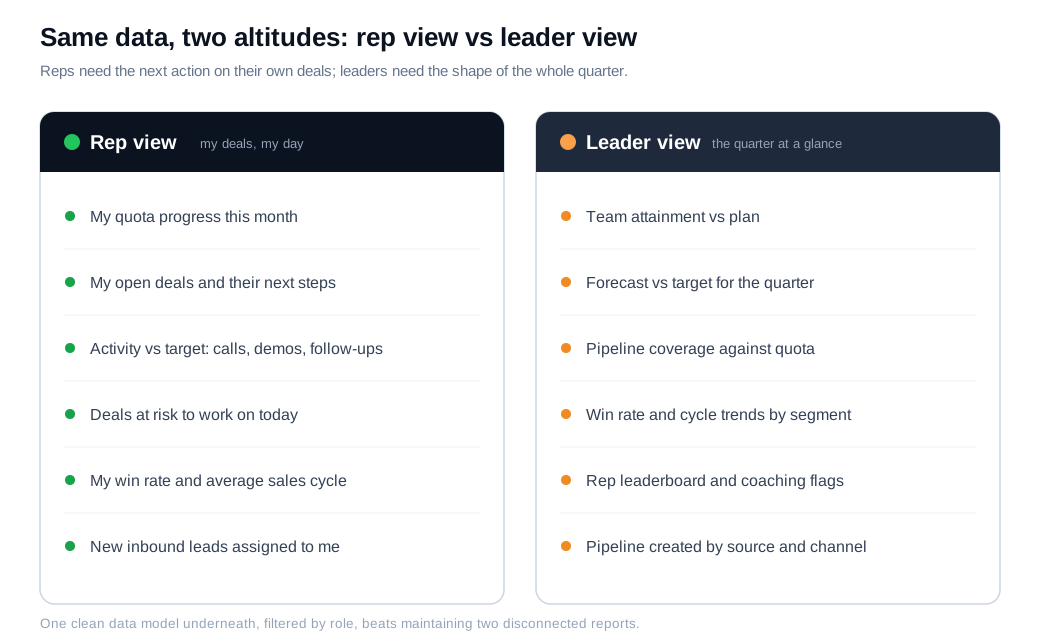
Two design habits make both views easier to read. Color-code against thresholds, so green means on or above target, amber means at risk, and red means behind, and a reader gets the status without doing math. And allow drill-down, so a leader who sees a red win-rate tile can click into the segment or rep behind it. The point is one shared data model underneath, filtered by role, instead of two disconnected reports that drift apart within a month.
How do you build a sales dashboard step by step?
You build a sales dashboard by starting from a decision, choosing the few metrics that inform it, connecting clean data, laying it out by role, and setting a review cadence. Working in that order keeps the dashboard tied to something useful, rather than starting with every chart your tool can draw and hoping meaning appears.
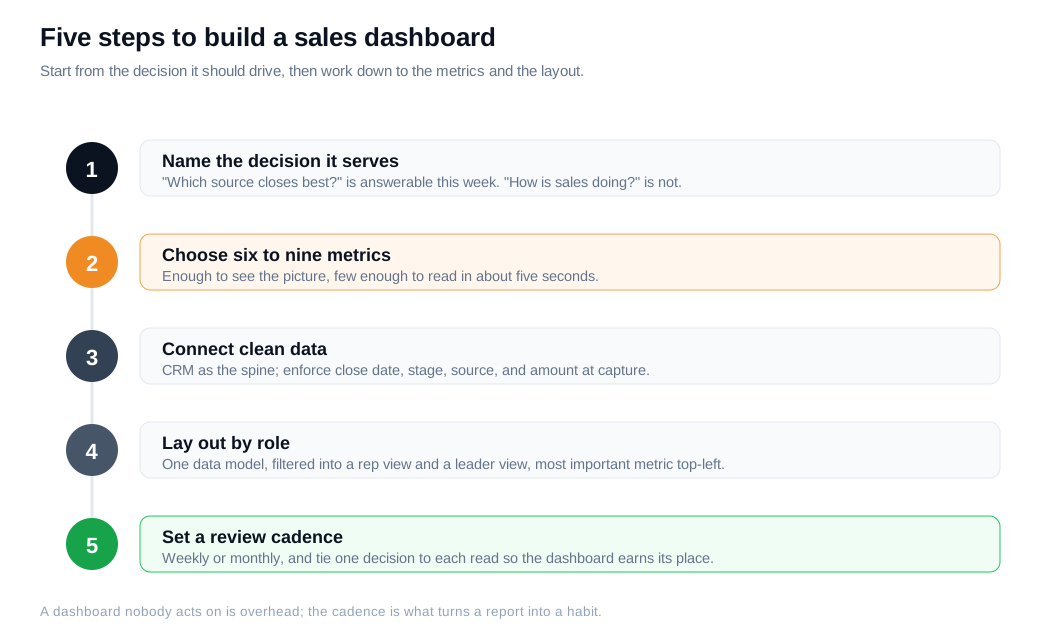
The five steps in practice:
- Name the decision it serves. "Which lead source closes best?" is answerable this week and points to a budget move. "How is sales doing?" is not a decision and produces a dashboard nobody uses.
- Choose six to nine metrics. Enough to see the picture, few enough to read in about five seconds. Write down each formula so everyone measures the same way.
- Connect clean data. Your CRM is the spine. Enforce the fields every metric depends on, close date, stage, source, and amount, because a missing close date quietly corrupts cycle length and forecast alike.
- Lay out by role. Filter the same data into a rep view and a leader view, and put the most important metric in the top-left where the eye lands first.
- Set a review cadence. Weekly or monthly, and tie one decision to each read so the dashboard stays a working tool.
Step three is where most dashboards fail before they start. The hard part is rarely access to data, it is quality, and duplicate accounts or deals parked in stages nobody updates will poison every number downstream. Capturing conversations cleanly at the source, for example routing and logging inbound leads automatically instead of relying on reps to type them in later, does more for dashboard accuracy than any chart choice.
What tools can you use to build a sales dashboard?
You can build a sales dashboard with your CRM's native reports, a spreadsheet, a dedicated business intelligence tool, or a revenue platform, and the right choice depends on your data volume and how many sources you need to combine. Most teams should start with what they already own before buying anything.
The main options, roughly in order of lift:
- CRM native dashboards. HubSpot and Salesforce both ship dashboard builders that read your live pipeline with no extra plumbing. For a single sales team, this is usually enough.
- Spreadsheets. Google Sheets or Excel connected to a CRM export works for a first version and for combining a couple of sources by hand. Cheap, flexible, and fine until the manual refresh becomes a chore.
- Business intelligence tools. Looker Studio, Power BI, and Tableau are the step up when you need to blend CRM, marketing, and finance data or serve many teams from one model.
- Revenue and RevOps platforms. Tools like Clari layer forecasting and pipeline inspection on top of the raw metrics for larger, forecast-driven organizations.
Whichever you pick, feed it data captured where selling happens. Live channels such as live chat on your site create a clean record of who engaged, on which page, and what they asked, so lead source and first-touch land in the CRM automatically rather than as a guess a rep types in. That accuracy at the top of the funnel is what makes the source and conversion cuts on your dashboard trustworthy, and it feeds directly into an inbound sales motion where the dashboard is meant to drive the next conversation.
How often should you update a sales dashboard?
Update frequency should match the decision the metric drives: numbers reps act on during the day need real-time or near-real-time data, while the strategic metrics leaders review can refresh weekly or monthly. A rep chasing a new inbound lead cannot wait for an overnight batch, and a board-level attainment trend does not change hour to hour.
This is where fresh data becomes a lever rather than a nicety. The classic Harvard Business Review study The Short Life of Online Sales Leads found that firms contacting a web lead within an hour were far more likely to reach a decision-maker, and up to 60 times more likely to qualify the lead, than those who waited a full day. A dashboard that surfaces new high-intent visitors the moment they arrive turns that finding into a routine, which is only possible when the underlying feed is live.
So set the refresh by tier. Operational tiles that trigger action get live data. Trend tiles that inform planning get a slower, steadier cadence, which also keeps leaders from overreacting to daily noise.
How do you keep a sales dashboard actionable?
You keep a sales dashboard actionable by tying every metric to a decision, refreshing it on a cadence people trust, and deleting anything nobody acts on. A dashboard decays the moment it becomes a place data goes to be admired, and the fix is ruthless editing rather than more panels.
Start with the five-second test. Someone who is not you should be able to open the dashboard and say what is going well and what needs attention within five seconds. If they cannot, the layout or the metric count is the problem, and the answer is usually to cut, not to add.
Then benchmark each number so it carries meaning. A 24% win rate reads very differently depending on motion, and Forecastio's B2B sales KPI benchmarks put transactional teams closer to 40% to 50%, consultative B2B nearer 20% to 30%, and enterprise around 10% to 20%, with sales cycles that stretch from 30 to 60 days for SMB to 90 to 180 days for enterprise. A metric without a benchmark is a number, and a number without context rarely drives a decision.
Watch out for benchmarks applied blindly. The old 3x pipeline coverage rule is a good example. Clari notes it assumes a roughly 33% win rate, so a team closing at 25% actually needs closer to 4x coverage to be safe, and a high-velocity team closing at 50% can run leaner. The cleaner formula is one divided by your historical win rate, and putting that tailored target on the dashboard beats parroting a rule of thumb from the 1990s.
The last habit is the one that saves reps' time. Salesforce's State of Sales research has repeatedly found that reps spend less than a third of their week actually selling, with the rest lost to admin and manual updates. A dashboard that ranks each rep's own deals by probability, and flags the ones going cold, hands some of that selling time back by making the next action obvious. Review it on a fixed cadence, tie one decision to each review, and the dashboard stays a working tool instead of a screensaver.
Key takeaways
- Start from a decision, not a chart. A dashboard built to answer one clear question stays useful, while one built to display everything gets ignored within a month.
- Keep it to six to nine metrics. People read five to nine items at a glance, so quota attainment, pipeline coverage, win rate, cycle length, conversion, and velocity beat a wall of thirty tiles.
- Split rep and leader views. Build one clean data model and filter it, so reps get their own deals and next actions while leaders get attainment, forecast, and trends.
- Data quality outranks tooling. Missing close dates and duplicate accounts corrupt every metric, so clean capture at the source matters more than which BI tool you pick.
- Match refresh to the decision. Operational tiles reps act on need live data, and speed on inbound leads is worth up to 60 times the qualification odds, while trend tiles can refresh weekly.
- Benchmark and prune relentlessly. Give every number a benchmark for context, replace blanket rules like 3x coverage with one over your own win rate, and delete anything nobody acts on.
TAGS

Written by
Nilas MylerCo-founder & CTO, Glimpze
Nilas is the co-founder and CTO of Glimpze, an inbound sales tool that turns high-intent website visitors into live conversations. A former SEO consultant for some of the largest companies in Denmark, he writes about speed-to-lead, inbound sales, and conversion rate optimization — the technical and operational mechanics of turning traffic into pipeline.


