On this page
A shopper types "waterproof hiking boots" into your search box. The engine returns 4,000 products sorted by newest, none of them obviously waterproof, and the third result is a pair of wool socks.
The visitor scrolls once, sees nothing that matches, and leaves. They told you the exact thing they wanted to buy, and the search box lost the sale in a single query.
That moment is more common than most teams realize, and it is expensive because the person who searches is rarely a casual browser. They have skipped past the homepage and category pages to type a specific need, which is why searchers convert at a multiple of everyone else.
Good on-site search optimization treats the box as a conversion surface, not a utility bolted on in the footer.
This post covers why on-site search matters for conversions, what a good search conversion rate looks like, how to improve relevance, how to rescue zero-result searches, how to measure search-driven sales, and the mistakes that quietly cap the channel.
Why does on-site search matter for conversions?
On-site search matters because the people who use it are your highest-intent visitors, and they convert at a multiple of everyone else, so small gains in the search box move a disproportionate share of revenue.
A visitor who types a query has already decided roughly what they want. The engine's only job is to not get in their way.
The conversion gap is well documented. An eConsultancy study widely cited across search vendors found that while the average site converted around 2.77% of visits, visitors who used site search converted at 4.63%, and most benchmarks put searchers at roughly two to three times the conversion rate of non-searchers.
The pattern holds because intent is baked into the behavior. Browsing is a signal of curiosity, and searching is a signal of a decision already half made.
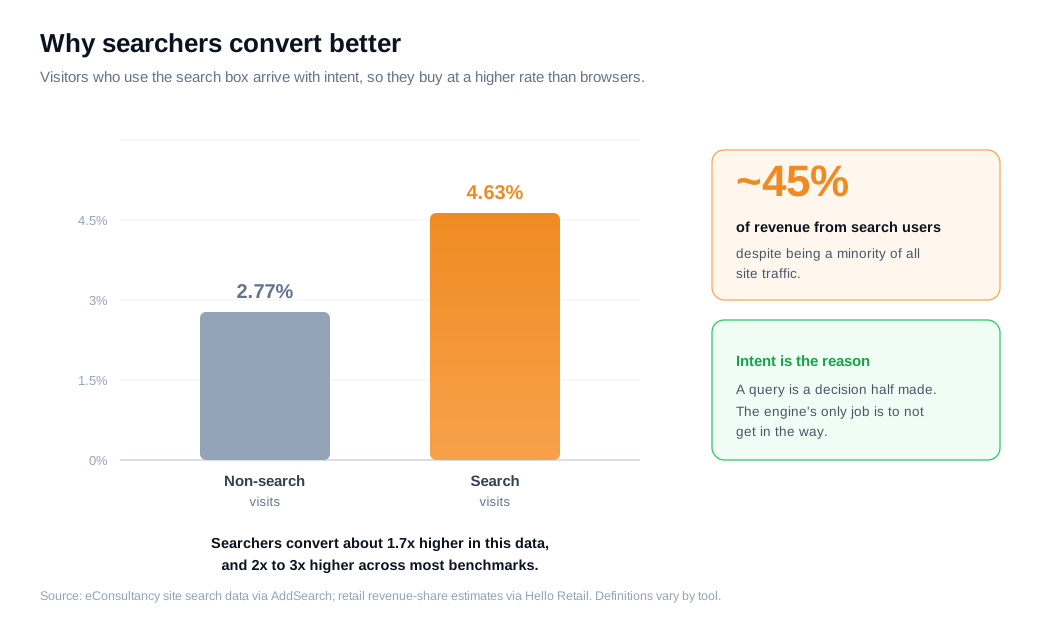
The revenue concentration is the part that turns a UX task into a business priority. Searchers are usually a minority of total traffic, yet aggregated retail data shows they account for a disproportionate share of revenue, often close to half.
That is why a store treating its storefront as an inbound sales channel should read every search as a warm lead stating its own intent. When the box returns the wrong thing, you are not losing a page view. You are losing the visitor who was closest to buying.
What counts as a good site search conversion rate?
A good site search conversion rate usually sits well above your overall rate, often close to double, but the number that matters most is the gap between your searchers and non-searchers on your own store. Published benchmarks are a rough map, and the internal comparison is the compass.
Two cautions keep the benchmarks honest:
- Definitions vary. Some tools measure the share of search sessions that end in a purchase, others measure conversions per search query, and a session with five refined searches counts differently under each.
- Category and price shift the ceiling the same way they do for overall conversion, so a fashion store and a furniture store cannot be held to one target.
Put rough numbers on it. Say your store converts search sessions at 4.5% and non-search sessions at 2.2%. That gap tells you two useful things at once.
It confirms search users are worth protecting, and it sets a realistic bar: closing more of that gap, or moving more visitors into the searching group, is where the next point of overall conversion is hiding.
Track the searcher rate as its own line on the dashboard, watch the trend, and compete against last month rather than a headline figure.
How do you improve search relevance?
You improve search relevance by making the engine understand what shoppers actually type, which means handling synonyms, misspellings, and natural-language queries, then ranking the best-matching in-stock products first.
Exact-keyword matching is where most search boxes fail, because real shoppers do not type the way your product feed is labeled.
Baymard Institute's search usability research is the clearest evidence of the problem. Across large-scale testing, subjects leaned heavily on queries built around a theme, feature, relation, or symptom ("waterproof jacket," "gift for a runner," "shoes that go with a navy suit"), yet most tested sites supported those query types poorly.
Synonym handling is a common failure point on its own, with a large share of engines returning nothing useful when a shopper types "blow dryer" instead of "hair dryer." The 2026 Baymard benchmark found that 46% of desktop sites, 58% of mobile sites, and 64% of apps deliver a mediocre or worse search experience, so this is the norm rather than the exception.
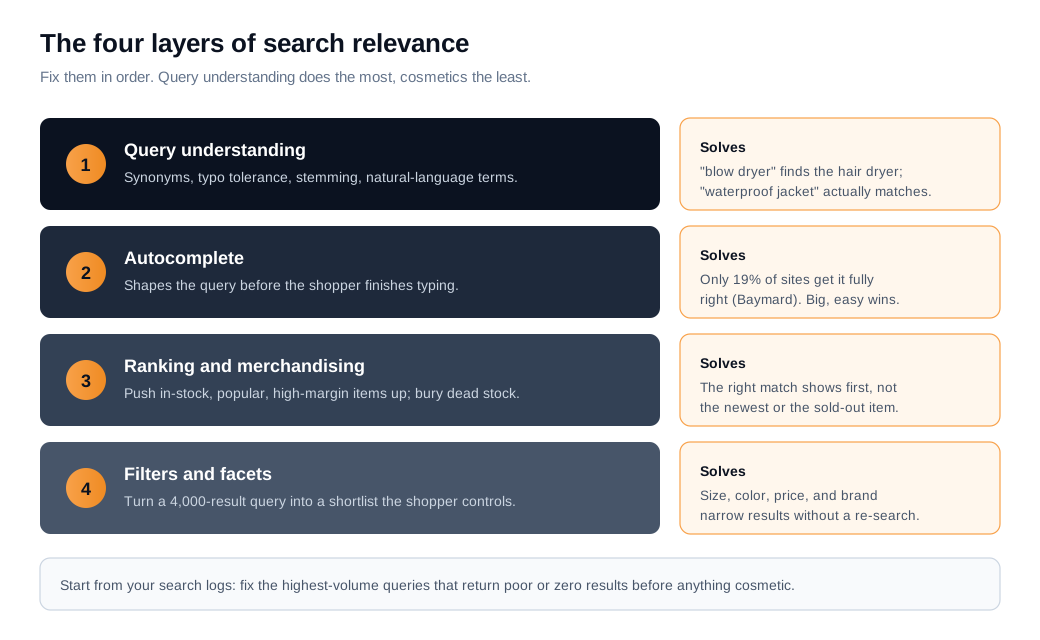
Relevance is built in layers, and it helps to fix them in order:
- Query understanding. Synonym dictionaries, typo tolerance, and stemming so "boot," "boots," and "bootie" resolve sensibly.
- Autocomplete, which shapes the query before the shopper finishes typing. Baymard found autocomplete appears on around 80% of sites but only 19% get every best practice right, and weak misspelling support in the dropdown puts most sites at risk of steering shoppers wrong.
- Ranking and merchandising, where you push in-stock, popular, and high-margin items up and bury out-of-stock or discontinued products.
- Filters and facets, so a 4,000-result query becomes a 12-result shortlist the shopper controls.
The practical sequence is to instrument your search logs first, find the top queries that return poor or zero results, and fix those exact terms with synonyms and manual ranking rules before touching anything cosmetic. A single high-volume query with a broken result set can leak more revenue than a month of layout tweaks.
How do you handle zero-result searches?
You handle zero-result searches by never showing a dead end, replacing the blank "no results found" screen with a recovery page that acknowledges the miss, offers a "did you mean" correction, and shows popular or related products so the session keeps moving.
A zero-result page is the highest-risk screen in your store, because the shopper has stated an intent and the site has answered with nothing.
The scale is larger than most teams assume. Industry estimates put the share of on-site searches that return zero results at roughly 10% to 20% on a typical store, and each one hits a visitor who was actively trying to buy.
Many of those failures are not missing inventory at all. They are synonym gaps, typos, or overly literal matching that hides products you actually stock.
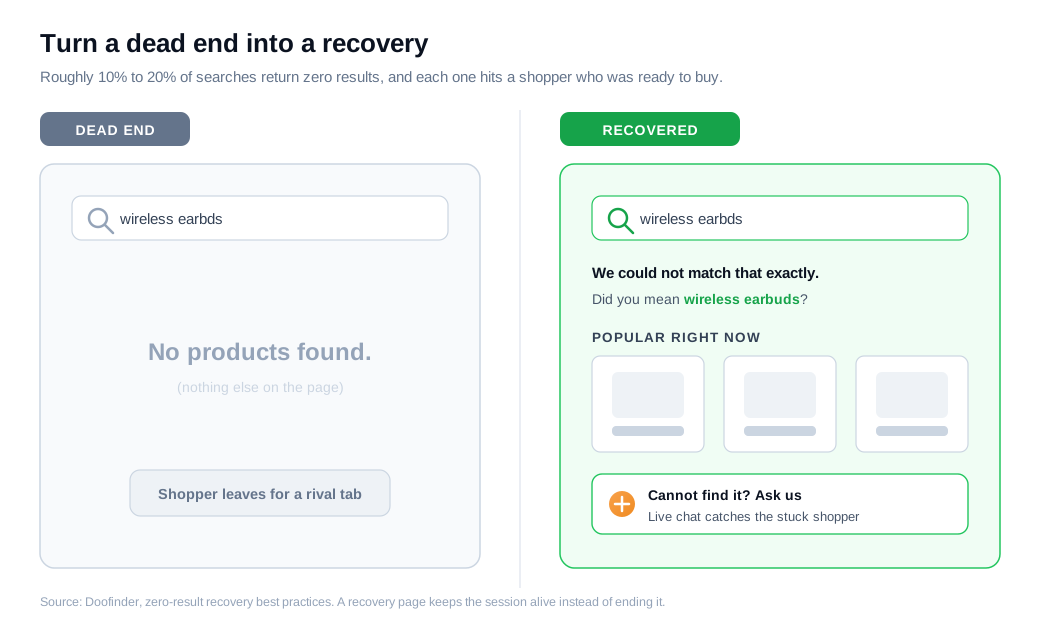
A strong recovery page does five things:
- Says clearly that the exact term returned nothing, so the shopper does not think the page is broken.
- Suggests a spelling correction or a broader "did you mean" query.
- Shows best-selling or category-related products, so there is somewhere to click instead of the back button.
- Keeps the search bar and any filters in view, so the next attempt is one keystroke away.
- Offers a human path for the shopper who knows the product exists but cannot find it.
That last one is where live chat on the results page lets a visitor ask "do you carry this in a size 12" and get an answer before they leave for a competitor. Feed those chat questions and your zero-result logs back into the synonym rules, and the same query stops failing next week.
How do you measure search-driven sales?
You measure search-driven sales by tracking a short list of search KPIs in your analytics, segmenting search users from non-search users, and attributing revenue to the sessions that used search.
The tracking is straightforward. The segmentation is what makes the number defensible.
Five metrics carry most of the weight:
- Search usage rate, the share of sessions that use the box at all.
- Search conversion rate, the share of search sessions that end in a purchase, watched against the non-search rate.
- Zero-result rate, the share of queries that return nothing.
- Search refinement or exit rate, which flags queries where shoppers re-typed or gave up, a strong signal of poor relevance.
- Revenue per search, which ties it all to money.
GA4 and most search platforms capture site search events out of the box, so you tag search sessions and attribute the orders that follow within a normal window.
Here is the arithmetic on an ordinary store. Say you get 200,000 sessions a month, 15% of them use search (30,000 search sessions), those search sessions convert at 4.6%, and your average order value is $70. That is 1,380 orders and about $96,600 a month flowing through search.
Now you fix your top failing queries and cut the zero-result rate, lifting search conversion from 4.6% to 5.3%, which sits inside what relevance projects commonly report. The same 30,000 search sessions now produce 1,590 orders, 210 more a month, worth roughly $14,700, or about $176,400 a year on the same traffic.
If the cleaner experience also nudges search usage from 15% to 18%, the gain compounds because more of your highest-intent visitors enter the funnel that converts best.
Run the comparison as searchers versus non-searchers over a consistent window, and treat the lift the way you would an A/B test result rather than a vanity metric. The point of measurement here is to know which fix paid, so you spend the next sprint on the query logs that matter instead of guessing.
What on-site search mistakes cost the most conversions?
The mistakes that cost the most are a hard-to-find search box, exact-keyword-only matching, dead-end zero-result pages, and never measuring any of it. Each one caps the channel before it gets a fair test, and each is fixable without a redesign.
- A hidden or tiny search field is the first leak, because a shopper who cannot find the box browses instead and converts at the lower rate. Keep the field visible on every page, wide enough to read, and ideally with a placeholder prompt.
- Exact-match-only relevance is the second, and it is the biggest, since it turns every synonym, plural, and typo into a failed search.
- Dead-end zero-result pages are the third, quietly sending motivated buyers to a competitor's tab.
- Flying blind is the fourth, and it hides the other three by keeping the damage off the dashboard.
Fix visibility and relevance first, give zero-result searches a recovery path, and let your search logs tell you where the next point of conversion is waiting.
Key takeaways
- Searchers are your warmest visitors. They convert at roughly two to three times the rate of non-searchers (about 4.63% versus 2.77% in the widely cited eConsultancy data), so the search box moves an outsized share of revenue.
- Compete against your own gap, not a benchmark. A good search conversion rate is one that beats your non-search rate and improves month over month, since definitions and categories make cross-site figures unreliable.
- Relevance is built in layers. Handle synonyms and typos, sharpen autocomplete (only 19% of sites get it fully right per Baymard), rank in-stock winners first, then let filters narrow the set.
- Never show a dead end. With 10% to 20% of searches returning zero results, replace the blank page with a "did you mean" correction, popular products, and a way to ask a human.
- Measure five KPIs, segmented. Track search usage, search conversion, zero-result rate, refinement or exit rate, and revenue per search, always comparing searchers to non-searchers.
- Fix the cheap failures first. A visible box, synonym rules on your top queries, and a real recovery page recover more revenue than any layout change, and the logs tell you where to look.

Written by
Nilas MylerCo-founder & CTO, Glimpze
Nilas is the co-founder and CTO of Glimpze, an inbound sales tool that turns high-intent website visitors into live conversations. A former SEO consultant for some of the largest companies in Denmark, he writes about speed-to-lead, inbound sales, and conversion rate optimization — the technical and operational mechanics of turning traffic into pipeline.