
On this page
- Why does video call etiquette matter for sales reps?
- What are the rules of video call etiquette?
- How do you set up your camera, audio, and background?
- How do you make eye contact on a video call?
- How do you keep prospects engaged on a video call?
- What should sales reps avoid on video calls?
- Key takeaways
- Sources
A prospect books a demo, joins on time, and finds a rep lit from behind by a window, the webcam angled up at the ceiling, a housemate crossing the frame. Thirty seconds in, the buyer has already decided something about the rep and the product, and none of it is about the software.
On a video call the small things carry weight they never had across a conference table. The camera angle, the half-second pause before you unmute, where your eyes point when the buyer asks the hard question. Buyers read all of it, and the data says it moves the deal one way or the other.
This guide covers why video etiquette matters for a sales rep, the core rules of a video call, how to set up your camera, audio, and background, how to hold eye contact through a lens, how to keep a prospect engaged, and the habits worth dropping before your next call.
Why does video call etiquette matter for sales reps?
Video call etiquette matters because how you show up on camera measurably changes whether a deal closes, and because a distracted buyer is one dull frame away from checking their phone. The stakes are higher than they look, and the fixes are cheap.
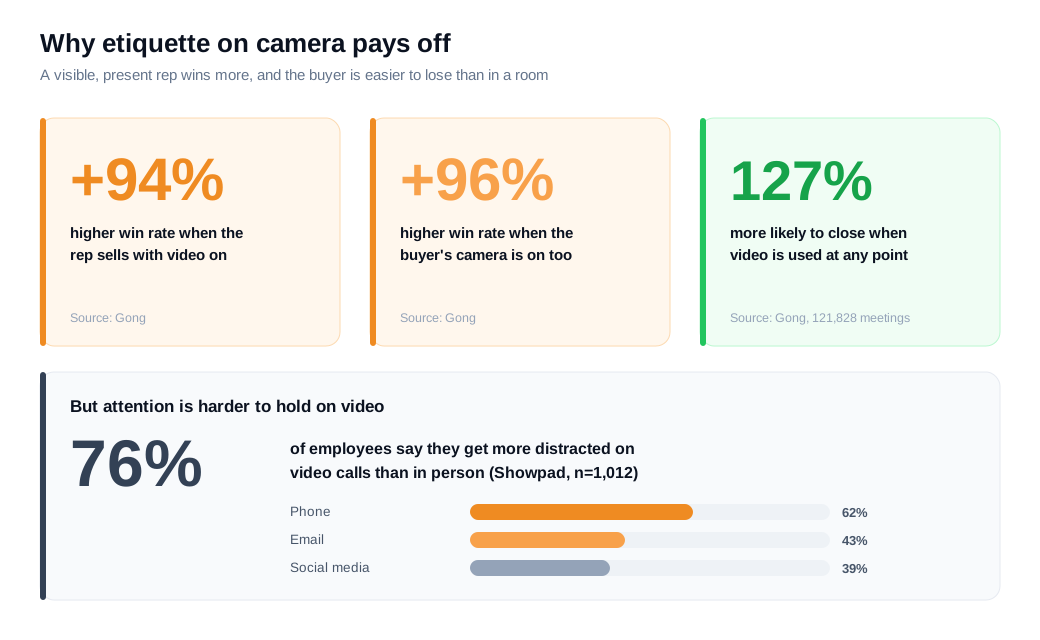
Gong recorded audio and video of 121,828 web-based sales meetings and ran them through AI, and the pattern was consistent: win rates were 94% higher when reps sold with their camera on, and 96% higher when the buyer's camera was on too. In an earlier study of thousands of 2020 opportunities, Gong found deals were 127% more likely to close when video was used at any point in the cycle. A visible face is not a nicety. It changes how the other side engages.
The other half of the story is how easy it is to lose a buyer once they are on camera. Showpad's State of Selling survey of 1,012 employees found that 76% get more distracted on video calls than in person, with the phone (62%), email (43%), and social media (39%) pulling attention away. That share climbed to 84% among 18-to-34-year-olds, the buyers most sales teams sell to.
So etiquette here does real work. Good habits earn the win-rate lift the camera can deliver, and they keep a buyer's eyes on you instead of on a second screen.
What are the rules of video call etiquette?
The rules of video call etiquette come down to respecting the buyer's time, being easy to see and hear, and staying present, which in practice means arriving early, testing your gear, keeping your camera on, and running the call as a conversation. None of them are hard. Most reps break one or two out of habit.
Start with punctuality. The Center for Sales Strategy's guidance is to join three to five minutes early as a participant, and at least five minutes early if you are running the call, with your hardware and the app already tested. A rep who spends the first two minutes fumbling with audio has spent the buyer's goodwill before the pitch begins. Open with a short agenda so the buyer knows where the next half hour goes.
Turn your camera on and leave it on. If the buyer is off camera, invite them on warmly rather than demanding it, and lead by example so the exchange feels like two people talking. On any call with more than two people, mute yourself when you are not speaking, then unmute cleanly instead of talking through the first three words.
Handle screen sharing with care. Share the specific window or tab you need, not your entire desktop, and hide notifications, close stray tabs, and turn off your bookmarks bar before you present. A Slack ping from a colleague or a personal calendar alert popping up mid-demo is the kind of small leak that pulls a buyer out of the moment. Dress and set your space as you would for an in-person meeting, and end on time or early.
How do you set up your camera, audio, and background?
Set your camera at eye level, light your face from the front, keep your mic close, and make your background clean and neutral, then test the whole thing on a real call before a buyer ever sees it. The setup is a one-time cost that pays off on every call after.
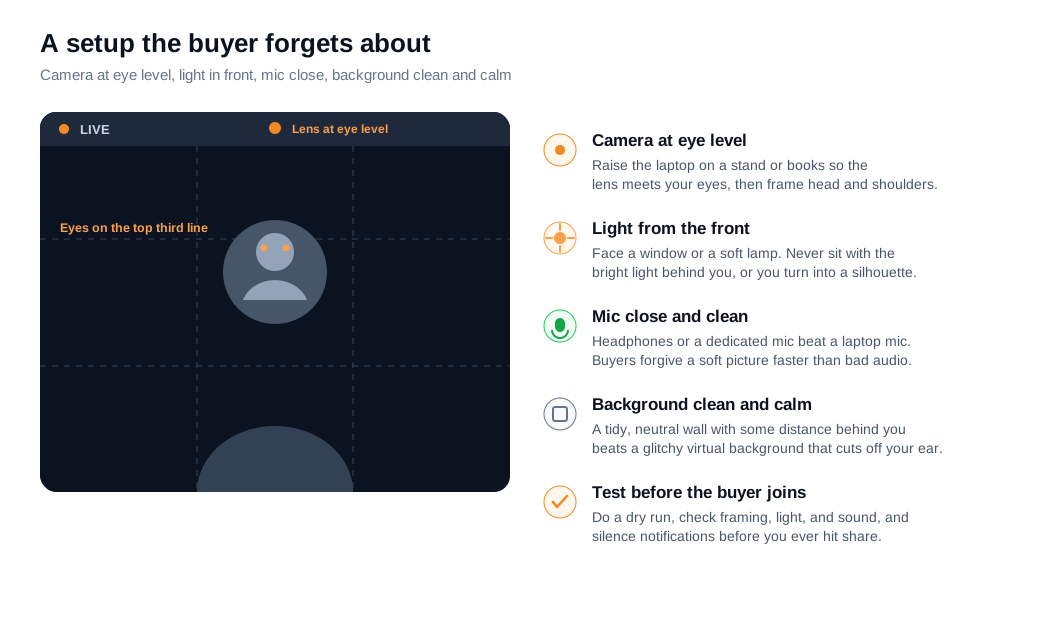
Raise the camera to your eyes. Most laptops sit below eye level, which points the lens up your nose and makes you loom over the buyer. Prop the laptop on a stand or a stack of books so the lens meets your eyes, and frame yourself head and shoulders. Setup guides suggest the rule of thirds, with your eyes along the upper third of the frame and a little space above your head, so you look composed rather than crammed into a corner.
Get the light in front of you. A window or a soft lamp facing you evens out your face, while a bright light behind you turns you into a silhouette the buyer has to squint at. Diffused, front-facing light beats a single harsh bulb, and it costs nothing to move a desk lamp.
Fix the audio, because buyers forgive a soft picture faster than they forgive bad sound. Headphones or a dedicated microphone beat the built-in laptop mic, and a quiet room beats any gadget. For the background, a tidy, neutral wall with a bit of distance behind you reads as professional and adds depth. A busy or glitchy virtual background that clips your ear every time you move does the opposite. Do a dry run before the call, check framing, light, and sound, and silence every notification so nothing surprises you on screen.
How do you make eye contact on a video call?
You make eye contact on a video call by looking into the camera lens, not at the buyer's face on your screen, especially during the moments that carry the most weight: your opening line, a key point, and the close. It feels unnatural for the first few calls, and it is the single habit that most separates a present rep from a distant one.
The trap is obvious once you name it. When you watch the buyer's face on screen, your eyes point below or beside the lens, so from their side you appear to be looking away even while you are fully engaged. Sales coaches who study this, like Julie Hansen, argue that looking at the lens is what reads as eye contact to the person on the other end, and that a camera at eye level is what makes it feel like you are sitting across from them.
Treat it as a rhythm, not a stare. Locking your gaze on the lens for a full minute looks unsettling. A few seconds on the camera when you make a point, then back to the screen to read the buyer's reaction, mirrors the natural give-and-take of in-person eye contact. Two small tweaks help you hold the pattern: turn off your self-view so you stop watching yourself, and drag the buyer's video window to the top of your screen, just under the webcam, so a glance at their face keeps your eyes close to the lens.
How do you keep prospects engaged on a video call?
You keep a prospect engaged by talking less than you think you should, asking real questions, and making the call interactive, because the moment a video call turns into a monologue is the moment the buyer opens a second tab. Engagement is mostly a function of who is doing the talking.
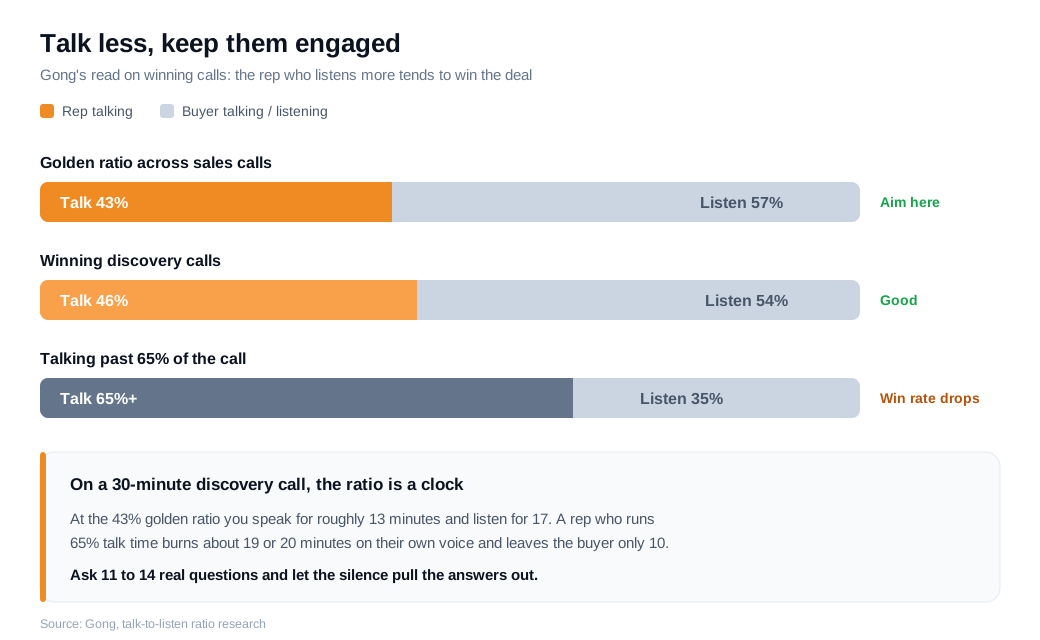
The numbers are specific. Gong's analysis of sales calls puts the golden ratio at about 43% rep talk time and 57% listening, with winning discovery calls landing near 46/54. Push past roughly 65% talk time and win rates fall. The discipline is to ask a question, then stop, and let a few seconds of silence pull the answer out rather than filling the gap yourself.
Make the call a two-way thing throughout. Use the buyer's name, invite reactions, and when you share your screen, narrate it and check in ("does this match how your team handles it today?") instead of reading twenty slides at them. Vidyard's sales guidance is to open on the prospect's own context rather than a company intro, because a specific opening is what stops the buyer from drifting. Keep the whole call tight and front-load your one key point.
Here is a worked example. On a 30-minute discovery call, the talk-to-listen ratio is really a clock. At the 43% golden ratio you speak for roughly 13 minutes and listen for 17. A rep who runs 65% talk time burns about 19 or 20 minutes on their own voice and leaves the buyer only 10, which is barely enough to surface a single real objection. Aim to ask 11 to 14 genuine questions across the call, and let the buyer's answers set the direction. The rep who listens more usually learns the thing that closes the deal.
Engagement also starts before the call ever loads. A buyer is most engaged the minute their interest peaks, so the faster you can meet a high-intent visitor, the warmer the eventual call. A widely cited MIT Lead Response Management study, summarized in this lead-response research, found that responding within five minutes made a rep about 21 times more likely to qualify a lead than waiting 30. That is why teams running an inbound sales motion increasingly let an engaged visitor start a live video call right on the site instead of booking a slot three days out. Tight lead routing and notifications keep that raised hand from cooling, and a lower-commitment live chat message gives a hesitant buyer a way in before anyone turns a camera on.
What should sales reps avoid on video calls?
Avoid the habits that tell a buyer you are only half there: showing up late, fumbling the tech, reading a script, talking over them, and quietly multitasking while they speak. Most video-call failures are self-inflicted, and each one is easy to name and drop.
Do not start late or spend the first minutes wrestling with audio, screen sharing, or a link that will not open. Do not monologue. A rep who shares a slide deck and talks uninterrupted for fifteen minutes has turned a conversation into a webinar the buyer did not sign up for. Do not multitask, because buyers can see your eyes tracking another window, and doing it gives them silent permission to do the same.
Watch the on-camera tells too. TED's Masterclass guidance flags several avoidable video mistakes, including poor framing, distracting backgrounds, and staring at your own image rather than the camera. Darting your eyes between the lens and the screen reads as shifty, and staring blankly reads as checked out, so aim for the steady rhythm covered earlier.
A few more to retire. Do not read your pitch word for word, since a script kills the energy that makes a person worth listening to on camera. Do not pressure a reluctant buyer to turn their camera on, and do not ignore obviously bad audio on your end, because a call the buyer has to strain to hear will not survive to a second meeting. Cutting these habits does more for your close rate than any new gadget.
Key takeaways
- Etiquette moves the number. Gong's data ties camera-on selling to win rates 94% higher, and a buyer on camera to 96% higher, so how you show up is part of how you sell.
- Respect time and stay present. Join early, test your gear, keep your camera on, share only the window you need, and run the call as a conversation with a clear agenda.
- Get the setup right once. Camera at eye level, light on your face from the front, mic close and clean, background neutral, and every notification silenced before the buyer joins.
- Look at the lens, not the screen. Meet the camera during your opening, your key points, and the close, in a rhythm of a few seconds on and off, with self-view turned off.
- Talk less to keep them engaged. Aim for the 43/57 talk-to-listen ratio, ask 11 to 14 real questions, narrate a screen share instead of reading slides, and let silence work.
- Drop the self-inflicted mistakes. Lateness, monologues, multitasking, darting eyes, and a read-aloud script cost more deals than any camera or microphone ever will.
TAGS

Written by
Daniel SemeckyCo-founder & CEO
Daniel is the co-founder and CEO of Glimpze. He spends his days talking to revenue teams about how to catch high-intent visitors before they bounce, and writes about inbound sales, lead conversion, and building a motion where marketing and sales actually share a number.


