
On this page
- What do heatmaps reveal about visitor behavior?
- What is the difference between click maps and scroll maps?
- How much traffic do you need before a heatmap is trustworthy?
- How do you spot conversion leaks in heatmaps?
- What are rage clicks and dead clicks, and why do they signal leaks?
- How do you pair heatmaps with session recordings?
- Key takeaways
- Sources
A heatmap is the closest thing you get to standing behind a thousand visitors and watching where their eyes and hands go. It aggregates clicks, taps, scrolls, and cursor movement from real sessions into one colored image, so a pattern that would take hours to find in individual recordings shows up at a glance.
That is also where people go wrong. A pretty heatmap is easy to admire and easy to misread, and a single hot spot can mean interest or confusion depending on what happens next. Used well, though, heatmaps are one of the fastest ways to find the exact places where a page loses visitors who were ready to convert.
This post covers what heatmaps reveal, how click and scroll maps differ, how much traffic you need before the picture is trustworthy, how to read a map for conversion leaks, what rage and dead clicks tell you, and how to pair maps with session recordings.
What do heatmaps reveal about visitor behavior?
Heatmaps reveal where visitors click, how far they scroll, where they move the cursor, and where they get stuck, all aggregated across many sessions into one color-coded view. Red and orange mark the areas with the most activity and blue the least, so you can read attention and effort the way you read a weather map.
Four things surface reliably. Which elements pull clicks and which get ignored. How far down the page real attention reaches. Where cursors cluster, which is a rough proxy for where eyes go. And where people struggle, shown by repeated or unresponsive clicks. Each of these answers a different question about a page, and each has a matching heatmap type.
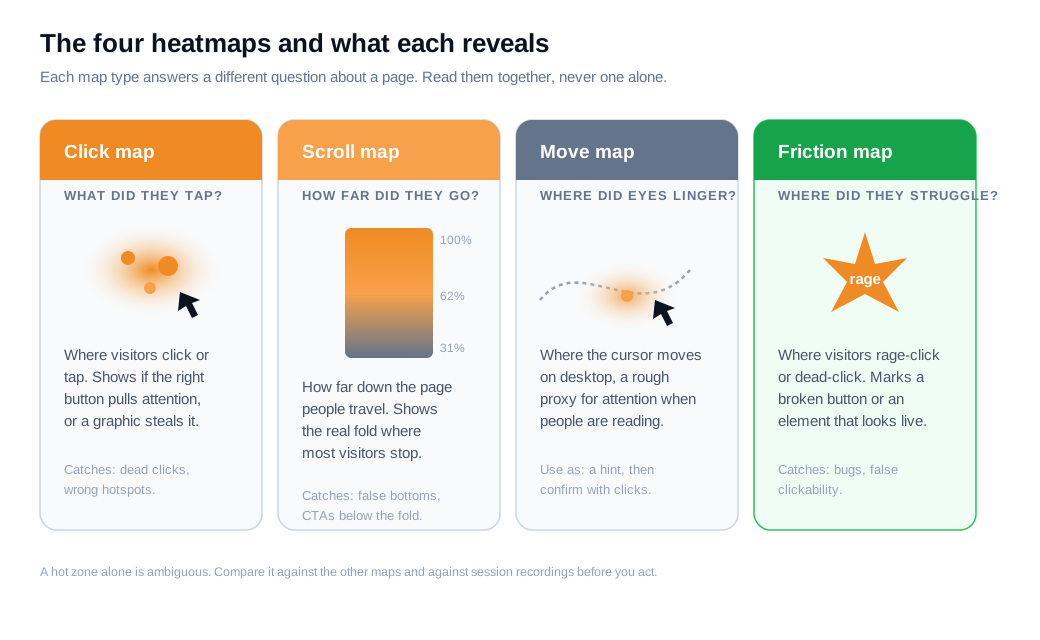
The value is not the picture itself. It is the comparison between where you designed attention to go and where the map says it actually went. A checkout button you spent a week on can sit stone cold while a decorative graphic three sections up runs hot. The heatmap makes that mismatch visible in seconds, and the mismatch is usually where your money is leaking.
What is the difference between click maps and scroll maps?
A click map shows where visitors click or tap, while a scroll map shows how far down the page they travel, so one answers what people interacted with and the other answers what they even saw. They are read differently and they catch different leaks.
On a click map, each interaction is plotted where it landed, and the hottest zones are the elements getting the most clicks. Microsoft's Clarity documentation describes a click map as an aggregate of clicks on desktop and taps on mobile. That tells you whether your primary button is the thing people reach for, or whether a headline, an image, or a stray line of text is stealing the attention you wanted on the button.
A scroll map colors the page by the percentage of visitors who reached each depth. As Clarity's scroll map docs put it, the redder the area, the more people saw it, and the color cools as visitors drop away toward the bottom. The single most useful line on a scroll map is the real fold, the depth where a large share of your audience stops. Anything below it is functionally invisible to most of your traffic, no matter how carefully you designed it.
A third common type, the move map, tracks cursor movement on desktop and often stands in as a cheap proxy for attention. Research summarized by Inspectlet traces this back to a Carnegie Mellon study finding that the cursor tracks gaze reasonably well when people are actively reading, though the link weakens when they park the mouse and think. Treat a move map as a hint about attention, then confirm it against clicks and scroll depth rather than trusting it alone.
How much traffic do you need before a heatmap is trustworthy?
Most practitioners want at least 200 to 300 sessions per page and per device type before a heatmap means anything, and 500 or more before they make a costly change on the strength of it. Below that, one or two visitors clicking the same place can paint a hot zone that looks like a clear signal and is really just noise.
Zoho PageSense frames the low end of that range as the point where patterns start to form, and pushes the threshold to 500-plus sessions for major decisions such as restructuring a checkout or removing a section from a high-value page. Some teams go further still and aim for a few thousand pageviews per screen on the pages that matter most.
Two details save you from false reads. Count desktop and mobile separately, because layouts, fold positions, and thumb-versus-mouse behavior differ enough that a blended map hides both stories. And give the map a full normal week, since a Tuesday visitor and a Saturday visitor rarely behave the same way.
Sample size buys confidence, not certainty. A heatmap with 10,000 sessions still only shows what happened, never why, which is exactly why it belongs next to session recordings and funnel data instead of standing on its own.
How do you spot conversion leaks in heatmaps?
You spot a conversion leak by looking for the gap between where you want clicks and attention to go and where the map says they actually go, then reading the specific pattern that gap makes. A handful of patterns account for most leaks.
The first is scroll drop-off before the call to action. If your scroll map shows the primary CTA sitting below the depth where most visitors stop, the offer is invisible to the people you are trying to convert. Scroll maps often expose a false bottom, where a full-width image, a hard divider, or a band of white space looks like the end of the page and quietly halts scrolling. Mida notes that a majority of visitors can miss a mid-page form for this reason. It matches eye-tracking work from the Nielsen Norman Group, whose 2018 study of roughly 130,000 fixations found that about 57% of viewing time still lands above the fold and 74% within the first two screenfuls, so anything you push low starts at a real disadvantage.
The second pattern is clicks on things that do not click. A click map lit up on a static image, a heading, or a line of body copy usually means visitors expect it to do something. That is a mismatch between perceived and actual interactivity, and the element either needs to become a link or needs to stop looking like one.
The third is attention landing on the wrong element. When the hottest zone on the page is a secondary nav item or a promo that pulls people off the conversion path, you are leaking intent to a distraction you built yourself.
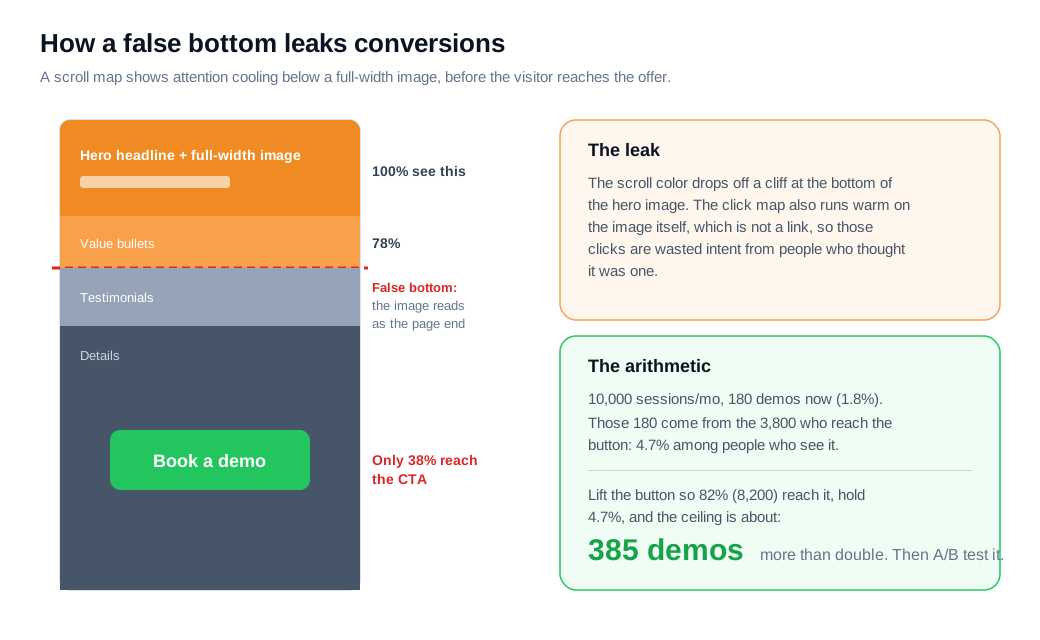
Here is the arithmetic on an ordinary case. Take a demo landing page with 10,000 sessions a month. The "Book a demo" button sits just under a tall, full-width hero image. The scroll map shows a sharp color drop at the bottom of that image: only about 38% of visitors, or 3,800 people, scroll past it to the button. The click map, meanwhile, shows a warm patch on the hero image itself, which is not a link, so those are wasted clicks from people who assumed it was one.
Right now the page produces demo requests at 1.8% of sessions, or 180 a month. Those 180 come almost entirely from the 3,800 people who reach the button, which is a 4.7% conversion among visitors who actually see it. Shorten the hero and lift the button so roughly 82% of visitors (8,200 people) reach it, hold that 4.7% steady, and the reachable ceiling climbs to about 385 demos, more than double the current number.
Exposure never converts one for one, and the people who used to scroll past may have been more motivated than the average visitor, so the real lift will be smaller than the ceiling. Treat the figure as the size of the opportunity, then run an A/B test to measure what you actually get. The heatmap points you at the leak; the test tells you the value of the fix.
What are rage clicks and dead clicks, and why do they signal leaks?
A rage click is a burst of rapid clicks on the same element when a visitor expects something to happen and nothing does, and a dead click is a single click on something that gives no response, and both mark places where your interface quietly breaks the path to conversion. Friction or error heatmaps plot these signals directly, so a cluster jumps off the page.
A rage click is the louder of the two. Hotjar describes rage-click maps as a way to surface repeated frustrated clicks, which usually trace back to a broken button, a form control that will not submit, a slow action, or a spinner that never resolves. These tend to fire at the worst possible moments, inside checkout, sign-up, and demo flows, where frustration turns straight into an exit.
A dead click is quieter but just as useful. Mouseflow's friction heatmap highlights clicks on elements that do nothing, which points to a perceived-clickability mismatch: someone clicked a heading, an icon, or a product image because it looked interactive, and the click went nowhere.
Each cluster is a hypothesis you barely have to guess at. A rage-click hotspot on a "Submit" button that keeps failing is a bug costing you finished forms. A dead-click hotspot on a product image that people expect to enlarge is a missed expectation you can satisfy with one small change. Because these signals sit on top of your normal click map, they turn a vague sense that something feels off into a precise coordinate on a specific page.
How do you pair heatmaps with session recordings?
You use the heatmap to find where a problem is and the session recording to understand why it happens, moving from the aggregate pattern down to the individual sessions that explain it. Heatmaps are strong at showing what and where across thousands of visitors and weak at cause, while recordings are the reverse, which is why mature CRO teams run them together.
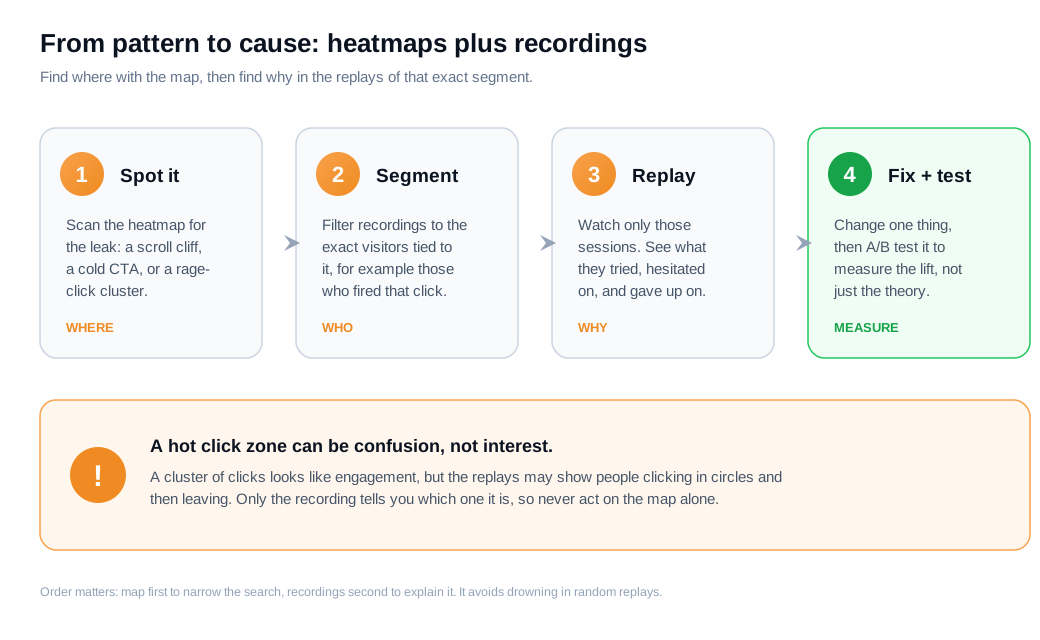
The efficient order is map first, recordings second. Scan the heatmap for the leak, a scroll cliff, a cold CTA, or a rage-click cluster, then filter your recordings to the exact segment tied to it, for example visitors who reached that depth or sessions that fired a rage click on that button, and watch only those. Zoho PageSense recommends this sequence because it keeps you from drowning in random replays and from cherry-picking the ones that confirm a hunch.
The pairing also guards against the most common misread. A hot click zone looks like engagement, but the replays may show people clicking in confusion and then leaving, which is a friction signal wearing an engagement costume. Only the recording tells you which one you are looking at, so a change that seems obvious from the map alone can point in the wrong direction.
Once you know which pages and moments leak, the highest-value response is often to act while the visitor is still on the page rather than after they leave. A stalled scroll on a pricing page or a rage click on a demo button is a live signal of strong intent and rising frustration at the same time, and a tool like live chat lets you offer help in that exact moment instead of waiting for a next-day email. This is how inbound sales teams get the most out of behavior data: the map and the replay tell them where intent concentrates, and they route a real person or a proactive nudge to that spot before the visitor gives up.
Key takeaways
- Heatmaps show behavior, not reasons. They aggregate clicks, scrolls, and cursor movement into one view of what happened, which makes them fast at finding leaks and useless for explaining them on their own.
- Click and scroll maps answer different questions. A click map shows what people interacted with; a scroll map shows what they saw and where the real fold sits. Read both before you conclude anything.
- Wait for enough data. Aim for 200 to 300 sessions per device type before you trust a pattern, and 500 or more before you make a costly change, counting desktop and mobile separately.
- Leaks show up as gaps and clusters. Watch for a CTA below the scroll drop-off, a false bottom, clicks on elements that do nothing, and attention landing on the wrong thing.
- Rage and dead clicks name the broken spot. A friction map turns a vague sense of trouble into an exact coordinate, usually a bug or a clickability mismatch you can fix directly.
- Pair maps with recordings, then act fast. Use the heatmap for where, the replay for why, and a live conversation for the high-intent moments the data reveals.
TAGS

Written by
Nilas MylerCo-founder & CTO, Glimpze
Nilas is the co-founder and CTO of Glimpze, an inbound sales tool that turns high-intent website visitors into live conversations. A former SEO consultant for some of the largest companies in Denmark, he writes about speed-to-lead, inbound sales, and conversion rate optimization — the technical and operational mechanics of turning traffic into pipeline.


