
On this page
Two reps send the same forty-five-second demo clip on the same Tuesday. One opens with "Hi Sarah, I saw Northwind just moved into three new markets" and shows Sarah's own website behind the rep's face. The other opens with "Hi there, thanks for your interest." Same product, same rep, same length. One gets a reply by lunch. The other gets archived.
That gap is the whole personalization question. Recording video for sales already outperforms plain text, so the next decision is how much of each clip to tailor to the person watching, and whether the extra minutes per prospect earn their keep.
This post covers what separates personalized from generic video, how personalization changes reply and win rates, what is actually worth tailoring, how to scale it without filming all day, when a generic clip is the right call, and how to decide which prospects get the one-to-one treatment.
What is the difference between personalized and generic video?
The difference is the audience of one: a personalized video is recorded or assembled for a specific viewer and references something only that person would recognize, while a generic video is made once and sent to everyone unchanged. Both are legitimate tools, and the line between them is less about production and more about how the clip is targeted.
Three levels sit on a spectrum. A fully personalized, one-to-one video is recorded from scratch for a single prospect, with their name spoken aloud and their situation on screen. A dynamically personalized video is recorded once and then assembled per recipient, with a name, a company, or a website background swapped in automatically. A generic video is a single evergreen asset, the kind you build once to answer a common question, walk through a feature, or reply to an inbound lead.
The reason this matters is that the three levels cost wildly different amounts of time, and the payoff does not scale in a straight line. A one-to-one video can take a rep a few minutes each, which caps how many you can send. A generic clip costs nothing after the first recording, but it lands the same for a stranger and a hot account. The rest of this post is about matching the level to the moment.
How does personalization affect video performance?
Personalization reliably lifts the metrics that decide whether outreach works: the same video earns more opens, clicks, and replies once it references the person watching. The size of the lift varies by source and by how deep the tailoring goes, but the direction is consistent across vendor data and independent research.
Start with the baseline that video sets over text. Vidyard's sales stats put plain sales emails near a 2.5% click-through rate and a 1.5% reply rate, while emails carrying a video reach roughly 17% click-through and a 6% reply rate. That is the floor personalization builds on.
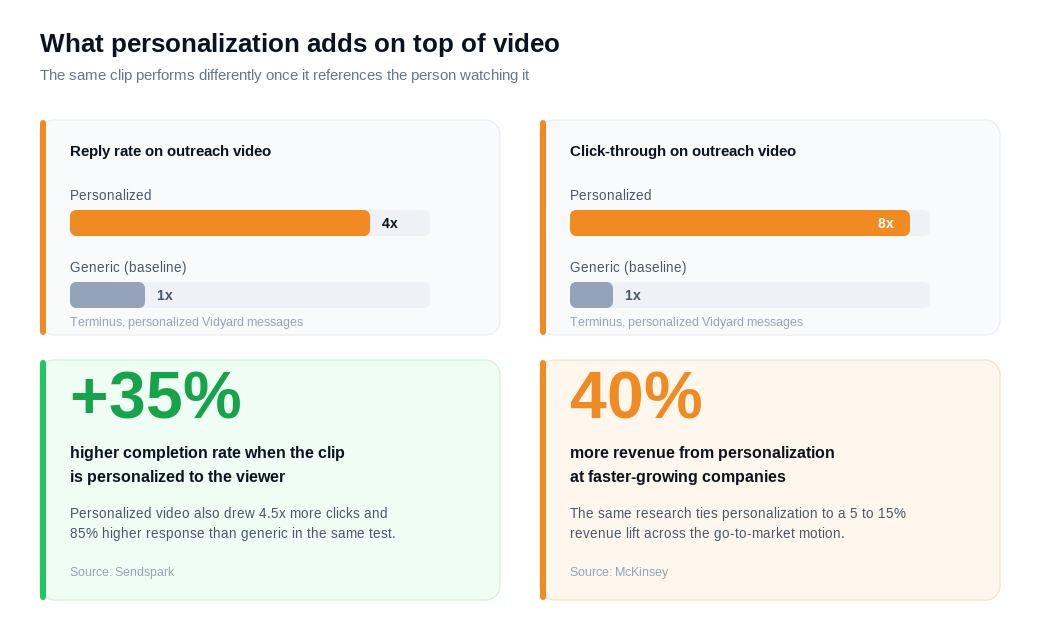
Now add personalization on top. Terminus, an account-based marketing company, brought Vidyard into its prospecting and reported that personalized video messages drove an 8x improvement in click-through rate and a 4x improvement in reply rate against its previous outreach. Sendspark's comparison of personalized against generic video found personalized clips pulled 4.5 times more clicks, a 35% higher completion rate, and an 85% higher response rate in the same test. The exact multiples are vendor figures and depend on the starting point, so treat them as a range rather than a promise.
The pattern holds at the business level too. McKinsey's research on personalization found that faster-growing companies derive about 40% more of their revenue from personalization than slower-growing peers, and that getting personalization right tends to lift revenue in the 5 to 15% range across a go-to-market motion. Vidyard's benchmark report, drawn from close to a million videos, found more than a third of teams using video reported higher win rates, 28% saw more pipeline, and 27% cited shorter deal cycles. Video does the heavy lifting. Personalization is the multiplier on top.
What can you personalize in a sales video?
You can personalize four layers of a sales video, and they run from a cheap data swap to a full re-record: the thumbnail, the opening seconds, the on-screen background, and the call to action. Knowing which layer you are touching tells you how much time it will cost and whether it can be automated.
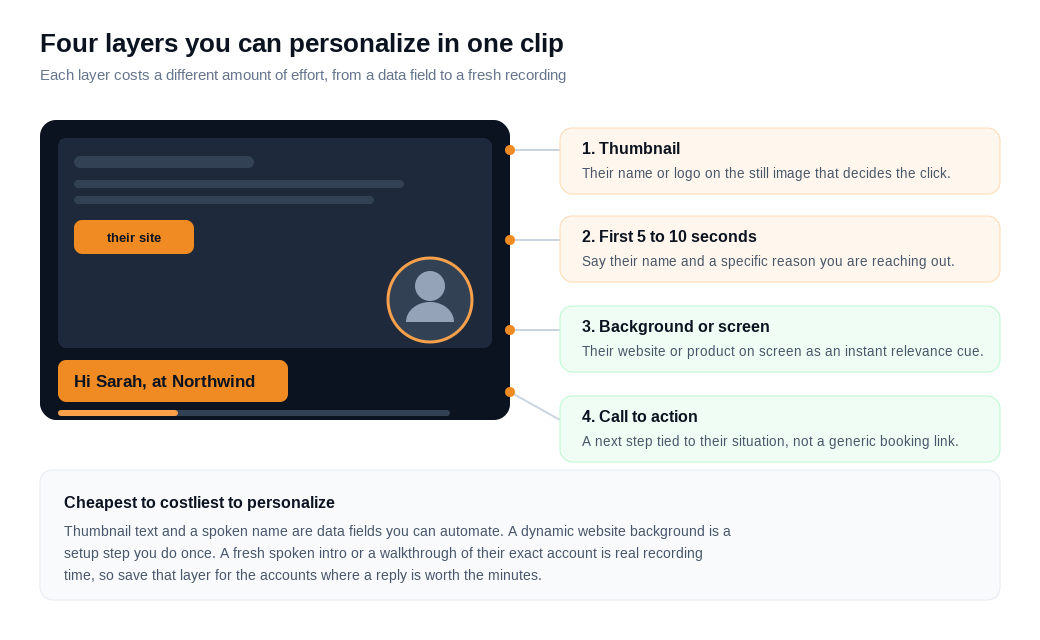
The thumbnail is the cheapest layer and the one with the most upside, because it decides the click before the video ever plays. A still frame that shows a human face plus the recipient's name or their website in view consistently beats an auto-generated thumbnail. This is a text overlay on an image, so it can be generated from a data field.
The opening seconds are where one-to-one recording earns its cost. The strongest personalized clips spend the first five to ten seconds on something specific to the prospect: their name, a recent company event, or their own site pulled up on screen. That is the layer that reads as "this was made for me" rather than "this was made for a list."
The background and the call to action round it out. A dynamic background that renders the prospect's website or LinkedIn page behind the rep is a one-time setup that then runs on autopilot, and seeing their own site is an immediate relevance signal. The closing ask should point at their situation, a reply about the specific problem you named, rather than a generic "book a slot" link.
How do you scale personalized video?
You scale personalized video by recording once and letting data fill in the rest, so a single take becomes hundreds of tailored versions instead of hundreds of separate shoots. The whole point of scaling is to keep the relevance signal that drives the lift while cutting the per-clip recording time that caps your volume.
Three mechanisms do the work. Variable intros and dynamic backgrounds let a base recording carry a swapped-in name, company, and website per recipient. Keyword replacement substitutes fields in a script with data you provide or enrich from a third-party source. AI avatars go furthest: you record a few minutes of footage once, generate an avatar, and then produce fresh clips from typed text without filming again. Vidyard has described using its avatar tooling to turn about ten minutes of source footage into 2,000 unique sales videos in a single day.
Scaling has a ceiling worth respecting. A dynamically assembled clip is only as convincing as the seams are invisible, and a name that is obviously dropped in reads as automation, which can undercut the trust that made video work in the first place. AI avatars can drift into an uncanny register that some buyers find off-putting. The practical rule is to scale the layers that automate cleanly (thumbnail, name field, website background) and keep a human in the loop for the accounts where the opening seconds have to feel genuinely one-to-one.
When is generic video enough?
Generic video is enough whenever the viewer's specific context does not change the message, which covers more of the funnel than most reps assume. If the same answer serves everyone who asks a question, personalizing it adds cost without adding relevance.
Four situations are squarely generic. Inbound FAQ responses, where a prospect asks about pricing, security, or an integration and the answer is identical for everyone. Product demos and feature walkthroughs, where the value is showing the thing, not naming the viewer. Onboarding and how-to clips, which travel to whoever needs them. And genuinely top-of-funnel broad sends where per-lead value is too low for a rep to spend two minutes each and expect the reply to pay it back.
There is also a hybrid that captures most of the upside for a fraction of the effort: a personalized opening bolted onto a generic body. The rep records a fresh ten-second intro that names the prospect and states one reason for reaching out, then cuts to a reusable demo or explainer that never changes. The buyer gets the "made for me" signal in the seconds that decide the click, and the rep reuses the expensive part. That pattern is how a team keeps a personalized touch on volume that pure one-to-one recording could never reach. On your own site, the same logic favors a fast lane: when a visitor is already on your pricing page, letting them start a live video call in the browser turns their existing intent into a conversation without any pre-recording at all.
How do you decide which prospects get a personalized video?
Decide with one rule: spend one-to-one minutes only where the expected value of a reply clears the cost of recording it, and let dynamic or generic video cover everyone below that line. In practice that means tiering your list by deal value and matching the level of personalization to the payoff, rather than personalizing everything or nothing.
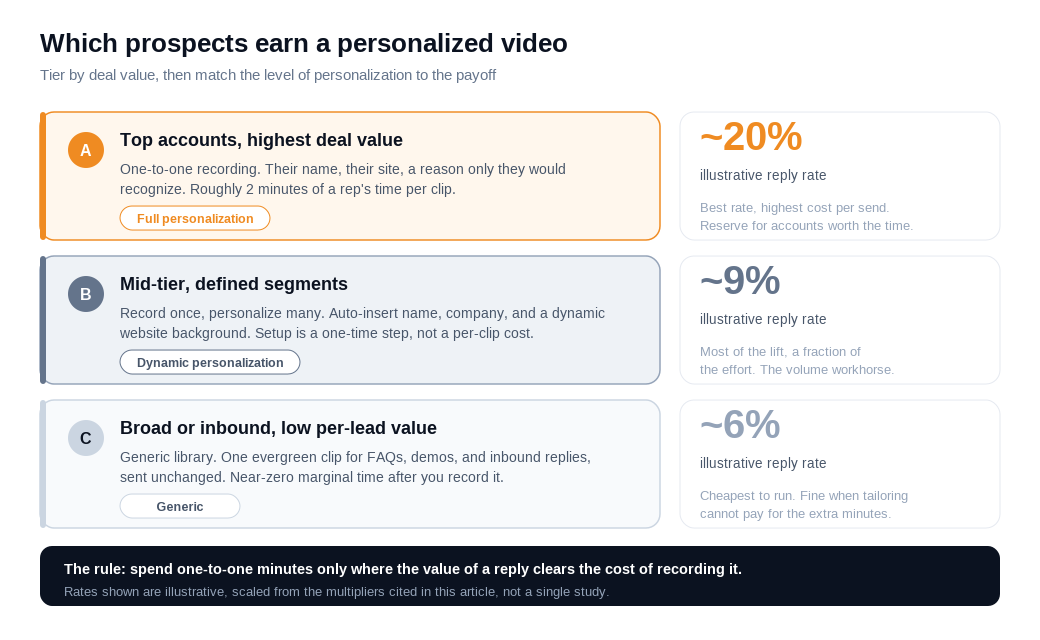
Here is a worked example. A rep has 300 prospects to reach this month and about eight hours to spend on video. A one-to-one clip takes roughly two minutes to record, the figure Intercom's team reported when it added personalized prospecting videos in Loom. The reply rates below are illustrative, scaled from the multipliers cited earlier, not a single study.
Personalize all 300 one-to-one and the recording alone runs about ten hours, over the budget before a single email is written, and quality slips as fatigue sets in. Blast one generic clip to all 300 and the marginal time is near zero, but at a 6% reply rate that is about 18 replies. Tier it instead: the top 60 accounts get one-to-one video (two hours of recording) at a personalized rate near 20%, which is 12 replies, and the remaining 240 get a record-once dynamic clip at roughly 9%, which is about 22 replies. The tiered plan produces around 34 replies in three hours, nearly double the generic blast, at a third of the time the all-personalized plan demanded.
The lesson is that personalization matters most where deal value is highest and volume is lowest. For a small set of strategic accounts, a one-to-one video is the best use of a rep's time. For the long tail, dynamic or generic video wins on math. Route the replies from either tier to a rep fast, because a warm response decays by the hour, and pairing recorded outreach with live chat on your site gives a hesitant buyer a low-commitment way to answer before stepping up to a call. Personalized video is worth the effort in an inbound sales motion exactly where the account justifies it, and not one prospect further down the list.
Key takeaways
- Personalization is a multiplier on video, not a separate channel. Video beats text on its own, and tailoring the clip to the viewer lifts click-through and reply rates further, with vendor tests reporting several times the response of generic sends.
- Four layers are personalizable, at four different costs. The thumbnail and a spoken name are cheap data fields, a dynamic website background is a one-time setup, and a fresh one-to-one intro is real recording time, so tailor from the cheap end first.
- Scale by recording once and swapping data in. Variable intros, dynamic backgrounds, and AI avatars turn one take into hundreds of versions, but watch for visible seams and uncanny avatars that undercut the trust video earns.
- Generic video is enough more often than reps think. FAQ answers, demos, onboarding, and low-value broad sends do not change with the viewer, and a personalized intro on a generic body captures most of the upside cheaply.
- Tier the list and spend minutes where they pay. Give top accounts one-to-one video, give segments record-once dynamic clips, and give the long tail a generic library, using the rule that one-to-one time goes only where a reply is worth it.
- Route replies fast, whatever the tier. A warm response from any video decays by the hour, so connect it to a live rep quickly rather than letting the intent you just earned cool off in an inbox.
TAGS

Written by
Daniel SemeckyCo-founder & CEO
Daniel is the co-founder and CEO of Glimpze. He spends his days talking to revenue teams about how to catch high-intent visitors before they bounce, and writes about inbound sales, lead conversion, and building a motion where marketing and sales actually share a number.


