
On this page
A rep on your team already sends video. Maybe a screen recording pasted into a follow-up, a quick webcam intro before a first call, a walkthrough shared after a demo. The clips go out, some get watched, and then they vanish. Nobody knows who pressed play, how far they got, or whether any of it moved a deal.
Video selling software turns that scattered habit into a system you can measure and repeat. It records the video, tracks who watched and for how long, and pushes that signal back to the rep and the CRM so a warm viewer gets a fast, informed follow-up. The wrinkle is that the phrase now covers at least four separate product categories, and the tool that helps a rep send personalized clips is a different animal from the one that lets a website visitor start a live call. Choosing well starts with matching the category to the job.
This post covers what video selling software actually does, the main categories on the market, the features that matter most, how to judge analytics and integrations, what it costs, and a simple way to compare options and pick one.
What does video selling software do?
Video selling software records, hosts, sends, and tracks video across the sales cycle, then ties what a buyer watched back to the deal so a rep can act on it. Strip away the marketing and it does four jobs: capture a video, distribute it, measure engagement, and route that signal to a person or system that follows up.
Capture is the recording itself, usually a screen with a webcam bubble, sometimes a live two-way call. Distribution is the shareable link, the embed, or the widget that puts the video where the buyer will see it. Measurement is the part a plain email attachment can never give you: view rate, watch time, and the exact second attention dropped. The fourth job, the one that separates a real platform from a screen recorder, is turning that engagement into an action, a CRM update, a Slack alert, or a task for the rep who owns the account.
That fourth job matters because of how buying has changed. Gartner's research on the B2B buying journey found that when buyers weigh a purchase, they spend only about 17% of the time meeting with potential suppliers, and that sliver is split across every vendor they consider. Most of the deciding happens when no rep is in the room. A recorded video keeps selling in that gap, and buyers welcome it: Wyzowl's annual survey found 63% of people would most like to watch a short video to learn about a product, against 12% who prefer a text article. Software is what lets you show up in that preferred format and still know what happened.
What types of video selling software are there?
Four categories dominate the market, and most teams end up combining two or three rather than buying one product that claims to do everything. Sorting a tool into its category before you compare features saves you from judging a screen recorder against a live-call platform as if they were the same purchase.
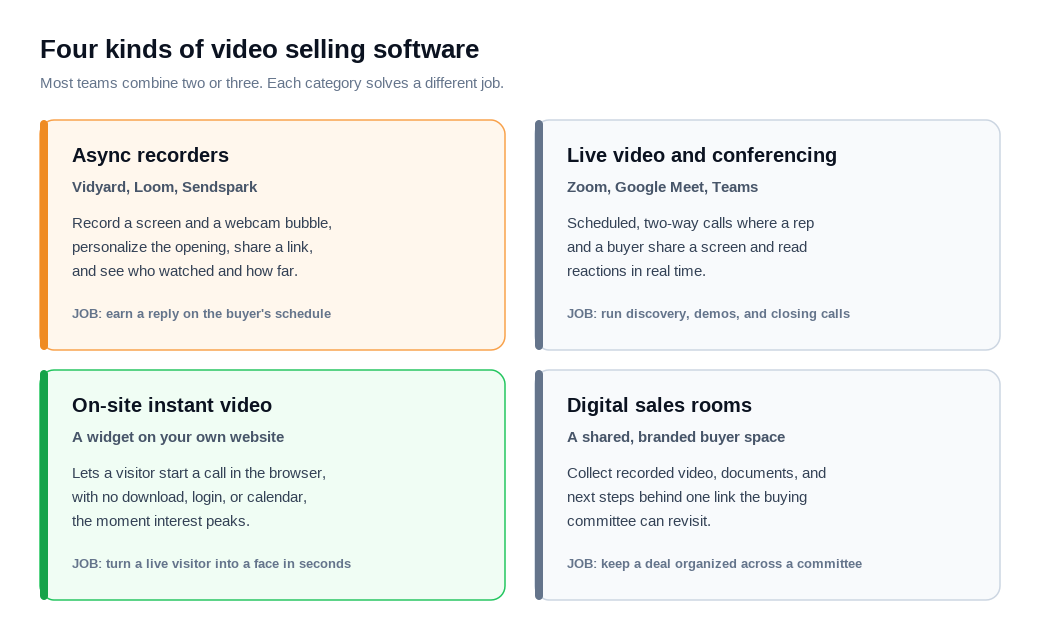
Async recorders are the entry point. Vidyard, Loom, and Sendspark let a rep capture a screen and a webcam, personalize the opening for a specific prospect, share a link, and see who watched. They differ mostly on analytics depth, CRM integration, and how far they lean into record-once, personalize-many outreach for high-volume teams.
Live video and web conferencing handle the scheduled call. Zoom, Google Meet, and Teams cover discovery, the demo, and the negotiation, where two people need to be present and share a screen while reading each other's reactions.
On-site instant video is the category teams overlook. When a visitor is already on your pricing page, the fastest call is one they can start in the browser with no download, no login, and no calendar. A widget that offers live video calls and screen share on your site turns a moment of interest into a face-to-face conversation in seconds, and pairing it with live chat on your website lets a hesitant buyer open with a low-commitment message and step up to a call once a rep is on the line.
Digital sales rooms are the newest slice. They give a buyer one branded space that holds recorded videos, documents, pricing, and the agreed next step, so a champion can revisit everything and forward it to the committee that actually signs.
What features matter most in video selling software?
The features that matter most are the ones that shorten the distance between a buyer watching and a rep acting: fast recording, honest analytics, CRM sync, real-time alerts, and a clean buyer-side playback experience. Everything else is a nice-to-have that should never outrank these.
Fast recording keeps the tool in daily use. If capturing and sending a clip takes more than a minute, reps quietly stop and the platform becomes shelfware. One-click capture, transcript-based trimming, and a thumbnail that generates on its own are the difference between a habit and an abandoned tab.
Personalization is what makes a video earn a reply. A first frame with the prospect's name or website, a short intro tailored to their situation, and a branded player all signal that a real person made this for them. Vidyard reports that adding a video to a proposal can raise close rates by up to 41%, drive 56% higher proposal engagement, and help close a deal about 26% faster, and personalization is a large part of why those clips get opened at all.
The buyer-side experience is the feature sellers forget because they never see it. Test what the recipient gets: does the video play instantly without a login, does it work on a phone, does the branded page look like your company or like a generic host. A buyer who hits a download prompt or a broken mobile player closes the tab, and no analytics dashboard recovers that view.
How do you evaluate analytics and integrations?
Judge analytics by whether they tell you who watched, how far they got, and where they dropped, and judge integrations by whether that data lands on the right contact or deal automatically, without a rep copying anything by hand. Those two systems working together are what turn a video into a sales signal instead of a vanity view count.
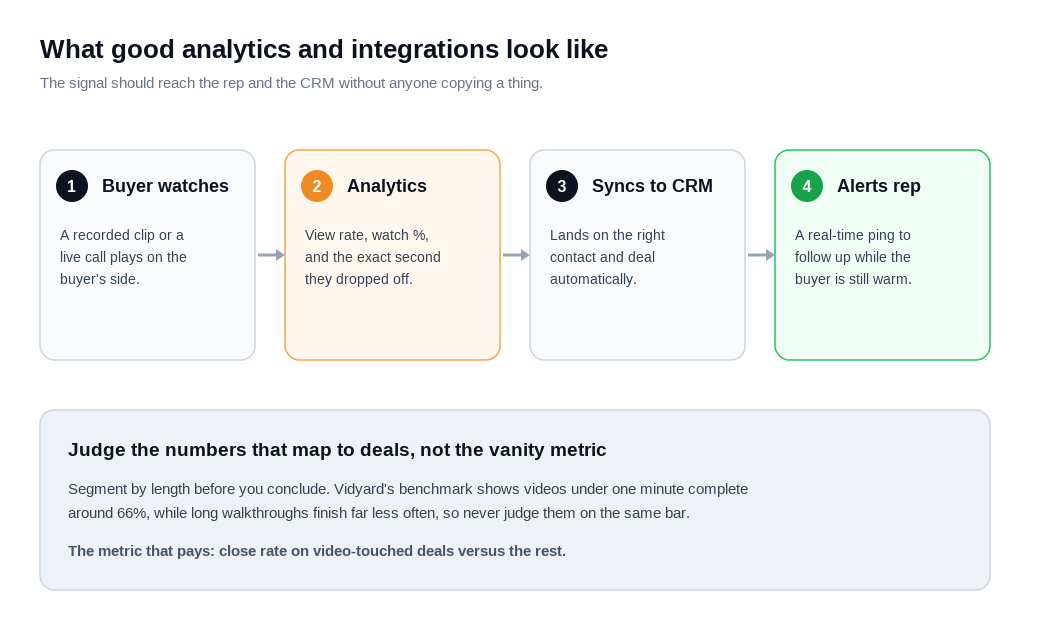
On analytics, four numbers do most of the work. View rate tells you whether the subject line and thumbnail earned the play. Watch rate tells you whether the content held them, so a viewer who reaches 90% is a warmer lead than one who bailed at 10%. Drop-off, usually shown as a heatmap, marks the second attention fell off, which points your follow-up at the exact objection. The fourth is a real-time notification, because a buyer who just finished your demo has raised a hand whose value decays by the hour.
Segment before you draw conclusions. Vidyard's business video benchmark shows completion holding near 66% for videos under a minute and falling sharply as length grows, so a short prospecting clip and a long technical walkthrough should never be measured on the same bar. The number that actually pays is close rate on video-touched deals compared with the rest, so keep that in view behind the engagement metrics.
On integrations, the test is whether the platform fits your stack without manual work. Bidirectional CRM sync is the baseline, so watch data appears on the Salesforce or HubSpot record on its own. For outbound teams, a link into the sequencer, Outreach, Salesloft, or Apollo, keeps video inside the cadence reps already run. For inbound, the alert path matters more, so confirm the tool can ping the right rep through Slack or an in-app notification the moment a high-intent visitor engages, and check that it installs on your site through the available integrations without a full developer project.
How much does video selling software cost?
Video selling software ranges from free tiers to roughly $15 to $60 per user per month for recorders, with enterprise plans quoted custom and on-site live-video tools often priced on top of their own free plan. The category you pick, more than the brand, sets the price band.
Recorders sit at the accessible end. Loom offers a free plan and paid tiers around $15 per user per month, while Vidyard's paid sales plans start near $59 per user per month and rise with AI features and analytics depth. Live conferencing you may already own inside a Google Workspace or Microsoft license. On-site instant video and digital sales rooms are usually seat-based with a free starter tier, so you can test the widget on a page or two before committing.
Watch the costs that never show up on the pricing table. A tool your reps abandon after week two costs its full license for zero calls sent. A platform that needs a paid add-on to reach your CRM, or professional services to install, can quietly double the sticker price. Weigh the plan against the motion it has to support, and start on a free tier wherever one exists.
How do you compare options and choose one?
Compare options with a short weighted scorecard: list the three or four criteria that matter for your motion, weight them to total 100%, score each candidate from one to five, and let the math break the tie instead of the demo that impressed you most. A rubric keeps a slick sales call from outvoting the feature your team will actually use every day.
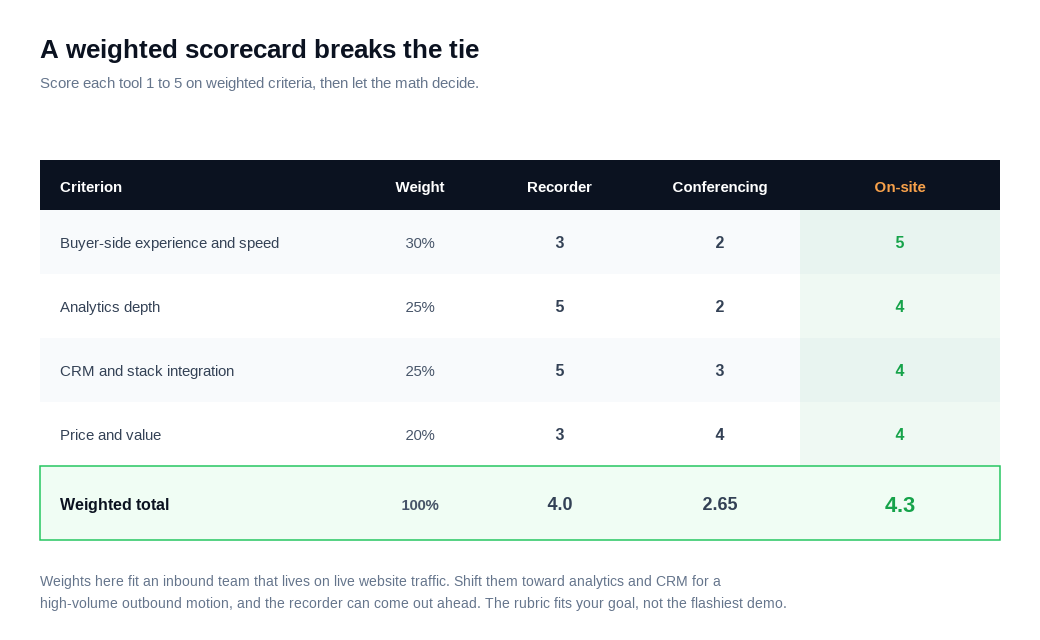
Here is a worked example. A six-person inbound team lives on live website traffic, so it weights buyer-side experience and speed at 30%, analytics depth at 25%, CRM integration at 25%, and price at 20%. Scoring three finalists one to five, an async recorder lands at 3, 5, 5, 3, a conferencing tool at 2, 2, 3, 4, and an on-site instant-video tool at 5, 4, 4, 4. Run the weights and the recorder scores 4.0, the conferencing tool 2.65, and the on-site tool 4.3. For this team the on-site tool edges ahead, because speed on high-intent traffic is what it weighted most heavily, while the recorder stays close enough to be worth keeping for follow-ups. Push analytics and CRM higher for a high-volume outbound team and the recorder wins the same table. The scorecard does not pick a favorite for you; it forces your priorities into the open.
A few rules keep the comparison honest. Shortlist by category first, so you are weighing like against like. Run a free trial on one motion for four weeks rather than a broad rollout, and measure reply and meeting rates against your current baseline. Test the buyer-side experience yourself on a phone. And if your highest-intent moment is a visitor already on your site, weigh the on-site options directly, since that is where an inbound sales motion converts fastest and where a form-and-callback loses the most deals. Glimpze fits that last category, bundling the widget, live visitor feed, routing, and one-click video into a single install, and you can line the pieces up against alternatives on the pricing page.
The speed argument is worth one number. The MIT and InsideSales lead response study found that contacting a lead within five minutes makes you 21 times more likely to qualify it than waiting 30 minutes. If the moment of peak interest is a live visitor on your pricing page, the software that reaches them in seconds is doing more for the deal than the one with the deepest editing suite.
Key takeaways
- Video selling software does four jobs: it captures a video, distributes it, measures who watched and how far, and routes that signal to a rep or the CRM so someone follows up while the buyer is warm.
- Sort by category before you compare. Async recorders, live conferencing, on-site instant video, and digital sales rooms solve different problems, and most teams combine two or three.
- Prioritize the features that shorten the gap to action: fast recording, honest analytics, CRM sync, real-time alerts, and a clean buyer-side experience the recipient never has to log in for.
- Analytics and integrations are one system. View rate, watch rate, drop-off, and a real-time alert only pay off when they sync to the deal automatically, and close rate on video-touched deals is the number that matters.
- Match the plan to the motion. Recorders run from free to about $60 per user per month, conferencing may come with your existing license, and on-site tools start free, so test before you commit and watch for adoption and integration costs.
- Let a weighted scorecard choose. Weight three or four criteria to your motion, score each finalist one to five, trial the winner on a single motion for four weeks, and keep only what beats your baseline.
TAGS

Written by
Daniel SemeckyCo-founder & CEO
Daniel is the co-founder and CEO of Glimpze. He spends his days talking to revenue teams about how to catch high-intent visitors before they bounce, and writes about inbound sales, lead conversion, and building a motion where marketing and sales actually share a number.


