
On this page
- What is the difference between a demo video and a walkthrough?
- When is video better than a live demo?
- How long should a demo or walkthrough video be?
- How do you script a walkthrough?
- How do you keep viewers engaged?
- How do you track viewing behavior?
- How do you turn a viewer into a conversation?
- Key takeaways
- Sources
A prospect lands on your pricing page at 11 p.m., opens the product tour, and watches ninety seconds of a screen recording that walks through the exact workflow they came to check. No form, no calendar invite, no waiting for a rep two time zones away to wake up. By morning they have forwarded the link to the person who controls the budget.
That is the work a good demo or walkthrough video does. It puts your product in motion in front of a buyer at the moment they are curious, and it keeps doing that while your team sleeps.
This post covers the difference between a demo and a walkthrough, when video beats a live demo, how long the video should run, how to script and pace a walkthrough, how to hold attention past the first thirty seconds, and how to track who actually watched.
What is the difference between a demo video and a walkthrough?
A demo video sells an outcome, while a walkthrough teaches the steps, and treating them as the same file is why so many recordings land flat. A demo answers "why should I care," compressing the product into its single sharpest result. A walkthrough answers "how does this actually work," moving click by click through a task the viewer will repeat on their own.
The two live at different points in the buyer's day. Someone who has never heard of you needs the demo: a short, punchy look at the before and after. Someone who is already comparing you against two competitors wants the walkthrough, because they are trying to picture themselves using the thing and they need to see the clicks.
Length follows from that. A demo can be forty-five seconds because its only job is to earn the next step. A walkthrough runs longer because it has to be complete enough to trust, though "longer" has a ceiling the data below makes clear.
Get the label right before you record. A three-minute walkthrough sent as a cold first touch will be ignored, and a forty-five-second highlight reel sent to a buyer in final evaluation will feel thin. Same footage, wrong container.
When is video better than a live demo?
Video beats a live demo whenever the buyer wants to move faster than your calendar allows, or wants to evaluate quietly before they talk to a human. Modern B2B buyers do most of their research alone. Gartner's research found that buyers spend only 17% of their total purchase time meeting with potential suppliers, and when they are comparing several vendors, any single rep may get 5% or 6% of that time.
A recorded walkthrough meets that behavior head-on. It answers the "show me how it works" question at 11 p.m. on a Sunday, replays the confusing part without anyone feeling awkward, and forwards to the three colleagues who were never going to join your call. A live demo cannot do any of that, and it costs a rep thirty minutes each time.
Gartner also found that 61% of B2B buyers would prefer a buying experience with no sales rep at all. Reps still matter. What has changed is that the first serious look at your product often needs to happen without a person in the room, and recorded video is the format that fills that gap.
Live demos still win in the moments video cannot reach. When a buyer has a specific, unscripted objection, when the deal is large enough to need real negotiation, or when a technical champion wants to stress-test edge cases, a real-time call reads reactions and adapts in a way no recording can. The rule is simple: use recorded video to earn and qualify interest, and save the live demo for the deal that has already raised its hand. A tool that offers live video calls and screen share on your site lets a warm viewer cross from one to the other without booking anything.
How long should a demo or walkthrough video be?
Keep it short, because completion falls off a cliff as videos get longer, and a viewer who quits before your point never got the point. Vidyard's benchmark of business videos found that 66% of viewers finish a video under one minute and 56% finish one to two minutes, while 50% still finish videos in the two to ten minute range. That number drops to 39% past ten minutes and to 22% once a video runs longer than twenty minutes.
Wistia's data tells the same story from the retention side. Engagement is highest in the opening seconds of any video and declines steadily after that, with videos of a minute or less holding around half their audience and videos over five minutes holding closer to 38%.
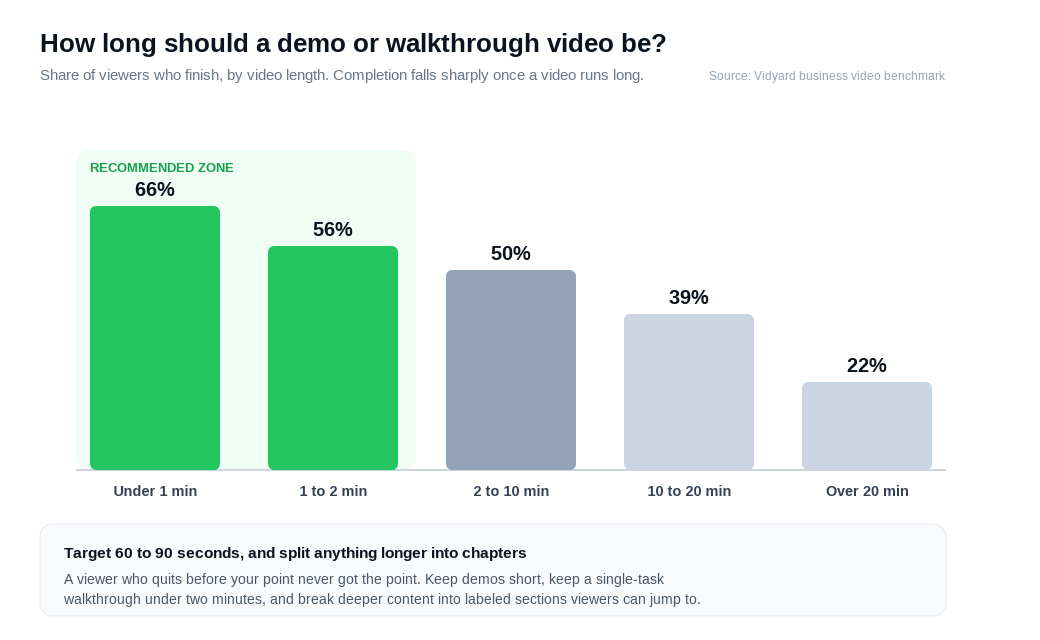
The practical targets: keep a demo to sixty to ninety seconds, keep a single-task walkthrough under two minutes, and if you need to cover more, break it into chapters rather than one long reel.
Here is the worked example. Say you send a six-minute feature walkthrough to 100 warm leads, with your call to action at the very end. At the roughly 50% completion the two to ten minute band predicts, about 50 people reach the ask. Now re-cut the same content into a ninety-second core that shows the one workflow, with the call to action placed at the sixty-second mark where retention is still high. Because most viewers are present in that first minute, close to 80 of the 100 now hear the ask. Same footage, same audience, and the point lands before people leave.
How do you script a walkthrough?
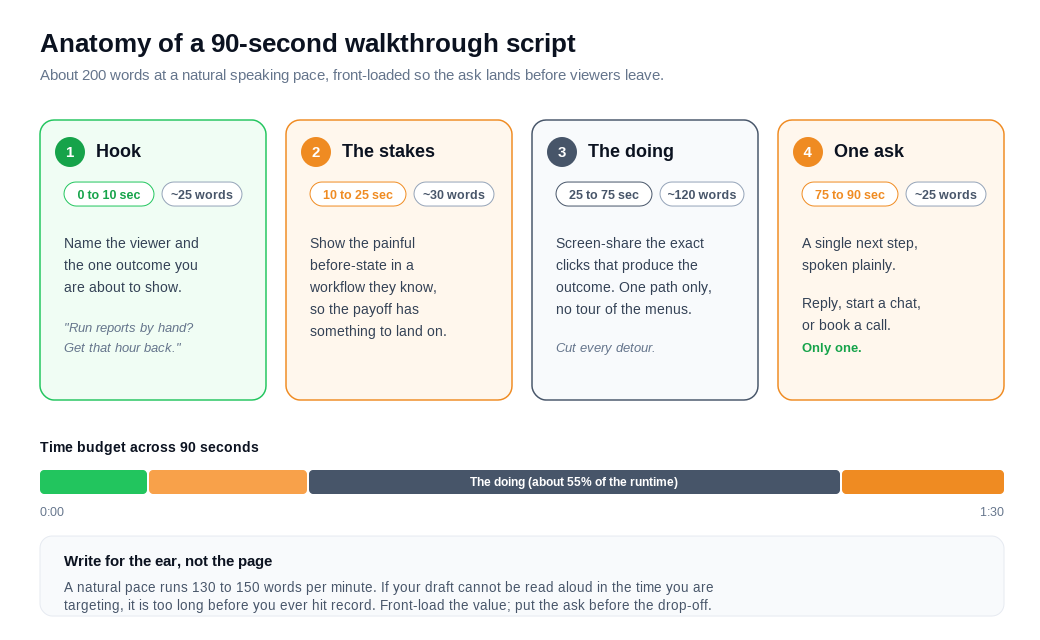
Script a walkthrough as four short beats, a hook, the stakes, the doing, and one ask, written to be spoken rather than read. The most common mistake is touring the interface, clicking through every menu because it is there. Viewers came to watch one job get done. Every extra menu you open is a reason to leave.
Write for the ear. A natural speaking pace runs about 130 to 150 words a minute, so a ninety-second walkthrough is roughly 200 words of script, not the 400 you would write for a page. If your draft cannot be read aloud in the time you are targeting, it is too long before you ever hit record.
Structure each beat around a job to do:
- Hook (first ten seconds): name the viewer and the one outcome you are about to show. "If you run weekly reports by hand, here is how to get that hour back."
- The stakes (next fifteen seconds): show the painful before-state in a workflow they recognize, so the payoff has something to land against.
- The doing (about fifty seconds): screen-share the exact clicks that produce the outcome, one path only, narrating what you click and why. Cut every detour.
- One ask (final fifteen seconds): a single next step, spoken plainly. Reply to this, start a chat, or book a call, but only one.
Front-load the value. Put the most compelling frame in the first ten seconds and place your call to action well before the end, because a share of your audience will leave before the last frame no matter how good the video is. Moving the ask to second sixty instead of second ninety is often the highest-return edit you can make.
How do you keep viewers engaged?
Hold attention by showing motion, cutting dead air, and giving the viewer a reason to stay in the first ten seconds, since that is where most drop-off happens. Industry demo benchmarks find that more than half of the viewers who leave a video do so within the first minute, and a large share are gone inside the first thirty seconds. The opening is where the video is won or lost.
A few things move the number. Open on the product doing something. A logo animation or a talking-head introduction spends your best seconds on nothing. Keep one workflow per video so the viewer never wonders where this is going. Trim every "um," every load screen, and every menu you opened by accident, because dead seconds are where fingers reach for the scrubber.
Chapters help on anything longer than two minutes. Breaking a walkthrough into labeled sections lets a buyer jump to the part they care about instead of abandoning the whole thing, and it turns one long video no one finishes into four short ones that get watched. Pair the recording with a live channel so a viewer who has a question mid-video can ask it without leaving. Dropping live chat on your website next to an embedded walkthrough means a hesitant buyer can type "does this work with Salesforce" the second the thought occurs, instead of closing the tab.
Personalization keeps warm viewers watching too. A walkthrough that opens with the prospect's company name, or uses their use case as the example, signals that the next ninety seconds were meant for them and not blasted to a list.
How do you track viewing behavior?
Track viewing behavior with four numbers your video host records automatically: view rate, watch rate, the drop-off point, and the reply or booking rate that follows. Together they turn a silent send into a signal you can act on.
View rate tells you whether the subject line, thumbnail, and context earned the play at all. Watch rate, the percentage of the video a viewer actually got through, tells you whether the content held them, and a viewer who reached 90% is a far warmer lead than one who bailed at 10%. The drop-off point, usually shown as a heatmap or retention graph, marks the exact second attention fell, so a cliff right at your pricing slide tells you where to aim the follow-up. Reply or booking rate closes the loop by showing who acted.
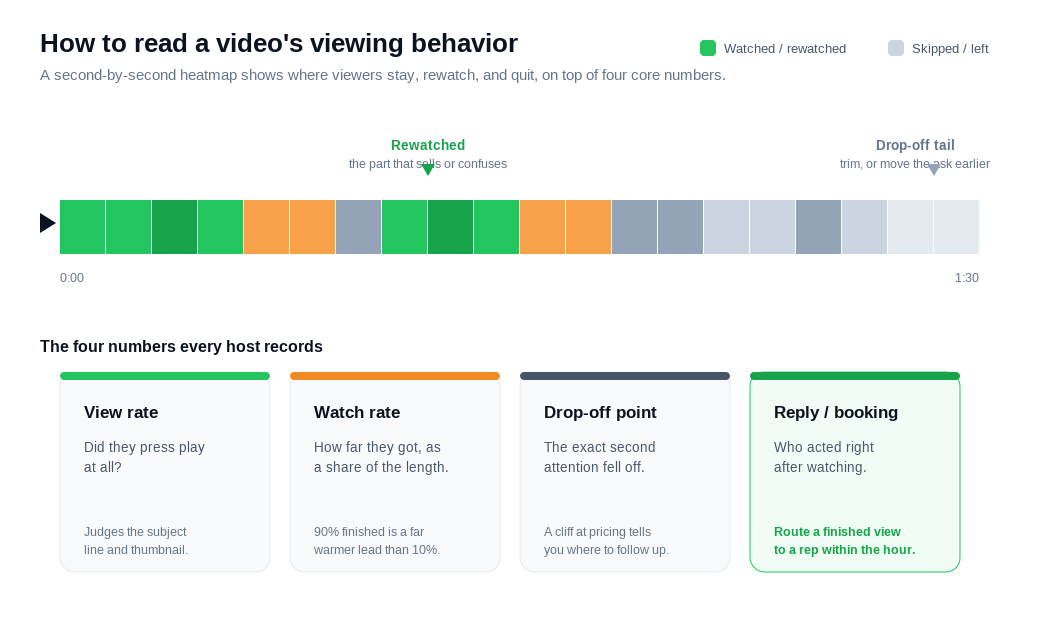
The heatmap is the underused one. Because it maps engagement second by second, it shows where people leave and where they rewatch, and a segment people replay is a segment that either sells hard or confuses hard. Either way it is telling you where to spend your next edit.
Behavior data is most valuable when it triggers a fast human follow-up. A buyer who just finished your demo has raised a hand whose value decays by the hour, so routing that signal straight to a rep, through tight routing and notifications, is where watch data turns into pipeline. Watching is only a proxy. What you do in the next hour is the point.
How do you turn a viewer into a conversation?
Turn a viewer into a conversation by removing the gap between "I just watched this" and "I want to talk to someone," which is usually where interest leaks out. The classic flow puts a form under the video and a promise to reply within a day. By then the buyer has closed the tab and moved on.
Do the opposite. Put the recorded walkthrough where intent is highest, on the pricing or product page, and give the viewer a way to start talking in the moment they finish. A visitor who just watched your demo end to end is the warmest lead you will get that day, and offering an instant live video call or a chat right there, instead of a callback tomorrow, is the highest-impact place to connect video to an inbound sales motion.
Start small. Pick the one page where your best-fit visitors already land, embed a single tight walkthrough, and watch the four numbers for a month. Keep what beats your current form-and-wait baseline, and cut what does not. The video does the teaching at scale, and the live channel catches the hand the moment it goes up.
Key takeaways
- A demo sells the outcome, a walkthrough teaches the steps. Pick the format that matches where the buyer is, and match the length to it, before you record.
- Video beats a live demo when speed and self-service matter. Buyers spend only 17% of their time with reps and 61% would prefer no rep at all, so recorded video carries the early evaluation a call cannot reach.
- Short wins. Completion runs about 66% under a minute and falls toward 22% past twenty minutes, so target sixty to ninety seconds and break longer content into chapters.
- Script four beats and write for the ear. Hook, stakes, the doing, and one ask, at roughly 200 words for ninety seconds, with the call to action placed before viewers drop.
- Engagement is won in the first ten seconds. Open on motion, keep one workflow per video, cut dead air, and add chapters so viewers jump instead of leaving.
- Track four numbers and act fast. View rate, watch rate, drop-off, and reply rate turn a send into a signal, and a finished demo is the cue to route the buyer to a live rep within the hour.
TAGS

Written by
Daniel SemeckyCo-founder & CEO
Daniel is the co-founder and CEO of Glimpze. He spends his days talking to revenue teams about how to catch high-intent visitors before they bounce, and writes about inbound sales, lead conversion, and building a motion where marketing and sales actually share a number.


