
On this page
- Why does video improve cold outreach?
- Where do you place video in a sequence?
- How do you personalize cold videos?
- What should a cold outreach video actually say?
- How do you add video to a cold email without hurting deliverability?
- How do you measure the impact of video in cold outreach?
- Key takeaways
- Sources
A prospect deletes your first cold email in the time it takes to read the sender name. Send that same prospect a 45-second video with their homepage on the screen and their name on the thumbnail, and the odds shift. The thing looks made for them, so they press play.
That is the whole case for video in cold outreach. A recorded clip carries a face, a tone, and a moving screen that a paragraph of text strips out, and it does it on the prospect's schedule. Used well, it turns a channel most buyers ignore into one they actually open.
This post covers why video lifts cold outreach, where it belongs in a sequence, how to personalize a clip, what the video should say, how to get it into an inbox without tripping spam filters, and how to measure whether any of it worked.
Why does video improve cold outreach?
Video improves cold outreach because it earns more opens and replies than plain text, it puts a human face on a stranger's pitch, and it gives the prospect something to react to instead of another block of copy to skim.
Vidyard's numbers on the gap between video and text email are the clearest evidence. Emails without video click through around 2.5% and reply around 1.5%, while emails with a video reach roughly 17% click-through and a 6% reply rate. Vidyard also reports that adding a video to a proposal can raise close rates by up to 41%, and that 63% of sales pros say video messaging increased their response rates.
The face matters as much as the medium. Gong recorded and analyzed 121,828 web-based sales meetings and found that closed deals used webcams 41% more often than lost ones, with win rates 96% higher when the buyer turned their own camera on. Cold outreach is asynchronous, so you cannot make a stranger switch on a camera. You can be the one on camera, though, and a visible person reading back the prospect's own situation is harder to archive than a wall of text.
Buyers also lean toward watching. Wyzowl's research found that 63% of people would most like a short video to learn about a product or service, ahead of text articles at 12% and sales calls at 5%. When most of your list would rather watch than read, showing up on video meets them where their attention already goes.
Video is not automatic lift. It works when it is short, relevant, and clearly made for the person, and it wastes effort when it is a generic clip blasted to a list. The sections below are about staying on the right side of that line.
Where do you place video in a sequence?
Put video where a text-only touch has already failed, usually the third or fourth step of a sequence, rather than on the very first email.
A cold prospect who has never heard of you has no reason to spend forty seconds watching a stranger, and a video on the first touch can read as a heavy ask before you have earned it. One or two short text emails first establish who you are and why you are reaching out, so the video lands as a step up in effort rather than a cold open.
Sendspark's guidance on cadence points to the window between roughly day 2 and day 20 of a sequence for the video touch, with the middle of that range, around day 8, tending to perform best. That is late enough that the prospect recognizes your name and early enough that the thread is not dead.
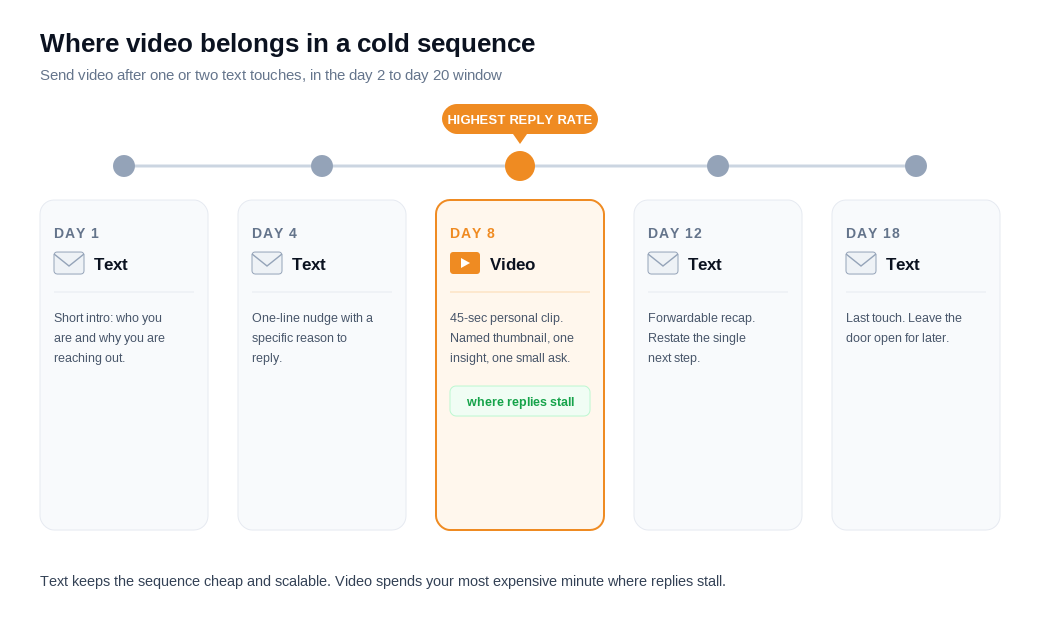
The practical pattern is hybrid. Text keeps the sequence cheap and scalable, and video adds a personal, higher-effort touch at the point where replies usually stall. You are not replacing the sequence. You are spending your most expensive minute where it changes the most outcomes.
Two exceptions are worth naming. For a small list of high-value accounts, a personalized video on the first touch can be worth it because the payoff per reply is large. And on your own website the logic flips, because a visitor already on your pricing page is warm right now, so offering a live video call and screen share in the moment beats waiting for a follow-up email. Pairing that with live chat on your website lets a hesitant visitor open with a low-commitment message and step up to video once a rep is on.
How do you personalize cold videos?
Personalize a cold video by making the first frame and the first five seconds unmistakably about the prospect, then keeping the body specific to their situation rather than your product.
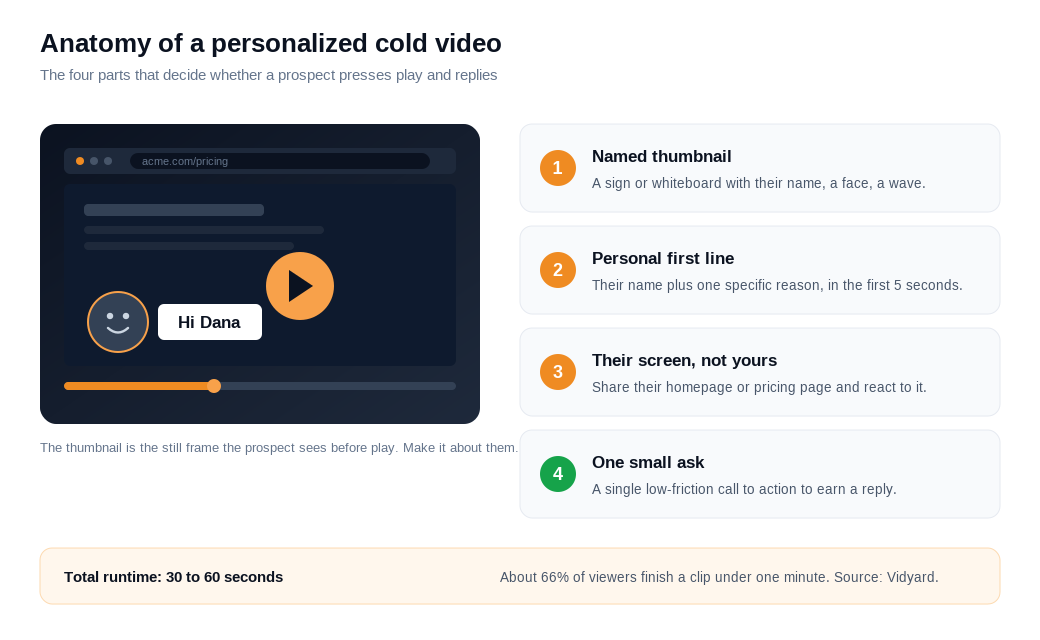
The thumbnail does most of the work, because it is what the prospect sees before deciding to press play. Nutshell's guidance is to hold up a whiteboard or sign with the prospect's name on it, or to open on their own website on your screen, so the still image reads as made for them rather than pulled from a template. A smiling face and a name beat a frozen mid-sentence frame, and a little movement, a wave or a nod, pulls the eye.
The opening line should name the person or company and give one specific reason you are reaching out, something you could not have said to anyone else on the list. "I was on your careers page and noticed you are hiring three SDRs" does more than any amount of polish.
Screen share is the cheapest personalization there is. Pull up their homepage, their pricing page, or their LinkedIn, and narrate one thing you noticed. It proves you did the work, and it fills the frame with their world instead of yours.
Keep it to 30 to 60 seconds. Vidyard's benchmark data shows completion falling as length climbs, with about 66% of viewers finishing a video under one minute and only half finishing one that runs two to ten minutes, so a short clip both respects the prospect's time and gets watched to the end.
Personalization and volume pull against each other. Recording a unique clip for every prospect does not scale past a few dozen a day, so most teams reserve hand-made video for their best-fit accounts and use lighter personalization, a named thumbnail on an otherwise reusable clip, for the wider list.
What should a cold outreach video actually say?
A cold outreach video should follow a simple three-part shape: a personalized hook, one relevant insight, and a single clear ask, delivered in under a minute.
Open with the prospect's name and the specific reason for the outreach in the first sentence, the same line that makes the thumbnail worth clicking. Skip the throat-clearing. "Hi Dana, I saw Acme just launched in the UK" beats "I hope this finds you well."
Spend the middle fifteen to thirty seconds on one thing that is true about their situation and one way you might help, shown on screen if you can. One idea, not a feature tour. The goal is to earn a reply, not to close the deal on the clip.
End with one ask, and make it small. "Worth a fifteen-minute look next week?" is easier to say yes to than "Can we book a demo?" A single call to action also keeps the follow-up simple.
Here is a worked example for a 45-second clip:
- 0 to 8 seconds: "Hi Dana, this is Sam from Acme. I was on your pricing page and noticed every demo request routes through a form." That is the name plus one specific observation.
- 8 to 35 seconds: a screen share of their contact form, with "Here is what happens when a high-intent visitor hits this, and here is what teams like yours do instead." That is one insight.
- 35 to 45 seconds: "If it is useful, I will send a two-minute breakdown, no call needed. Worth it?" That is one small ask.
One hook, one idea, one ask, and it fits on a single breath.
How do you add video to a cold email without hurting deliverability?
Do not embed the raw video file. Host the video and insert a clickable thumbnail image that links to it, because true embedded video does not play in Gmail or Outlook, and heavy attachments trip spam filters.
Most email clients, including Gmail, Outlook, and Yahoo, do not support inline video playback, so an embedded file either fails to render or gets your message flagged. The reliable pattern is a static image or a short GIF thumbnail with a play-button overlay, linked to a hosted video page.
Animated GIFs look better, but they cost you size. They often run 500KB to 2MB, which can blow past Gmail's clipping threshold and draw spam filtering, so a static thumbnail with a play button is the safer choice in true cold outreach. Save GIFs for warmer, engaged threads.
A few rules keep deliverability intact:
- Make the thumbnail the only link in the email. Extra links hurt.
- Keep image files under about 1MB and add alt text.
- Warm and authenticate the sending account (SPF, DKIM, and DMARC) first, because video does not rescue bad sending fundamentals.
The thumbnail-and-link method works in effectively every client and carries no deliverability penalty, which is why it is the default for teams sending video at any volume.
How do you measure the impact of video in cold outreach?
Measure video in cold outreach with four engagement numbers that every video host records, play rate, watch rate, drop-off point, and the reply or booking rate that follows, then tie them back to pipeline in your CRM.
Play rate, the share of recipients who pressed play, tells you whether your subject line and thumbnail earned attention. A named thumbnail usually moves this number more than anything inside the video.
Watch rate shows how far people got, and the drop-off point, usually a heatmap, marks the exact second attention fell off. A prospect who watched to 90% is a warmer lead than one who quit at ten seconds, and a cliff at the moment you said "demo" tells you where the follow-up should aim.
Reply or booking rate closes the loop by showing who acted. Vidyard's guidance on video analytics is to treat play rate as a relevance signal and watch time and CTA clicks as intent signals, then feed that engagement into the CRM as a lead-scoring input.
Judge like against like. Completion depends heavily on length, so a 40-second prospecting clip and a three-minute walkthrough should never share a benchmark, and warm sends should be compared with warm sends.
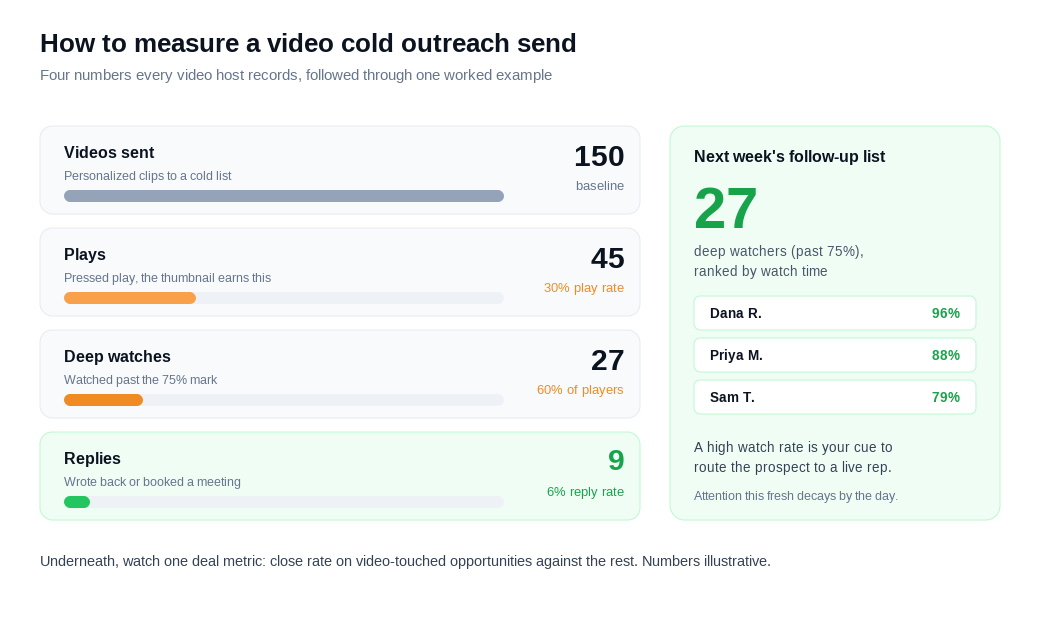
Here is a worked example. A rep sends a 45-second personalized video to 150 prospects who ignored two prior text emails. Say 45 press play (a 30% play rate, lifted by a named thumbnail), 27 of them watch past the 75% mark, and 9 reply. That is a 6% reply rate off a list that had gone cold, and the 27 deep watchers become next week's follow-up list, ranked by watch time instead of guesswork. Route those high-watch prospects to a rep quickly through tight lead routing and notifications, because attention that fresh decays by the day.
Underneath the four engagement numbers, watch one deal metric: close rate on video-touched opportunities against the rest. Plays feel good. Booked meetings and closed deals are the number that decides whether the extra minute per prospect is worth it.
Key takeaways
- Video lifts cold outreach because it earns opens, replies, and trust that text cannot. Vidyard puts video email reply rates near 6% against 1.5% for plain text, and Gong found win rates 96% higher when a buyer's camera is on.
- Place video after text, not before it. A clip on the third or fourth touch, roughly day 2 to day 20 of a sequence, lands as effort rather than a cold open.
- Personalize the first frame and the first five seconds. A named thumbnail, a wave, and their own website on screen decide whether the prospect ever presses play.
- Say one thing and ask for one thing. A hook, a single insight, and a small ask in under 60 seconds beats a feature tour, and short clips get finished more often.
- Link, do not embed. A static thumbnail with a play button pointing to a hosted video keeps you out of spam where a raw file or heavy GIF would land you.
- Measure play rate, watch rate, drop-off, and reply rate, then tie them to pipeline. A high watch rate is your cue to route the prospect to a live rep before the attention fades.
TAGS

Written by
Daniel SemeckyCo-founder & CEO
Daniel is the co-founder and CEO of Glimpze. He spends his days talking to revenue teams about how to catch high-intent visitors before they bounce, and writes about inbound sales, lead conversion, and building a motion where marketing and sales actually share a number.


