
On this page
- What is concurrent chat handling?
- How many chats can an agent handle at once?
- How does concurrency affect quality?
- How do you calculate the right concurrency limit for your team?
- How do you train agents to handle concurrent chats?
- What tools help agents handle more chats without losing quality?
- Key takeaways
- Sources
A support agent signs in on a busy Tuesday, and by 10 a.m. four chat windows are open at once. One visitor wants a shipping update, one wants a refund, one is stuck at login, and one is a prospect comparing pricing. Each of them believes they have the agent's full attention. None of them do.
That split attention is the whole promise of chat and the whole risk of it. One person can hold several conversations that would each tie up a full phone line, which is why chat costs less to staff and scales further. Push the count too high and every visitor waits longer, gets shorter answers, and rates the experience lower.
This guide covers what concurrent chat handling is, how many chats an agent can realistically handle, how concurrency affects quality, how to calculate the right limit for your team, how to train agents for it, and which tools keep quality up as the count climbs.
What is concurrent chat handling?
Concurrent chat handling is the practice of a single agent managing several live chat conversations at the same time, and the number of chats open at once is called concurrency. A rep with three active windows is running at a concurrency of three, and a supervisor can raise or lower that ceiling per agent.
The idea only works because a chat is not continuous the way a phone call is. When a customer is reading a reply, typing, or checking their account, the agent has idle seconds to spend on another window. Cobbai describes concurrency as the number of live conversations a single agent can handle simultaneously, and those pauses between messages are exactly what makes running more than one possible.
This is the lever that makes chat cheaper than voice. A phone agent handles one caller at a time, while a chat agent fills the gaps. Tidio pegs the cost of a live chat interaction at $3 to $4 against $6 to $7 for a phone call, and most of that gap comes from one agent serving several visitors instead of one. The same math is why a small team can staff live chat on a busy site without a call-center headcount. Concurrency is the setting that decides how far that efficiency stretches before it starts to hurt.
How many chats can an agent handle at once?
Most agents handle two to three chats well and can stretch to three to five during simpler, high-volume stretches, with four being the point where quality usually needs help to hold. There is no single correct number, because it moves with question complexity, agent skill, and the tools behind the desk.
The published benchmarks cluster tightly. Tidio reports that most chat agents handle three to five conversations at once, which works out to roughly seven resolved chats an hour. Kayako's cross-vendor roundup puts typical concurrency at three to five simultaneous conversations, with top performers reaching six and complex issues dropping to one or two. Cobbai finds that most teams land between two and six, and flags any ratio above four as a quality risk signal unless strong assistance is in place.
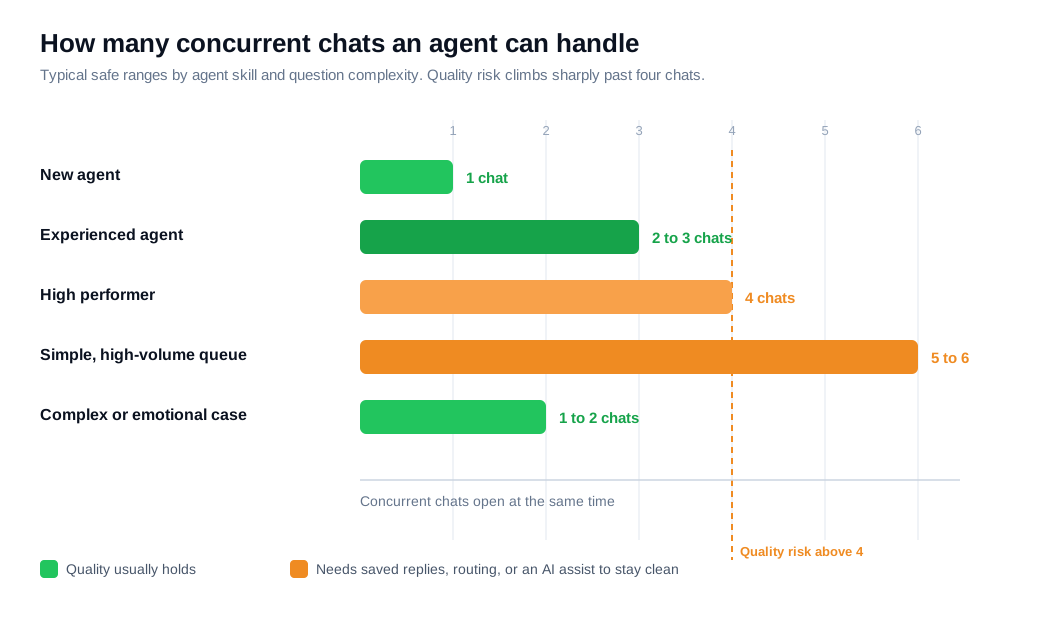
Skill sets the range. Cobbai suggests tiering the cap so new agents start at one, experienced agents run two to three, and high performers reach four. WhosOn recommends three concurrent chats as a starting point and then scaling by skill, while noting that studies point to two sessions as the balance that best protects both productivity and satisfaction.
Complexity moves the number more than anything else. A queue of "does this ship to Canada" questions can support five open windows because each one closes in two lines. A queue of billing disputes or technical troubleshooting drags the safe count down to one or two, since each reply needs thought and a wrong answer costs more than a slow one. Set the ceiling for the hardest chats a given agent will see, not the easiest.
How does concurrency affect quality?
Concurrency trades staffing efficiency for depth of attention, so past a certain point every extra chat lengthens replies, thins out answers, and pulls satisfaction down. The decline is gradual at first and then steep, which is what makes an over-high cap easy to miss on a dashboard.
The early warning signs are quiet. Cobbai notes that when concurrency runs past what a workflow can support, the first symptoms are longer pauses between replies, more "let me check" loops, more templated answers, and a rising escalation rate. Context loss and prioritization confusion pile up when several people need attention in the same minute, especially when a quick question and a high-stakes case sit in adjacent windows.
Customers feel the rush, and they care more about the answer than the speed of it. Gorgias reports that 95 percent of customers value higher-quality support over faster support in live chat. That preference is the reason overloading agents backfires: the visitor would rather wait thirty extra seconds for a correct, complete reply than get an instant half-answer that forces a second chat. Chat already outperforms other channels on this front, with Kayako citing 82 percent satisfaction for chat against 61 percent for email and 44 percent for phone, and that lead is exactly what a bloated concurrency cap puts at risk.
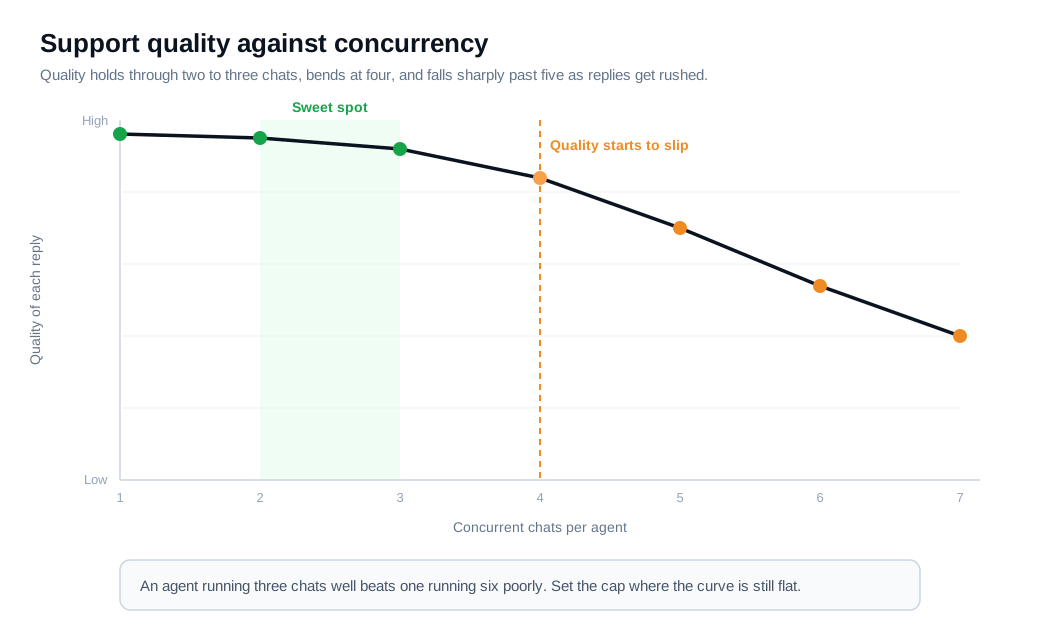
Here is the trade-off in plain numbers. An agent running three chats at a steady pace might resolve twelve an hour, each with a clear answer and a happy rating. Push the same agent to six, and replies that used to take twenty seconds now take ninety while they cycle through windows, half-read messages, and paste boilerplate. Raw throughput may look similar, yet resolution slips, repeat contacts climb, and CSAT falls. An agent handling three chats well produces better outcomes than one handling six inconsistently, which is why the cap belongs where quality holds rather than where the queue would like it.
How do you calculate the right concurrency limit for your team?
You calculate a concurrency limit by comparing your average handle time against the active-touch time each chat actually costs, then sizing headcount so the cap you set is achievable rather than aspirational. The formula is a ratio, and the check is whether your quality metrics survive it.
Start with the ceiling. Divide the average handle time (the full length of a chat) by the active-touch time (the minutes an agent spends reading and typing in it). If a chat lasts twelve minutes end to end but the agent is only active for about four of them, the theoretical ceiling is twelve divided by four, or three concurrent chats. The other eight minutes are the visitor reading, typing, and thinking, which is the slack a second and third window fill.
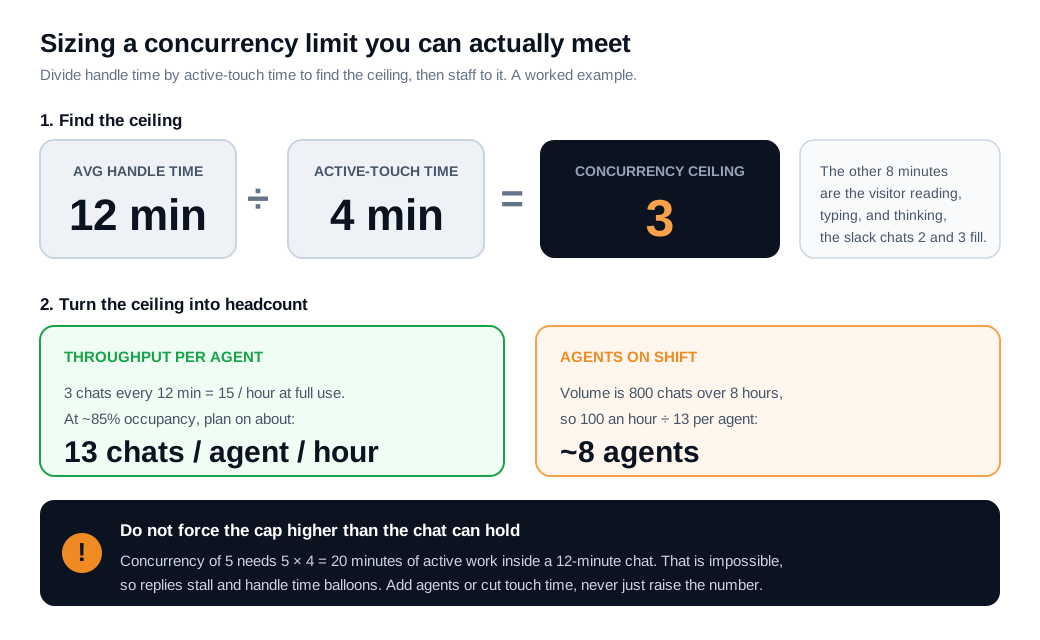
Now turn the ceiling into staffing. Say a team fields 800 chats across an eight-hour window, or about 100 an hour. At a concurrency of three and a twelve-minute handle time, one agent finishes three chats every twelve minutes, which is fifteen an hour at full occupancy. Real occupancy runs closer to 85 percent once you account for wrap-up and breaks, so plan on about thirteen resolved chats per agent per hour. To clear 100 an hour you need roughly eight agents on shift. Kayako's benchmark of around 714 chats per agent per month lands in the same neighborhood, which is a useful sanity check on any number you calculate.
The math also shows the trap. If someone forces concurrency to five to trim headcount, each agent would need five times four, or twenty minutes of active work, crammed inside a twelve-minute chat. That is impossible, so replies stall, handle time balloons, and satisfaction drops while the queue stays full. When your target concurrency demands more active minutes than a chat contains, the fix is more agents or shorter touch time, and never a higher cap on its own.
How do you train agents to handle concurrent chats?
You train agents for concurrency by ramping the count slowly, drilling the specific skills multitasking demands, and giving people explicit permission to cap their own load. Concurrency is a learned skill, so a new hire who is strong on one chat will still flounder on four without practice.
Start low and add windows as competence shows. A new agent should run a single chat until their answers and tone are solid, then move to two, then three, matching the tiered caps that Cobbai recommends. Rushing that ramp produces the templated, error-prone replies that a high cap is supposed to avoid.
Drill the mechanics that only matter under load. Zendesk's guidance for supporting multiple chats centers on a few habits: keep every conversation moving, set expectations, and signal when you have hit capacity so a teammate can pull from the queue. The key skills are the holding message ("Let me pull that up, one moment") that buys time without losing the visitor, prioritizing the chat closest to resolution or escalation, and passing full context in a note when a case has to move to someone else. A clean desk setup, with the queue and knowledge base one glance away, removes the friction that turns three chats into chaos.
Practice under realistic pressure. Concurrency simulations, where a trainee handles two or three scripted chats at once with a built-in curveball, expose pacing and prioritization gaps in a safe setting before a real customer sees them. Pair that with saved replies for the most common questions, so an agent spends their scarce active minutes on the parts of each chat that genuinely need a human. Skills-based routing and notifications support the training by sending each agent the chats they are equipped to handle, which keeps a junior rep off the hardest cases while they build up.
What tools help agents handle more chats without losing quality?
The tools that raise safe concurrency all do one thing: they cut the active-touch time each chat costs, so an agent can hold more windows without rushing any single visitor. Lower the minutes a chat demands and the ceiling from the earlier formula rises on its own.
Canned responses and a solid knowledge base are the first lever. When a common question can be answered from a saved reply that the agent personalizes in a few seconds, the four-minute touch time shrinks, and the same person can carry another conversation without cutting corners. Routing is the second lever. Sending each chat to the right skill group means less "let me find the right person" churn and fewer stalled windows, which is why routing and notifications belong in any concurrency plan.
Automation changes the mix upstream. An AI chat assistant that resolves repetitive questions on its own keeps them out of the human queue entirely, so agents spend their concurrency budget on the conversations that need judgment. The same assistant covers after-hours traffic and captures leads when no rep is online, so quality holds without adding round-the-clock headcount. Cobbai's caution that a concurrency above four is a risk signal comes with the qualifier that strong assistance changes the equation, and that assistance is what makes a higher cap survivable.
Know when to drop concurrency to one instead. When a chat turns into a serious buying conversation or a thorny technical problem, moving it to a live video call or screen share in the same thread resolves it faster than another round of typing across four windows. Most platforms, Glimpze included, offer a free tier, so you can baseline your current concurrency, handle time, and CSAT before spending anything to change them. The goal is a cap your agents can actually meet, measured against quality rather than against the size of the queue.
Key takeaways
- Concurrency is how many chats one agent runs at once. It is the lever that makes chat cheaper than phone, since one rep fills the gaps between messages across several conversations at roughly half the cost per interaction.
- Two to three chats is the safe default. Benchmarks cluster at three to five for simple queues, top performers reach six, and complex or emotional cases drop to one or two, so set the cap for your hardest chats rather than your easiest.
- Quality declines gradually, then sharply. Past four chats, replies lengthen, answers get templated, and escalations rise, and 95 percent of customers would rather wait for a good answer than get a fast half-answer.
- Calculate the ceiling before you set it. Divide average handle time by active-touch time to find the ceiling, then size headcount so the cap is achievable, because forcing a number the chat length cannot fit just stalls the queue.
- Concurrency is a trained skill. Ramp new agents from one chat upward, drill holding messages, prioritization, and clean escalation, and give people permission to signal when they are at capacity.
- The right tools raise the ceiling. Saved replies, routing, and an AI assistant cut the active minutes each chat costs, which lets an agent hold more windows without rushing any single visitor.

Written by
Nilas MylerCo-founder & CTO, Glimpze
Nilas is the co-founder and CTO of Glimpze, an inbound sales tool that turns high-intent website visitors into live conversations. A former SEO consultant for some of the largest companies in Denmark, he writes about speed-to-lead, inbound sales, and conversion rate optimization — the technical and operational mechanics of turning traffic into pipeline.


