
On this page
- Should you offer 24/7 live chat?
- What does round-the-clock live chat actually cost?
- How do you set and display your chat business hours?
- How do you handle after-hours chat messages?
- How do bots and AI extend your coverage?
- Which coverage model fits your team?
- How do you measure whether your coverage is working?
- Key takeaways
- Sources
A buyer is comparing two vendors at 9 p.m. on a Tuesday. Both sites have a chat widget. One says "We're online, ask us anything," and then nobody answers for eleven hours. The other says "Team's offline until 8 a.m. ET, but I can answer most questions now or grab your email." The second widget keeps the lead, because it told the truth and still did something useful with the visit.
Business hours are a promise. The widget on your site tells every visitor whether a real conversation is possible right now, and the honest answer changes by the hour. Set that promise well and off-hours traffic still turns into pipeline. Set it badly and you train people to expect a reply that never comes.
This guide covers whether 24/7 chat is worth it, what round-the-clock coverage actually costs, how to set and display your hours, how to handle messages that arrive after you close, how bots stretch your coverage, which staffing model fits your team, and how to measure whether any of it is working.
Should you offer 24/7 live chat?
Offer 24/7 live chat only if you can genuinely answer at 3 a.m., because a widget that shows "online" while nobody replies does more damage than clearly stated business hours. The demand is real, but the promise has to be real too.
Customer expectations have moved. Zendesk's 2026 CX Trends research found that 74 percent of consumers now expect 24/7 service, and they credit AI for raising the bar, while 51 percent say they prefer a bot when they want an immediate answer. That expectation is about speed at any hour, and it does not require a human awake through the night in every business.
The failure most teams stumble into is flipping the widget "on" around the clock with a small crew, so a message at 10 p.m. lands in a channel nobody is watching. As one support team put it plainly, offering 24/7 chat and having nobody there is worse than not offering it at all.
So match the promise to the reality of your buyers. If your customers are global, or your product is urgent (outages, payments, healthcare), live coverage through the night earns its keep. If you sell B2B software to buyers in two or three time zones, a staffed weekday window backed by an AI chat assistant and clean lead capture usually beats a thin round-the-clock rota that nobody can staff well.
What does round-the-clock live chat actually cost?
True 24/7 human coverage costs roughly three shifts of staffing every day of the week, plus a night and weekend premium, which is why most teams reach for a hybrid model instead. The number is usually bigger than it looks on a planning doc.
To keep even one agent live at all times, you need people across three eight-hour shifts, seven days a week, and the overnight and weekend hours usually carry higher pay or overtime. Quality tends to slip on those shifts too, since the night bench is often smaller and less experienced than the daytime team.
Run the math. Suppose you staff chat 12 hours a day, 5 days a week, with two agents on during peaks, which is roughly 120 agent-hours a week. Moving to true 24/7 with one agent always live is 168 hours a week, and keeping two on during busy stretches pushes you toward 250 to 300 agent-hours. At a loaded cost near $30 an hour, that is the difference between about $14,400 a month and $36,000 or more, before night premiums. For a team fielding a handful of chats a night, that spend rarely clears its own bar.
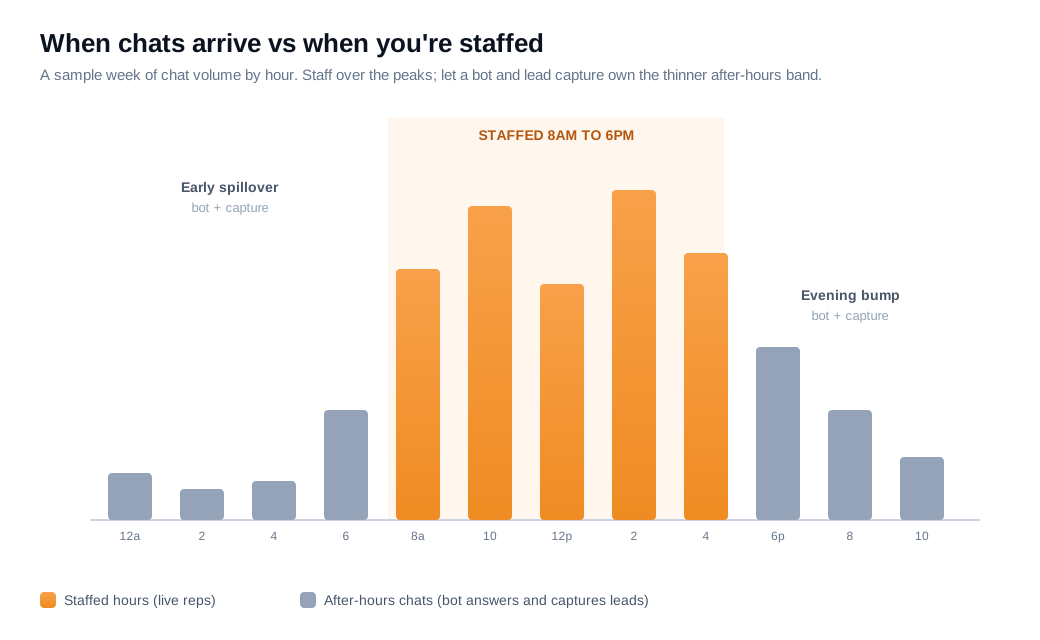
The cheaper paths cover the same demand for far less: extend the staffed window to catch the early and late spillover, run a follow-the-sun team across time zones, outsource the overnight shift, or let a bot hold the line and capture leads until morning. Most teams combine two of these rather than paying for a full in-house night shift.
How do you set and display your chat business hours?
Set your chat hours as a specific weekly schedule tied to a named time zone, then let the widget switch itself between an online and offline state automatically so what visitors see always matches reality. The goal is that nobody on your team ever toggles availability by hand.
Be specific about the hours. "9 a.m. to 6 p.m. ET, Monday to Friday" beats a vague "business hours" that quietly sets the wrong expectation, because a visitor in another region can do the math and decide whether to wait or leave their details.
Sync the schedule to the widget so it flips modes on its own at open and close. Most tools let you define a weekly schedule per widget, and the launcher then shows online during those windows and offline outside them without anyone touching it. Layer holiday and one-off overrides on top, so the widget does not promise a Monday reply on a holiday Monday.
Set expectations before the visitor types a word. A short line like "Usually replies in under 2 minutes" during staffed hours, and "Team's offline, back at 8 a.m. ET" after close, tells people what to expect up front. Then decide what the offline widget actually does: keep it visible to take a message, show a return time, or route straight to an AI assistant. There are several offline options that work, but hiding the launcher entirely is usually the weakest, because it throws away every after-hours lead. Wiring the online state, the offline copy, and the schedule together is part of setting up your widget and welcome messages.
How do you handle after-hours chat messages?
Handle after-hours messages by acknowledging instantly, telling the visitor exactly when a human will reply, capturing the details you will need to follow up, and then actually clearing that queue first thing in the morning. Each of those four moves protects a different part of the visit.
Acknowledge the message the second it lands, so the visitor knows it reached someone. Then set a concrete expectation, "A rep will reply by 9 a.m. ET," instead of a vague "we'll get back to you soon." Customers after hours mostly want acknowledgment, a clear timeline, and a trustworthy path to a human when it matters.
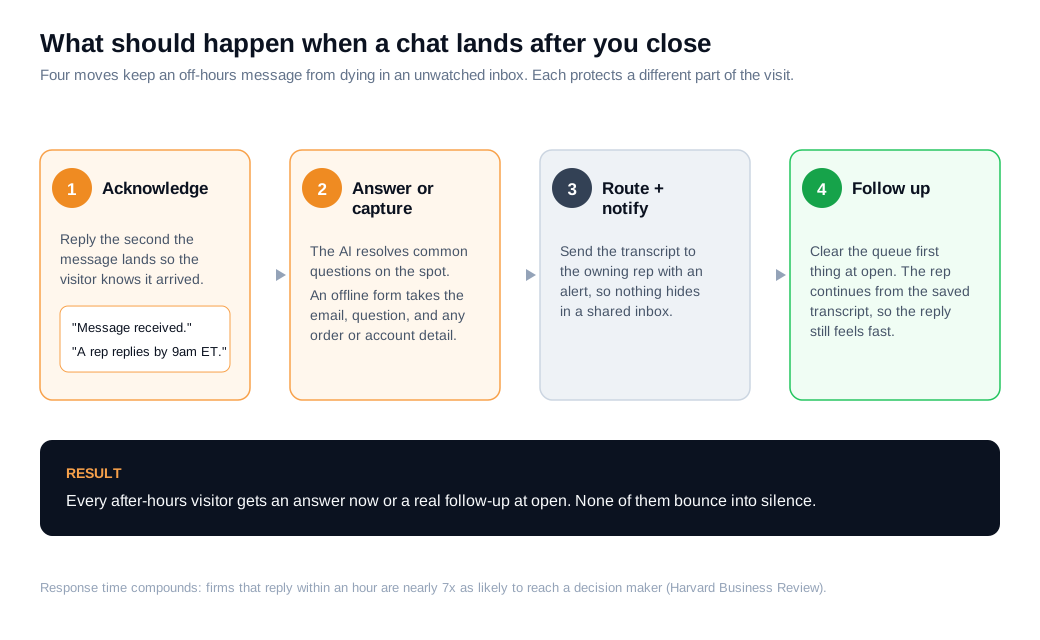
Collect the right details up front. Ask for an email, the question, and any order ID or account reference, so the morning reply does not open with twenty clarifying questions. Then carry the transcript forward and route it to the right rep, which is the job of your routing and notifications setup, so the follow-up starts exactly where the visitor left off.
The morning follow-up is where after-hours chat quietly wins or loses. An overnight message that gets a real reply at 8:05 a.m. still feels responsive. The same message answered at 2 p.m. after it sat in a shared inbox reads as neglect. Response time compounds, and Harvard Business Review's audit of 2,241 companies found that firms responding within an hour were nearly seven times as likely to have a meaningful conversation with a decision maker, while the average first response took 42 hours and 23 percent of companies never replied at all. So the after-hours queue should be the first thing your team clears at open. For high-intent messages from pricing or demo pages, a captured email is a warm lead, and moving it to a live conversation or live video and screen share as soon as a rep is online often beats a slow email thread, which is the inbound sales case.
How do bots and AI extend your coverage?
Bots extend coverage by answering common questions instantly from your knowledge base, qualifying and capturing leads when no human is online, and escalating anything they cannot resolve into your team's queue for the next available rep. After hours, a well-built bot is doing three separate jobs at once.
First, it deflects the routine questions. Shipping, pricing, "does it integrate with X," and similar asks get an instant answer from your content, so those visitors get real help at midnight instead of a form and a wait. Second, it qualifies and captures the conversations that genuinely need a person, gathering the context the morning rep will need. Third, it hands off cleanly, so anything beyond its reach lands in the queue rather than disappearing.
The quality of those answers depends entirely on what you feed the bot. A capable AI chat assistant draws from your FAQ, docs, pricing, and policies, so the more complete your knowledge base, the more it resolves without a human. Feed it thin content and it escalates everything, which defeats the point.
Speed is where automation pays off most for sales. The widely cited MIT and InsideSales lead response study found that companies reaching a new lead within five minutes were 21 times more likely to qualify it than those who waited 30 minutes. No human can hit that at 2 a.m., but a bot that answers in seconds and books a time can.
Here is the blended math on a single site. Say you get 600 chat conversations a month, and 35 percent of them, about 210, start outside your staffed hours. With the widget simply "offline," maybe 20 percent leave an email (42 leads) and the rest bounce. Put an AI assistant on the off-hours shift and it might answer 60 percent of those 210 outright (126 visitors helped) while capturing a qualified lead from another 25 percent (roughly 53 leads) that flow into the morning queue. Same traffic, and the after-hours channel went from 42 cold emails to 126 answered visitors plus 53 warm leads. The bot did not replace your reps. It stopped the off-hours traffic from leaking away. The exact rates are illustrative, but the shape holds at any realistic numbers.
Which coverage model fits your team?
Pick your coverage model from your own traffic-by-hour data and deal value, not from what a competitor advertises, because the right answer ranges from staffed weekday hours with a bot backstop to full follow-the-sun coverage. There are five common models, and most teams run a mix of two.
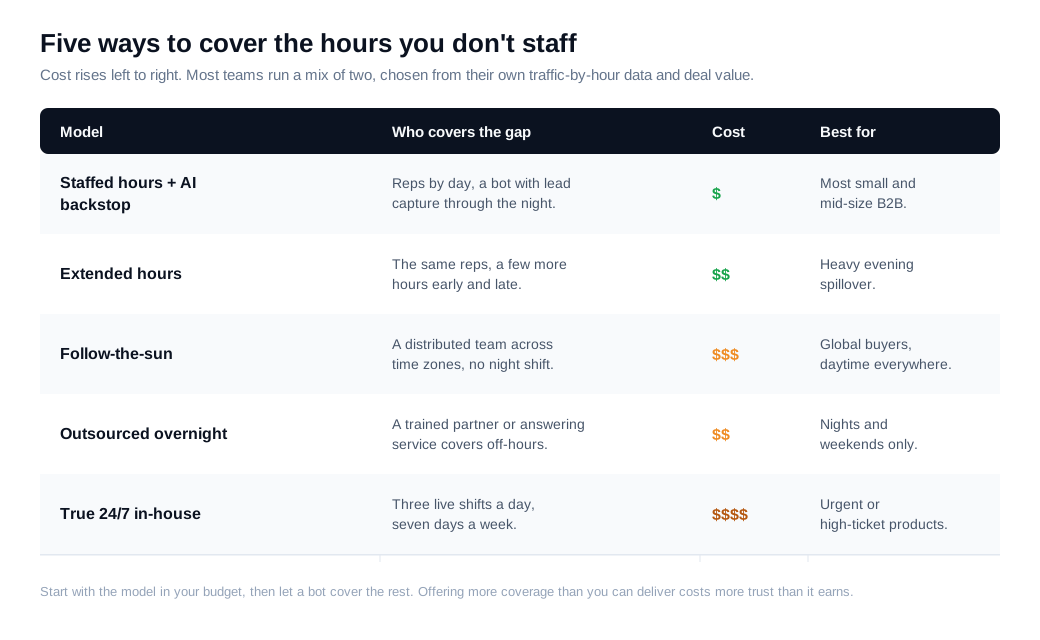
The models sit on a spectrum of cost and complexity. Staffed hours plus an AI backstop keeps reps on during your window and lets a bot with lead capture own the rest, which fits most small and mid-size B2B teams. Extended hours adds a few hours early and late to catch spillover. A follow-the-sun team spreads agents across time zones to cover the clock without a graveyard shift. An outsourced overnight service hands the hours you do not staff to a trained partner. True 24/7 in-house is the heaviest option, justified mainly for global, urgent, or high-ticket products.
Choose by looking at your data. Pull a week or two of chat volume by hour and day, and the peaks jump out, usually mid-morning and mid-afternoon on weekdays for B2B, with a smaller evening bump. Your staffed window should sit over those peaks, and the after-hours gap is where the bot and capture do the work. As a worked case, if 80 percent of your chats land between 8 a.m. and 8 p.m. local time and evenings are your second peak, staffing 8 to 6 and letting a bot own 8 p.m. to 8 a.m. covers most of the value at a fraction of the cost of a night shift.
How do you measure whether your coverage is working?
Measure coverage on four numbers, immediate response rate, after-hours resolution or capture rate, human escalation rate, and after-hours lead conversion, and review them separately from your in-hours stats. Blending the two hides the problem you are trying to see.
Immediate response rate is the share of chats that get any acknowledgment fast, and with automation in place it should sit near 100 percent at every hour. After-hours resolution or capture rate is how many off-hours chats the bot solves or turns into a captured lead, versus how many bounce with nothing. Human escalation rate is how often the bot hands a conversation to a person, and a rising number there usually means your knowledge base has gaps to fill. After-hours lead conversion tracks whether the leads you capture overnight actually close, which tells you if the morning follow-up is doing its job.
Watch for two silent failures: overnight leads that nobody follows up on, and a widget that reads "online" during hours you do not really cover. Both quietly erode the trust you built during the day. Most platforms, live chat tools like Glimpze included, offer a free tier, so you can baseline your after-hours volume and capture rate before spending anything on more coverage, then add hours or automation where the numbers say the leak actually is.
Key takeaways
- Match the promise to the reality. A widget that shows "online" while nobody answers does more harm than clearly posted hours, so only commit to coverage you can actually deliver.
- True 24/7 is expensive, and hybrid usually wins. Round-the-clock human staffing means three shifts a day plus night premiums, so most teams do better with staffed hours backed by a bot and lead capture.
- Display specific hours and let the widget switch itself. Post "9 a.m. to 6 p.m. ET, Monday to Friday" in a named time zone, sync the schedule so the widget flips automatically, and add holiday overrides.
- Acknowledge, set a time, capture details, follow up at open. Handle every after-hours message with an instant acknowledgment, a concrete reply time, the details you need, and a morning follow-up that continues from the transcript.
- Bots stretch coverage by deflecting, capturing, and escalating. A well-fed AI assistant answers common questions instantly, captures qualified leads, and hands off cleanly, so off-hours traffic stops leaking.
- Measure the after-hours channel on its own numbers. Track immediate response rate, after-hours capture rate, escalation rate, and overnight lead conversion separately, then fix the two silent failures: unworked leads and a dishonest "online" state.

Written by
Nilas MylerCo-founder & CTO, Glimpze
Nilas is the co-founder and CTO of Glimpze, an inbound sales tool that turns high-intent website visitors into live conversations. A former SEO consultant for some of the largest companies in Denmark, he writes about speed-to-lead, inbound sales, and conversion rate optimization — the technical and operational mechanics of turning traffic into pipeline.


