
On this page
A customer emails your support address on Monday. On Tuesday they reply from a second address, so the thread quietly splits in two. On Wednesday they open a live chat asking why nobody has gotten back to them, and the agent who picks it up has no idea the first two messages exist.
That gap is the problem customer support software exists to close. It pulls every question into one place, keeps the full history attached to the person asking, and sends each request to whoever should own it. Fewer threads get dropped, answers come faster, and most of what customers call good support follows from those two things.
This guide covers what customer support software is, what it does, the main types, the features worth paying for, what it costs, how to choose a tool, and when it makes sense to build your own.
What is customer support software?
Customer support software is a platform that collects customer questions from every channel, turns them into records a team can track, and helps agents answer and resolve those questions from one place. Salesforce describes it as a suite of tools for managing, tracking, and resolving customer interactions across channels such as email, chat, voice, and social media.
The label moves around. Some vendors call it customer service software, others say help desk or support desk software, and in day-to-day use the terms overlap. There is a fine conceptual line, since customer support usually means the narrower job of solving product and technical problems while customer service covers the whole relationship, but the software that powers both sits in the same category.
Underneath the marketing, the job is mundane and important. A request arrives, it becomes a ticket or a conversation, it gets an owner, and it moves toward resolution with the history attached so nobody has to make the customer repeat themselves. Everything else in the category is built on that spine.
What does customer support software do?
It captures incoming requests, turns them into tickets, routes them to the right agent, and gives that agent the context and tools to resolve the issue quickly. Five jobs sit under that summary.
First, it centralizes. Email, live chat, phone, social messages, and web forms land in one shared queue instead of scattered personal inboxes, so a customer who switches channels does not fall through a crack.
Second, it tracks. Each request becomes a ticket with a status, an owner, and a full message history. That is how a team of any size avoids two agents replying to the same person, or nobody replying at all.
Third, it automates the busywork. Rules tag, prioritize, assign, and escalate tickets without a person touching them. A well-built help desk turns a reactive inbox into a self-managing system that routes messages by topic or customer tier the moment they arrive and flags any ticket about to miss a deadline.
Fourth, it deflects. A knowledge base and, increasingly, an AI assistant answer common questions before they ever reach an agent.
Fifth, it reports. Managers see volume, response time, resolution time, and satisfaction, which is the only reliable way to tell whether the operation is keeping up. The stakes there are real: 83% of customers say they expect to interact with someone immediately when they reach out, and plenty of teams miss that bar because their requests are scattered across tools that do not talk to each other.
What are the main types of customer support software?
The main types are help desk (ticketing) software, live chat, knowledge base and self-service tools, the CRM that holds the customer record, and AI chatbots, though modern platforms often bundle several of these into one product. SuperOffice groups the core into four: CRM, help desk, live chat, and knowledge base.
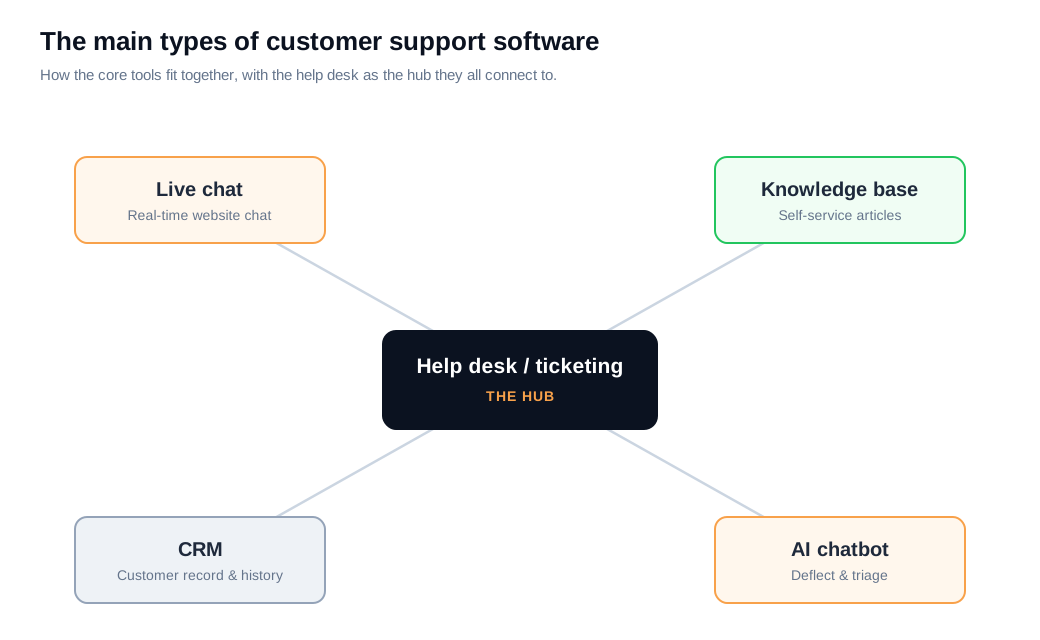
Help desk software is the hub. It runs the ticketing system that captures requests from every channel, assigns them, and tracks them to resolution, and it is what most people picture when they say support software.
Live chat handles real-time questions on your website or inside your app. It tends to score well with customers: live chat earns roughly an 88% satisfaction rating, the highest of any digital channel, according to the American Customer Satisfaction Index. A tool like live chat also catches people while they are still on the page, which matters as much for sales as for support.
Knowledge base software powers self-service. It is a searchable library of help articles that answers routine questions around the clock, and customers clearly want it: 67% prefer to solve minor issues themselves rather than talk to an agent, and 91% say they would use a knowledge base if it were available and fit their needs. Building one well is its own discipline, covered in this knowledge base guide.
The CRM stores the customer record, so a support conversation connects to purchase history and account details instead of starting from zero. AI chatbots sit on top of the knowledge base to answer questions and triage tickets in plain language, and a good one hands the hard cases to a person rather than guessing. On a website, that front door is often a chat widget backed by an AI chat assistant.
What key features should you look for?
Look for a shared ticketing system, omnichannel coverage, automation and routing, a knowledge base, reporting, integrations, and security controls, roughly in that order. The first four decide whether daily work is smooth, and the last three decide whether the tool survives contact with your real business.
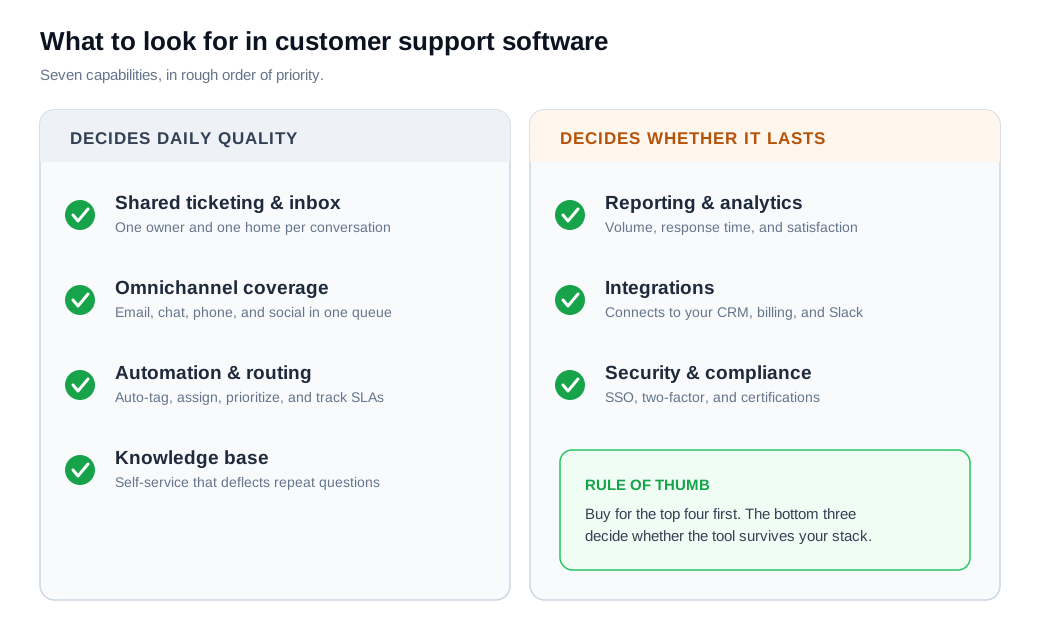
Ticketing and a shared inbox come first. Every conversation needs one clear owner and one place to live, or requests get answered twice or not at all.
Omnichannel coverage is next. Customers expect a reply within about four hours by email and under a minute on live chat, per commonly cited benchmarks, and no team hits those numbers while agents toggle between five disconnected tools looking for context.
Automation and routing carry the load as volume grows. Look for rules that tag, assign, and prioritize on their own, plus service level agreement tracking that escalates a ticket before it breaches. That is the line between a queue that manages itself and one that needs a person babysitting it.
A knowledge base is the cheapest capacity you can add, since every article that answers a question is a ticket that never gets created. Reporting tells you where the time goes. Integrations with your CRM, billing system, and Slack keep support connected to the rest of the company. And security controls like single sign-on, two-factor authentication, and the right compliance certifications stop being optional the moment you handle customer data. Ease of use belongs on the list too, because a tool your agents dread opening will get worked around no matter how strong its feature grid looks.
How much does customer support software cost?
Most customer support software is sold per agent per month, with a free tier for very small teams, tiered paid plans that add more channels and automation, and custom enterprise pricing at the top. The subscription line is only part of the number that matters.
Total cost of ownership also includes setup, data migration, integration work, training, and the ongoing admin time to keep automation rules and help articles current. Buyers weigh that against time to value, which is how fast a team can get the tool running and start seeing a return. A cheaper tool that takes three months to configure can end up costing more than a pricier one that is useful in a week.
The figure that surprises people is the cost of the alternative. Building an equivalent platform in house turns a monthly subscription into a multi-month engineering project, and the section below puts real numbers on it.
How do you choose the right tool?
Start from your actual support volume and channels, then match tools to that reality rather than buying the longest feature list. A five-step checklist keeps the decision grounded.
- Map your channels and volume. Count where requests actually come from and how many arrive each week. A team living in email and chat needs different tools than one running a phone queue.
- Involve the agents who will use it daily. They spot the workflow gaps a sales demo hides, and their buy-in decides whether the rollout sticks.
- Shortlist two or three tools and compare them side by side on the capabilities you actually named, not the ones each vendor leads with.
- Run a free trial with real tickets. Route a slice of live volume through each finalist for a week and watch how it handles your messy edge cases, not the clean ones in the tutorial.
- Check integrations, security, and total cost before you sign. Confirm it connects to your CRM and Slack, meets your compliance needs, and still pencils out once training and admin time are included.
A worked example makes it concrete. Say a four-person team handles about 1,200 requests a month, split 60% email, 30% live chat, and 10% social, with no phone support. The right shortlist is a shared inbox with strong automation, a knowledge base to deflect the repetitive 40% of questions, and a live chat widget for the website. A full call-center suite would pile on cost and complexity for a channel this team does not even use. Matching the tool to the volume, rather than to the feature grid, is the whole exercise.
Should you build or buy?
For almost every team, buying is the right call, and building your own makes sense only when support is a core, differentiated part of your product that no vendor can serve. The economics are lopsided.
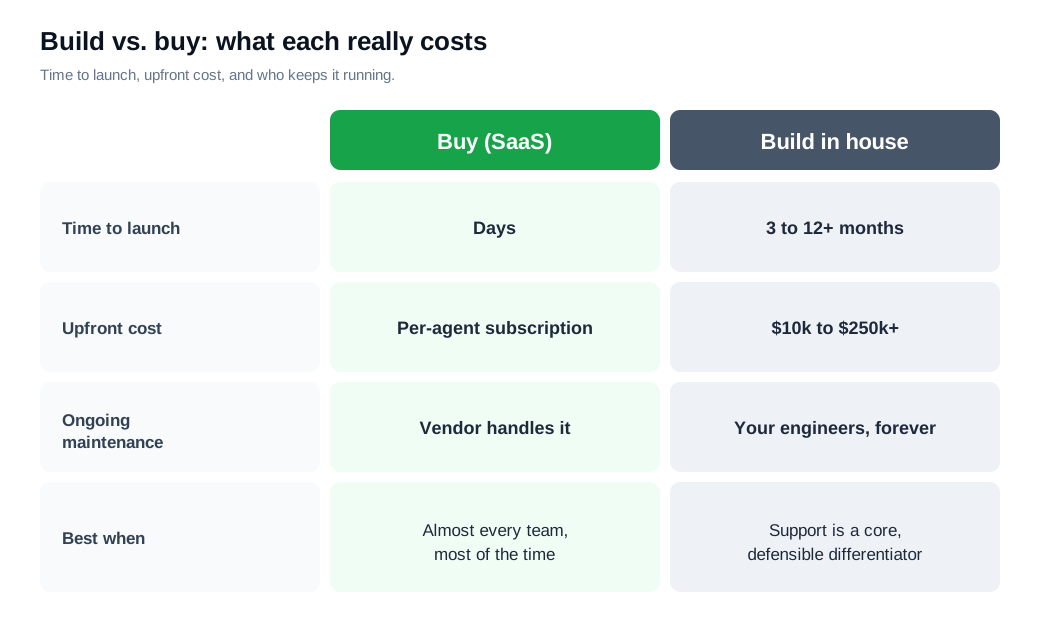
Buying means you are live in days on a per-agent subscription, with the vendor handling security, uptime, and a steady stream of new features. Building means a development project. Industry estimates put a basic in-house support platform at roughly 3 to 4 months and $10,000 to $60,000 to reach a minimum viable version, 5 to 7 months and $30,000 to $100,000 for a mid-scale build with live chat and SLA management, and 9 to 12 months and $80,000 to $250,000 or more for a full platform. None of those figures includes the engineering time to maintain the thing after launch.
That maintenance is where homegrown systems quietly break down. GitHub started on tools it built itself, then moved to a commercial platform in 2012 once dedicating engineers to keep the internal system running got too expensive to justify. The pattern repeats across companies: the build looks cheaper on day one, until you count the years of developer attention it takes to keep pace with what a vendor ships by default.
Buy unless you have a specific, defensible reason not to. For most companies the money and the engineering hours are better spent on the product, and the support stack is a solved problem you can rent for a fraction of what it costs to build.
Key takeaways
- Customer support software centralizes and tracks requests, pulling email, chat, phone, and social into one queue where every conversation has an owner and a history.
- The core types stack together, with a help desk at the hub, live chat for real-time questions, a knowledge base for self-service, a CRM for context, and AI to deflect and triage.
- Buy for the workflow, not the feature list. Ticketing, omnichannel coverage, automation, and a knowledge base decide daily quality, while reporting, integrations, and security decide whether the tool lasts.
- Self-service pays for itself. With 67% of customers preferring to solve minor issues on their own, every knowledge base article is a ticket that never gets created.
- Match the tool to your volume and channels, shortlist two or three, involve the agents who will live in it, and run a real free trial before signing.
- Buy rather than build unless support is a core differentiator, because an in-house platform runs into six figures and years of maintenance that a subscription avoids.

Written by
Nilas MylerCo-founder & CTO, Glimpze
Nilas is the co-founder and CTO of Glimpze, an inbound sales tool that turns high-intent website visitors into live conversations. A former SEO consultant for some of the largest companies in Denmark, he writes about speed-to-lead, inbound sales, and conversion rate optimization — the technical and operational mechanics of turning traffic into pipeline.


