
On this page
- What is information architecture in web design?
- What are the four components of information architecture?
- How do you structure site content?
- Flat or deep: how many levels should a site have?
- How does information architecture affect findability?
- What is the difference between information architecture and navigation?
- How do you test your information architecture?
- Key takeaways
- Sources
Every website has an information architecture, whether anyone designed it or not. It is the structure that decides which page sits under which section, what each link is called, and how a visitor gets from a vague intention to the exact thing they came for.
When that structure matches how people think, the site feels obvious and nobody notices the work behind it. When it does not, visitors bounce between menu items, run the same search twice, and leave believing the answer was not there, even when it was two clicks away.
This post covers what information architecture actually is, the four systems it is built from, how to structure your content, how many levels deep a site should go, how IA drives findability and revenue, how it differs from navigation, and how to test it with real users before you ship.
What is information architecture in web design?
Information architecture (IA) is the practice of organizing, labeling, and structuring a website's content so that people can find what they need and understand where they are. The term comes from Louis Rosenfeld and Peter Morville, whose book Information Architecture for the Web and Beyond describes it as the structural design of shared information environments and the art and science of shaping information to support usability and findability.
A useful way to picture it: IA is to a website what a floor plan is to a building. Long before anyone chooses paint colors or furniture, the architect decides how many rooms there are, what each is for, and how you walk between them. Change the layout after the walls are up and the cost is enormous. The same holds online, where IA is set early and touches every page at once.
People often confuse IA with visual design or the navigation menu, but it sits underneath both. You can redesign every button on a page and leave its information architecture untouched, or rebuild the IA while keeping the same visual style. The structure decides what goes where and what it is called. The interface is how that structure gets exposed to a visitor.
What are the four components of information architecture?
Information architecture is built from four systems that Rosenfeld and Morville identified: organization, labeling, navigation, and search. Each does a different job, and they only work when they work together.
Organization systems group content into categories and arrange those categories into a hierarchy. This is the decision that "Pricing," "Docs," and "Customers" are top-level sections, and that a specific integration guide lives three levels down under Docs.
Labeling systems decide what each of those categories is called. A label is a promise about what a visitor will find behind a link, and a vague or internal term ("Solutions," "Resources") breaks that promise before the click.
Navigation systems are the paths that let people move through the structure without getting lost: the main menu, breadcrumbs, related links, and footers. They surface the organization and give a visitor a sense of where they are and how to back out.
Search systems let people jump straight to content by typing what they want, which matters most on large sites where browsing every branch is impractical. Good search depends on good labeling and metadata working behind the scenes.
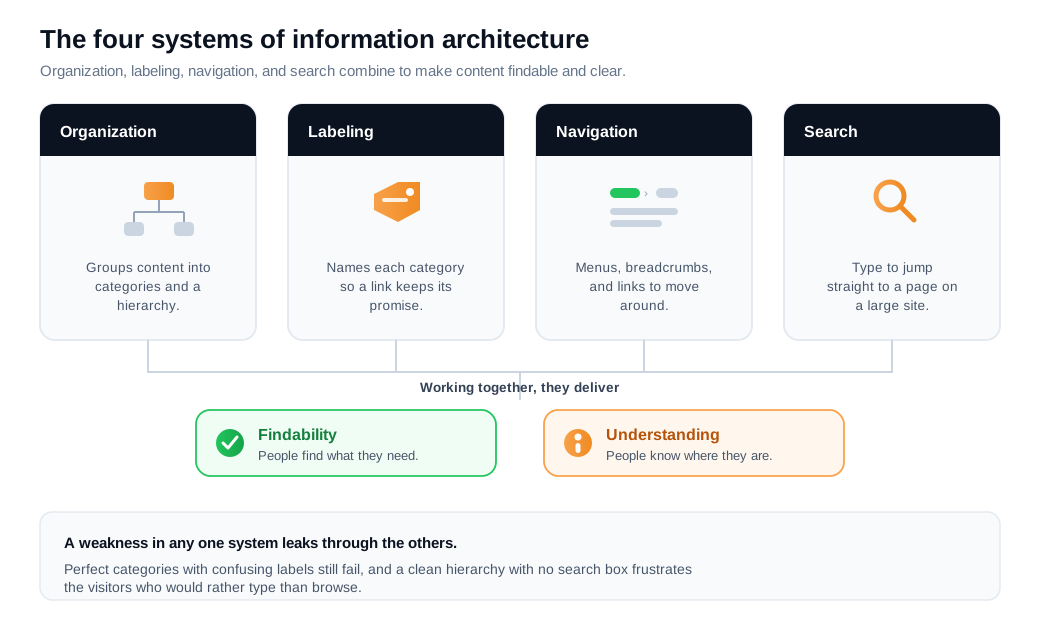
Weakness in any one system leaks through the others. Perfect categories with confusing labels still fail. A clean hierarchy with no search box frustrates the people who would rather type than browse. The systems share one goal, and a visitor may use several of them within a single session.
How do you structure site content?
You structure site content by choosing an organization scheme that matches how your visitors think about the content, then grouping and labeling pages to fit it. Rosenfeld and Morville split these schemes into two families: exact and ambiguous.
Exact schemes divide content into well-defined, mutually exclusive groups. Alphabetical, chronological, and geographical orderings are exact. They work when a visitor already knows the specific name, date, or place they are after, the way you use a phone book or a dictionary. Their limit is that they are close to useless when someone does not know the exact term to look under.
Ambiguous schemes group content by meaning: by topic, by task, or by audience. A topical scheme organizes a university site into departments. A task scheme organizes a banking app around "Transfer money" and "Pay a bill." An audience scheme splits a health system into "For patients" and "For clinicians." These are harder to get right, because reasonable people disagree about where things belong. They are also where most of the value sits, because they support the browsing and discovery that real visitors do when they cannot name what they want.
Most real sites use a hybrid. A supermarket is organized mostly by topic (dairy, produce) with a few task and audience shortcuts (checkout, pharmacy). The risk with hybrids is mixing schemes inside a single menu, so that a visitor cannot tell whether to think in terms of product type, audience, or task. Keep each level of the hierarchy internally consistent, and let the scheme change between levels rather than within one.
The reliable way to land on the right scheme is to borrow the visitor's own categories rather than reusing your org chart. The sections that make sense to your marketing team, sales team, and engineers are three different structures, and none is the one a first-time visitor carries in their head.
Flat or deep: how many levels should a site have?
There is no fixed number of levels, and the popular "three-click rule" that every page must sit within three clicks of the homepage is not backed by evidence. Nielsen Norman Group traces the rule to no published study, and a 2003 analysis by Joshua Porter of 44 users across 620 tasks found no rise in abandonment after the third click, with some people happily clicking through as many as 25 pages to finish a task.
What actually keeps people moving is information scent: the sense, at each step, that they are getting warmer. As long as every link confirms they are on the right trail, visitors keep clicking. When the scent fades, when a label no longer seems to match their goal, they stop and back out, and it makes little difference whether that happened on click two or click five.
Breadth and depth still trade off against each other. A flat hierarchy has few levels and many items on each one, so pages sit close to the homepage but menus get crowded. A deep hierarchy has more levels with fewer choices at each, which keeps every single decision simple but buries content and raises the odds of a wrong turn. Nielsen Norman Group frames a flat structure as roughly three levels and a deep one as five or more.
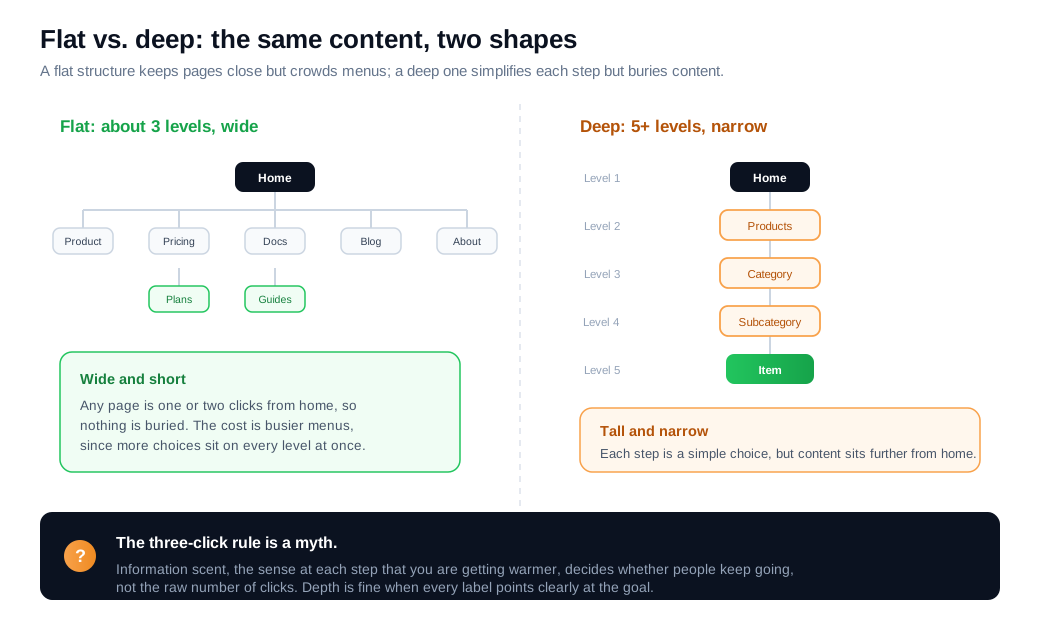
The practical target is a broad, shallow shape: a handful of confident top-level categories, each opening onto well-grouped children, rarely more than three or four levels before a visitor reaches a real page. Depth is fine when each step carries strong scent. Depth without scent is where people get lost.
How does information architecture affect findability?
Information architecture affects findability directly, because findability is the whole point of IA: content that exists but cannot be located may as well not exist. Morville's often-quoted line is that findability precedes usability, since you cannot use what you cannot find.
The strongest evidence for how much structure matters comes from first-click testing. A body of usability research associated with Bob Bailey and Cari Wolfson found that when a visitor's first click lands on the right path, they complete the task about 87% of the time, and when the first click is wrong, that drops to roughly 46%. The first choice a visitor makes inside your top-level structure is close to half the battle, which is why organization and labeling carry so much weight.
Findability has a measurable cost when it fails, even away from a checkout. McKinsey and IDC research on knowledge work has estimated that employees spend close to a fifth of the workweek just looking for information, time that better structure recovers. On a public site, the same failure shows up as bounces, repeated searches, and support tickets asking where something lives.
Here is an illustrative worked example. Say a SaaS site draws 30,000 visitors a month, and 60% of them (18,000) arrive looking for something specific: pricing, a particular integration, a doc. Suppose a poorly labeled top section currently sends 35% of those visitors down the wrong first branch. Using the first-click numbers, the 11,700 with a right first click finish at 87% (about 10,179 finds), and the 6,300 with a wrong one finish at 46% (about 2,898 finds), for roughly 13,077 successful finds and 4,923 failures. Relabel and regroup so only 15% start down the wrong branch, and successful finds rise to about 14,553, recovering around 1,476 finds a month. If even 4% of those recovered finders take the next step, starting a trial or asking a question, that is about 59 extra high-intent actions a month from structure alone, with no new traffic bought. The numbers are illustrative; the shape is what usability tests keep showing.
Structure cannot answer every question a hesitating visitor has, which is why a persistent live chat entry point makes a useful backstop: it gives someone who cannot find the right page a way to just ask. And when analytics show visitors circling the same menu without landing anywhere, a well-timed proactive nudge can catch them before they give up on the structure entirely.
What is the difference between information architecture and navigation?
Information architecture is the underlying structure of your content, while navigation is the interface that exposes part of that structure to a visitor. Nielsen Norman Group draws the line plainly: IA is the full map of how content is organized and related, and navigation is the set of on-screen elements (menus, links, breadcrumbs) that let people move through a slice of that map. Web navigation is the tip of the iceberg sitting on top of the IA.
The distinction matters because a menu can only ever show a fraction of the IA. A site with hundreds of pages might surface six items in its top navigation, so the quality of those six labels and the structure beneath them decides whether the other pages are reachable at all. Fix the menu wording without fixing the structure underneath, and you have painted a new sign on the same maze.
It also means the two get tested differently. You evaluate the structure with methods that ignore visual design, and you evaluate the navigation with the menu and page in front of a user. A site can carry a sound IA that a clumsy menu hides, or a slick menu sitting on top of categories that match nobody's expectations.
How do you test your information architecture?
You test information architecture with a small set of research methods that check whether your categories, labels, and hierarchy match how real people think, before you commit them to a build. Nielsen Norman Group groups the main methods by what they answer.
Card sorting comes first, while you are still generating the structure. You give participants a set of content items on cards and ask them to group and name the piles themselves, which reveals the categories and labels living in their heads rather than yours. Run an open card sort with around 20 or more participants to see reliable patterns.
Tree testing comes next, to evaluate a structure you have already drafted. Participants get a stripped-down, text-only version of your hierarchy (no visual design, no search box) and are asked to find specific items, which isolates pure findability. The two numbers to watch are success rate, the share who land on the right answer, and directness, the share who get there without backtracking. Fifteen to twenty participants per task is enough to expose the branches where people get lost.
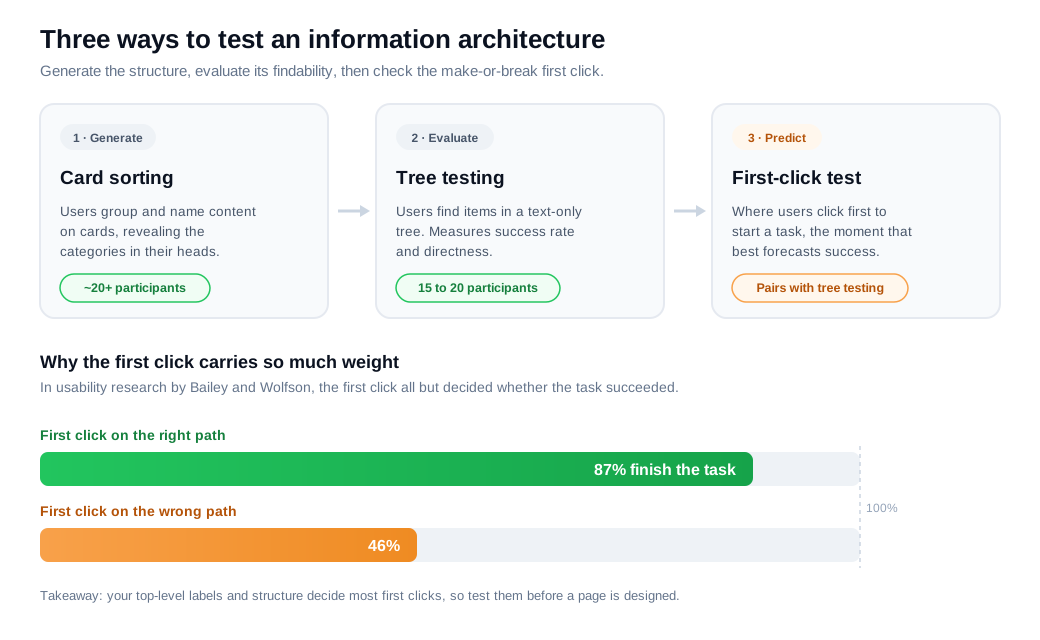
First-click testing checks the single most predictive moment, where people click first to start a task, and it pairs naturally with tree testing given how strongly that first click forecasts success. Once a real design exists, usability testing and live analytics (search logs, path reports, and the questions reaching your support and sales teams) confirm whether the tested structure holds up under real traffic.
The pattern across all of them is the same. Do the cheap structural research first, with 15 to 20 people, before a single page is designed, because reworking an information architecture after launch is the expensive version of the same fix.
Key takeaways
- Information architecture is the structure under the surface. It decides where every page lives and what it is called, sits below both visual design and the menu, and is set early enough that it touches every page at once.
- IA is four systems working together. Organization, labeling, navigation, and search each do a distinct job, and a weakness in any one leaks through the others.
- Match the visitor's categories, not your org chart. Exact schemes (alphabetical, chronological) suit people who know the term; ambiguous schemes (topical, task, audience) suit the browsing that real visitors do.
- Depth is fine when the scent is strong. The three-click rule is false, and Joshua Porter's analysis found no drop-off after the third click; information scent, not click count, decides whether people keep going.
- Findability is where IA pays off. A correct first click predicts about 87% task success versus 46% for a wrong one, so top-level labels and structure carry most of the weight.
- Test structure before you build it. Card sorting generates the IA, tree testing and first-click testing evaluate it, and 15 to 20 participants catch most problems for very little cost.
TAGS

Written by
Nilas MylerCo-founder & CTO, Glimpze
Nilas is the co-founder and CTO of Glimpze, an inbound sales tool that turns high-intent website visitors into live conversations. A former SEO consultant for some of the largest companies in Denmark, he writes about speed-to-lead, inbound sales, and conversion rate optimization — the technical and operational mechanics of turning traffic into pipeline.


