
On this page
Open any page you have never seen before, and within a fraction of a second your eyes have already picked a spot to land. You did not decide to look there. The layout decided for you, by making one thing bigger, brighter, or more isolated than everything around it. That quiet steering is visual hierarchy at work.
Every page has a visual hierarchy whether anyone planned one or not. The only question is whether it points people at what matters or scatters them across a wall of equal-weight elements until they give up. Get the order right and a stranger reads your page in the sequence you intended. Get it wrong and your best headline fights a stock photo and a cookie banner for the same half-second of attention.
This post covers what visual hierarchy is, how people actually scan a page, how size, color, and spacing steer the eye, how hierarchy moves conversions, a step-by-step way to apply it, and the mistakes that flatten a page back into noise.
What is visual hierarchy in web design?
Visual hierarchy in web design is the deliberate arrangement of elements so a visitor's eye moves through them in order of importance, seeing what matters first, what to do next, and what it can ignore. The Nielsen Norman Group describes it as controlling the delivery of information from the interface to the user, letting people know where to focus their attention (NN/g).
The mechanism behind it is visual weight, the amount of pull an element exerts on the eye relative to its neighbors. A large, bold, high-contrast button carries more weight than a line of gray body text, so the eye reaches it first. Designers assign that weight on purpose, turning a flat collection of elements into a ranked one.
NN/g lists hierarchy as one of five core principles of visual design, alongside scale, balance, contrast, and the Gestalt rules for how the brain groups shapes (NN/g). Scale, contrast, and the rest are the levers. Hierarchy is the result you get when you pull them with intent.
The reason any of this matters is speed. A 2006 study by Gitte Lindgaard found that people form a stable opinion of a page's visual appeal in about 50 milliseconds, faster than a conscious thought (Behaviour & Information Technology). In that sliver of time, the only thing a visitor can act on is which element grabbed them, and hierarchy decides which one that is.
How do people actually read a web page?
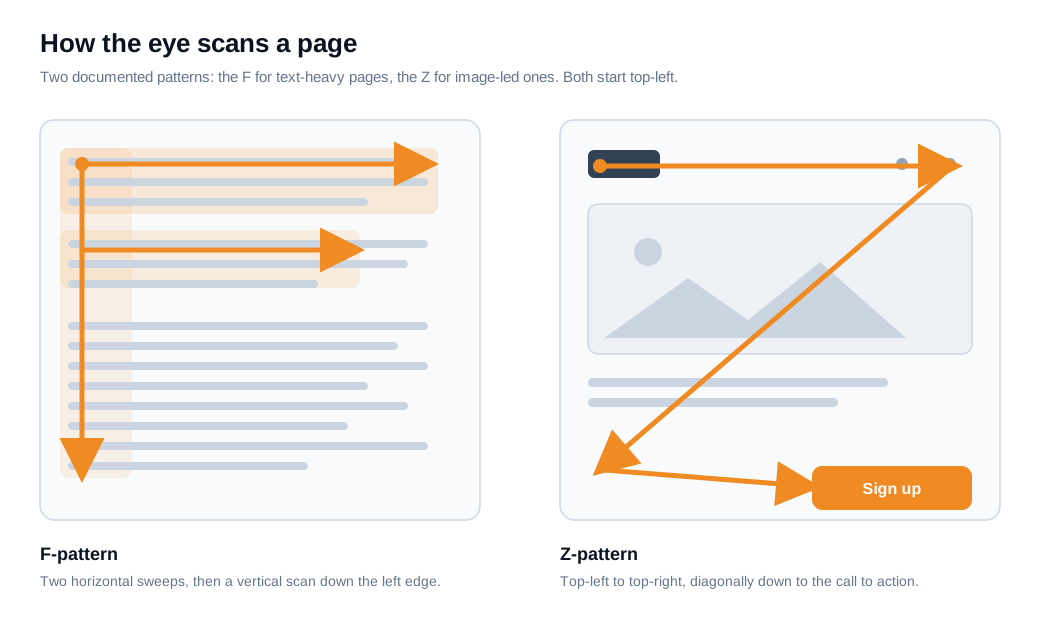
People rarely read a web page line by line; they scan it in predictable shapes, and the most documented shape is the F-pattern. NN/g discovered it by recording how 232 users looked at thousands of pages, and the trace came back the same again and again: two horizontal sweeps across the upper content, then a vertical run down the left edge, forming a rough letter F (NN/g).
The pattern is not a relic. When NN/g revisited it in 2017, eleven years after the original study, the F-shaped scan was still alive on both desktop and mobile screens, especially when a page dumps unstructured text on the reader with little formatting to guide them (NN/g).
Image-heavy pages with little text tend to draw a different shape, the Z-pattern. The eye starts top-left, travels across to the top-right, cuts diagonally down to the bottom-left, and finishes at the bottom-right, which is why so many landing pages park a logo and nav up top and a call to action at the end of that path.
Both patterns point to the same lesson. The top and left of the page collect the most attention by default, so that is where your highest-priority content belongs. Anything you want a visitor to notice out of sequence, such as a signup button lower on the page, has to earn a look by carrying much more visual weight than its surroundings.
How do size, color, and spacing guide attention?
Size, color, and spacing guide attention by changing an element's visual weight, the pull it has on the eye compared with everything near it. Each one is a dial a designer can turn up on the things that matter and down on the things that do not.
Size and scale are the bluntest dial. Larger elements read as more important, so a headline set well above body size gets seen first and a primary button drawn bigger than a secondary link wins the click. A clear type scale, where an H1 outsizes an H2 which outsizes body text, tells a scanning reader how the content is ranked before they read a single word.
Color and contrast are the sharpest dial. A saturated color against a restrained palette becomes a focal point the eye cannot skip, which is exactly how a single orange button on a navy page announces itself. Two cautions come with it. Keep to a small number of contrast levels, because when everything is high-contrast nothing stands out, and never lean on color alone to signal importance, since visitors with color vision deficiency will miss the cue. For accessibility, aim for a contrast ratio of at least 3:1 on large interface elements like buttons.
Spacing is the quietest dial and often the most underrated. Whitespace around an element isolates it, and isolation is one of the strongest ways to make something look important, an effect psychologists call the Von Restorff or isolation effect, where the item that differs from its neighbors is the one people notice and remember (Laws of UX). Spacing also groups: by the Gestalt principle of proximity, elements placed close together read as related, so tight spacing bundles a label with its field while generous spacing separates one section from the next. A Human Factors International study, reported by Attention Insight, found that using whitespace to emphasize key elements raised visitor comprehension by nearly 20% (Attention Insight).
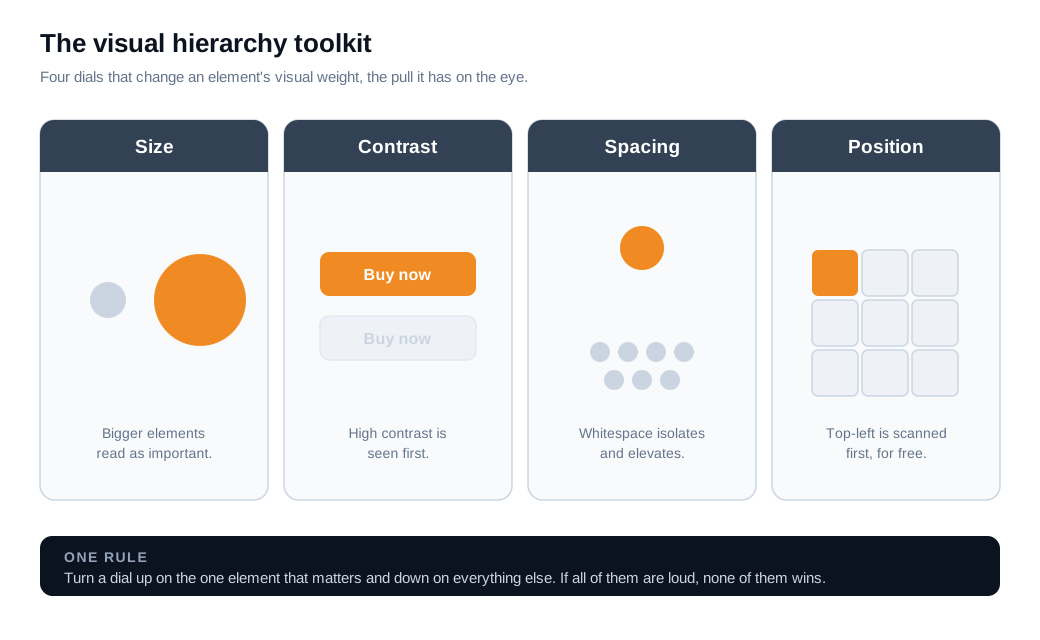
Position and typography round out the set. An element placed where the scan starts, at the top-left, gets attention cheaply, while weight, italics, and case give type its own internal ranking. Used together, these dials let you set an order the eye follows without the visitor ever noticing they were guided.
How does visual hierarchy drive conversions?
Visual hierarchy drives conversions by making the one action you want people to take the most obvious thing on the page, so fewer visitors miss it or stall before they reach it. When the primary button out-weighs everything around it, the eye finds it during the first scan instead of hunting for it.
The most cited illustration is a HubSpot test in which a red call-to-action button beat a green one by 21% over more than 2,000 visits (CXL). The red button won for one reason: it stood out sharply against a site built mostly in green. Contrast did the work, and any color can create contrast given the right surroundings. Salience beat blending in, which is the whole job of hierarchy.
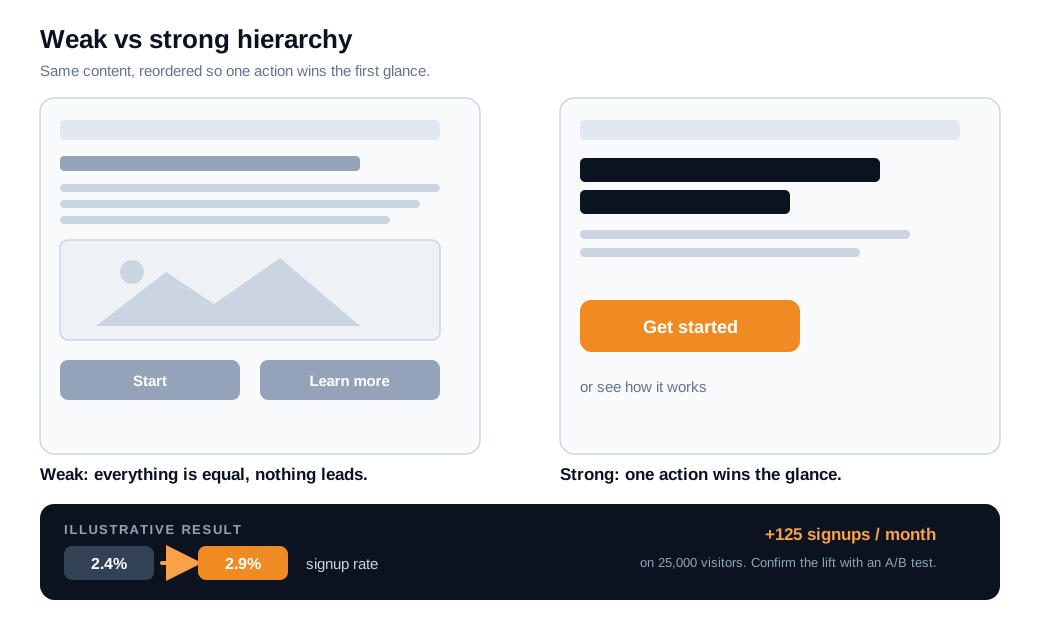
Here is the arithmetic on an ordinary case. A SaaS landing page draws 25,000 visitors a month and converts 2.4% of them into trial signups, which is 600 signups. The hero has a headline, a subhead, two equal-weight buttons, a demo video, and a row of feature links, all competing for the same glance. You rebuild the hierarchy: one dominant primary button in a contrasting color, the second action demoted to a quiet text link, more whitespace around the button to isolate it, and the feature links shrunk and moved below the fold.
Say those changes lift conversion from 2.4% to 2.9%, half a point. That is 725 signups a month, 125 more than before, from reordering attention rather than buying traffic. Treat the figure as an estimate and confirm it with an A/B test, because the real lift depends on your audience and offer. The direction is reliable: when the primary action is the clear focal point, more people act on it.
A page can only carry so much on its own. When a visitor's eye lands on your primary action but they still have one blocking question, a persistent live chat entry point gives them a way to ask in the moment instead of leaving to find a contact page.
How do you apply visual hierarchy to a page?
You apply visual hierarchy by ranking your content before you style it, then using size, contrast, spacing, and position to make the visual order match that ranking. The mistake most teams make is decorating first and ranking never, which leaves the hierarchy to chance.
Start by listing every element on the page and sorting it into three tiers: the one primary action, the supporting content that builds the case for it, and the secondary links a few people will want. Most pages have exactly one job, so most pages should have exactly one tier-one element.
Then assign weight to match the ranking. Give the tier-one item the strongest combination of size, contrast, and whitespace on the page, and make sure nothing in tier two or three competes with it. A second call to action should look like a quieter option, a text link or an outline button, so it supports the primary path instead of splitting it.
Set a consistent type scale so headings, subheads, and body text signal their rank on sight, and align everything to a grid so the F-pattern's left edge stays clean and easy to run down. Group related items with proximity, separate unrelated ones with space, and put the highest-priority content where the scan begins.
Finish with the squint test. Blur your eyes or step back from the screen until the text goes illegible, and see which shapes still stand out. If the primary button is the first thing you notice, the hierarchy is working. If your eye lands on a stock photo or a banner instead, you have found what to fix. When analytics show visitors reaching your main action but hesitating, a well-timed proactive nudge can answer the blocking question rather than asking the layout to do everything.
What are the most common visual hierarchy mistakes?
The most common visual hierarchy mistakes share one root cause: too many elements demanding equal attention, so nothing wins the glance. A page where everything is emphasized reads the same as a page where nothing is.
A short field guide to the recurring offenders:
- Everything shouts. When every heading is bold and oversized, the reader hears a flat drone instead of a ranked message. Emphasis only works when most of the page stays quiet.
- Competing calls to action. Two or three buttons of equal weight give the visitor no priority to follow. Pick the one action that matters most and let the rest recede.
- A low-contrast primary button. If the most important element blends into the background, the eye skips it. The primary action should be the highest-contrast thing in view.
- Color as the only signal. Marking importance with hue alone fails for visitors with color vision deficiency and in grayscale. Back color up with size, weight, or position.
- A hero that outweighs the message. A giant decorative image or autoplay video can pull more weight than the headline it is meant to support, burying the offer under scenery.
- No whitespace. Cram elements edge to edge and you erase the isolation that creates focal points, leaving the eye with nowhere obvious to rest.
Watching where people actually stall tells you which of these you have. For teams running inbound sales, a real conversation with a visitor who paused on the page often surfaces the exact element stealing attention that no amount of guessing would have found.
Key takeaways
- Visual hierarchy ranks a page for the eye. It is the deliberate use of visual weight so visitors see what matters first, know what to do next, and can ignore the rest, all within the 50 milliseconds it takes to form a first impression.
- People scan, they do not read. NN/g's eye-tracking found a durable F-pattern across 232 users and confirmed it again in 2017, so the top and left of a page collect the most attention by default.
- Size, color, and spacing are the dials. Larger elements, higher contrast, and generous whitespace all raise an element's weight, and the isolation effect means space alone can turn a button into a focal point.
- Salience converts. HubSpot's red button beat green by 21% because it stood out from its surroundings, and a single dominant call to action reliably outperforms a page of equal-weight options.
- Rank before you style. List elements, sort them into primary, supporting, and secondary tiers, assign weight to match, then run the squint test to confirm the right thing stands out.
- Equal emphasis is the core mistake. Competing buttons, low-contrast primary actions, color-only cues, and zero whitespace all flatten a page back into noise where nothing wins.
TAGS

Written by
Nilas MylerCo-founder & CTO, Glimpze
Nilas is the co-founder and CTO of Glimpze, an inbound sales tool that turns high-intent website visitors into live conversations. A former SEO consultant for some of the largest companies in Denmark, he writes about speed-to-lead, inbound sales, and conversion rate optimization — the technical and operational mechanics of turning traffic into pipeline.


