
On this page
- What is web accessibility?
- What are the WCAG principles?
- What are the WCAG conformance levels, and which should you target?
- What are the most common accessibility mistakes?
- How does accessibility affect conversions and SEO?
- Is web accessibility a legal requirement?
- How do you audit accessibility?
- Key takeaways
- Sources
A visitor reaches your checkout using only a keyboard, because a wrist injury makes a mouse painful this month. She tabs through the shipping form, fills every field, then lands on a "Continue" button that never takes keyboard focus. There is no way forward. She gives up and buys the same item somewhere else.
Nothing on that page looked broken to the team that built it. It rendered fine, the button worked on click, and the analytics logged one more abandoned cart with no reason attached. Accessibility problems are quiet like that. They turn away real buyers without leaving a mark you can see in a dashboard.
This post covers what web accessibility is, the WCAG principles behind it, the conformance levels you can aim for, the mistakes that trip up almost every site, how accessibility moves conversions and search rankings, where the law now stands, and how to audit your own pages.
What is web accessibility?
Web accessibility is the practice of building sites that people with disabilities can perceive, navigate, and use, including those who rely on assistive technology like screen readers, screen magnification, voice control, or a keyboard instead of a mouse. The goal is that someone who cannot see the screen or use a mouse can still complete the same tasks as anyone else.
Disability here is broader than most teams assume. It covers permanent conditions like blindness, deafness, and motor impairments, but it also covers temporary ones (a broken arm, an eye infection) and situational ones (bright sun on a phone screen, a noisy room where you cannot play sound). Design that works for the permanent case tends to help the temporary and situational cases too, which is why curb cuts built for wheelchairs also serve people with strollers and rolling luggage.
The reference standard for the web is the Web Content Accessibility Guidelines, or WCAG, published by the World Wide Web Consortium through its Web Accessibility Initiative. WCAG is not a law by itself. It is the technical yardstick that most laws, procurement rules, and internal standards point to when they say a site has to be accessible.
What are the WCAG principles?
WCAG rests on four principles, known by the acronym POUR: perceivable, operable, understandable, and robust. Every guideline and testable success criterion in the standard sits under one of these four ideas, so they are the fastest way to hold the whole framework in your head.
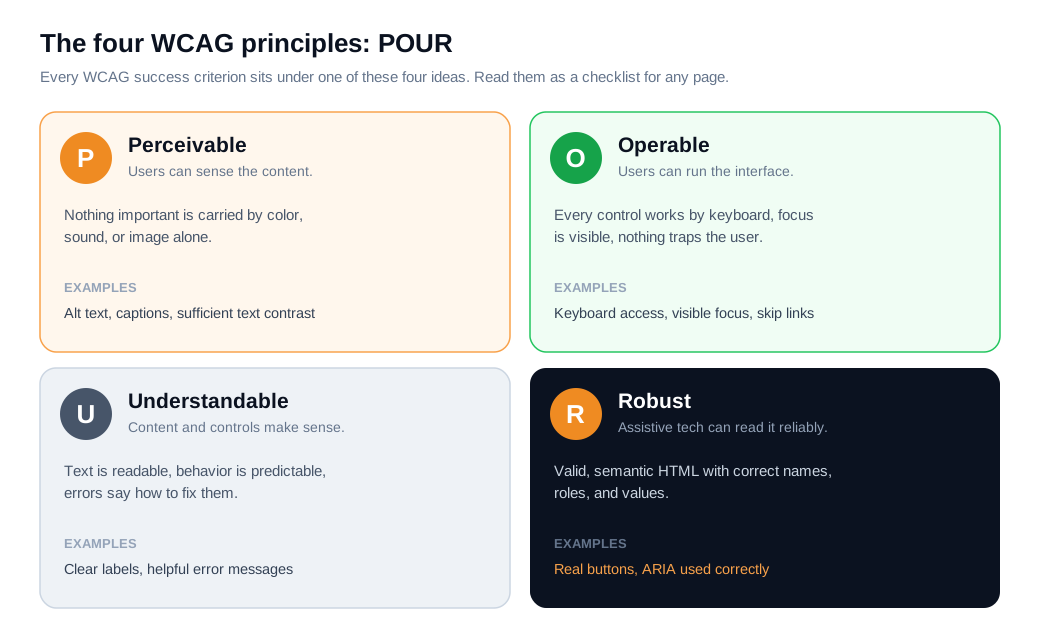
Perceivable means information cannot be invisible to all of a person's senses. If content is carried only by color, only by sound, or only by an image with no text alternative, someone will miss it. Alt text on meaningful images, captions on video, and text that meets a minimum contrast ratio all live here.
Operable means a person can actually run the interface. Every function should work with a keyboard, focus should be visible and follow a sensible order, and nothing should trap the user or flash fast enough to trigger a seizure. The stuck "Continue" button from the opening is an operable failure.
Understandable means the content and the controls make sense. Text should be readable, behavior should be predictable, and when someone makes a mistake the site should say what went wrong and how to fix it. A form that rejects an entry with a red border and no message fails this test.
Robust means the markup is clean enough that browsers and assistive technology can interpret it reliably now and as tools change. In practice that means valid, semantic HTML with correct names, roles, and values, so a screen reader announces a button as a button.
The current version is WCAG 2.2, which became a W3C Recommendation on 5 October 2023. It organizes 13 guidelines under the four principles, and each guideline breaks down into specific success criteria you can test against.
What are the WCAG conformance levels, and which should you target?
WCAG sorts its success criteria into three conformance levels, A, AA, and AAA, and most sites should aim for AA. The levels stack: to claim AA you meet every A and AA criterion, and to claim AAA you meet all of them.
Level A covers the most basic barriers, the ones that can make a site impossible to use for some people, such as content that depends entirely on a mouse or images with no text alternative at all. Clearing A is the floor, and a site that only meets A still leaves plenty of people stuck.
Level AA is the practical target. It removes the barriers that block most users of assistive technology, and it is the level almost every law and standard references, including the U.S. Section 508 rules, the European EN 301 549 standard, and public-sector rules in Canada and beyond. The W3C's own guidance on Level AA conformance treats it as the benchmark for a broadly accessible site. When someone says "WCAG compliant" without a level, they almost always mean 2.1 or 2.2 AA.
Level AAA is the strictest tier, with criteria like a higher 7:1 contrast ratio and sign-language interpretation for video. The W3C itself advises against requiring AAA across a whole site, because some criteria cannot be satisfied for all content. Treat AAA as a goal for specific high-impact pages rather than a sitewide mandate.
What are the most common accessibility mistakes?
The most common accessibility mistakes are a short, stubborn list: low-contrast text, missing image alt text, unlabeled form fields, empty links, empty buttons, and a missing page language. The 2026 WebAIM Million, an automated scan of the top one million home pages, found detectable WCAG failures on 95.9% of them, averaging 56 errors per page, and these same six issues have topped the list for seven years running.
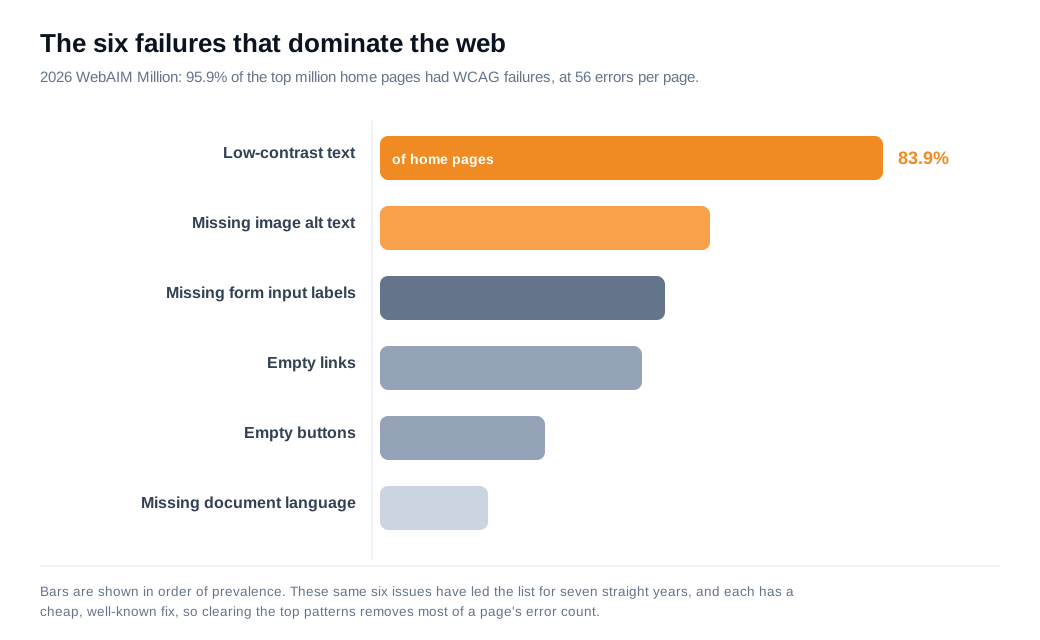
Low-contrast text is the biggest, detected on 83.9% of home pages, with an average of 34 instances each. It is also one of the cheapest to fix, since darkening a gray or bumping a font weight satisfies the AA contrast ratio without a redesign. The good news buried in that list is that a handful of repeat offenders account for the bulk of all errors, so fixing the top few patterns clears most of the count.
Each of the six maps to a specific fix. Add descriptive alt text to images that carry meaning and empty alt to purely decorative ones. Tie every form input to a visible label with a matching for and id, so a screen reader announces what the field wants. Give links and buttons real text instead of an icon with no accessible name, and set the page's language in the html element so screen readers use the right pronunciation. None of these require rebuilding the site.
How does accessibility affect conversions and SEO?
Accessibility affects both directly: barriers push a measurable share of visitors to leave without buying, and many of the fixes double as the on-page signals search engines use to understand a page. Accessibility is a revenue question wearing a compliance costume.
The clearest revenue data comes from the Click-Away Pound survey, which studies how disabled shoppers behave online in the UK. It found that 71% of customers with access needs will click away from a site they find hard to use, and that this lost business added up to about £17.1 billion in a single year. The same survey found that 82% of customers with access needs would spend more with sites that were easier to use, so the money leaves for reasons a team can fix.
Put numbers on it. An online store draws 30,000 sessions a month and converts 3% into orders, which is 900 orders. An audit finds two checkout problems: the "Continue" button fails the AA contrast ratio, so low-vision shoppers struggle to spot it, and one address field has no label, so screen readers announce a blank box. Both fixes take an afternoon, and a higher-contrast button plus a labeled field is easier for every visitor to use, including people who never report a disability. Say the cleaner checkout lifts conversion from 3% to 3.3%. That is 990 orders, 90 more a month, from removing friction that never showed up in the funnel. Treat the figure as an estimate and confirm it with an A/B test, but the change cost almost nothing and helped everyone who reached the page.
The SEO overlap is structural. The same work that satisfies WCAG produces the signals a crawler relies on: alt text describes images for both screen readers and Google's image understanding, semantic headings and landmarks map a page's hierarchy, and descriptive link text ("view pricing" rather than "click here") reads clearly to assistive technology and search bots alike. The overlap between accessibility and SEO is large enough that an accessibility pass usually leaves a page better structured for search as a side effect.
Because some visitors will still hit a question no page answers, giving them a fast way to ask is part of the same job. A keyboard-operable live chat widget lets a stuck visitor get help in the moment instead of leaving, and a well-timed proactive outreach nudge can surface that offer on the exact step where your data shows people stalling. For an inbound sales team, catching one stuck high-intent visitor often returns more than a week of copy tweaks, provided the widget itself meets the same accessibility bar as the rest of the page.
Is web accessibility a legal requirement?
For a growing share of organizations, yes, web accessibility is a legal requirement, and WCAG AA is the standard the rules point to. None of this is legal advice, but the trend is clear.
In the United States, courts have read the Americans with Disabilities Act to cover many commercial websites, and thousands of ADA-related digital accessibility lawsuits are filed each year, most of them against ecommerce sites. In April 2024 the Department of Justice finalized a rule requiring state and local government web content to meet WCAG 2.1 AA, with compliance deadlines in 2026 and 2027 depending on the entity's size.
In Europe, the European Accessibility Act became enforceable in June 2025, extending accessibility obligations to a wide range of consumer products and digital services sold into the EU, again benchmarked to WCAG 2.1 AA through the EN 301 549 standard. Public-sector bodies across the EU, the UK, and Canada already operate under similar rules.
The practical takeaway is the same whether or not a specific law names your business today: targeting WCAG 2.1 or 2.2 AA is the way to reduce legal exposure, and it is the level that also serves the most users. Chasing compliance and chasing usability pull in the same direction.
How do you audit accessibility?
You audit accessibility by combining automated scans that catch the obvious, machine-detectable failures with manual testing that catches everything a tool cannot judge. Neither half is enough on its own, and the gap between them is where most real barriers hide.
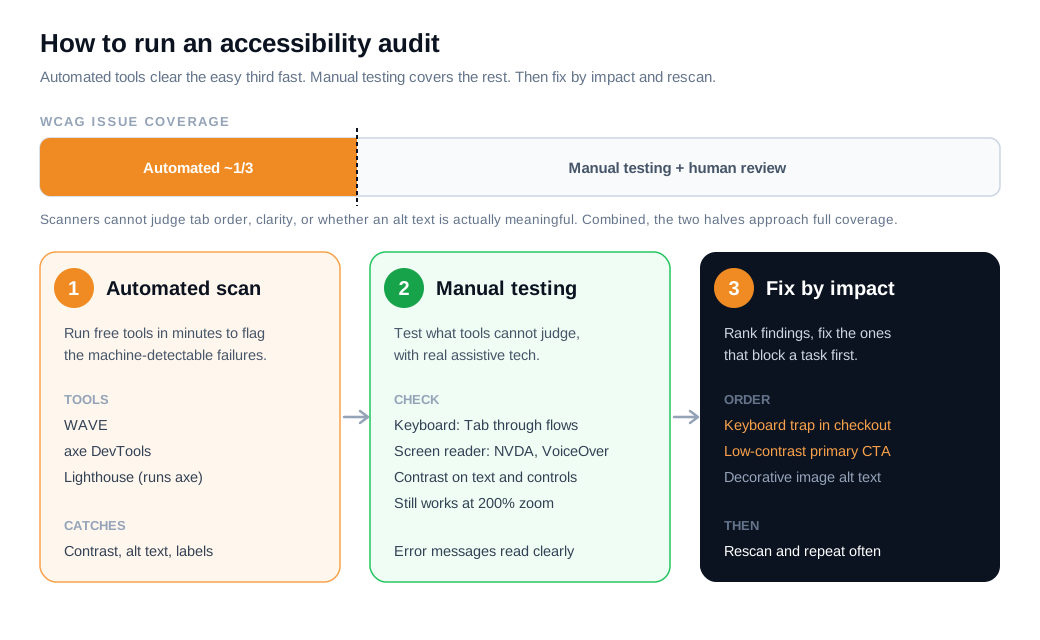
Start with automated tools. Free scanners like WAVE, axe DevTools, and Lighthouse (which runs the axe engine) flag issues like low contrast, missing alt text, and empty labels in minutes, and the W3C keeps a full list of evaluation tools to choose from. These catch roughly a third of WCAG issues, which sounds modest but clears many of the repeat offenders from the WebAIM list fast.
Then test by hand, because most success criteria need human judgment. Unplug the mouse and move through each key flow with the Tab and Enter keys alone: every control should be reachable, the focus outline should be visible, and the order should make sense. A tool can confirm a button is focusable, but only a person can tell whether the tab order is sane.
Run a screen reader next. NVDA on Windows and VoiceOver on Mac are free, and thirty minutes with either on your top pages reveals whether images, headings, forms, and buttons announce themselves clearly. Check color contrast on text and interactive elements, confirm the page still works at 200% zoom, and read error messages as an assistive-technology user would hear them.
Finish by ranking what you found and fixing it in order of impact. A contrast failure on your primary call to action or a keyboard trap in checkout outranks a decorative image missing alt text, since it blocks a conversion path. Fix the highest-impact, lowest-effort issues first, then rescan to confirm the count dropped and nothing new broke. Small, regular audits beat a single heroic pass that goes stale the next time someone ships a new component.
Key takeaways
- Web accessibility means everyone can use your site. It covers people with permanent, temporary, and situational disabilities, and the fixes that help them tend to reduce friction for every visitor.
- WCAG runs on four principles. Perceivable, operable, understandable, and robust (POUR) organize every success criterion, and Level AA is the target almost every law and standard references.
- The same six mistakes dominate. WebAIM found WCAG failures on 95.9% of home pages, led by low-contrast text on 83.9% of them, and each of the top six has a cheap, well-known fix.
- Accessibility is a revenue and search issue. Click-Away Pound tied inaccessible sites to about £17.1 billion in lost UK sales, and accessibility fixes like alt text and semantic structure double as SEO signals.
- The law increasingly requires it. The 2024 U.S. DOJ rule and the 2025 European Accessibility Act both benchmark to WCAG 2.1 AA, and ADA lawsuits over inaccessible sites run into the thousands each year.
- Audit with tools and by hand. Automated scanners catch about a third of issues, so pair them with keyboard, screen-reader, contrast, and zoom testing, then fix by impact and rescan.
TAGS

Written by
Nilas MylerCo-founder & CTO, Glimpze
Nilas is the co-founder and CTO of Glimpze, an inbound sales tool that turns high-intent website visitors into live conversations. A former SEO consultant for some of the largest companies in Denmark, he writes about speed-to-lead, inbound sales, and conversion rate optimization — the technical and operational mechanics of turning traffic into pipeline.


