On this page
You paid to get these visitors here. They read the headline, they scroll, some of them hover over the "Start free" button. Then a large share close the tab without ever creating an account. The traffic was never the problem.
Sign-up conversion is where most SaaS growth quietly leaks. A single point of lift on a page taking 40,000 visitors a month is 400 more accounts every month, with no new ad spend. The fixes are mostly known, mostly cheap, and usually visible within a few weeks of traffic.
This post covers what blocks visitors from signing up, how to measure sign-up conversion and what a good rate looks like, how reducing form fields actually helps and when it backfires, how trust signals and live chat move the number, and how fast you have to respond once someone raises a hand.
What blocks visitors from signing up?
Visitors stall at sign-up when the effort or risk of creating an account feels larger than how clearly they understand what they get in return. Three families of blocker cover most of it: unclear value, too much friction, and too little trust.
Unclear value is the quiet killer. If a visitor cannot tell what your product does and why it matters within about five seconds of landing, the sign-up button is asking them to commit to something they do not yet understand. A vague headline, feature jargon in place of an outcome, and a hero section that buries the point all leave the visitor guessing, and a guessing visitor does not sign up.
Friction is the effort itself: a long form, a forced credit card, an email confirmation loop, four steps where one would do, and any of it made worse on a phone where typing is slow and the keyboard covers half the screen. Every extra field and click is one more moment for a distracted person to decide the account is not worth it.
Trust is the third blocker, and it shows up as doubt. No visible pricing, no customer logos, a request for a phone number before the product has proven anything, or a page that simply does not look credible. Checkout data makes the pattern concrete: in the Baymard Institute survey of why shoppers abandon, 26% left because the site forced them to create an account and 25% did not trust the site with their details. Sign-up pages fail for the same reasons in different clothes.
These rarely appear alone. A page can have a sharp value proposition and still lose people to a nine-field form, or a short form that still reads as risky because nothing on the page says anyone else has trusted it.
How do you measure sign-up conversion?
You measure sign-up conversion as the share of unique visitors who create an account, calculated as sign-ups divided by unique visitors, times 100.
Sign-up conversion rate = sign-ups ÷ unique visitors × 100
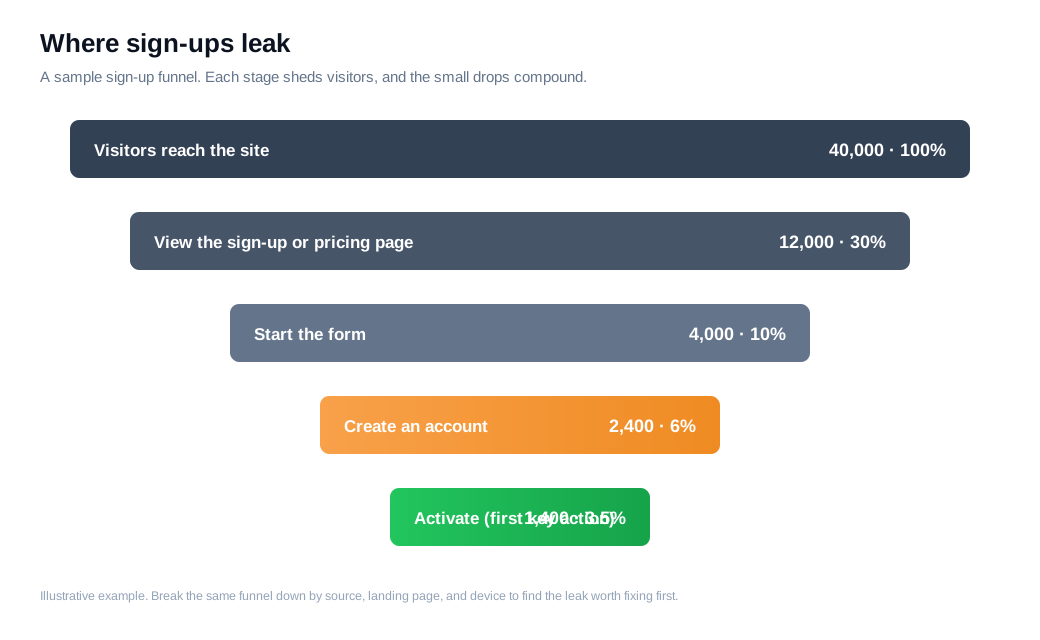
If 40,000 unique visitors reach your site in a month and 1,200 create an account, that is a 3% sign-up conversion rate. Three details decide whether the number means anything. Count unique visitors rather than raw pageviews, or one person reloading inflates the denominator and sinks the rate. Match the window, so this month's sign-ups sit against this month's traffic, not last quarter's. And name the conversion before you measure it, because a visitor-to-signup rate and a visitor-to-paid rate live in completely different bands.
Segment it too. A blended sitewide rate hides the fact that branded search converts far better than a cold display click, and the average tells you nothing about which channel to fix. Break the rate down by source, by landing page, and by device, and the leaks show themselves.
Benchmarks give you a rough yardstick, though your model bends them. Userpilot puts the median free-trial conversion around 8%, with no-card opt-in trials turning more visitors into sign-ups and credit-card trials fewer. On the trial-to-paid side, First Page Sage reports opt-in trials converting to paid near 18% and credit-card trials near 49%, which shows how much the gate you choose reshapes the whole funnel. Treat these as context, not targets. A 3% visitor-to-signup rate can be excellent for one product and poor for another.
How does reducing form fields help?
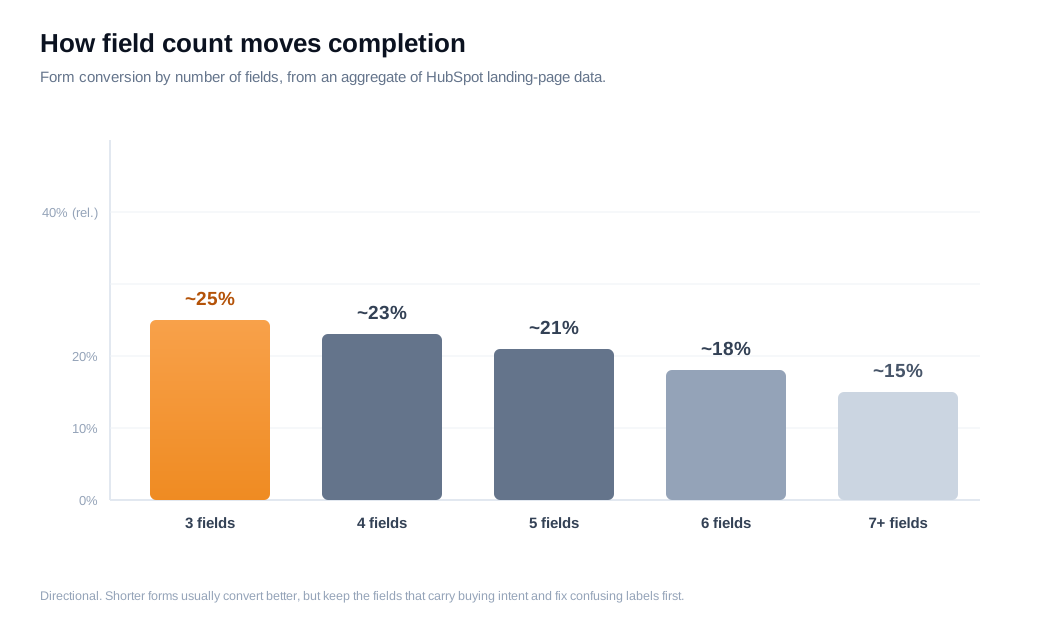
Reducing form fields helps because every field you add is another unit of effort and another reason to quit, so cutting the ones you do not genuinely need usually lifts completion. Aggregating several studies, Venture Harbour cites HubSpot data from tens of thousands of landing pages showing forms with three fields converting best, a little over 25%, with the rate tapering as the count climbs.
Here is the arithmetic on an ordinary sign-up form. Say 8,000 people start your form each month and 60% finish, which is 4,800 accounts. You audit the fields and find two, company size and phone number, that nobody on the team ever uses to do anything. You remove them, completion rises to 72%, and you now get 5,760 accounts from the same traffic. That is 960 more sign-ups a month, roughly 11,500 a year, at no extra cost.
The nuance matters, because "fewer fields" is not a guarantee. Michael Aagaard, writing for CXL, cut a form from nine fields to six and watched conversions fall 14%. Later research showed why: he had removed the fields visitors most wanted to fill in and kept the dull ones. Putting the fields back and rewriting the labels to reduce friction produced a 19% increase instead. So the rule is to cut fields no human acts on, keep the fields that carry buying intent or route the lead, and fix confusing labels before you delete anything.
When you do need more information, defer it rather than demand it up front. Progressive profiling asks for an email now and the harder questions later, once the visitor is invested. Some products push this to the limit: Omnisend reports that moving to a single-field, email-only sign-up form lifted sign-ups by 300%. That is not right for every product, though it shows the direction the field count should move.
Do trust signals and social proof increase sign-ups?
Yes, trust signals increase sign-ups because a visitor deciding whether to hand over an email is quietly scanning for evidence that other people already did and were glad they had. When that evidence is missing, the safe default is to do nothing.
The clearest data again comes from checkout, where Baymard found a quarter of abandoning shoppers cited not trusting the site with their details. On a sign-up page the same doubt is cheaper to answer. Put proof where the decision happens, next to the button and the form: recognizable customer logos, a specific count ("used by 12,000 teams" beats "trusted by many"), a short testimonial that names a real person and links back to them, and any security or compliance badge that applies. Specificity is what makes proof believable, so a concrete number and a named face carry more weight than a wall of anonymous stars.
Pricing transparency belongs in the same category. A visitor who cannot find what your product costs assumes the worst and leaves, so a clear pricing page, linked near the sign-up, removes a real source of anxiety before it stops the click. That kind of clarity does quiet conversion work most teams underrate.
How does live chat lift sign-up rates?
Live chat lifts sign-up rates by answering the exact objection freezing a visitor in the moment it happens, so a question that would have closed the tab becomes a two-line exchange instead. Forrester's research, summarized by Social Intents, found that visitors who engage in a chat are about 2.8 times more likely to convert than visitors who do not, and that they tend to spend more once they do.
Read that figure with some care, since people who choose to chat are often already more interested, so part of the lift is self-selection. The mechanism underneath it is still real. A visitor stuck on your pricing or sign-up page is showing intent right now, and a person or an assistant who resolves the sticking point in that moment removes the reason they were about to leave.
Timing changes the size of the effect. The same research points to proactive invitations, a well-timed message offered when a visitor lingers on a high-intent page, outperforming chat that only waits to be clicked. A tool like live chat on the pricing page, or an AI chat assistant that fields the first question and hands off to a human when the visitor is close, turns a passive form into a conversation. This is the core of a fast inbound sales motion: treat a high-intent visitor as a live signal, and qualify through dialogue while interest is hot rather than through a gate that only adds friction. For the visitors most likely to convert, a well-timed proactive nudge tends to beat any next-day email.
How fast do you need to respond to a new sign-up or lead?
You need to respond within minutes, because the odds of qualifying a lead fall off a cliff with every hour you wait. The Lead Response Management study, run at MIT and published by InsideSales, found that contacting a web lead within five minutes made a firm about 100 times more likely to connect and 21 times more likely to qualify that lead than waiting 30 minutes.
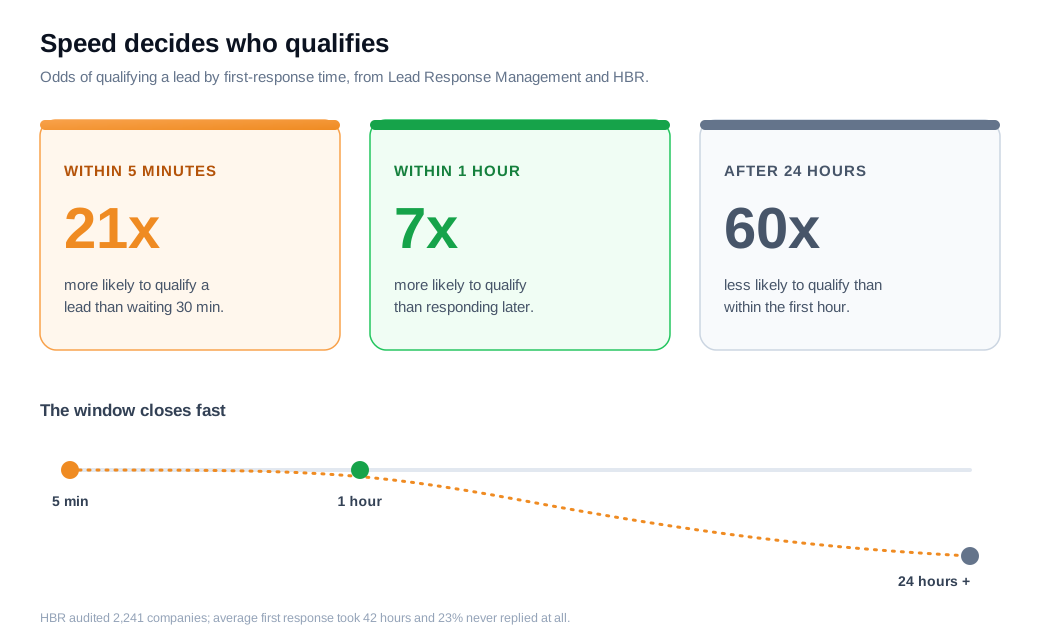
The gap holds at larger scale. Harvard Business Review's audit of 2,241 companies, The Short Life of Online Sales Leads, found the average first response took 42 hours, 23% of firms never responded at all, and companies that answered within an hour were nearly seven times more likely to qualify a lead than those that waited longer, and sixty times more likely than those who took a day or more.
Put that against a real pipeline. If your sign-up flow generates 200 sales-assist requests a month and you currently reply the next day, moving first response inside the hour can multiply how many of those same 200 turn into qualified conversations, without adding a single new lead. The traffic is already paid for; speed decides how much of it you keep.
The practical fix is to remove the delay between a high-intent action and a human seeing it. Instant Slack and email alerts when someone hits pricing or starts a sign-up, paired with routing that sends the lead to the right rep automatically, close the window where interest cools. The team that answers a raised hand in two minutes converts more of the same traffic than the team that answers in two days.
Key takeaways
- Traffic is rarely the bottleneck. A one-point lift in sign-up conversion on 40,000 monthly visitors is 400 more accounts a month, so fixing the page usually beats buying more clicks.
- Measure the right rate against the right window. Divide sign-ups by unique visitors in the same period, name the conversion you mean, and segment by source, because a blended average hides the leak.
- Cut fields no one acts on, and keep the ones that carry intent. Aagaard's test lost 14% by removing the wrong fields, so audit before you delete and fix confusing labels first.
- Answer the trust question near the button. Specific customer counts, named testimonials, and clear pricing remove the doubt that makes a hesitant visitor default to leaving.
- Convert through conversation at the moment of intent. Visitors who chat convert far more often, and a well-timed proactive message on a pricing or sign-up page beats a static form.
- Speed decides how much you keep. Replying within minutes rather than hours multiplies qualified conversations from the same leads, so alert and route high-intent visitors instantly.
TAGS

Written by
Nilas MylerCo-founder & CTO, Glimpze
Nilas is the co-founder and CTO of Glimpze, an inbound sales tool that turns high-intent website visitors into live conversations. A former SEO consultant for some of the largest companies in Denmark, he writes about speed-to-lead, inbound sales, and conversion rate optimization — the technical and operational mechanics of turning traffic into pipeline.


