On this page
A stranger lands on your pricing page, reads it twice, opens your comparison page, then leaves without filling out anything. Your analytics logs a visit. Your sales team hears nothing.
That gap between what your website already knows and what your team ever acts on is the reason visitor tracking exists.
Website visitor tracking is easy to switch on and easy to get wrong. Done well, it shows which accounts are in a buying cycle and where they hesitate. Done badly, it hoards data you cannot legally use and quietly burns the trust of the exact people you want as customers.
This post covers how tracking works, what you can and cannot see, where the law draws its lines, how to run it ethically, and how to turn the data into something a rep or a workflow can act on.
What is website visitor tracking?
Website visitor tracking is the practice of recording how people interact with your site, which pages they view, how long they stay, what they click, and what they abandon, then organizing that behavior so you can analyze it.
The goal is to replace guesswork about visitor intent with evidence. There are two levels to it, and confusing them causes most of the trouble:
- Aggregate analytics: counts, trends, and funnels that describe your traffic as a whole without pointing at any one person.
- Individual or person-level tracking, which stitches a single visitor's actions into one timeline and, in some cases, attaches a real identity to it.
Most teams need far more of the first than the second. Knowing that 4 out of 10 visitors leave your pricing page within eight seconds is a product problem you can fix.
Knowing the name of one of those visitors is only useful if you can act on it responsibly, which is a much narrower situation than most vendors imply.
How does website visitor tracking work?
Website visitor tracking works by placing a small script on your site that logs visitor actions and sends them to an analytics tool or database. That script, usually one line of JavaScript in your site's template, loads on every page and quietly records events as they happen.
The signals it captures fall into a few buckets:
- Behavioral data: pageviews, click paths, scroll depth, time on page, and form starts.
- Technical data: the browser, device, operating system, referrer, and the visitor's IP address.
- Campaign data: the UTM parameters that tell you which ad, email, or search brought them in.
First-party cookies or local storage give each browser a temporary ID so a single session holds together as the person moves between pages.
Two design choices decide how invasive the setup is.
The first is session-based versus person-level tracking. Session-based tracking treats each visit as an independent event that ends after roughly 30 minutes of inactivity, while person-level tracking tries to connect visits across days, devices, and channels into one profile.
The second is first-party versus third-party. First-party tracking watches behavior only on your own domain, while third-party tracking follows people across other sites and carries far heavier legal and reputational baggage.
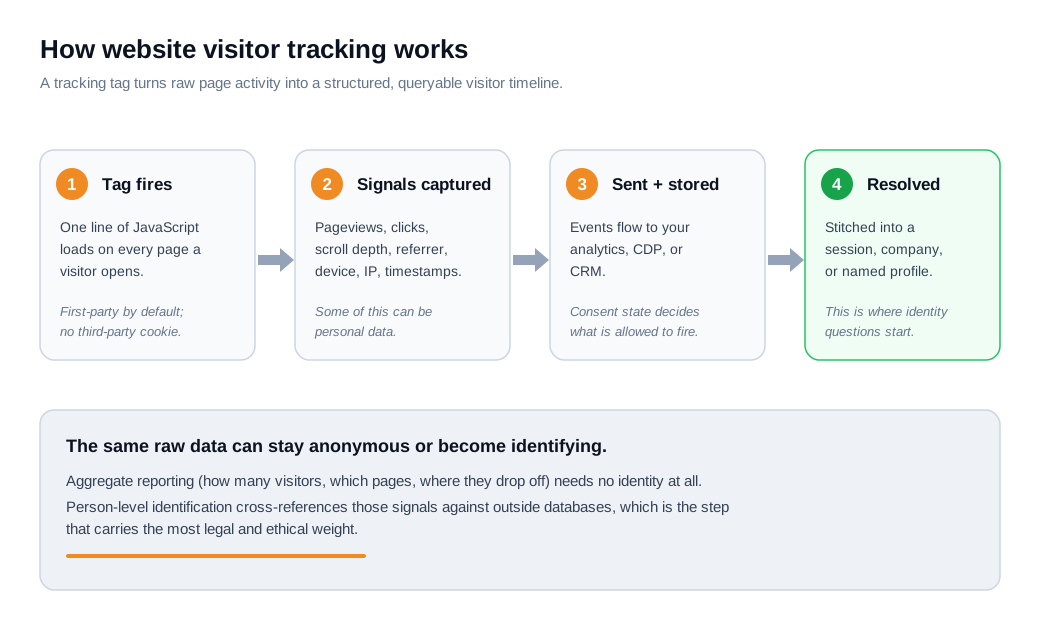
The important point in that flow is the last step. The same raw signals can stay anonymous forever, powering reports that never need a name, or they can be cross-referenced against outside databases to identify a person. Nothing about the tag itself forces that choice. You do.
What can and can't you see about your visitors?
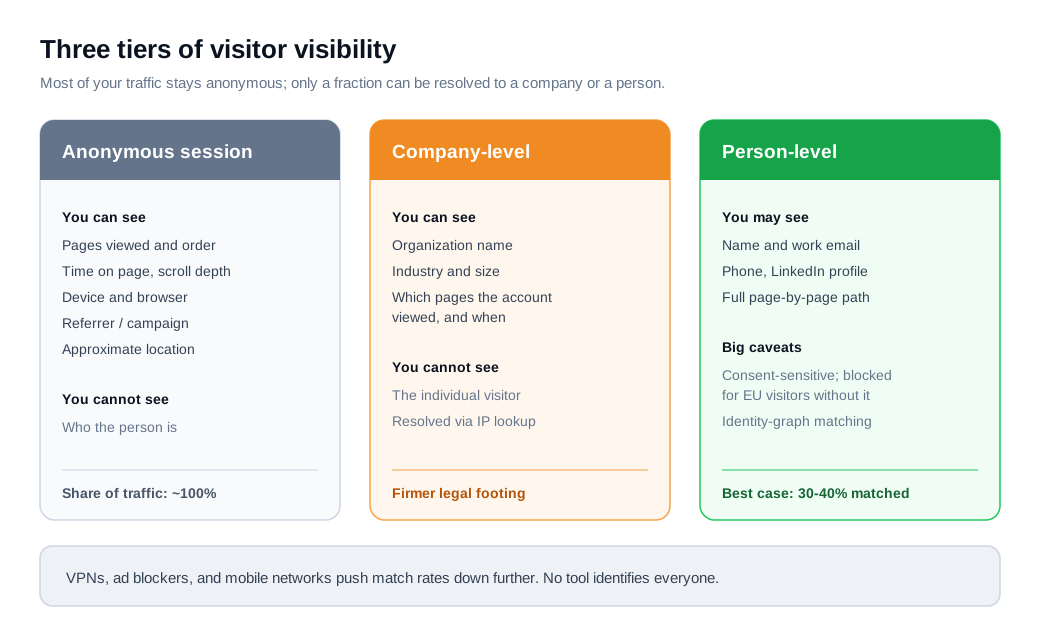
You can always see anonymous behavior, you can sometimes see the company, and you can rarely see the exact individual without their cooperation. Those three tiers behave very differently, both technically and legally.
At the anonymous tier, standard analytics shows you pages viewed, time on site, scroll and click behavior, device and browser, traffic source, and an approximate location derived from IP. It does not tell you who the person is. This covers effectively all of your traffic and is where most of the value lives.
The company tier uses an IP-lookup database to map a visit to an organization. You learn that "someone at Acme Corp viewed your pricing page at 2:14 PM," along with the company's industry and rough size. You do not learn which employee it was.
Company-level identification works reasonably well for B2B desktop traffic on corporate networks and sits on firmer legal ground because a business is not a private individual.
The person tier is where vendors make the boldest promises and where reality bites hardest. Person-level tools cross-reference IP and behavioral signals against an identity graph to surface a name, work email, phone number, and LinkedIn profile.
Even the best of these match roughly 30 to 40 percent of traffic, not all of it, and that ceiling drops further because of remote workers on residential IPs, VPNs, ad blockers, and mobile networks. In the EU, identifying a named person this way without consent is not permitted at all.
Here is what that means with numbers. Say a B2B site gets 10,000 visitors a month. All 10,000 generate anonymous behavioral data you can analyze freely. An IP-lookup tool might resolve a few thousand of them to a company, weighted heavily toward desktop visitors on corporate networks.
A person-level tool, at a generous 35 percent match rate, would surface a name for around 3,500, and you would then need to remove every EU visitor from that pool before contacting anyone.
The workable, contactable list is a fraction of your traffic, which is worth remembering before you buy a tool that prices itself as though it identifies everyone.
Is website visitor tracking legal under GDPR, ePrivacy, and CCPA?
Website visitor tracking is legal, but the rules change sharply depending on where your visitor sits, and person-level identification is where nearly all of the risk lives. Aggregate, anonymous analytics is low-risk almost everywhere.
In the EU and UK, the GDPR and the ePrivacy Directive work together to require prior, informed, opt-in consent before non-essential tracking runs. Consent has to be freely given, specific, informed, and unambiguous, which rules out pre-ticked boxes and cookie walls that only offer "accept."
IP addresses are treated as personal data, so even IP-based logging can fall under the rules. The stakes are real: serious breaches can draw fines of up to 20 million euros or 4 percent of a company's total global annual turnover, whichever is higher, under Article 83(5).
UK regulators have also signaled that device fingerprinting, which identifies a browser even when cookies are blocked, requires consent and is not considered a fair way to track people.
California takes the opposite default. The CCPA, as amended by the CPRA, uses an opt-out model: you may track visitors as long as you disclose what you collect and why, give residents a way to opt out of the sale or sharing of their information, and publish a "Do Not Sell or Share My Personal Information" link.
The law applies to for-profit businesses that hit any one of three thresholds, roughly 26.6 million dollars in gross annual revenue, personal information on 100,000 or more California consumers or households, or 50 percent of revenue from selling or sharing that data.
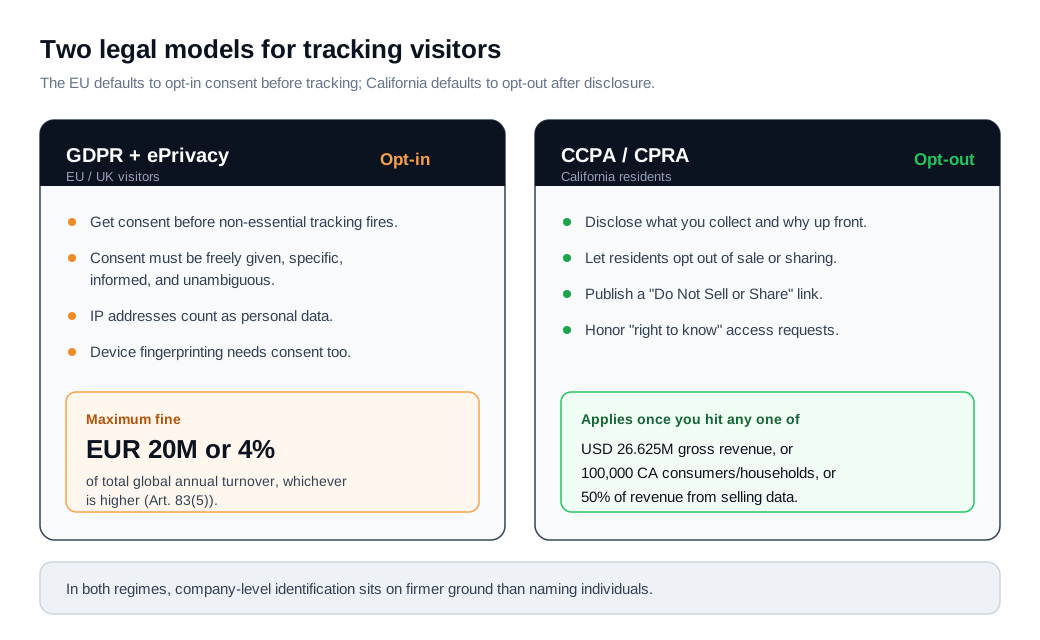
The practical takeaway across both regimes is the same. Anonymous analytics and company-level identification are defensible for most businesses. Person-level identification of individuals demands a lawful basis, real disclosure, and a working opt-out, and for EU residents it usually demands consent you have actually collected.
None of this is legal advice, and thresholds shift, so confirm your own obligations before you rely on a specific number.
How do you use visitor tracking ethically?
You use visitor tracking ethically by collecting only what you need, being honest about what you collect, and honoring people's choices without making them fight for it. Compliance is the floor. Ethics is the part your customers actually feel.
Start with data minimization. Every event you log has a cost in storage, in privacy exposure, and in noise that hides the signals you care about.
Track the actions that map to real decisions, such as viewing pricing, starting a trial, or requesting a demo, and skip the mouse-movement heatmaps you will never look at. A smaller, purposeful dataset is easier to secure and easier to reason about.
A few practices carry most of the ethical weight:
- Prefer first-party over third-party tracking. Watching behavior on your own site is far easier to justify than following people around the web.
- Respect consent signals in the tools themselves. A consent banner is meaningless if your tags fire before the visitor clicks, or if "decline" changes nothing.
- Avoid fingerprinting and unnecessary identifiers. Techniques that identify a device even when cookies are blocked take control away from the visitor, which is why regulators single them out.
- Do not store raw IPs and user-agent strings when you do not need them. Many privacy-first analytics tools drop or truncate the IP the moment it arrives, which is why Google Analytics 4, for example, does not store full IP addresses by default.
- Write a privacy policy a human can read, disclose visitor tracking plainly, and make access and deletion requests easy to submit and quick to honor.
There is an upside that gets overlooked. People who consent to tracking tend to be more engaged and more likely to buy than the ones who would have opted out, so a clean, consent-respecting dataset is often a more accurate picture of your real buyers than a bloated one full of people who never wanted to hear from you.
Restraint improves the data.
How do you act on website visitor data?
You act on visitor data by routing the highest-intent signals to a person or a workflow fast enough to matter, then closing the loop between what a visitor did and what you do next. Data that sits in a dashboard nobody checks changes nothing.
Speed is the variable that decides most of the outcome. The widely cited Lead Response Management Study found that contacting a new inbound lead within five minutes made a rep about 21 times more likely to qualify it than waiting 30 minutes, and roughly 100 times more likely to even reach the person.
Yet Harvard Business Review's audit of 2,241 companies in The Short Life of Online Sales Leads found an average first-response time of 42 hours, with 23 percent of companies never responding at all.
The behavior your data recommends and the behavior most teams actually deliver are miles apart, and that gap is the opportunity.
Turning tracking into action usually runs in three moves:
- Score intent from behavior. A visit to pricing, a return visit within a few days, and a look at a comparison or demo page together signal a live buying cycle far more reliably than a single pageview.
- Route that signal to the right place the instant it fires. A lead routing and notification setup can push a high-intent visit straight to an owner in Slack rather than into a report someone reads on Friday.
- Engage while the interest is still warm.
That last step is where real-time channels earn their keep. Instead of waiting for a form and a 24-hour email reply, a nudge from proactive outreach can open a conversation the moment someone lingers on a high-value page, and live chat lets them get an answer in the same session rather than the next one.
The tracking tells you who is worth interrupting and when; the conversation is what converts.
A quick worked example ties it together. Suppose 10,000 monthly visitors produce 200 pricing-page views, and 60 of those visitors also return within three days.
If you treat those 60 as high-intent and reach out in real time while they are still on the site, even a modest 10 percent conversion to a booked call yields 6 qualified conversations a month you were previously letting bounce.
That is the entire point of tracking: not the report, but the six calls.
Key takeaways
- Tracking has two very different modes. Aggregate analytics describes your traffic with no identity attached and is low-risk; person-level identification attaches a name and carries almost all of the legal and ethical weight.
- You can see less than vendors imply. Anonymous behavior covers nearly all traffic, IP lookup can reveal the company, and even the best person-level tools match only 30 to 40 percent of visitors, before you exclude EU residents.
- The law splits by geography. GDPR and ePrivacy require opt-in consent before non-essential tracking, with fines up to 20 million euros or 4 percent of global turnover, while CCPA allows an opt-out model after clear disclosure.
- Ethics beats bare compliance. Collect only what maps to a real decision, respect consent signals in the tools, avoid fingerprinting, and make opt-out and deletion effortless.
- Speed decides the payoff. Reaching a high-intent visitor within five minutes can make qualification about 21 times more likely, yet the average company takes 42 hours, so the value is in acting fast, not in the dashboard.
- Route behavior to action. Score intent, notify an owner instantly, and open a real-time conversation while interest is still warm, or the data does nothing.
TAGS

Written by
Nilas MylerCo-founder & CTO, Glimpze
Nilas is the co-founder and CTO of Glimpze, an inbound sales tool that turns high-intent website visitors into live conversations. A former SEO consultant for some of the largest companies in Denmark, he writes about speed-to-lead, inbound sales, and conversion rate optimization — the technical and operational mechanics of turning traffic into pipeline.


