
On this page
Most of the people who signed up for your product last quarter are not using it today. They created an account, clicked around once or twice, and then went quiet.
On paper they are still customers. In practice they are gone, and nobody on your team got an alert when it happened.
Winning those people back is some of the cheapest growth you can buy. A dormant user already knows your name, has a login, and has some memory of why they signed up, which is more than any cold prospect brings.
This guide is about turning that quiet list into active accounts again, without discounts, guilt, or spam. Here is the path: who actually counts as inactive, why people go dark, the re-engagement tactics that move the needle, how soon to act, how to measure whether any of it worked, and a worked example you can copy.
Who counts as an inactive user?
An inactive user is someone who used your product before and has since stopped doing the things that count as real use, for longer than a threshold you decide in advance.
The two words that matter are "before" and "threshold." Someone who never activated was never active, and a customer who skips a single day is not dormant. Inactivity is a change from a prior pattern that lasts.
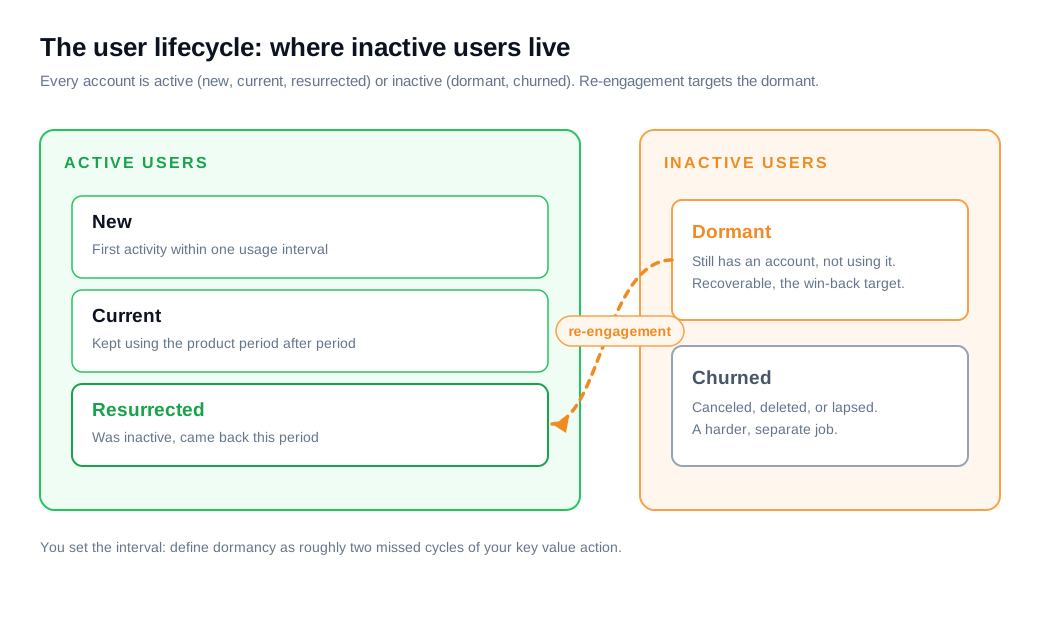
Product teams usually split inactive users into two groups:
- Dormant users still have an account or the app installed and could return tomorrow, they just have not used it in a while.
- Churned users have canceled, deleted, or let a subscription lapse, so bringing them back is a harder, separate job.
Userpilot's breakdown frames inactive users as exactly this pair, and most re-engagement work targets the dormant group, where the door is still open.
What counts as "a while" is specific to your product. Amplitude's lifecycle model defines a dormant user as one who performed your key event in the previous period but not in the current one, and a resurrected user as one who did the reverse, coming back after sitting out a period.
The period is yours to set. A daily-habit app might call a user dormant after a week of silence, while a tax tool that people touch once a year needs a far longer window.
Pick the action that signals value (a task created, a report run, a message sent) and the interval that matches how often a healthy user does it, then define dormancy as roughly two missed intervals.
Why bother re-engaging inactive users?
Re-engage inactive users because reviving someone you already have costs a fraction of acquiring a stranger, and revived users tend to be worth more than fresh ones.
Harvard Business Review has reported that landing a new customer runs five to twenty-five times more than keeping an existing one, and that a five percent lift in retention can raise profits by twenty-five to ninety-five percent. Those numbers explain why growth teams that only pour money into the top of the funnel eventually plateau.
Cost is only part of the advantage. Reactivated users have already crossed the hardest line, the decision to try you at all, so they need less convincing than a cold lead.
One analysis of SaaS reactivation found that returning customers carried a roughly twenty-three percent higher average revenue per user than newly acquired ones. A dormant account is warm pipeline that happens to be quiet.
There is a strategic reason too. Every dormant user is feedback. The reason they left, once you find it, points straight at the leak in your onboarding or your product, which means a re-engagement program doubles as a diagnostic for why new users churn in the first place.
What causes users to go dormant?
Users go dormant mostly because they never reached the value your product promised, and the damage is usually done early.
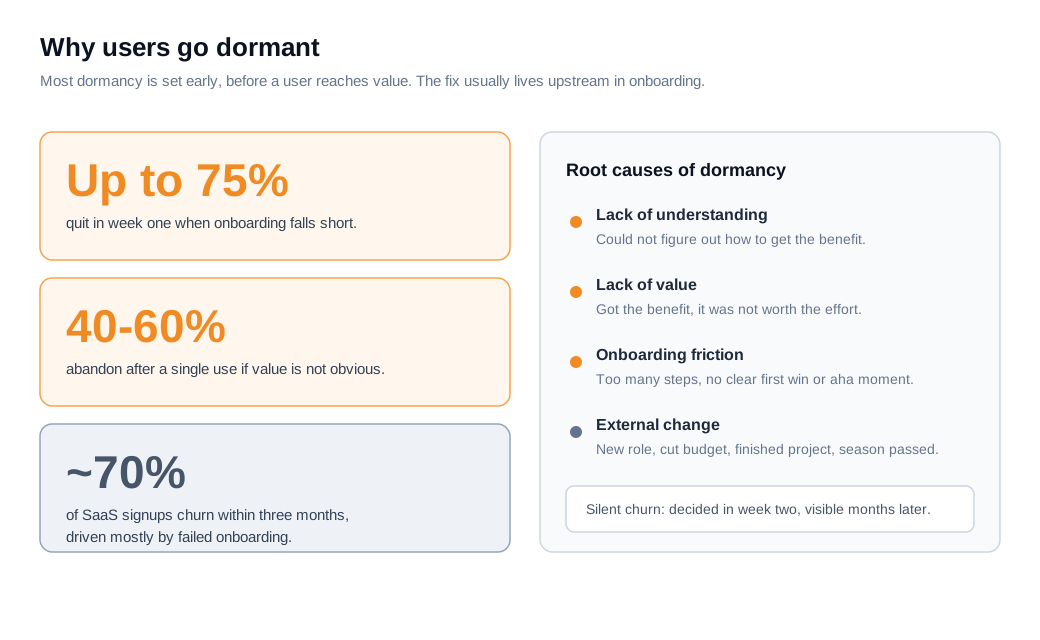
The two most common root causes are a lack of understanding (they could not figure out how to get the benefit) and a lack of value (they got it and it was not worth the effort). Both trace back to the first few sessions.
Onboarding is where the fade begins. One review of onboarding drop-off reports that up to seventy-five percent of new users abandon a product within the first week when onboarding falls short, and that forty to sixty percent walk away after a single use if they do not quickly see the point.
The same pattern shows up at the quarter mark: analysts estimate that around seventy percent of new SaaS users churn within three months, with failed onboarding as the main driver, ahead of price or competition.
The tricky part is that this churn is silent. A frustrated user rarely complains. They finish step one, never come back for step two, and stay on the books until a renewal that never happens.
The decision was made in week two and only becomes visible months later. That lag is why teams miss it, and why catching dormancy early beats waiting for a cancellation.
Not every cause is your fault. People change roles, budgets get cut, a project ends, or a seasonal need passes. Those users can still return when their situation shifts, which is a good reason to keep a light touch alive rather than deleting them from your list.
What re-engagement tactics work?
The tactics that work start with segmentation by reason, then deliver a personalized, low-pressure message that reminds the user of the value they missed and removes whatever stopped them.
A blanket "we miss you" email to everyone is the weakest possible version. Sorting dormant users by why they went quiet is what makes the rest effective.
Begin by grouping. Look at each user's last meaningful action before they faded and cluster the segments: people who never finished setup, people who used one feature and stopped, people who were heavy users and then dropped off a cliff.
Each group needs a different message. The never-activated need help reaching the first win. The lapsed power user needs a reason the product is worth returning to, like a feature that fixes their old complaint.
Then match the channel to the user. Email is the workhorse, and win-back emails earn their keep, but in-product messages reach people who still open the app, and a scheduled welcome and re-engagement flow can fire the right nudge automatically when someone crosses your dormancy line.
Personalization is what separates a nudge from noise. One SaaS study found that emails highlighting new features tied to a user's history lifted reactivation by about fifteen percent, and that automated in-app reminders drove roughly twenty percent higher engagement than generic prompts.
Where you can, ask instead of guess. A short, human question when a quiet user returns ("what were you trying to do when you last logged in?") surfaces the real blocker faster than any dashboard, which is why a light touch of live chat or a proactive nudge on a returning visitor often beats sending another email.
Keep incentives in reserve. A discount can pull back a price-sensitive user, but leading with money trains people to wait for it and rarely fixes the reason they left. Repairing the root cause in the product does more than any coupon.
How soon should you try to win a dormant user back?
Try to win a dormant user back the moment they slip below their normal rhythm, because the odds of a return fall the longer they stay away.
Reactivation follows a decay curve. A user who went quiet last week remembers you and has low friction to return. A user who has ignored you for six months has moved on, replaced you, or forgotten the password.
Set the trigger at roughly two missed usage intervals, the same line you drew when you defined dormancy, and automate the first touch so no one has to notice.
If your active users engage weekly, a nudge at two to three weeks of silence is early enough to matter. A single gentle reminder at the thirty-day mark saves far more accounts than a dramatic win-back push at month six, when most of the segment has already gone cold.
Timing also means letting behavior reset the clock. When a dormant user opens a re-engagement email or logs back in, that action should move them out of the win-back track and into normal lifecycle messaging automatically.
The goal is a system that watches for the dip and responds while the memory is fresh, rather than a quarterly cleanup of a list that went stale months ago.
How do you measure win-back?
Measure win-back with a reactivation rate, the share of inactive users who become active again inside a defined window, and then track how many of them stay.
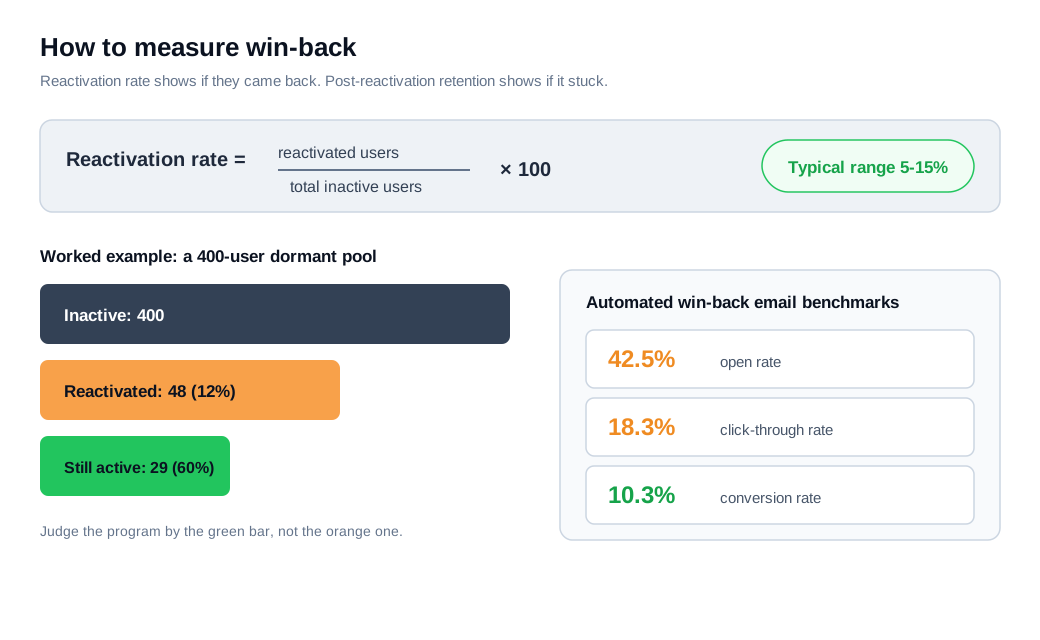
The core formula is simple: reactivated users divided by total inactive users, times one hundred. Amplitude frames the same idea as a resurrection rate, resurrected users over churned users.
Whichever label you use, three windows have to be nailed down first: the period over which users became inactive, the window in which you count reactivations, and the inactivity threshold that separates active from dormant.
Benchmarks give context but not a target. Reactivation-rate references put typical programs in the five to fifteen percent range, with well-run efforts higher, though the honest answer is that context matters more than any single number because dormancy is defined differently everywhere.
If email is your main channel, the win-back message has its own benchmarks: automated win-back emails have been measured at around a forty-two percent open rate, an eighteen percent click rate, and a ten percent conversion rate, well above ordinary promotional sends.
The number that actually matters is what happens next. A reactivation that lasts one session is a vanity win.
Track post-reactivation retention (how many revived users are still active a week or a month later) so you separate people who genuinely came back from people who clicked once and vanished again. A campaign that reactivates twelve percent and keeps half of them is worth more than one that spikes to twenty percent and loses almost all of them by the next period.
What does a re-engagement campaign look like in practice?
Here is the whole loop with numbers, using a project-management tool that counts a user as active when they create or complete a task in a given week.
Say 1,000 people signed up over a quarter. Thirty days later, 400 of them have not touched a task in two weeks, so they cross into dormant. That is the pool.
Segment the 400 by their last action. Suppose 250 never got past setup and 150 were active for a while and then faded. The two groups get two flows.
The 250 setup-stallers receive an in-app checklist that walks them to their first completed task, a short email offering a ten-minute live setup call, and one reminder. The 150 faded users get an email highlighting a feature released since they left that maps to what they used to do, plus an in-app message waiting for them the next time they log in.
Now the math. If the campaign reactivates twelve percent of the 400, that is 48 users back inside thirty days. Track them for another month: if 60 percent stay active, 29 users have genuinely returned.
At a $30 monthly plan, that is about $870 in recovered monthly revenue, or roughly $10,000 a year, from accounts you had already written off.
Buying those 48 reactivations as new signups at a $150 acquisition cost would have run about $7,200. The re-engagement flows, once built, ran on automation and cost close to nothing per user. That gap, recovered revenue against near-zero marginal cost, is why the quiet list deserves a real program.
Key takeaways
- Define inactive before you fix it: pick the action that signals value and the interval a healthy user hits it, then treat two missed intervals as dormant, keeping recoverable dormant users separate from churned ones.
- The economics favor re-engagement: acquiring a new customer costs five to twenty-five times more than keeping one, and revived users often spend more than fresh ones, so the quiet list is warm pipeline.
- Most dormancy is an onboarding failure: users go dark because they never reached value, and up to seventy-five percent abandon in week one when onboarding falls short, so the real fix often lives upstream.
- Segment by reason, then personalize: group dormant users by their last action and send a targeted nudge across email and in-product channels, because personalized, feature-specific messages beat a generic "we miss you."
- Act early and let behavior reset the clock: reactivation odds decay with time, so trigger the first touch at roughly two missed intervals and move users back to normal messaging the moment they return.
- Measure the return, then the retention: track reactivation rate against a five to fifteen percent yardstick, but judge the program by post-reactivation retention, since a revival that lasts one session does not count.

Written by
Nilas MylerCo-founder & CTO, Glimpze
Nilas is the co-founder and CTO of Glimpze, an inbound sales tool that turns high-intent website visitors into live conversations. A former SEO consultant for some of the largest companies in Denmark, he writes about speed-to-lead, inbound sales, and conversion rate optimization — the technical and operational mechanics of turning traffic into pipeline.


