
On this page
A new user signs up for your product on a Tuesday morning, clicks around the dashboard for ninety seconds, and closes the tab. Your onboarding email lands in her inbox that afternoon, four hours too late, and joins the roughly four in five onboarding emails that are never opened. She has already decided the product is confusing, and a message she never reads will not change her mind.
In-app onboarding is built for that exact gap. It teaches people inside the product, at the moment they are actually trying to use it, instead of in a channel they check hours later or ignore entirely. For a self-serve business, how well you do this often decides how many signups become paying, retained customers.
This post covers what in-app onboarding is, why it matters, which patterns like tooltips and checklists actually work, how it compares with email-only onboarding, and how to measure whether it is doing its job.
What is in-app onboarding?
In-app onboarding is the guided, in-product experience that helps a new user learn your product and reach value without leaving the interface. It is the layer of instructions, prompts, and tips that lives inside the app itself, delivered through elements like welcome modals, tooltips, checklists, and empty-state hints while the user works.
That marks it off from onboarding in the wider sense, which also includes welcome emails, help docs, webinars, and, for larger deals, a human success manager. Those channels sit outside the product. In-app onboarding is the part that happens where the work happens, and it can react to what a user does in the moment. As UserGuiding describes it, in-app onboarding introduces core features, explains navigation, and communicates the product's value from within the interface rather than around it.
The reason teams treat it as its own discipline is timing. A tooltip that appears the instant a user hovers over an unfamiliar button is answering a question the person is asking right now. An email sent that evening is answering a question they have already given up on. In-app guidance meets attention at its peak, which is why it carries so much of the load in modern SaaS onboarding.
Why does in-app onboarding matter?
In-app onboarding matters because most users decide whether a product is worth their time during the first session, and the surest way to reach them in that window is inside the product itself. Miss it and you lose them before any email, call, or renewal notice can help.
The retention data is blunt about the stakes. Wyzowl's onboarding research found that customers who go through a poor onboarding experience are three times more likely to churn, and that structured onboarding lifts 90-day retention from about 52% to 76% for the same product and the same signups. The only variable that changed was how well those users were guided to their first win.
Activation numbers tell the same story from the other side. Userpilot's onboarding metrics research puts average B2B SaaS activation around 37%, which means roughly two of every three signups never reach the moment the product is supposed to deliver for them. Every one of those lost users cost real acquisition money to bring in. In-app onboarding is the cheapest lever you have to move more of them across that line, because it works on traffic you have already paid for.
What in-app onboarding patterns like tooltips and checklists work?
The patterns that work are a small set of in-app elements, each fired at the right moment rather than all at once: a welcome modal, an onboarding checklist, contextual tooltips, hotspots, empty-state prompts, and a resource center. Chameleon frames a pattern as a reusable design solution tied to a trigger condition, meaning when it fires, for whom, and what it is trying to accomplish. The trigger is what separates helpful guidance from noise.
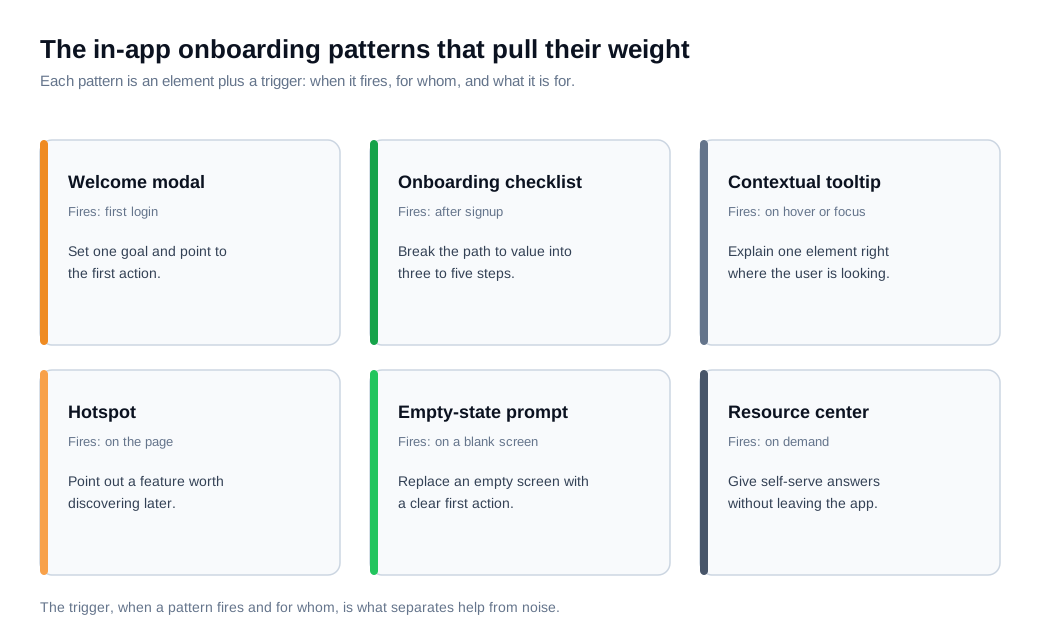
A welcome modal is the opening step, a single screen that confirms the outcome the user came for and points them at the first action. Keep it to one screen and one goal. A welcome message flow can carry this automatically, greeting each new account and routing it to the right first task.
The checklist is the workhorse. It breaks the path to value into a few visible steps so progress feels real, and short lists finish far more often than long ones. Userpilot's benchmark across 188 companies puts average checklist completion at just 19.2%, with a median of 10.1%, so three-to-five outcome-anchored items beat a list of ten.
Tooltips and hotspots handle the fine grain. A contextual tooltip explains one element at the point of confusion, while a hotspot marks a feature worth discovering later. Product tours string several of these into a walkthrough, and the trigger matters as much as the content. Chameleon's data shows user-triggered tours perform two to three times better than tours that fire automatically, and Appcues recommends keeping any tour to five steps or fewer before completion falls off. When a user stalls despite the guidance, a contextual live chat prompt that appears on the stuck screen catches them before they close the tab.
How does in-app onboarding beat email-only onboarding?
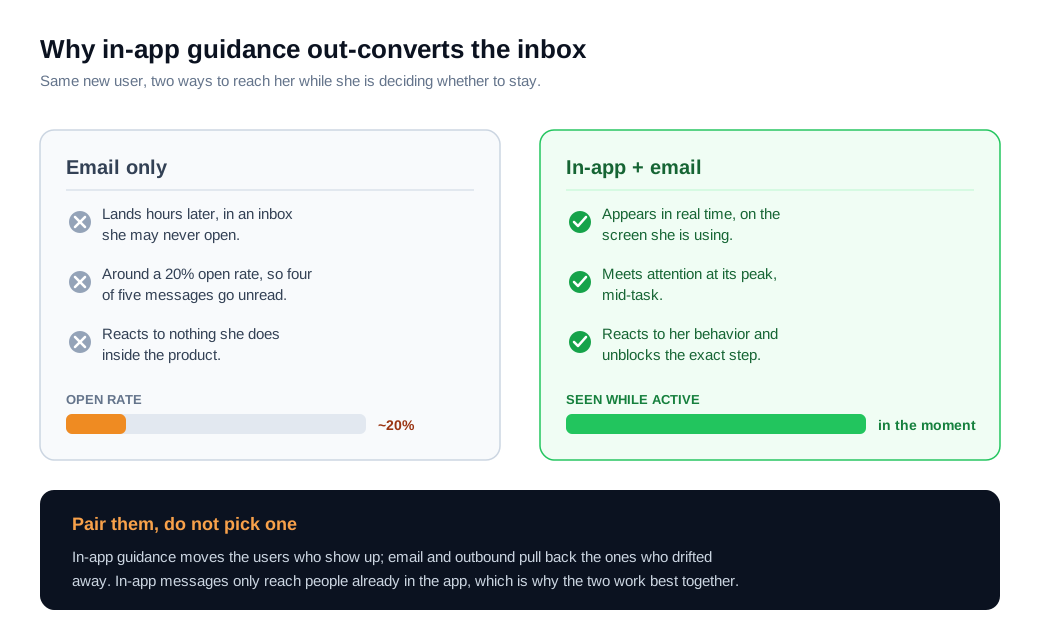
In-app onboarding beats email-only onboarding because it reaches users where the work is happening, in real time, while email waits in an inbox that most new users barely check. Timing and context are the whole advantage.
The engagement gap is large. Onboarding email drip campaigns average roughly a 20% open rate, so four of every five messages go unread, per Userpilot's review of in-app messaging channels. The same research points to Braze findings that pairing in-app messaging with email is associated with far higher engagement than email interactions alone. A prompt shown while a user is mid-task simply gets acted on more often than a message sitting in a queue.
There is a real limit worth naming. In-app messages only reach users who are currently in the app, which is exactly the group that needs the least help. The people most at risk of churning are the ones who signed up and never came back. That is why the strongest programs run both: in-app guidance to move the people who show up, and email or other outbound to pull back the ones who drifted away. Treat them as two halves of one system.
Here is the math on one cohort. A self-serve SaaS priced at $50 a month signs 1,000 trials a month and runs email-only onboarding: a welcome email, a few tips, and a nudge to come back. About 30% of trials activate, so 300 reach first value. The team then adds in-app onboarding, a short welcome modal, a four-step checklist, and tooltips on the two screens where users got stuck most. Activation climbs to 45%, which is 450 activated accounts from the same 1,000 trials, or 150 more per month. Activated users retain far better than those who never reached value, so even if only half of those extra accounts stay a year, that is 75 accounts times $600, or $45,000 in additional annual revenue, with no added acquisition spend. The lift is illustrative, but the mechanism is real, because guidance shown in the moment converts more of the traffic you already bought.
How do you measure in-app onboarding?
You measure in-app onboarding by outcomes rather than by how many people clicked through the tour, tracking activation rate, time to value, feature adoption, and retention by cohort. Step-completion on the onboarding UI tells you almost nothing on its own, because a user can finish every tooltip and still never reach real value.
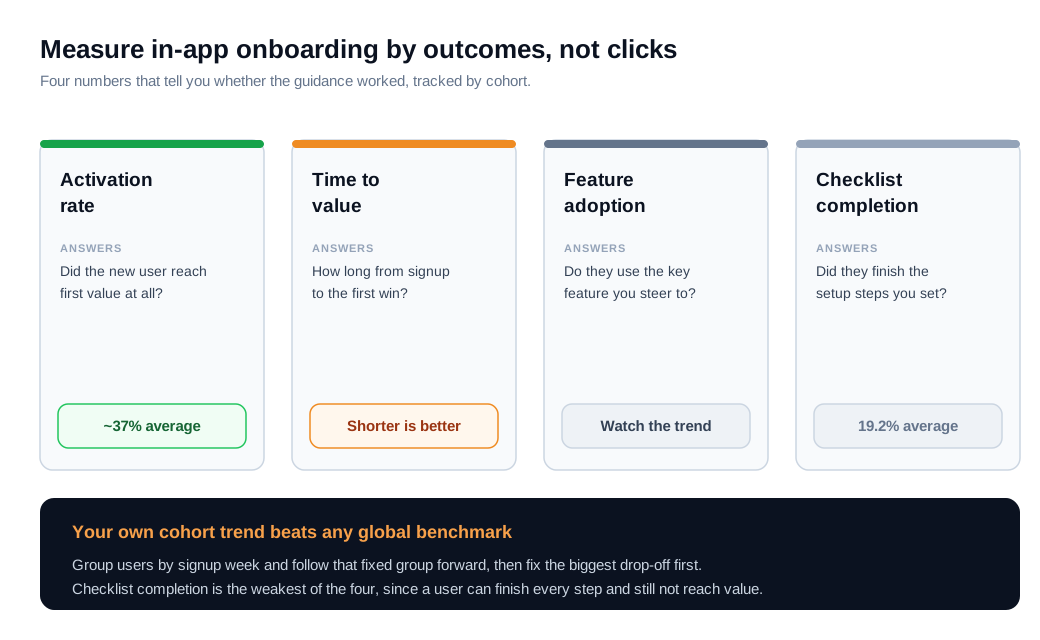
Activation rate is the anchor. It is the share of new users who complete the key action that signals they reached first value, and Userpilot's research puts the B2B SaaS average around 37%. If your activation sits below that, the onboarding has clear room to move; above it, you are beating most of the field.
Time to value is the stopwatch on that same moment, the elapsed time from signup to first win, and shorter is almost always better. Feature adoption rate tracks whether users reach the capabilities onboarding is meant to drive them toward. Dismissing a prompt is not the same as using the feature, so this metric keeps you honest. Retention over 30, 60, and 90 days is the final check, since it confirms the early win turned into a habit.
Two habits keep the numbers trustworthy. Measure by cohort, grouping users by the week they signed up and following that fixed group forward, so a change you ship can be credited or blamed cleanly. And instrument the flow so you can see the exact step where users fall out, then attack the biggest drop-off first. When an account stalls on a specific step, a behavior-triggered proactive nudge can reach it right then, which turns measurement into action instead of a report nobody uses. Benchmarks are useful context, but your own trend line is the number that compounds.
How do you avoid overdoing in-app onboarding?
You avoid overdoing in-app onboarding by treating every modal and tooltip as friction until it earns its place, and by firing guidance from user behavior rather than blasting all of it at everyone on day one. More prompts are not more helpful; past a point they train users to dismiss without reading.
The common failure is stacking. A welcome modal covers the screen, a product tour starts underneath it, and a checklist blinks in the corner, all before the user has done anything. Auto-triggered tours are part of the problem, since they underperform user-triggered ones by two to three times, and the five-step ceiling exists because completion drops sharply beyond it. Let users skip, save their progress, and come back.
Segmentation is the fix that scales. Ask one job-to-be-done question at signup and branch the flow, so a user who came for one outcome does not get walked through three they will never use. Reserve human help for the accounts that justify it: a mid-market buyer stuck on setup is worth a quick screen share, while a low-cost self-serve user is better served by a tooltip that unblocks them without a call. The test for any piece of in-app guidance is simple. If removing it does not lower activation, it was noise, and the cleanest onboarding reaches value with the fewest interruptions.
Key takeaways
- In-app onboarding teaches inside the product. It is the guided, in-product layer of modals, checklists, and tooltips that helps a new user reach value without leaving the interface, and it can react to behavior in the moment.
- It matters because the first session decides retention. Poor onboarding makes users three times more likely to churn, and only about 37% of signups activate, so in-app guidance is the cheapest way to move more of the traffic you already paid for.
- A few patterns do the work. A welcome modal, a short checklist, contextual tooltips, hotspots, empty states, and a resource center, each fired at the right trigger, beat a wall of prompts shown at once.
- It outperforms email because of timing. Onboarding emails average a 20% open rate, while in-app guidance meets users mid-task, though the two work best paired so drifted users still get reached.
- Measure outcomes, not clicks. Track activation rate, time to value, feature adoption, and cohort retention, since a user can finish every tooltip and still never reach value.
- Restraint beats volume. Trigger guidance from behavior, segment by goal, let users skip, and cut any prompt that does not lift activation.

Written by
Nilas MylerCo-founder & CTO, Glimpze
Nilas is the co-founder and CTO of Glimpze, an inbound sales tool that turns high-intent website visitors into live conversations. A former SEO consultant for some of the largest companies in Denmark, he writes about speed-to-lead, inbound sales, and conversion rate optimization — the technical and operational mechanics of turning traffic into pipeline.


