
On this page
- What is lead routing in a CRM?
- Why is fast, accurate routing critical?
- What routing rules should you configure?
- How do you handle round-robin and territories?
- How do you set up lead routing in your CRM, step by step?
- How do you test routing before it goes live?
- What are the most common lead routing mistakes?
- Key takeaways
- Sources
A form comes in at 9:14 on a Tuesday morning. It lands in a shared inbox that three reps can see, and each of them assumes one of the others has it. By the time someone finally opens it the next day, the buyer has already booked a demo with a competitor who called back in four minutes. The lead was strong. The routing was the problem.
That gap is what lead routing is built to close. It is the set of rules inside your CRM that decides which rep owns which lead and how quickly they find out, so a good prospect never sits in a queue waiting for a human to work out whose job it is.
This post covers what lead routing is, why fast and accurate assignment matters, which rules to configure, how to handle round-robin and territories, how to set it all up in your CRM step by step, how to test it before it goes live, and the mistakes that quietly break it.
What is lead routing in a CRM?
Lead routing is the automated logic in your CRM that assigns each incoming lead to the right rep or queue based on attributes like territory, company size, product interest, or lead source, so assignment happens in seconds instead of waiting on a manager. It replaces the manual triage where someone eyeballs a list and hands leads out by hand.
At low volume, manual assignment feels fine. At a few hundred leads a month it breaks down: leads pile up overnight and on weekends, the best ones get skimmed while the rest go stale, and nobody can say who owns what. Routing turns that judgment call into a rule that runs the instant a lead is created.
Every major CRM ships with native tools for this. Salesforce uses lead assignment rules, HubSpot uses workflows with a "rotate record to owner" action, and both can branch on any field in the record. The mechanics differ, but the goal is the same: get the right lead to the right rep, fast, every time, without a person in the loop. Most teams pair the routing rule with an instant alert, which is why routing and notifications are usually configured together. A good walkthrough of that pairing lives in the routing and notifications guide.
Why is fast, accurate routing critical?
Fast, accurate routing is critical because a lead's value decays within minutes of arriving, and every extra hop through a slow or wrong assignment burns the short window when the buyer actually wants to talk. Speed and accuracy are two sides of the same rule: a lead delivered late fails, and a lead delivered fast to the wrong rep fails just as surely.
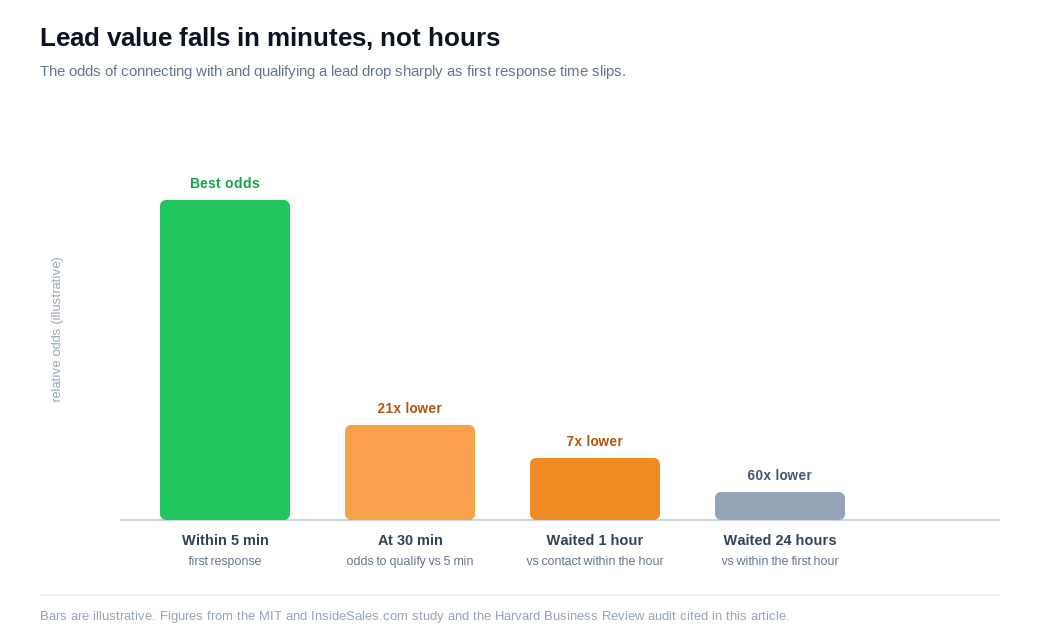
The numbers on speed are stark. The Lead Response Management study led by James Oldroyd at MIT, working with InsideSales.com, analyzed more than 15,000 leads and 100,000 call attempts and found that the odds of qualifying a lead drop by 21 times when you call after 30 minutes instead of within 5, and the odds of even reaching the contact drop by 100 times. Classic research from Harvard Business Review that audited 2.24 million leads found that firms attempting contact within an hour were nearly seven times more likely to have a meaningful qualifying conversation than those who waited just 60 minutes longer, and 60 times more likely than those who waited a day or more. The same HBR audit of thousands of US companies clocked the average first response at 42 hours, and roughly a quarter of firms never responded at all.
Accuracy is the other half. A lead that reaches a rep in two minutes but sits in the wrong territory still has to be found, reassigned, and reworked, which erases the speed advantage. Fast and wrong is just a slower kind of slow.
Here is a worked example. Say marketing sends 400 inbound leads a month to sales. Before any routing changes, average first response is six hours and only 60% of leads get contacted at all, which works out to 240 conversations. The team then switches to real-time routing that assigns each lead the moment it arrives and pings the owner instantly. First response falls to eight minutes and the contact rate climbs to 88%, which is 352 conversations. That is 112 more real conversations a month from the same 400 leads, with zero extra ad spend. Speeding up the first touch this way sits at the core of any serious inbound sales motion.
What routing rules should you configure?
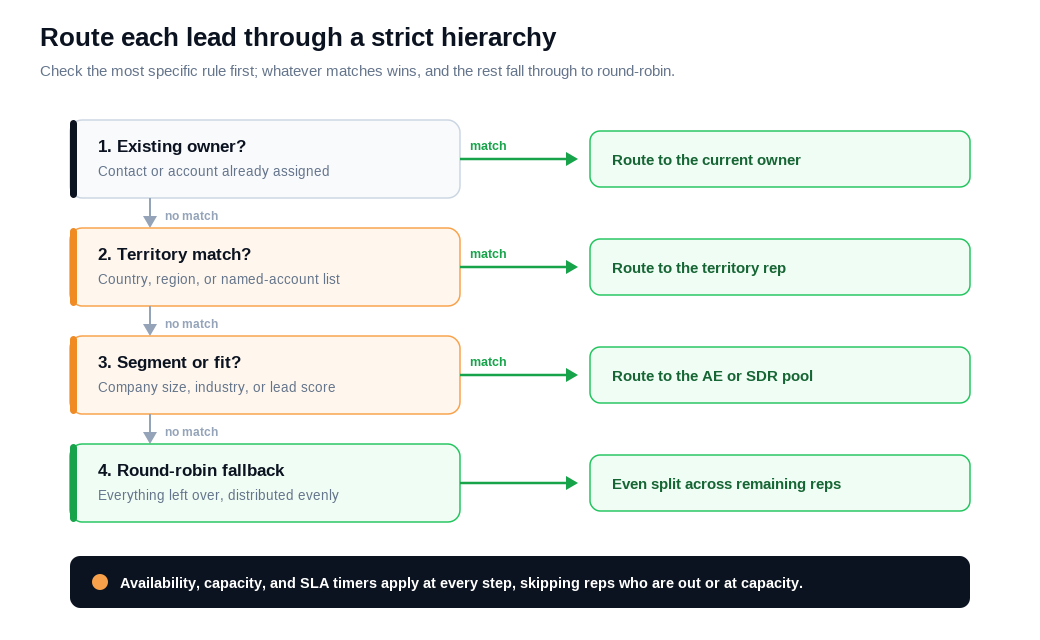
The rules you should configure follow a clear hierarchy, checked from most specific to most general: existing ownership first, then territory, then segment or product fit, then a round-robin fallback for everything left over. Ordering them this way means the sharpest rule always wins and nothing lands in two places at once.
Work down the layers:
- Existing ownership. If the contact or its account already has an owner, route the lead straight to that person. This stops two reps from working the same logo and keeps a buyer with the rep who already knows them.
- Territory. Assign by geography (country, state, region) or by named-account lists so leads land with the rep who covers that patch.
- Segment and fit. Split by company size, industry, product interest, or lead score. Enterprise-sized leads go to account executives, smaller ones to an SDR pool, so the deal size matches the rep.
- Round-robin fallback. Everything that does not match a specific rule gets distributed evenly across the remaining reps, so no lead is ever orphaned.
Two more conditions belong on top of that stack. Layer in availability and capacity so a rep who is out of office or already at their lead limit is skipped, and add an SLA timer that reassigns or escalates a lead if the first owner does not act within a set number of minutes. Both keep the hierarchy from quietly dumping leads on someone who cannot work them.
How do you handle round-robin and territories?
You handle round-robin and territories by layering them rather than choosing between them: territory rules make the first cut so each lead lands in the correct pool of reps, and a round-robin then distributes leads fairly among the people inside that pool. Territory decides where a lead belongs; round-robin decides whose turn it is.
Set territories on clean, normalized fields. If your leads arrive with "USA," "U.S.," and "United States" all mixed together, the territory rule cannot match them, so standardize country and state values at capture before anything routes. Define each territory as a region, a set of postal codes, or a named-account list, and give every territory a clear owner or team.
Round-robin then runs inside each territory. Plain round-robin splits leads evenly, one to each rep in turn, which is fair but blunt. Native tools have real limits here: as LeanData notes, basic round-robin keeps handing leads to reps who are out of office or already at capacity unless you add availability and capacity checks that pull them out of the rotation automatically.
Weighted round-robin fixes the fairness-versus-skill tension. You assign proportions instead of an even split, so your strongest closers get more volume. A quick example: with a 3-to-1 weight between a senior rep and a junior one, every four leads in that territory send three to the senior and one to the junior. Across 200 leads in a month, that is 150 to the senior rep and 50 to the junior, which keeps high-value leads with proven closers while still developing the newer rep.
How do you set up lead routing in your CRM, step by step?
You set up lead routing by mapping the logic on paper first, then translating it into your CRM's native tools one rule at a time, ordered from most specific to most general. A clean lead routing CRM setup is mostly careful sequencing, so the drawing comes before the clicking.
A practical order of operations:
- Map the decision tree. Sketch every branch (owner, territory, segment, fallback) and write down which rep or queue each path ends at. The map usually exposes overlaps and gaps before you build anything.
- Clean the input data. Make sure the fields you route on (country, state, lead source, record type, territory) are populated and normalized at the point of capture. Routing logic can only be as accurate as the data feeding it.
- Build rules from specific to general. In Salesforce, one active assignment rule per object holds ordered rule entries, and the first entry that matches wins, so put your narrowest criteria at the top. In HubSpot, use if/then branches to sort by territory and segment, then a "rotate record to owner" action for the round-robin step.
- Wire up the notification. Pair each assignment with an instant alert so the owner knows within seconds, whether that is an email, a mobile push, or a message in Slack through your integrations. Routing without a fast alert just moves the delay from assignment to awareness.
- Set an SLA and escalation path. Decide the maximum minutes a lead can sit unactioned, then have the CRM reassign or escalate it automatically when that timer runs out.
Build the rules in a sandbox or test environment where you can, so you are not editing live logic that is actively routing real leads.
How do you test routing before it goes live?
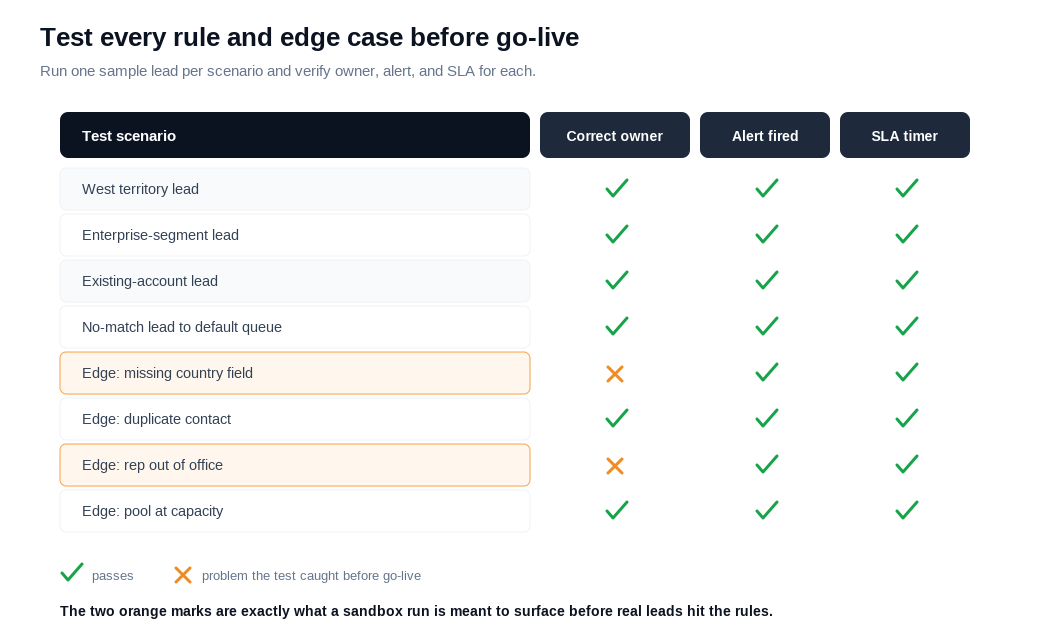
You test routing by pushing sample leads that match every rule and edge case through a sandbox before launch, confirming each one lands with the correct owner and fires the right notification, then watching for unassigned and misrouted leads once it is live. Testing is where you find the gaps that a tidy decision tree hides.
Build a test matrix with one lead per scenario. Cover the happy path for each rule (a clean lead for every territory and segment) and then the edge cases that break routing in practice: a lead with a missing country, a duplicate of an existing contact, an unusual field combination, a rep who is out of office, and a pool that is already at capacity. For each test lead, check three things: the owner it landed on, whether the alert fired, and whether the SLA timer started.
Pay special attention to the fallthrough. Leads that match no rule should drop into a clearly owned default queue, never vanish into an unassigned void where nobody sees them. A single missing fallback is the most common way real leads disappear.
Once the rules go live, keep monitoring. Audit unassigned and misrouted leads weekly at first, then adjust as territories, headcount, and product lines change. Treating routing as ongoing maintenance rather than a one-time build is what keeps it accurate as the team drifts.
What are the most common lead routing mistakes?
The most common lead routing mistakes are processing leads in batches instead of in real time, feeding rules dirty data, running round-robin with no availability check, shipping without an SLA or escalation, and never revisiting the rules as the team changes. Each one quietly reopens the gap that routing was supposed to close.
Batch processing is the worst offender. A system that assigns leads every 15 minutes has already burned most of the 5-minute window before a rep ever sees the lead, so assignment has to fire the instant a lead is created. Dirty data is close behind: unnormalized country values and empty required fields send leads to the wrong rep or to nobody. Round-robin with no availability check piles leads on people who are on holiday. Missing SLAs let a lead sit untouched with no backstop. And rules that no one audits slowly rot as reps leave, territories shift, and new products launch. None of these are exotic. They are the ordinary ways a routing setup decays, and a periodic audit catches all of them, which most routing best-practice guides rank as the single most valuable habit.
Key takeaways
- Speed and accuracy are the same job. A lead's odds of qualifying drop sharply within minutes, so routing has to deliver the right lead to the right rep in seconds, not hours.
- Route in a strict hierarchy. Check existing ownership first, then territory, then segment or fit, then a round-robin fallback, ordered from most specific to most general so the sharpest rule wins.
- Layer territories and round-robin. Territory rules place the lead in the right pool, and a weighted round-robin distributes fairly inside it while sending more volume to your proven closers.
- Clean the data before you build. Routing is only as accurate as the country, state, source, and record-type fields it reads, so normalize them at capture.
- Test every rule and edge case. Run sample leads through a sandbox, verify owner, alert, and SLA for each, and make sure unmatched leads hit an owned default queue.
- Audit on a schedule. Routing drifts as the team and product change, so review unassigned and misrouted leads regularly and adjust the rules.

Written by
Daniel SemeckyCo-founder & CEO
Daniel is the co-founder and CEO of Glimpze. He spends his days talking to revenue teams about how to catch high-intent visitors before they bounce, and writes about inbound sales, lead conversion, and building a motion where marketing and sales actually share a number.


