
On this page
Your top target account, a 2,000-person company your team has chased for two quarters, finally lands on your pricing page at 2:14 on a Tuesday afternoon. In most ABM programs, that visit shows up as a row in a dashboard the next morning, and the account owner sends a "saw you were on our site" email three days later. By then the buyer has answered the question somewhere else.
Conversational marketing closes that gap. It watches for the accounts you already care about, recognizes them the moment they arrive, and puts a relevant message or a live rep in front of them while the interest is still warm. ABM decides which accounts are worth the effort. Conversational marketing decides what happens the second one of them shows up.
This guide covers what conversational ABM is, how chat supports an ABM motion, how to spot target accounts on your site, how to personalize the conversation for named accounts, how to alert reps in real time, how to measure the program, and how to build one without a large budget.
What is conversational ABM?
Conversational ABM is the practice of identifying your target accounts the moment they visit your website and engaging them in a real-time, personalized conversation, in place of a form and a delayed follow-up. It layers a live channel (chat, an AI assistant, or a call) on top of the account list your ABM team already maintains, so a named account that shows intent gets a response in seconds rather than days.
The two ideas fit together neatly. ABM narrows your effort to a defined set of high-value accounts and works to pull them to your site through ads, content, and outbound. Conversational marketing, the category Drift named in the mid-2010s, handles the moment they land. As Qualified frames it in its explainer, conversational ABM is the act of identifying and proactively engaging target accounts on the website in real time with tailored conversations. The account list tells you who to watch. The conversation is what you do when one of them appears.
The timing matters because the window is small. Gartner's research on the B2B buying journey found that buyers spend only about 17 percent of purchase time meeting with all suppliers combined, and as little as 5 percent with any single rep when comparing vendors, as described in Gartner's buying journey research. A June 2025 Gartner survey found that 61 percent of B2B buyers prefer a rep-free buying experience. The few minutes a target account spends on your pricing page is one of the rare chances you get, so wasting it on a form is expensive.
How does chat support ABM?
Chat supports ABM by turning a passive account-visit signal into an active conversation, so the intent your program spent budget to create actually converts while it is live. ABM gets the right company to the site, and a live channel catches it before it leaves.
Four things a conversation adds to an ABM motion:
- Real-time engagement. A target account that reaches a high-intent page gets a message in the moment, not an email tomorrow.
- Qualification inside the chat. A few questions about role, use case, and timing separate a buying-committee member from a junior researcher, without a gated form.
- Routing to the account owner. The conversation goes to the rep who already owns the relationship, with context attached.
- A booked meeting or live handoff. A qualified conversation ends in a calendar hold or a jump to a live call, not a promise to follow up.
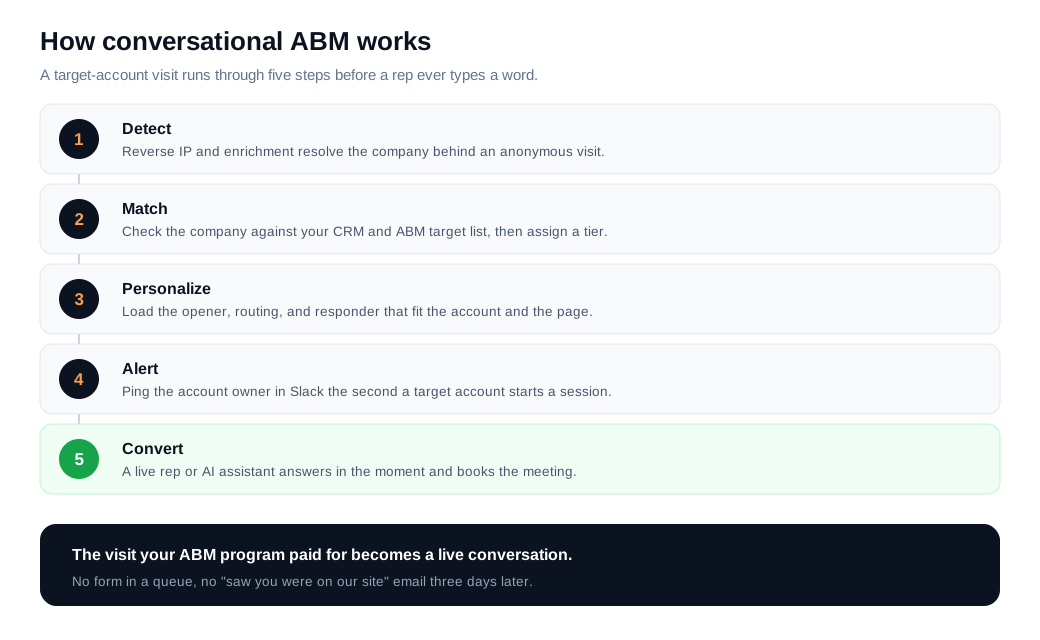
The play works because it puts humans only where they add value. A preference for self-serve still leaves sales a job: a rep should appear when a named account is on a buying-intent page with a real question, and stay out of the way otherwise. On-site live chat, backed by an AI chat assistant for the first pass and off-hours coverage, makes that timing possible without staffing every hour.
ThoughtSpot, a data analytics company, built its program around exactly this idea. It first defined a "sales-ready" segment that included people who engaged with an ABM campaign, browsed high-converting pages, or matched a target job title, then greeted only that segment with a conversation and routed them to sales. Qualified's ThoughtSpot case study reports the program produced 10 times more sales conversations, 70 percent more marketing-qualified leads, and 64 percent more meetings booked. Treat a single vendor's numbers as directional, but the mechanic is the point: watch for the accounts ABM already flagged, and talk to them the moment they show intent.
How do you detect target accounts on your site?
You detect target accounts by matching anonymous visitors to companies using reverse IP lookup and firmographic enrichment, then checking those companies against your CRM and ABM target list to flag the ones that matter. Most of the traffic on a B2B site never fills out a form, so the first job is turning an unknown session into a known company.
Reverse IP lookup resolves the organization behind a visit by matching the visitor's IP address to corporate IP ranges, turning anonymous traffic into a company name, as Dreamdata explains in its reverse IP overview. Enrichment adds firmographics like size, industry, and region, and a match against your Salesforce or HubSpot account list tells you whether this is a target account and which tier it belongs to.
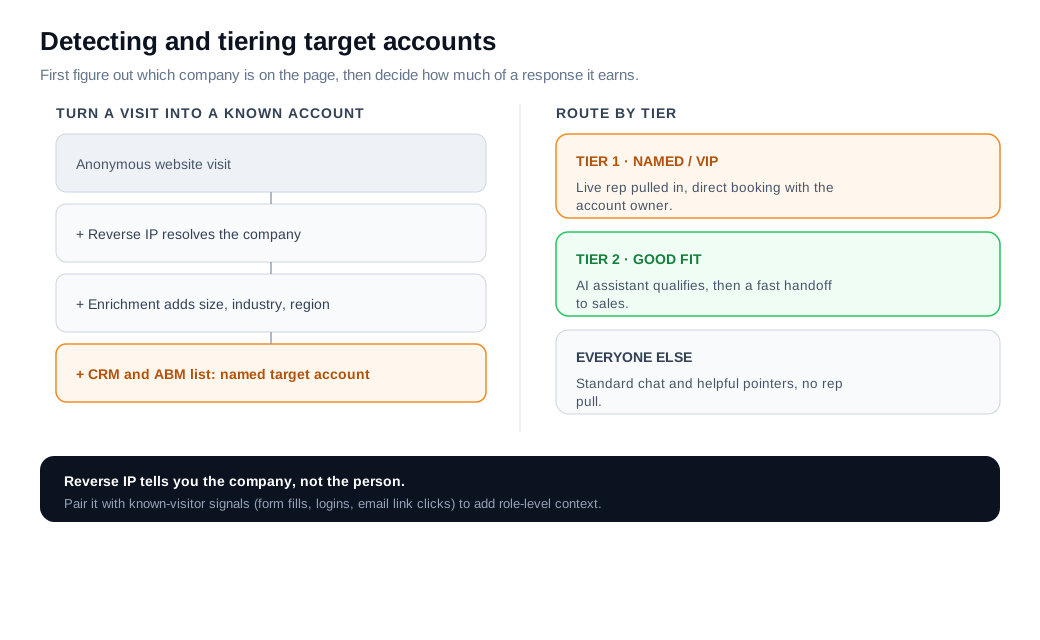
Reverse IP has a real limit, and pretending otherwise leads to awkward conversations. It tells you the company, not the person or the role, so pair it with known-visitor signals (a returning contact who filled a form before, a logged-in user, or an email-link click) to add the person-level context a rep needs.
Then tier the list. A named Tier 1 account deserves a live rep and a direct line to its account owner. A Tier 2 good-fit account can be qualified by an AI assistant first. Everyone else gets standard chat and useful pointers. Tiering keeps your reps' time on the accounts where a human reply changes the outcome.
How do you personalize chat for named accounts?
You personalize chat for named accounts by using what you already know about the account, its name, industry, tier, open opportunity, and account owner, to change the opener, the routing, and who responds. Personalization here is about relevance and speed, not a gimmick that greets someone by name before they have said hello.
A few concrete moves work well:
- Match the opener to the page and the account. A visitor from a target account on your integrations page might see "Most fintech teams ask about our SOC 2 posture and SSO, want the short version?" instead of a generic greeting.
- Bring CRM context into the thread. If the account has an open opportunity, the rep who joins references it instead of restarting from zero, and a prior conversation picks up where it left off.
- Change the experience by tier. A Tier 1 account gets a live rep and a booking link straight to its owner. A lower tier gets an assistant that qualifies first and hands off only when the fit is clear.
- Escalate to a richer channel when text stalls. For a technical question that is hard to resolve in writing, a hot account can jump to a live call or screen share without leaving the page.
Keep it grounded in what you can verify. If reverse IP only tells you the company, personalize at the company level and let the visitor fill in the rest. One 2026 industry survey of B2B personalization found that accounts prioritized by intent signals converted to closed opportunities at 21.3 percent, versus 8.4 percent for accounts that were not, per Markettailor's state of B2B personalization report. Treat the exact figures as directional, but the gap between a relevant conversation and a generic one is large.
How do you alert reps in real time?
You alert reps in real time by wiring your chat tool to push an instant notification, to Slack, email, or a mobile app, to the specific account owner the moment a target account starts a session or a conversation. The alert is the hinge the whole program turns on: a personalized experience no human answers converts worse than none at all.
Good alerting has two parts. Routing rules decide who gets pinged, matched by Salesforce owner, territory, or ABM tier. Alert channels decide how they hear about it. Qualified's guide to alerting and routing target accounts describes pushing notifications across Slack, Microsoft Teams, email, and a mobile app, plus desktop and voice alerts, when a visitor matches a company in the CRM. A routing and notifications setup that ties into your Slack workspace means the owning rep sees the account name, the page, and the tier without leaving the tool they already live in.
Speed is why the alert exists. The MIT and InsideSales.com Lead Response Management study, which analyzed more than 15,000 leads across six companies, found that responding within five minutes rather than thirty made a rep about 100 times more likely to connect and 21 times more likely to qualify the lead, published as the Lead Response Management study. Most firms never come close. A Harvard Business Review audit of 2,241 companies found an average first response of 42 hours, with 23 percent that never responded at all. For a named account you have chased for two quarters, a 42-hour reply is the same as no reply.
Here is the sequence in practice. A Tier 1 account opens your pricing page, detection matches it to the CRM, a Slack alert fires to the account owner with the company name and the page, and the rep joins the chat inside a minute while the buyer is still reading. That is the whole program working as designed.
How do you measure conversational ABM?
You measure conversational ABM by tracking how much of your target account list you engage and convert, target-account coverage, conversations held, meetings booked, and influenced pipeline, rather than total chat volume. The account list is the denominator that keeps the numbers honest: 500 conversations mean little if none came from target accounts.
A practical scorecard covers six things:
- Target-account coverage: the share of your list that started a conversation.
- Conversation rate: the share of target-account visits that engaged.
- Meeting rate: the share of qualified conversations that booked.
- Influenced and sourced pipeline: the pipeline the program touched or created.
- Response time: how fast a real reply reached the account.
- Close rate and deal size: what the program produced at the end.
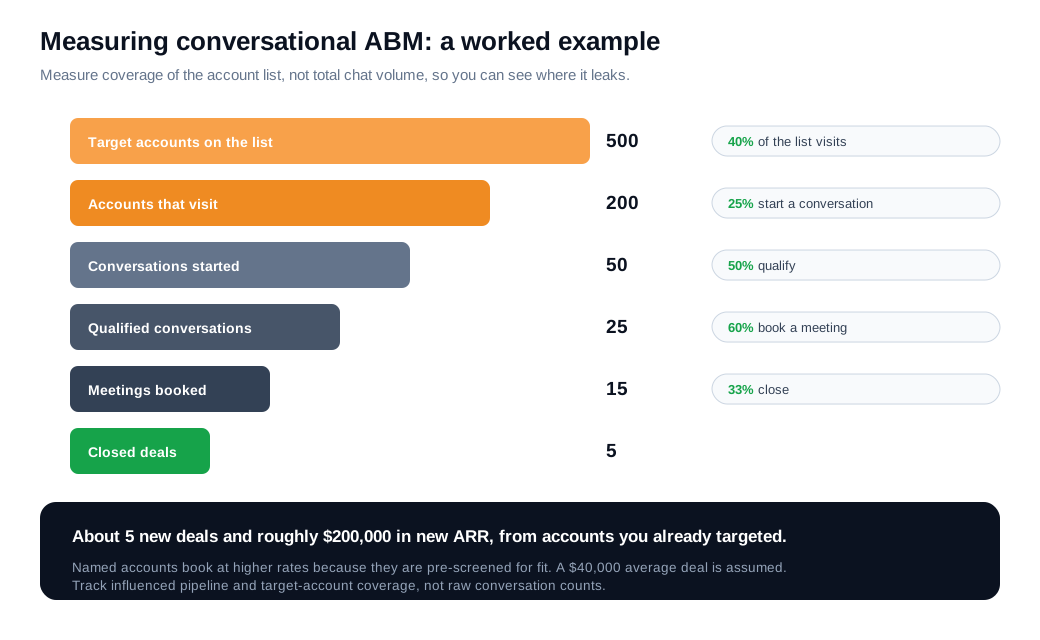
A simplified worked example shows the shape. Say your ABM list holds 500 target accounts, and in a quarter 40 percent of them (200 accounts) visit the site. If your chat engages 25 percent of those visits, that is 50 conversations, and if half qualify, you have 25 real opportunities. Named accounts book at higher rates than cold traffic because they are already screened for fit, so 60 percent booking a meeting is reasonable, or about 15 meetings. At a 33 percent close rate and a 40,000 dollar average deal, roughly 5 of those become customers, adding about 200,000 dollars in new annual recurring revenue from accounts you were already targeting.
The value of measuring each stage is that it shows you the leak. If coverage is low, the accounts are not visiting, an ads and outbound problem rather than a chat one. If conversations start but never qualify, the openers or the flow need work. If qualified conversations never book, the culprit is usually routing or a slow response. Report the whole thing in pipeline and coverage, the numbers a revenue leader recognizes.
How do you build a conversational ABM program?
You build a conversational ABM program by syncing your target account list to your chat tool, writing tiered rules for who gets alerted and who responds, and starting on your highest-intent pages before you expand. This is a launch you can stand up in a week, not a quarter.
- Sync the account list. Connect your CRM or ABM platform to the chat tool so detection can match visitors to named accounts and tiers automatically.
- Set tiered experiences. Decide up front that Tier 1 accounts get a live rep and a direct booking link, Tier 2 accounts get an AI assistant with a fast handoff, and the rest get standard chat.
- Write personalized openers. Draft a short, page-aware prompt for each high-intent page and segment. Keep the qualifying flow to the two or three questions that actually separate a buyer from a browser.
- Wire alerts and routing. Point notifications at the owning rep through Slack, Teams, email, or mobile, so a Tier 1 visit reaches a human in seconds.
- Staff it honestly. Cover your peak traffic with real people and let an assistant or an offline form handle the rest. A widget that promises a fast reply and then goes silent damages the accounts you most want to impress.
- Instrument from day one. Track coverage, meetings, and influenced pipeline so you can see which stage is losing accounts.
- Start narrow, then expand. Put the program on your pricing, product, and demo pages for your Tier 1 list first. Add pages and tiers once the first ones earn it.
Start narrow, respond fast, and let results decide where you scale. Many platforms, including Glimpze, offer a free plan, so you can test whether a conversation on one page converts your target accounts before committing budget or rebuilding your funnel. The same discipline that makes inbound sales work applies here: a narrow, well-staffed start beats a wide rollout nobody can answer.
Key takeaways
- Conversational ABM adds a live channel to your account list, engaging named accounts in a real-time, personalized conversation the moment they visit instead of a form and a wait.
- Detection turns anonymous traffic into named accounts, using reverse IP and enrichment to identify the company, then matching against your CRM and ABM tiers, with known-visitor signals filling in the person.
- Personalization means relevance, not tricks. Match the opener to the page and account, bring CRM context into the thread, and change who responds by tier.
- The real-time alert is the hinge. MIT's research found a five-minute response was 21 times more likely to qualify a lead than a thirty-minute one, yet the average first reply still runs about 42 hours.
- Measure coverage and pipeline, not chat volume. Track the share of your list you engage and convert, and report in the pipeline numbers a revenue leader recognizes.
- Start narrow and instrument early. Put the program on your highest-intent pages for your Tier 1 accounts, staff it honestly, then expand once it performs.

Written by
Daniel SemeckyCo-founder & CEO
Daniel is the co-founder and CEO of Glimpze. He spends his days talking to revenue teams about how to catch high-intent visitors before they bounce, and writes about inbound sales, lead conversion, and building a motion where marketing and sales actually share a number.


