
On this page
- What is a welcome bot?
- How is a welcome bot different from live chat and a chatbot?
- What should a welcome bot say?
- How does a welcome bot capture and route leads?
- How do you avoid annoying visitors with a welcome bot?
- How do you set up a welcome bot?
- How do you measure whether a welcome bot is working?
- Key takeaways
- Sources
A visitor opens your site at 9 p.m., reads two feature pages, and lands on pricing with one question in mind. Nobody on your team is online. The only thing waiting is a contact form that promises a reply within one business day, so the visitor closes the tab and books a demo with the competitor who answered in the moment.
A welcome bot exists to close that gap. It is the automated first message that appears when someone lands on a page, and, set up well, it does more than wave hello. It asks the question that matters, separates a buyer from a browser, and can put a high-intent lead in front of a rep before the visitor clicks away.
This guide defines what a welcome bot is, how it differs from live chat and a general chatbot, what it should say, how it captures and routes leads, how to keep it from irritating people, and how to measure whether it earns its place.
What is a welcome bot?
A welcome bot is an automated greeting that opens a conversation with a visitor the moment they arrive on a page, then steers them toward a useful next step such as an answer, a qualifying question, or a booked call. It is the first-touch layer of a conversational setup, the part that turns a silent page into a two-way exchange.
The term covers two things people often conflate. A plain welcome message is a single line of text that greets a visitor and stops there. A welcome bot adds logic on top: it can react to the page a visitor is on, ask follow-up questions, capture an email, and route the conversation based on the answers. ChatBot's documentation frames the welcome message as the initial exchange that sets the tone within seconds of someone landing, and the bot is what carries that opening line into an actual conversation.
The reason it matters is timing. A welcome bot works the seconds when interest is highest and a human is often unavailable. That window has real value: Forrester's research found that site visitors who use web chat are 2.8 times more likely to convert than those who do not. A welcome bot is how you start that chat automatically, on every page, at every hour, instead of hoping a visitor finds the widget on their own.
A good welcome bot has four jobs: greet the visitor with something relevant, qualify them with a question or two, route the promising ones to the right person, and capture enough detail that no lead falls through. The rest of this guide walks each one.
How is a welcome bot different from live chat and a chatbot?
A welcome bot is the opening and triage layer, live chat is the human who takes over when a conversation gets serious, and a general chatbot is the broader automation that can run an entire session. They overlap in the same widget, so the labels blur, but each carries a distinct job.
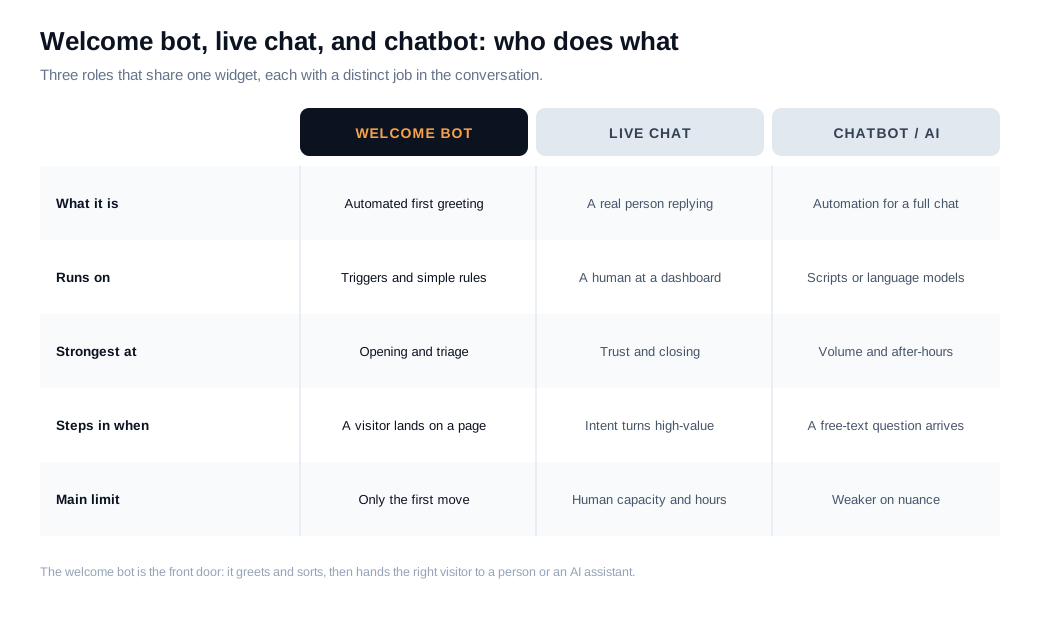
Think of it as a relay. The welcome bot greets every visitor and asks the first question, the way a good receptionist would. When the answers show real buying intent, it hands the thread to a person through live chat so a rep can read nuance, handle an objection, and close. A general chatbot or AI chat assistant sits alongside both, answering free-text questions, pulling from a knowledge base, and covering the hours no rep is online.
The practical takeaway is that a welcome bot rarely works alone. It is the front door. Its value comes from how cleanly it opens the conversation and how fast it gets the right visitors to the right next step, whether that step is a human, an AI answer, or a booked meeting.
What should a welcome bot say?
A welcome bot should say something specific to the page and the visitor, state one thing it can help with, and ask a single clear question that moves the conversation forward. Generic greetings get generic results. A page-aware opener that references what the visitor is actually looking at starts far more real conversations than a blanket "Hi, how can we help?" bubble, a point Social Intents makes across its library of welcome message examples.
Three rules keep an opener useful. Be specific: name the page, the product, or the behavior you can see. State a capability: tell the visitor what the bot can actually do, so they do not spend a message finding out. Ask one question: give a single, low-effort next step rather than an open-ended prompt that stalls people.
Here is the difference in practice. Compare three openers on a pricing page:
- Generic: "Hi there. How can we help you today?"
- A little better: "Have a question about pricing? Ask away."
- Page-aware and specific: "Comparing the Pro and Enterprise plans? I can tell you what changes at each tier, or line up a 10-minute walkthrough."
The third works because it meets a visitor who is already weighing plans, names the exact decision they are making, and offers two concrete paths. Match the message to intent by page. A blog reader might get an offer to send a related guide, a pricing visitor gets help choosing a plan, and a returning visitor who already demoed gets a nudge to pick up where they left off. The welcome messages and flows guide covers how to map an opener to each page.
Keep it short, write it the way a helpful person talks, and never promise a live human in the next second if no one is online to deliver.
How does a welcome bot capture and route leads?
A welcome bot captures and routes leads by asking two or three qualifying questions in the flow of conversation, saving the answers and contact detail, scoring the visitor against your criteria, and sending the qualified ones to the right rep with a notification, while logging everything to your CRM. Done well, it replaces the static form and the overnight wait with a live sort that happens while the visitor is still on the page.
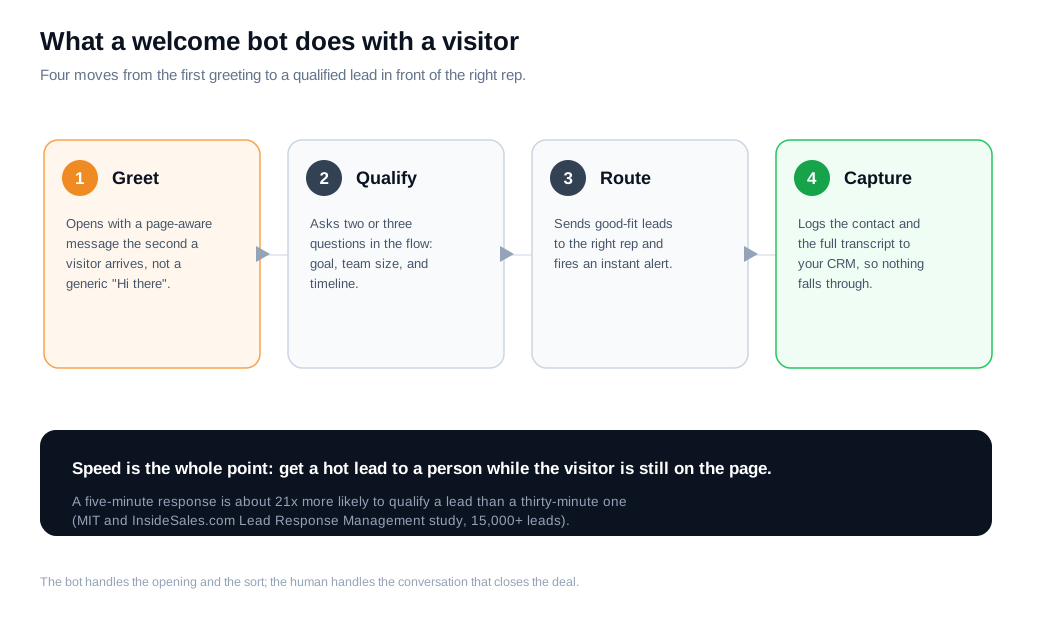
The capture works because it is conversational. Instead of a nine-field form, the bot asks one question, listens, and asks the next: what are you trying to do, how big is the team, what is your timeline. Each answer both qualifies the lead and gathers the data a rep would otherwise chase later. When the visitor matches your good-fit criteria, the bot routes the thread to an available rep and fires an alert so someone picks it up in seconds, the same way Intercom's Fin qualifies a prospect against defined criteria and routes accordingly, then hands off to a human on request. Wiring that routing and those alerts to where your team already works is its own job, covered in the routing and notifications guide.
Speed is the reason to do any of this. The canonical evidence is the MIT and InsideSales.com Lead Response Management study, which found that contacting a lead within five minutes rather than thirty made a rep about 100 times more likely to reach the lead and 21 times more likely to qualify it, across six companies and more than 15,000 leads. Most companies miss that window badly. Harvard Business Review's audit of 2,241 firms found an average response time of 42 hours, with 23 percent that never responded at all. Drift's reporting on conversational marketing frames the same gap around buyer expectations, describing how few companies answer inside the first minutes a lead expects, as its note on response-time expectations lays out. A welcome bot exists to answer inside that window automatically, then get a person involved before the lead cools.
Put a number on it. A lead who fills a form at 9 p.m. and waits until a rep logs in at 10 a.m. has sat for 13 hours. A welcome bot that qualifies the same visitor at 9:01 p.m. and books a morning call keeps that lead in the five-minute band where, per the MIT figures, it stays about 21 times more likely to qualify.
How do you avoid annoying visitors with a welcome bot?
You avoid annoying visitors by delaying the trigger, capping how often the bot appears, making the message relevant to the page, and giving people an obvious way to dismiss it. The failure mode is a bot that pops up on load, covers the content, and says nothing useful, which trains visitors to close it on reflex.
Timing is the first lever. Firing the bot the instant a page loads feels aggressive, before a visitor has read anything worth reacting to. Best-practice guidance from SendPulse on pop-up timing points to a window of roughly 15 to 30 seconds, or a scroll or exit signal, so the prompt lands after the visitor has shown a little interest. Tie the trigger to behavior where you can: time on a high-intent page, a second visit, or a scroll past the fold.
Frequency is the second lever. A bot that reappears on every page load, or every session, wears out its welcome fast. Cap it so a visitor who dismisses the greeting is not greeted again five seconds later, and remember the dismissal as they move across pages.
Relevance is the third, and it is the one most teams skip. A generic greeting on every page becomes background noise fast. A message that reflects the page a visitor is on reads as help rather than interruption. Keep the widget small, make the close button obvious, and never trap someone in a loop with no path to a human. If the bot cannot answer, it should offer a fast exit to live chat or a booked call rather than repeating its menu.
One honest rule sits above all of these. Do not promise speed you cannot keep. A bot that says "a specialist will be right with you" and then goes silent does more damage than no bot at all, so set clear hours and let an assistant or an offline form take over when the team is away.
How do you set up a welcome bot?
You set up a welcome bot by starting on your highest-intent pages, writing one page-aware opener and a short qualifying flow, wiring the routing and alerts, then instrumenting each step before you expand. It is a launch you can run in an afternoon.
- Pick the pages. Start where buying interest is clearest: pricing, product, demo, and comparison pages. Leaving the bot off low-intent pages at first means every conversation that opens is worth acting on.
- Write the opener and the questions. Draft a specific greeting for each page and the two or three questions that separate a good-fit buyer from a browser, such as role, team size, use case, and timing.
- Set the trigger. Use a delay or a behavior signal instead of firing on load, and cap the frequency so the bot does not nag.
- Wire routing and handoff. Decide who gets which conversation and how the bot hands a hot lead to a person, then connect the alerts to your team's inbox or chat tool so no lead waits.
- Cover the hours honestly. Staff peak traffic with real people, and let an AI assistant or an offline form catch the rest.
- Instrument every step. Track engagement, qualification, meetings, and dismiss rate from day one, so you can see which step loses people and fix that one.
Start narrow, keep response times honest, and let the bot earn more pages once the first ones perform.
How do you measure whether a welcome bot is working?
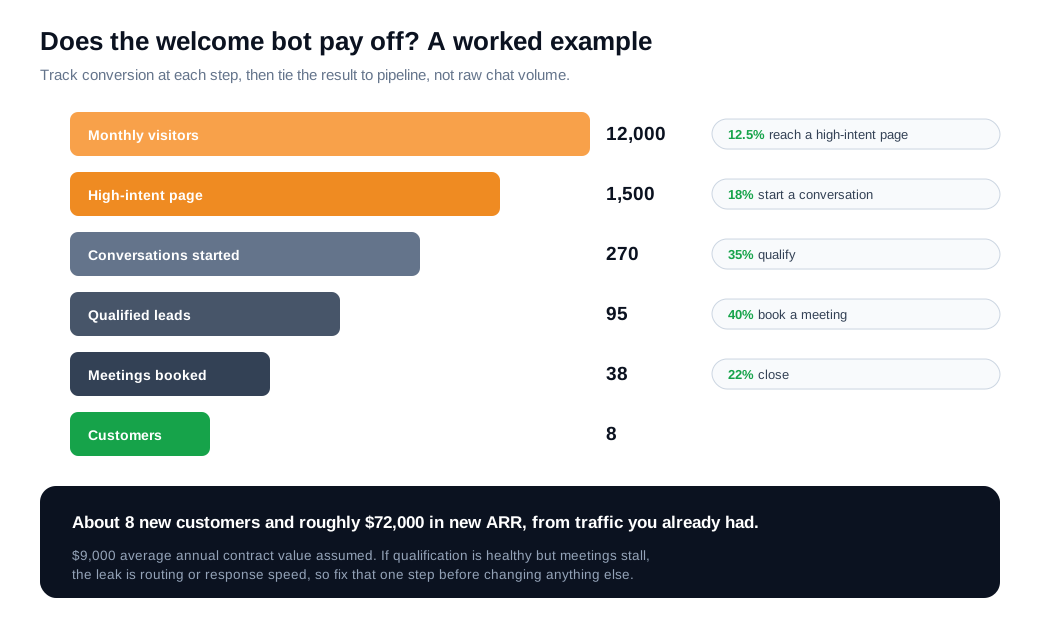
You measure a welcome bot by tracking conversion at each step, from greeting shown to conversation started to lead qualified to meeting booked, then tying the result to pipeline rather than raw chat counts. Stage-by-stage rates show where visitors drop off, and the downstream numbers show whether the bot earns its keep.
A useful scorecard covers six things: engagement rate (the share of greeted visitors who reply), qualification rate (the share of conversations that become good-fit leads), meeting rate (the share of qualified leads who book), dismiss rate (how many close the bot on sight), influenced pipeline (deals the bot touched), and any change in bounce rate on pages where it runs. Watch the dismiss and bounce numbers as guardrails: if a large majority dismiss instantly or bounce climbs after you switch the bot on, the timing or the message needs work.
Here is a worked example with round numbers. Say a B2B SaaS site draws 12,000 visitors a month, and about 12.5 percent of them, or 1,500 people, reach a high-intent page like pricing or product. The welcome bot greets them, and 18 percent reply, for 270 conversations. If 35 percent qualify, that is roughly 95 good-fit leads. Book 40 percent of those into meetings and you get about 38 meetings. At a 22 percent close rate and a 9,000 dollar average annual contract value, that is about 8 new customers and roughly 72,000 dollars in new annual recurring revenue, from traffic the site already had.
The value of the funnel view is that it makes the leak visible. If engagement is healthy but qualification is weak, the questions or the flow need work. If qualified leads never book, the problem is routing or response speed. Change one thing at a time, watch the stage rate move, and let the numbers tell you what to fix next.
Key takeaways
- A welcome bot is the automated opener that greets a visitor on arrival and moves them toward an answer, a qualifying question, or a booked call, working the seconds when interest is highest and a rep is often offline.
- It is a triage layer that works with people. The bot greets and sorts, live chat and an AI assistant handle the real conversation, and the value is in how cleanly it hands the right visitor to the right next step.
- Specific beats generic in what it says. A page-aware opener that names the decision and asks one clear question starts far more conversations than a blanket "How can we help?" prompt.
- Capture and routing run on speed. Qualify in the flow of chat, alert a rep instantly, and log to the CRM, because MIT's research puts a five-minute response 21 times more likely to qualify a lead than a thirty-minute one.
- Respect the visitor or lose them. Delay the trigger to roughly 15 to 30 seconds, cap frequency, keep the message relevant, make dismissal easy, and never promise a live human who is not there.
- Measure by stage and by pipeline. Track engagement, qualification, meetings, dismiss rate, and influenced pipeline, so you can see exactly where the funnel leaks and fix that step.

Written by
Daniel SemeckyCo-founder & CEO
Daniel is the co-founder and CEO of Glimpze. He spends his days talking to revenue teams about how to catch high-intent visitors before they bounce, and writes about inbound sales, lead conversion, and building a motion where marketing and sales actually share a number.


