
On this page
- What makes a good chat greeting?
- Do proactive chat greetings actually work?
- What proactive greetings convert visitors?
- When should a proactive greeting fire?
- How do you personalize greetings by page?
- What greetings should you avoid?
- How do you test and improve your live chat greetings?
- Key takeaways
- Sources
A visitor lands on your pricing page, reads for forty seconds, and hovers over the annual plan without clicking. A small message slides up from the corner: "Comparing Standard and Pro? I can point you to the right one in about thirty seconds." She types back, and a conversation starts that a contact form would never have produced.
That is the entire job of a chat greeting. It is the first line a visitor reads, and it decides whether they reply or close the tab. Most greetings fail because they say nothing specific, so they read like a doorman waving at everyone who walks past.
This guide covers what makes a greeting worth answering, the proactive greetings that actually convert, whether they move real numbers, when to fire them, how to tailor them to the page a visitor is on, the mistakes that kill response rates, and how to test your way to better ones.
What makes a good chat greeting?
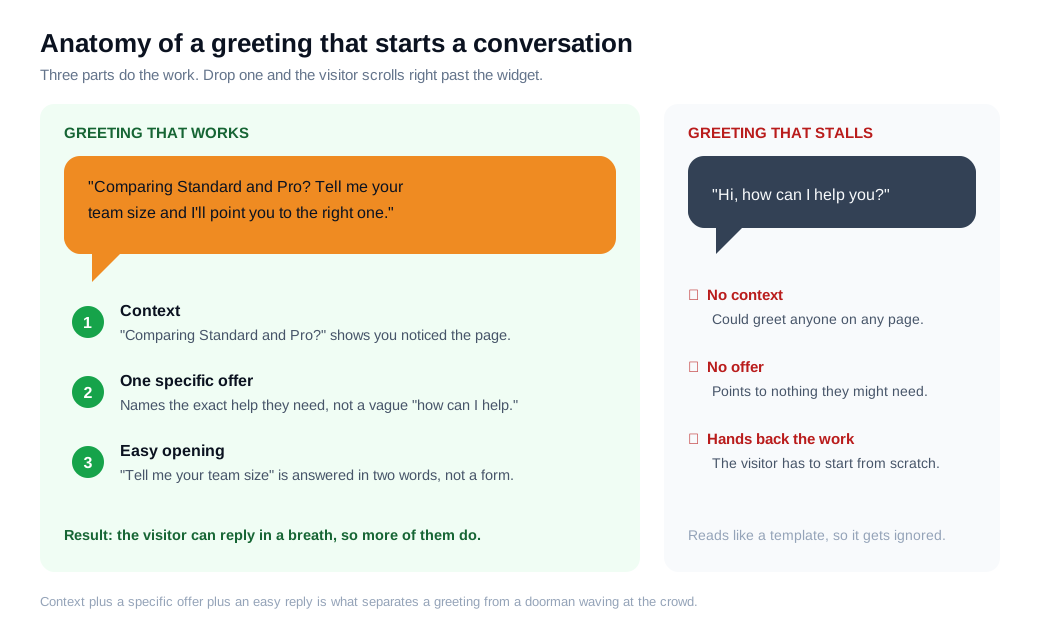
A good chat greeting is short, specific to what the visitor is doing, and easy to answer in a single reply. Three parts do the work: a bit of context that shows you noticed where they are, one concrete offer that names the thing they might need, and an easy opening they can respond to with a tap or a few words.
Context is what separates a greeting from a generic hello. "I see you are on the integrations page" or "comparing plans?" tells the visitor a real system, or a real person, is paying attention. The specific offer follows from it: not "how can I help," but "want me to check if we integrate with your CRM?" The easy opening keeps the ball in their court with a yes or no question rather than an open-ended prompt that feels like homework.
Keep it to one or two lines. LiveChatAI's guidance is blunt on the failure mode: opening with "Hi, how can I help you?" is the chatbot equivalent of a blank page, because it hands the entire burden of the conversation back to the visitor (LiveChatAI). A paragraph-length welcome fails for the opposite reason, since people scan a chat widget rather than read it. Once the visitor does reply, speed matters: a first response inside 30 seconds signals that someone is actually there (LiveChat). A well-run live chat greeting is really a small promise that answering will be fast and worth it.
Do proactive chat greetings actually work?
Yes, a well-timed proactive greeting can lift engagement and conversion on high-intent pages by a wide margin, with one widely cited Intuit test raising sales 211% on a product comparison page after a proactive chat window was added (ProImpact7). The same test reported a 190% lift in conversion on a lead generation page and a 20% lift at checkout, with average order value up 43%.
Those are ceiling numbers from a carefully run experiment, so treat them as direction rather than a guarantee. The underlying demand is real, though. Forrester found that 44% of online consumers say having their questions answered by a live person while in the middle of a purchase is one of the most important features a website can offer (Forrester). A proactive greeting is how you reach the people who want that help but would never click a "chat with us" tab on their own.
Here is the math on a modest SaaS pricing page. Say 2,000 people visit it a month. With a passive widget in the corner, roughly 1% open a chat on their own, so 20 conversations, and if a quarter become demos you get 5. Add a page-aware greeting that fires at 40 seconds. If it pulls even 8% of visitors into a reply, that is 160 conversations. Many are early-stage, so hold the conversion rate lower at 10%, and you still land 16 demos. Same traffic, three times the qualified conversations, decided by one line of copy at the right moment.
What proactive greetings convert visitors?
The proactive greetings that convert name what the visitor is doing and offer one specific next step, rather than waving hello and hoping. Here are templates that follow the pattern, grouped by the situation that triggers them.
Visitor stuck on the pricing page: "Comparing plans? Tell me your team size and I will point you to the one that fits." This beats a generic greeting because it turns a hard decision into a two-word answer.
Visitor bouncing between two products: "Deciding between the Standard and Pro? Happy to run through the differences that actually matter for your use case." It meets the exact hesitation they are feeling.
Visitor idling in the cart or checkout: "Any last questions before you check out? I can help with shipping, sizing, or the return policy." Doubt is what stalls a checkout, so the greeting names the doubts and offers to clear them.
Returning visitor: "Welcome back. Last time you looked at the Pro plan, want to pick up there?" A reference to a past visit reads as recognition, which is exactly what LiveChatAI recommends for returning users (LiveChatAI).
Reader deep in a blog post or guide: "Reading up on lead routing? I can show you how it works in a two-minute demo whenever you are ready." It offers to move them from research to a real answer without demanding a form.
Visitor showing exit intent: "Before you go, was there something you could not find? I am right here." A short, low-pressure line at the moment of leaving often recovers a question the visitor did not know how to ask.
The thread running through all of them is that the visitor can answer in a breath. When a thread clearly wants a walkthrough, offering to move it into a live video call or screen share inside the same window turns a promising greeting into a working conversation.
When should a proactive greeting fire?
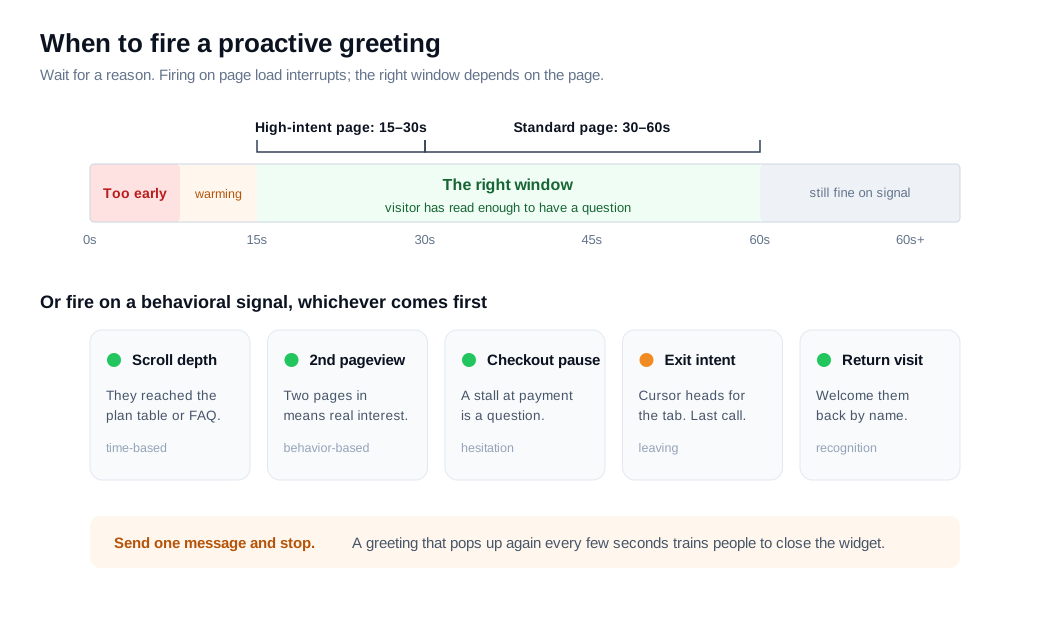
Fire a proactive greeting after the visitor has had time to read, which usually means 30 to 60 seconds on a standard page and 15 to 30 seconds on a high-intent page like pricing, or the instant a clear signal appears such as exit intent or a return visit. Timing is half the greeting. The same words that feel helpful at 40 seconds feel like an ambush at 2 seconds.
The most common mistake is firing on page load. REVE Chat's guidance is to let visitors explore first and send a message only after they have spent some time on a page, with roughly 50 seconds on a pricing or product page a reasonable default (REVE Chat). Before that, the visitor has not read anything yet, so the greeting interrupts instead of assisting.
Behavior beats a plain timer. Scroll depth, a second or third pageview, a long pause during checkout, and exit intent are all stronger signals than seconds alone, because each one marks a moment of hesitation. A visitor scrolling back and forth between two plans is asking a question in their head. That is the moment to answer it. Whatever you trigger on, send one message and stop. A greeting that pops up again every few seconds trains people to close the widget on sight. If you want a deeper setup, the proactive outreach guide walks through building these nudges rule by rule.
How do you personalize greetings by page?
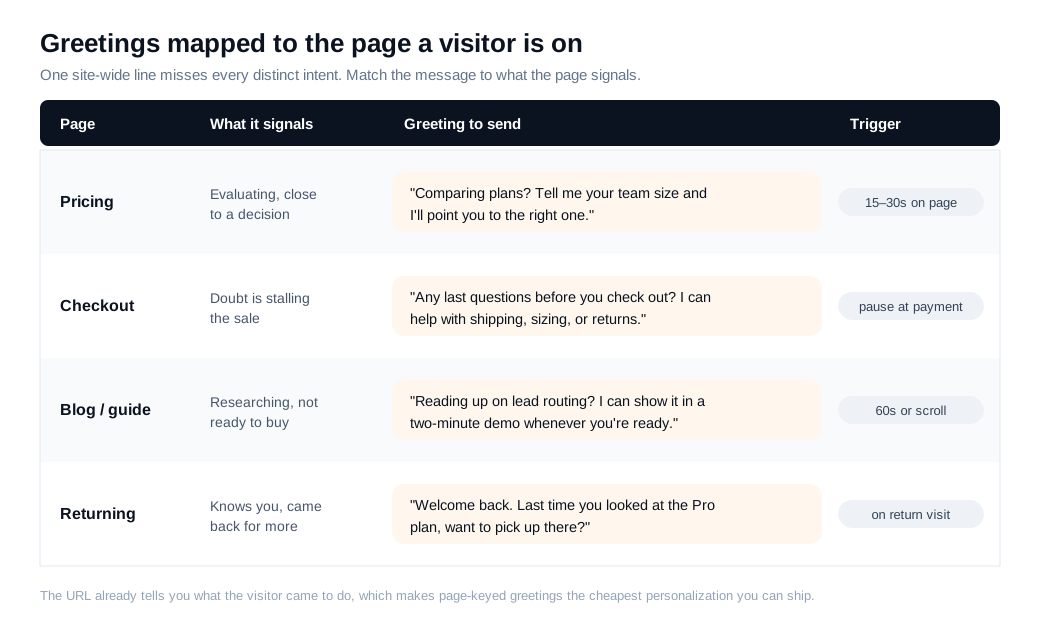
Personalize greetings by page by matching the message to the intent each page signals: help choosing on pricing, reassurance at checkout, a welcome-back reference for returning visitors, and a next step on content pages. One site-wide greeting misses all of them, because a homepage browser, a pricing-page evaluator, and a stalled cart are three different people with three different questions.
The payoff for getting this right is well documented. McKinsey found that 71% of consumers expect personalized interactions and 76% get frustrated when they do not happen (McKinsey). A greeting keyed to the page is the cheapest personalization you can ship, since the URL already tells you what the visitor came to do.
Checkout is where the page context pays off fastest. Cart abandonment averages around 70%, and a lot of that is last-minute doubt about shipping, sizing, or returns (LiveChat). A greeting that names those doubts can be the safety net that saves the sale. On pricing, the useful offer is help choosing a plan. On a documentation or comparison page, it is a two-minute demo. Map each greeting to the page before you write a word, and set the trigger and copy per page rather than once for the whole site. A well-built welcome message and flow can carry that page context in before an agent even joins, so the visitor lands in a conversation that already fits where they are.
What greetings should you avoid?
Avoid greetings that are generic, mistimed, over-eager, or fake-personal, because each one teaches the visitor to ignore the widget for the rest of the session. The failure modes are consistent, and most of them are easy to spot once you know the list.
Generic openers come first. "Hi, how can I help you?" is the phrase everyone uses, so it signals a template and offers the visitor nothing to grab onto (LiveChatAI). Replace it with a line that references the page or the behavior. Paragraph-length greetings fail next, since a welcome message longer than two or three lines goes unread in a widget people only scan.
Bad timing undoes good copy. A greeting that fires the instant the page loads interrupts before the visitor has read anything, and one that re-pops every few seconds reads as nagging. Fake urgency and hard-sell lines fail too, because a visitor who came to research feels the pressure and leaves. So does false personalization: greeting someone by a name your system guessed wrong, or claiming to be a human when a bot is typing, costs more trust than it earns. If a bot is handling the opener, say so plainly, and let an AI chat assistant hand off to a person the moment the question gets real. The safe test for any greeting is simple. If it could be sent, unchanged, to every visitor on every page, it is too generic to start a conversation.
How do you test and improve your live chat greetings?
Test greetings by changing one variable at a time, the message, the trigger, or the page, and judge each version on reply rate and downstream conversion rather than on how clever the copy sounds. A greeting that gets a lot of replies but no demos is loud, not effective, and the only way to tell the difference is to track what happens after the visitor types back.
Watch three numbers. The greeting response rate tells you whether the opener earns a reply. The chat-to-conversion rate tells you whether those replies turn into demos, sales, or qualified leads. The time to first human response tells you whether you are keeping the promise the greeting made. Run one change at a time so you know what moved the number: swap the copy while holding the trigger fixed, or shift the trigger from 60 seconds to 30 while holding the copy fixed.
Small, boring experiments compound. Try a page-aware greeting against your current site-wide one on the pricing page for two weeks, keep the winner, and move to the next page. When a greeting consistently pulls high-intent visitors into real conversations, route those chats to the right rep fast, because for inbound sales the speed of that handoff decides how many of the openings you actually convert. The greeting starts the conversation. Measurement is how you make the next one start more of them.
Key takeaways
- A good greeting has three parts. Context that shows you noticed the page, one specific offer, and an easy opening the visitor can answer in a breath, all in one or two lines.
- Proactive greetings move real numbers. A widely cited Intuit test lifted comparison-page sales 211%, and Forrester found 44% of shoppers rank live help mid-purchase among a site's most important features, so a well-timed greeting reaches buyers a passive widget never would.
- Timing is half the greeting. Wait 30 to 60 seconds on a standard page, 15 to 30 on a high-intent one, or trigger on exit intent and return visits, and never fire on page load or pop up again and again.
- Personalize by the page. Help choosing on pricing, reassurance at checkout where roughly 70% of carts are abandoned, and a welcome-back reference for returning visitors, since one site-wide line misses every distinct intent.
- Cut the generic and the fake. Drop "how can I help you," skip paragraph-length openers and hard-sell urgency, and never claim to be human when a bot is typing.
- Test one thing at a time. Change the message or the trigger, not both, and judge greetings on reply rate and downstream conversion rather than on wording alone.

Written by
Nilas MylerCo-founder & CTO, Glimpze
Nilas is the co-founder and CTO of Glimpze, an inbound sales tool that turns high-intent website visitors into live conversations. A former SEO consultant for some of the largest companies in Denmark, he writes about speed-to-lead, inbound sales, and conversion rate optimization — the technical and operational mechanics of turning traffic into pipeline.


