
On this page
A visitor has spent four minutes on your pricing page. They opened the enterprise tier twice, read the FAQ, and now the cursor is sliding toward the browser tab. They have a question, they are not going to fill out a form to ask it, and in about ten seconds they will be gone.
A proactive chat trigger is the small rule that catches that moment and says "Comparing plans? I can walk you through the enterprise tier" before the tab closes. Get it right and it reads like a helpful rep noticing you need a hand. Get it wrong and it is the pop-up you dismiss on reflex before a single word registers.
This guide covers what proactive triggers are, why they beat waiting for visitors to reach out, which behaviors deserve a message, how long to wait before firing one, how to keep triggers from feeling like spam, and how to test whether they actually earn their place.
What are proactive chat triggers?
Proactive chat triggers are rules that automatically send a visitor a message based on what they do on your site, instead of waiting for them to open the chat widget first. Each trigger pairs a condition with an action: when the condition is true, the widget sends a specific message.
The condition is a behavior or attribute you can detect. Common ones are time spent on a page, the URL the visitor is on, scroll depth, number of visits, cart value, traffic source, and signs that someone is about to leave. The action is the message that fires, ideally written for that exact situation rather than a generic "Hi, can I help?"
Compare that to reactive chat, where the widget sits quietly in the corner until the visitor clicks it. Reactive chat only ever helps the small share of people willing to start a conversation on their own. Proactive triggers reach the much larger group who have a question but would never raise a hand, which is where a channel like live chat starts to influence revenue rather than only answer tickets.
A quick mental model helps. Reactive chat is a help desk you walk up to, and a proactive trigger is a floor associate who notices you circling the same shelf and asks what you need. The associate sells more, as long as they read the room.
Why do proactive triggers beat waiting for the visitor?
Proactive triggers beat waiting because most visitors who have a question never ask it, so a well-timed message reaches buyers who would otherwise leave in silence. The people you lose to a quiet widget are often the ones closest to buying.
Forrester's research on interactive chat put numbers on the gap. In a Total Economic Impact analysis, investment in reactive chat returned a modest 15% ROI, while adding proactive chat capabilities produced an incremental 105% ROI on top of that. Most of the return sat in the proactive layer rather than in the widget itself.
Visitors do not resent the interruption when it is relevant. Forrester's "Making Proactive Chat Work" found that 44% of US online consumers say they like a chat invitation appearing to help answer questions during research or a purchase, up from 33% in 2012 and 27% in 2009, and that 94% of customers who were proactively invited to chat were somewhat or very satisfied with the experience. Appreciation for the nudge has grown, not faded.
The reason is simple. A form and a "we will get back to you within 24 hours" auto-reply asks a warm visitor to cool off and wait. A proactive message answers them while the intent is still live. For inbound sales, that timing is most of the advantage, and it is why teams build proactive outreach rules instead of hoping visitors click first.
What behaviors should trigger a message?
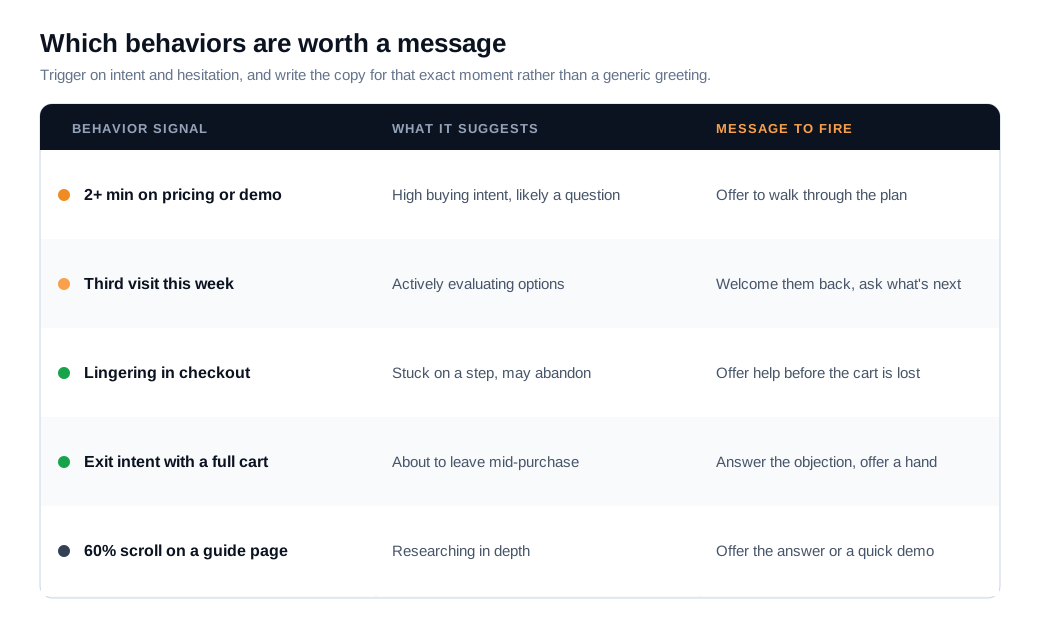
The behaviors worth a message are the ones that signal buying intent or visible hesitation: dwell time on a high-value page, repeat visits, deep scrolling, a loaded cart, a stall inside checkout or a form, and exit intent. Each one tells you something specific about where the visitor is and what to say.
Time on a high-intent page is the workhorse trigger. Someone who has spent two or three minutes on pricing, a demo page, or an enterprise plan is comparing options and probably has a question they have not asked. Repeat visits raise the signal further: a person on their third session this week is evaluating, and a message that references their return ("Welcome back, still weighing the Pro plan?") lands better than a cold greeting.
Cart and checkout behavior is the highest-value trigger in ecommerce, because the shopper has already decided to buy and is now stuck. Baymard Institute's analysis of dozens of studies puts the average cart abandonment rate at 70.19%, and higher on mobile at 80.02%. A trigger that fires when someone lingers in checkout, or drifts toward the exit with items in the cart, catches the abandonment before it happens.
Exit intent is the last-chance trigger. On desktop, a fast cursor move toward the browser bar is a reliable sign the visitor is leaving, and a message offering help or answering an objection at that moment recovers a share of people who were already gone. Exit-intent prompts are a proven format: across large samples they convert around 2.81% on average, with the top tenth of campaigns above 19%, and cart-specific exit prompts convert far higher, near 17%.
Here is the math on one trigger. Say a store gets 5,000 checkout sessions a month and abandons 70% of them, which is 3,500 lost carts. Add an exit-intent chat trigger on the checkout page that engages abandoning shoppers and recovers a conservative 10% of them. That is 350 recovered carts a month. At a $60 average order value, the single trigger returns about $21,000 in monthly revenue, from traffic you already paid to acquire.
How long should you wait before firing a trigger?
Wait long enough for the visitor to settle in and show intent, which usually means somewhere between 15 and 60 seconds, and almost never fire the instant the page loads. A message that appears before the visitor has read anything gets closed on reflex and teaches them to ignore the next one.
Set the delay from your own analytics. Pull the average time on page for each template, then trigger at a point where a visitor has clearly engaged but has not yet left. A common rule of thumb: if people typically spend a minute on a page, fire the message somewhere around the 20 to 30 second mark, once they are past skimming and into reading.
Tune the delay to the page's job. High-intent pages like pricing and demo reward a shorter wait, often 15 to 30 seconds, because a visitor there is already close to a decision and a quick offer of help is welcome. Long-form pages such as comparison guides, documentation, and implementation details deserve a longer wait, closer to 45 to 90 seconds, since people are reading rather than deciding. Checkout sits in the middle, with roughly 30 seconds giving a shopper room to work before you step in.
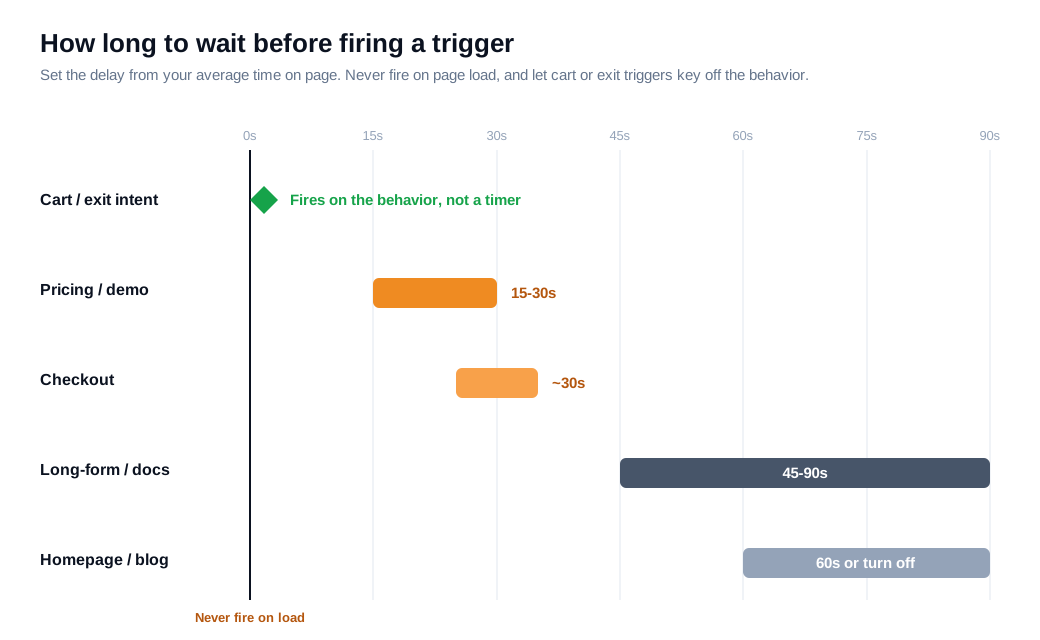
Timing is about the right moment, and a timer is only a proxy for it. A scroll-depth trigger that fires at 60% of a long page is often better than a fixed delay, because it keys off engagement instead of the clock. A cart or exit trigger should fire on the behavior itself rather than after a wait. The welcome messages and greeting flows you configure are where these timers and conditions live, so it is worth setting them per page instead of accepting one site-wide default.
How do you avoid annoying visitors?
You avoid annoying visitors by making every message relevant, capping how often it can appear, and suppressing it for the people who should not see it. A proactive trigger turns annoying when it fires too early, too often, or with a message that has nothing to do with the page.
Relevance comes first. A message that reads the page context ("Questions about the API rate limits?" on a docs page) feels helpful, while a generic "How can I help you today?" on every page feels like an ambush. Write the copy per trigger, and keep it short and specific.
Frequency capping keeps a helpful nudge from becoming a nag. Cap each message so a visitor sees it once per visit at most, and use rolling windows rather than calendar days: common rules are once every 24 hours, twice in 72 hours, or no more than three times in seven days. If someone dismisses a prompt, do not show the same one again in that session.
Suppression rules matter as much as caps. Turn triggers off for visitors who just converted, for logged-in customers who are not shopping, and for anyone already in an active chat. On mobile, tighten everything: a pop-up covers more of a small screen and creates more friction, so favor a quiet bottom slide-in over a full overlay, and fire less often than you would on desktop.
The honest test is whether the message would help a real person at that exact moment. If a rep standing behind the visitor would stay quiet, the trigger should too. When a text nudge is not enough for a high-value buyer, escalating in the same thread to live video and screen share is far less intrusive than a wall of pop-ups, because the visitor chose to go deeper.
How do you test trigger performance?
Test trigger performance with a controlled experiment: hold back a random share of eligible visitors who get no message, then compare conversion between the group that saw a trigger and the group that did not. That holdout is the only way to know a trigger caused a lift rather than taking credit for buyers who would have converted anyway.
Start with the metrics that matter, in order. Acceptance rate is the share of shown messages that get a reply, and it tells you whether the copy and timing are landing. Engagement and conversion rate on triggered visitors tell you whether the conversation moves people forward. Influenced revenue, the sales from sessions that included a triggered chat, is the number that justifies the whole program.
Use two kinds of tests for two questions. To compare variants, run a standard A/B test: change one thing at a time, whether it is the delay, the page, or the message, split traffic 50/50, keep the assignment stable across the session, and read the winner on statistical significance rather than a few days of noise. To measure absolute impact, split eligible visitors three ways instead: message A, message B, and a holdout that sees nothing. The A/B split measures which message is better, and the holdout measures whether messaging at all beats silence.
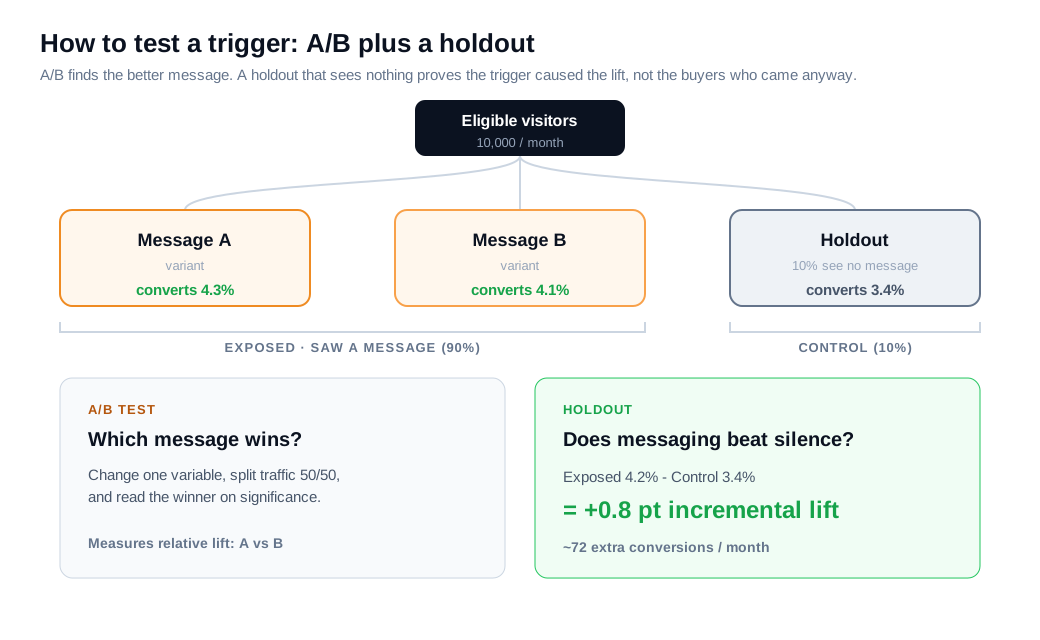
Here is a worked read. Suppose 10,000 monthly visitors qualify for a pricing-page trigger. You expose 9,000 of them and hold back the other 1,000 as a control that sees nothing. The exposed group converts at 4.2% and the holdout converts at 3.4%. The 0.8 point difference is the trigger's true incremental lift, worth about 72 extra conversions a month across the exposed group, and it is a number you can defend because the holdout rules out coincidence. If the two groups converge, the trigger is decoration, and you change the message or turn it off.
Most platforms, including Glimpze, offer a free tier, so you can baseline your current conversion rate and run a first holdout before spending anything, then keep only the triggers that clear the control group.
Key takeaways
- Triggers turn a passive widget into a salesperson. A proactive trigger pairs a behavior with a message and reaches the large group of visitors who have a question but will never click a reactive widget on their own.
- The proactive layer carries most of the ROI. Forrester's interactive chat analysis put reactive chat at a 15% return and the added proactive capability at an incremental 105%, and 44% of shoppers say they like a relevant chat invitation.
- Fire on intent and hesitation. Dwell time on pricing, repeat visits, a loaded cart, a checkout stall, deep scrolling, and exit intent are the signals worth a message, each paired with copy written for that moment.
- Wait 15 to 60 seconds, never on load. Set the delay from your own average time on page, keep pricing pages short and long-form pages longer, and let cart and exit triggers fire on the behavior itself.
- Relevance and frequency caps prevent spam. Match the message to the page, cap it to once per visit with rolling windows, suppress it for recent converters and active chats, and fire less often on mobile.
- Prove lift with a holdout. Hold back a random control that sees no message, compare its conversion to the exposed group, and keep only the triggers whose lift is real rather than assumed.
TAGS

Written by
Nilas MylerCo-founder & CTO, Glimpze
Nilas is the co-founder and CTO of Glimpze, an inbound sales tool that turns high-intent website visitors into live conversations. A former SEO consultant for some of the largest companies in Denmark, he writes about speed-to-lead, inbound sales, and conversion rate optimization — the technical and operational mechanics of turning traffic into pipeline.


