On this page
A SaaS team spends months and a healthy chunk of budget driving qualified signups, then watches more than half of them disappear before the second invoice clears. The traffic is fine. The product works. The leak sits in the first week, in the gap between the moment someone signs up and the moment the product first does something useful for them.
That gap is where onboarding either earns a customer or quietly loses one. Most of the churn that shows up as a canceled subscription ninety days later was actually decided in the first session, when a new user hit a wall, got buried in features, or waited too long for a payoff that never came.
This post covers the onboarding mistakes that cause early churn, how much of your churn they really explain, why a slow time to value hurts, how information overload backfires, and how to fix the gaps before they cost you the renewal.
What onboarding mistakes cause churn?
The onboarding mistakes that cause churn share one trait: they delay, block, or overwhelm a new user before they reach first value, so motivation runs out before the payoff arrives. A signup who never feels the product work has no reason to renew and every reason to leave. Six mistakes do most of the damage.
The first is defining "done" from the company's side instead of the customer's. Teams mark an account onboarded when an internal checklist is finished or a kickoff call is booked, even when the customer has not logged in since and cannot yet operate on their own. The account looks activated in the CRM and churns in the dashboard.
The second is the blank first screen. Dropping a new user into an empty workspace with no guided path reads as homework. They came for an outcome, and the product hands them a setup project instead.
The third is information overload. A twelve-step feature tour that fires every capability at once buries the one action the user actually needs under a dozen they do not.
The fourth is a slow time to value. Every required field, confirmation email, and configuration screen between signup and the first win is time the customer spends paying in effort with nothing back yet.
The fifth is no visibility into stalled accounts. When nobody is watching who signed up and never returned, the accounts most likely to churn are the ones you never contact.
The sixth is treating onboarding as a one-time event rather than a path tied to a real result. A welcome email and a product tour are not onboarding if they never lead the user to the moment the product pays off.
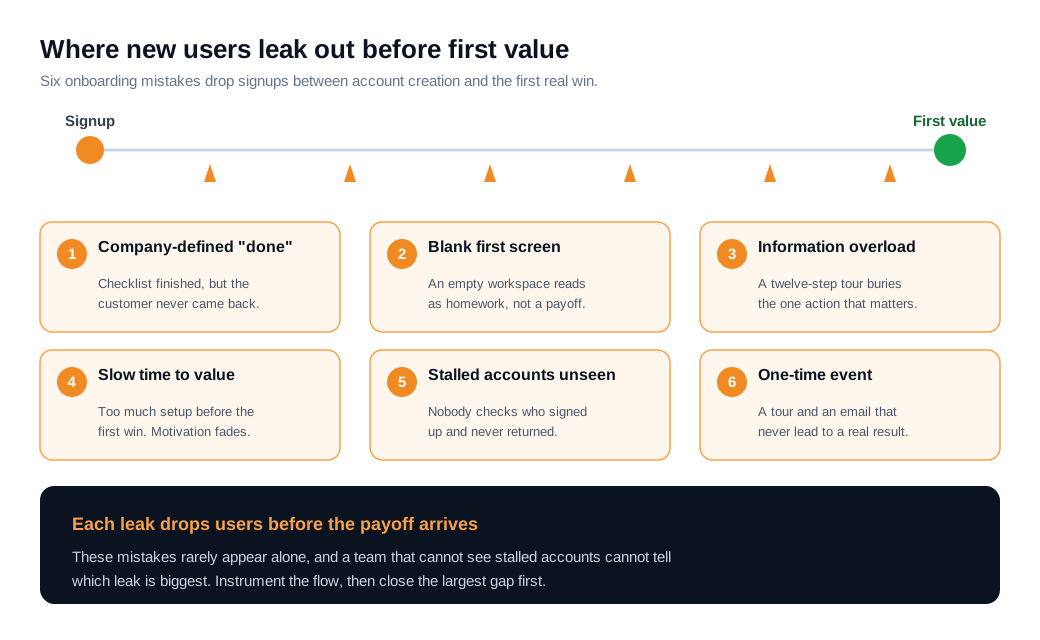
These mistakes rarely appear alone. A blank first screen and a slow time to value usually travel together, and a team that cannot see stalled accounts also cannot tell which of the other five is doing the most harm. The fix starts with naming which leak is biggest, which is the subject of the last section.
How much early churn does bad onboarding actually cause?
Bad onboarding is one of the largest single causes of early churn, and the research puts a real share of lost customers at its feet. Custify's roundup of onboarding and retention data attributes roughly 23% of average customer churn to an ineffective onboarding experience, and Retently ranks poor onboarding among the three leading causes of churn overall, alongside weak product fit and a lack of engagement.
The upside of getting it right is just as measurable. Wyzowl's onboarding research found that structured onboarding lifts 90-day retention from about 52% to 76%, the same product and the same signups, changed only by how deliberately customers were guided to their first win. Wyzowl also reports that 63% of customers weigh a company's onboarding when deciding whether to buy in the first place, so the experience shapes both acquisition and retention.
Timing concentrates the risk. In self-serve products, a large share of all churn lands in the first thirty days, before most customers have formed a habit or reached the value they signed up for. That is also the window where the fewest people are paying attention, because the account has not yet earned a place in anyone's week.
The economics make the case plain. Acquiring a new customer runs five to twenty-five times more expensive than keeping an existing one, and the same Harvard Business Review analysis, drawing on Bain and Frederick Reichheld's research, found that lifting retention by five points can raise profits between 25% and 95%. When a quarter of your churn traces back to onboarding, the first session is one of the highest-impact places to spend engineering and design time, because it defends revenue you have already paid to win.
Why does a slow time to value hurt?
A slow time to value hurts because motivation is highest right after signup and decays with every extra day, so the longer the clock runs, the fewer users are still trying when the payoff finally arrives. Time to value is the elapsed time from signup to the first result the customer genuinely cares about, and it quietly decides how much of your acquisition spend survives the first week.
The benchmarks show how wide the gap is between fast and slow products. Userpilot's study across hundreds of companies puts the median time to value at more than a day and a half, while top-quartile products get a new user to first value in under five minutes. That difference decides outcomes. It separates a customer who sees the product work while they are still excited from one who has already moved on to the next thing on their list.
Activation numbers explain where the slow clock sends people. Userpilot's benchmark across 62 B2B SaaS companies put the average activation rate at 37.5%, which means roughly two-thirds of signups never reach the value moment at all. Motivation drops with every step and every day of setup, so a longer runway pushes more of that two-thirds out before they arrive.
Consider a cohort of 500 signups where value means building a first report. If setup takes eight days on average, the account has to survive a full week of effort with no return before the payoff lands, and many will not. Compress that path to under an hour with preloaded data and a guided first step, and far more of the same 500 reach the report while they are still motivated. The product did not change. The clock did. A welcome message flow that greets each new account and points it at the right first task is one of the cheapest ways to start the clock ticking toward value instead of toward setup.
How does information overload backfire?
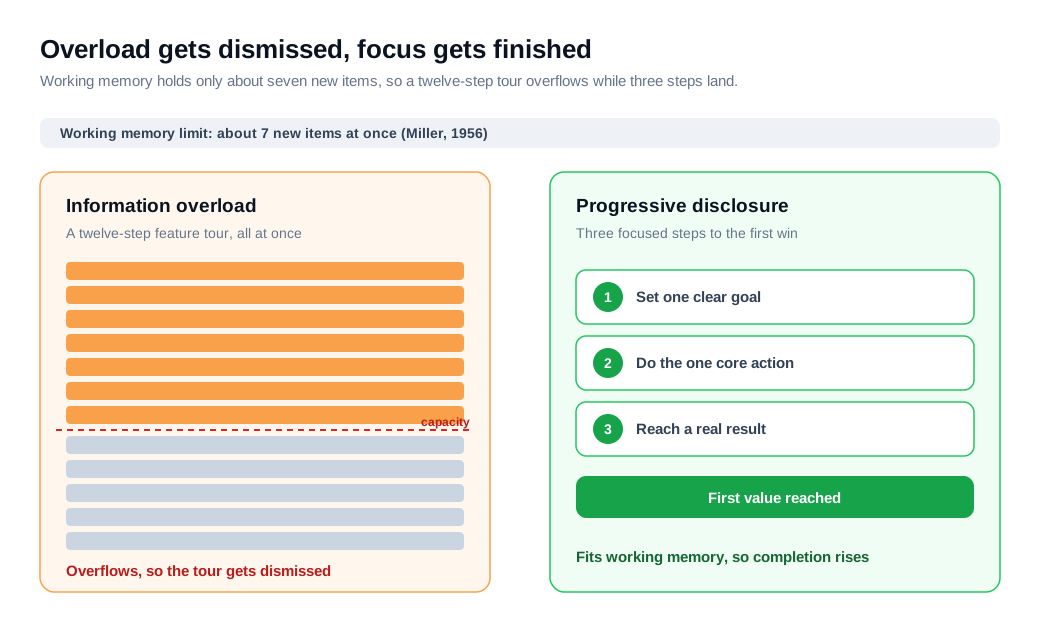
Information overload backfires because working memory can only hold a handful of new things at once, so a tour that fires ten or fifteen features at a new user gets forgotten or dismissed instead of learned. The classic finding from George Miller's 1956 research is that people can juggle only around seven items in working memory at a time, and a twelve-step feature tour blows past that limit inside the first minute.
The Nielsen Norman Group's answer is progressive disclosure, a pattern that shows only the essential information at each step and reveals the rest as the user goes deeper. Introduced by Jakob Nielsen in the 1990s, it lets a new user get to a first result without wading through advanced options they do not need yet, while still leaving that depth available once the habit forms. The point is to lower the mental cost of the next action, not to teach the entire product on day one.
The behavior data backs this up. Product teams routinely find that most tooltips are dismissed within a few seconds and that a large majority of users abandon traditional multi-step tours before finishing them, because a tour that explains everything explains nothing the user can act on right now. One team cited by Sparklin cut an onboarding flow that tried to gather all user data upfront down to a simple three-step introduction, and completion rose 44%. The pattern repeats across products: fewer things at once, more people through.
The trap is that overload feels generous while you build it. Every feature you show seems like a favor to the user, so the tour grows. From the new user's seat it reads as a wall of homework standing between them and the reason they signed up. The discipline is to cut the tour down to the one path that reaches value, and to trust that the rest of the product will be discovered when the user has a reason to look for it.
How do you fix onboarding gaps?
You fix onboarding gaps by finding exactly where new users fall out, cutting the path to first value, and catching stalled accounts in the moment they get stuck rather than a week later. The work is a loop, not a launch, and it starts with data rather than opinion.
Begin by instrumenting every step of the first session as an event, then run a cohort analysis: group users by the week they signed up, follow that fixed group forward, and compare the early behavior of customers who stayed against those who left. The action the survivors took that the leavers did not is your activation event, and the step where the biggest share drops out is the gap to fix first. Rank the drop-offs and attack the largest one before touching anything else.
Next, cut the path. Delete or defer every step between signup and the activation event that is not strictly required to reach it, preload sample data so nobody stares at a blank screen, and reveal advanced options only as they become relevant. Redefine "done" as the moment the customer reaches a real result on their own, not the moment an internal checklist is complete, so the metric you track matches the outcome you want.
Then catch the people who stall anyway. Even a clean flow strands some users, and the useful trigger is behavior, not the calendar. When an account pauses on a setup step, a live chat prompt that appears right then can resolve the sticking point while the user is still trying, and a proactive nudge can reach an account that went quiet mid-setup before it drifts away for good. Reaching a stuck user in the moment beats a re-engagement email sent three days after they gave up.
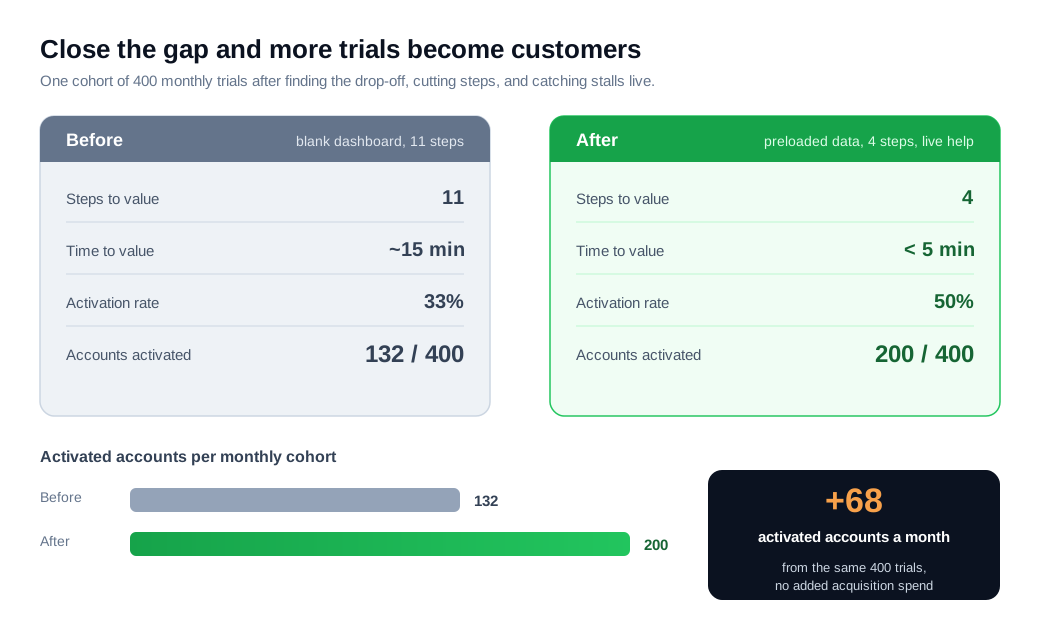
Here is the math on one cohort. A B2B product priced at $79 a month, so $948 in annual recurring revenue per account, signs 400 trials a month. Its first session runs eleven steps behind a blank dashboard, time to value sits near fifteen minutes, and only 33% of trials activate, so 132 accounts reach value each month. The team instruments the flow, finds most drop-off at a five-field configuration screen, names the activation event, cuts the flow to four steps, preloads a sample project, and adds a live chat prompt on the screen where users stalled. Time to value falls under five minutes and activation climbs to 50%, so 200 of the same 400 trials activate. That is 68 more activated accounts a month from the same traffic. Because activated accounts retain far better through the first ninety days, most of those 68 survive the danger window, worth tens of thousands in retained annual revenue with no added acquisition spend. The figures are illustrative, but the mechanism is real: find the leak, close it, and more of the traffic you already pay for turns into customers who stay.
Key takeaways
- Early churn is an onboarding problem before it is a product problem. Most of the customers who cancel at ninety days were lost in the first session, when they hit a wall, got overwhelmed, or waited too long for a first win.
- Six mistakes do most of the damage. Company-defined "done," a blank first screen, information overload, a slow time to value, no visibility into stalled accounts, and onboarding treated as a one-time event rather than a path to a real result.
- Bad onboarding causes a real share of churn. Custify attributes about 23% of churn to poor onboarding, while Wyzowl found structured onboarding lifts 90-day retention from roughly 52% to 76% on the same signups.
- A slow clock loses motivated users. Median time to value runs over a day and a half while top-quartile products reach value in under five minutes, and only about 37.5% of B2B signups activate, so every extra setup day pushes more of them out.
- Overload gets forgotten, not learned. Working memory holds only around seven new items, so trim the tour to the one path that reaches value and use progressive disclosure to reveal the rest later.
- Fix gaps with data, not opinion. Instrument the flow, find the biggest drop-off by cohort, cut the path to value, and catch stalled accounts live in the moment rather than a week after they quit.

Written by
Nilas MylerCo-founder & CTO, Glimpze
Nilas is the co-founder and CTO of Glimpze, an inbound sales tool that turns high-intent website visitors into live conversations. A former SEO consultant for some of the largest companies in Denmark, he writes about speed-to-lead, inbound sales, and conversion rate optimization — the technical and operational mechanics of turning traffic into pipeline.


