
On this page
- What is the difference between a product tour and an interactive walkthrough?
- What is a product tour?
- What is an interactive walkthrough?
- Which drives better activation?
- When should you use each?
- How long should a product tour be, and why do so many get skipped?
- How do you combine tours and walkthroughs in one onboarding flow?
- Key takeaways
- Sources
A new user signs up, and a nine-slide tour springs open before they have clicked a single thing. They tap through it the way most people do, half reading, and arrive at a dashboard they still have to work out on their own. The tour ran start to finish. It changed almost nothing about what the user can do.
A second product handles the same moment differently. It places one highlight on the screen, asks the user to create their first item, waits, and only reveals the next step once that action is done. By the time the guidance ends, the user has already performed the task the product exists to do.
Both experiences get filed under onboarding, and teams swap the terms freely, yet they behave differently and produce different numbers. A product tour introduces the interface by walking users around it, while an interactive walkthrough guides users through doing a task with their own hands. This guide covers what each one is, which lifts activation, when to reach for each, how long a tour can run before people quit, and how to run both inside a single flow.
What is the difference between a product tour and an interactive walkthrough?
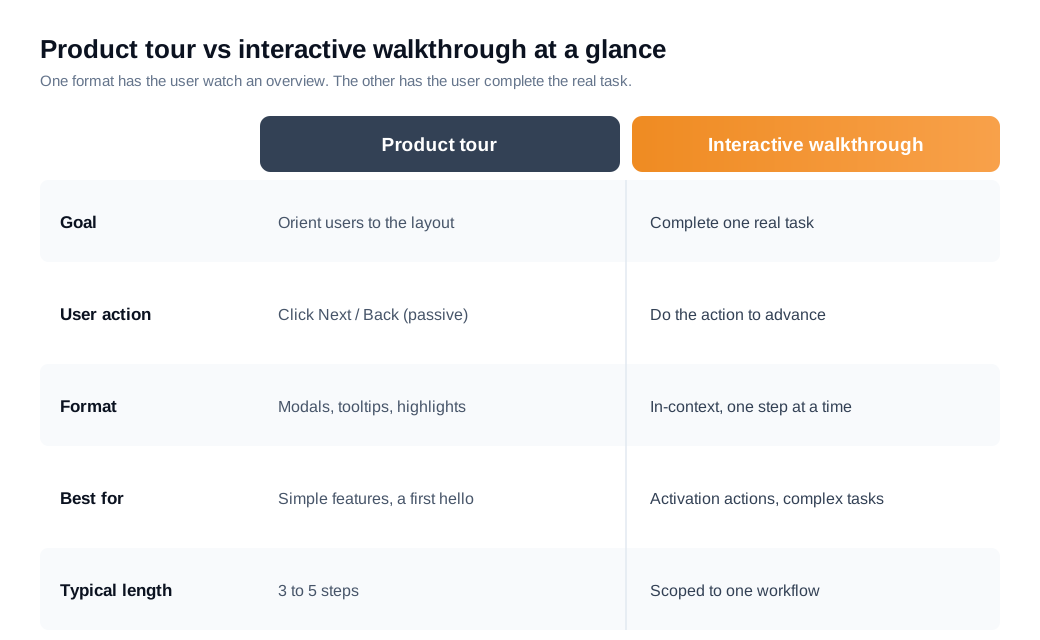
The difference is participation: a product tour has the user watch, and an interactive walkthrough has the user do. A tour is a sequence of modals, tooltips, and highlights that the user clicks through with Next and Back buttons, absorbing an overview of the product. A walkthrough hands control back to the user at every step, holding until they complete the real action in front of them before it advances to the next one.
Appcues frames tours as broad and mostly passive, built to show users what a product offers, while walkthroughs are hands-on and task focused. Userpilot draws the same line: a standard tour only asks for a click on Next or Previous, whereas a walkthrough requires genuine input, and completing each required action is what triggers the following step. One format tells users what exists. The other has them practice the thing itself.
That single distinction sets everything else, from how long each should run to which one moves your activation rate.
What is a product tour?
A product tour is a guided sequence of modals, tooltips, and highlights that introduces a new user to a product's main features and layout. It usually fires at first login, points out where the key areas live, and lets the user advance with a Next button until it ends. The job is orientation, showing the map before the user starts driving.
Because it is mostly passive, a tour is quick to build and easy to over-build. Appcues describes tours as the format teams reach for to explain more complex products, which is also why they tend to run long and shed people along the way. A tour answers the question "what is here," and it does that well for a simple interface or a light first hello. On its own it does not get a user to do anything, so a tour that stands alone often leaves the user oriented but still inactive.
Tours also carry a memory problem. Nielsen Norman Group's research on upfront tutorials found that they interrupt users who are trying to get started, are quickly forgotten, and do not reliably improve task performance, because a wall of tips shown before any context strains working memory. A user who taps through ten slides retains very little of them by the time a real task appears. That gap between "saw the tour" and "can use the product" is the core weakness of the format.
What is an interactive walkthrough?
An interactive walkthrough is a step-by-step, in-app guide that has the user complete each action before the next step appears, moving them through a single real task from start to finish. Instead of describing a feature, it puts the user inside it: click here, name the project, invite a teammate, publish. Each completed action reveals the next prompt, so the flow stays scoped tightly to one workflow rather than sprawling across the whole product.
The design goal is learning by doing. Nielsen Norman Group describes a good interactive walkthrough as something that feels like a practice round rather than a tutorial, letting users learn a small activity in a low-stakes way, and its analysis found interactive walkthroughs generally more effective than static ones for exactly that reason. Because the user acts at every step, the guidance stays tied to what they are doing and is far more likely to stick.
A walkthrough is naturally shorter and more focused than a tour, since it targets one outcome. Userpilot positions the format as the way to educate users on the specific features that lead to activation, guiding them to the payoff action faster instead of parading every menu. The user finishes a walkthrough having actually produced something, which is the state a tour rarely leaves them in.
Which drives better activation?
Interactive walkthroughs drive better activation, because activation is defined by a user taking a key action and the walkthrough is the format built to make that action happen. A passive tour can raise awareness of a feature, yet activation moves only when someone completes the core task, and a walkthrough is what walks them into it.
The benchmark backdrop explains why this matters. Across 62 B2B SaaS companies, Userpilot put the average activation rate at 37.5%, meaning roughly six in ten signups never reach the product's core value. Nielsen Norman Group's tutorial research is blunt about why a slideshow will not fix that: static, upfront tours do not improve task performance. Getting the user to perform the action is the whole game, and the interactive format is the one that does it.
A real case shows the size of the swing. Attention Insight had an easy product and a one-click trial, yet only 47% of trial users ever created a heatmap analysis, the core action. After the team added an interactive walkthrough that guided users through creating that first heatmap, backed by a checklist and a resource center, activation for that action climbed to 69%, a 47% relative increase.
Put numbers on it. Say a product signs 1,000 free trials a month and, with no guidance, activates 37% of them, in line with the benchmark, so 370 users reach the core action. The team ships an interactive walkthrough scoped to that exact action, the way Attention Insight did, and sees a lift of similar order. Applying that kind of relative increase turns 37% into roughly 54%, so about 540 of the 1,000 trials activate instead of 370. That is 170 additional activated users every month from one focused flow. If even a quarter of those extra users convert to a paid plan worth $600 a year, the walkthrough adds around $25,000 in new annual recurring revenue per monthly cohort. The dollar figures are illustrative, but the mechanism, more users completing the activation action, is exactly what the case study measured.
When should you use each?
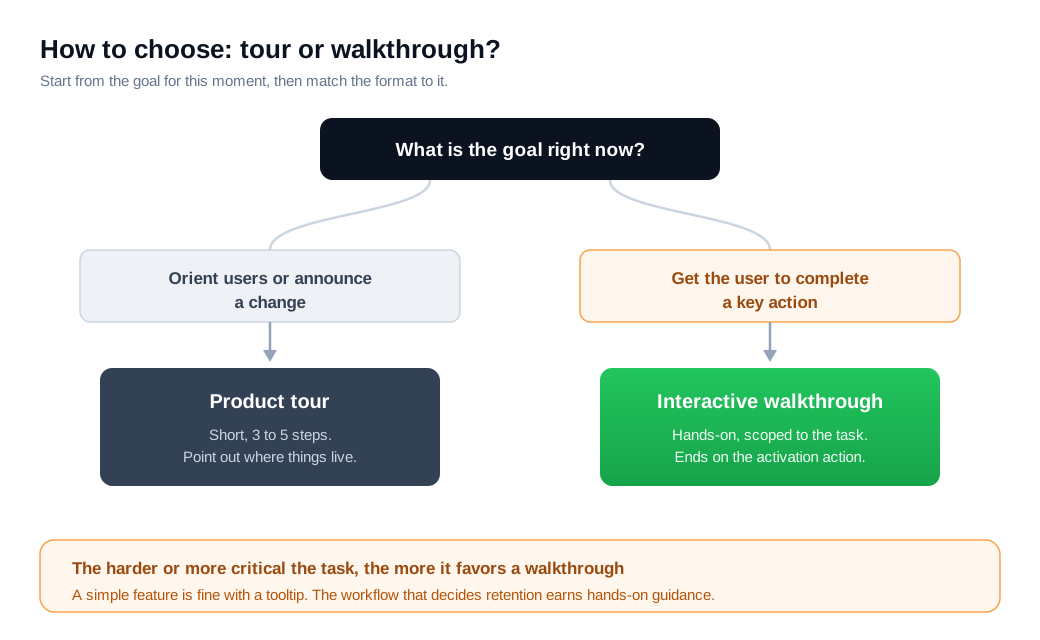
Use a product tour when the goal is orientation and an interactive walkthrough when the goal is task completion. If a new user mainly needs to know where things are, or you are announcing a redesign or a new area of the app, a short tour does the job. If the user needs to perform a specific action to get value, whether that is building a first report, connecting a data source, or sending a first message, a walkthrough is the tool, since it makes them do it rather than read about it.
Userpilot's rule of thumb is practical: use a light tour to point out simple features, and trigger an interactive walkthrough for the advanced or less intuitive ones where users get stuck. Complexity is the deciding factor. A simple feature can be introduced with a single tooltip and then left alone, while a critical or fiddly workflow, the one that predicts whether a customer sticks around, earns a hands-on walkthrough.
Timing matters as much as format. A welcome message flow that asks a new account what it came to do can route each user to the right first step instead of dropping everyone into the same generic tour. Segment by role or goal, then show the tour or walkthrough that fits, and both formats work harder than a one-size sequence fired at every signup.
How long should a product tour be, and why do so many get skipped?
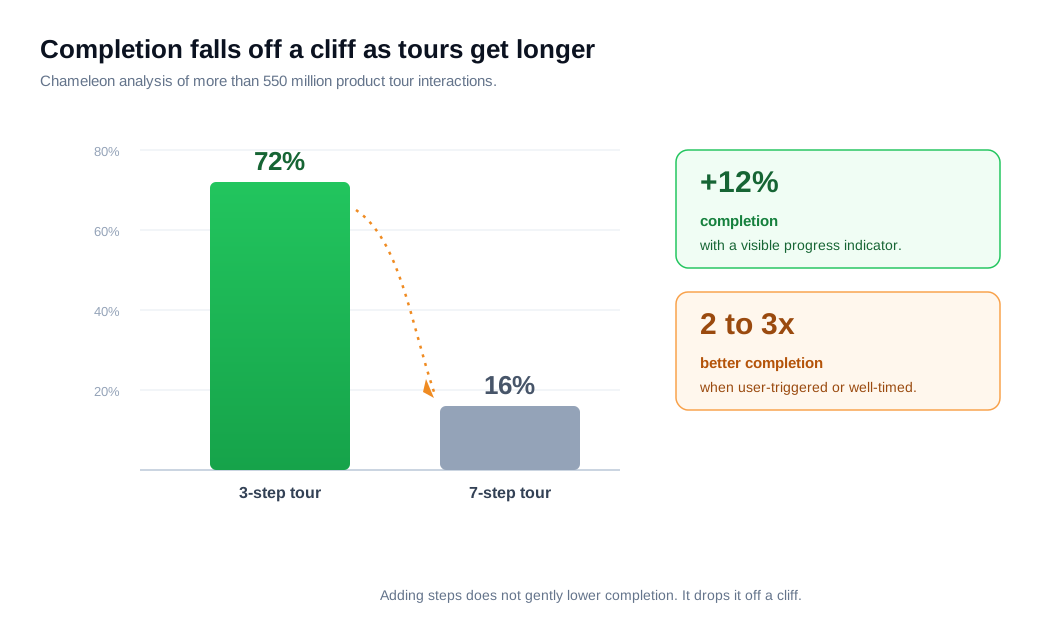
Keep a product tour to roughly three to five steps, because completion collapses beyond that and long tours are the ones users abandon. Chameleon, drawing on more than 550 million product tour interactions, found that three-step tours complete at 72% while seven-step tours complete at just 16%. Adding steps does not gently lower the number, it drops it off a cliff.
Two design choices soften the fall. Chameleon's data shows that a visible progress indicator lifts completion by around 12%, since users push through when they can see the finish line, and that tours which are user-triggered or smartly timed outperform ones that fire on a delay or blanket every login by two to three times. A tour that a user chooses to start, at the moment they hit a relevant screen, is a different animal from one that ambushes them at signup.
The skip problem follows from the same math. Most users are trying to get on with a task, and a long, unrequested tour is friction between them and that task, so they dismiss it. The fix is a shorter tour, an obvious way out, a progress cue, and a trigger tied to what the user is actually doing. Length is the lever most teams get wrong, and it is the cheapest one to correct.
How do you combine tours and walkthroughs in one onboarding flow?
Combine them by using a short tour for the lay of the land and interactive walkthroughs for the actions that matter, each triggered when the user reaches the relevant feature. Most strong onboarding is layered this way rather than betting on one pattern. A brief welcome, a two or three step tour to orient, then a walkthrough that carries the user through the first real task, then contextual walkthroughs that appear later when the user reaches an advanced feature for the first time.
Progressive, contextual triggering is what holds the layers together. Instead of front-loading everything at signup, fire each piece when the user hits the moment it applies to, which keeps guidance relevant and cuts the cognitive load Nielsen Norman Group warns about. A user who just clicked into reports gets the reports walkthrough, not a reminder about a feature three menus away.
Live help closes the gaps the automation leaves. Even a clean walkthrough will strand some users on a step, and the useful signal is behavior. When an account stalls, a proactive nudge can reach it right then, and a live chat prompt lets a person step in to unblock the exact sticking point while the user is still in the flow, rather than a day later when they have already left. The tour orients, the walkthrough activates, and a human catches the ones who slip through.
Key takeaways
- Participation is the dividing line. A product tour has users watch a passive sequence of modals and tooltips, while an interactive walkthrough has them complete each real action before the next step appears.
- Walkthroughs win on activation. Activation is defined by a user taking the core action, so the hands-on format that makes them take it beats a slideshow, which Nielsen Norman Group found does not improve task performance.
- The lift is measurable. Attention Insight moved activation on its core action from 47% to 69% of trial users, a 47% relative increase, after adding an interactive walkthrough with a checklist and resource center.
- Length quietly kills tours. Chameleon's 550 million interaction dataset shows three-step tours completing at 72% and seven-step tours at 16%, so keep tours to three to five steps with a visible progress cue.
- Match the format to the goal. Use a short tour to orient or announce, and a scoped walkthrough to drive a specific, high-value action, deciding by how complex and how critical the task is.
- The best flows layer both. Orient with a brief tour, activate with contextual walkthroughs triggered in the moment, and keep live help ready for the users who still stall.

Written by
Nilas MylerCo-founder & CTO, Glimpze
Nilas is the co-founder and CTO of Glimpze, an inbound sales tool that turns high-intent website visitors into live conversations. A former SEO consultant for some of the largest companies in Denmark, he writes about speed-to-lead, inbound sales, and conversion rate optimization — the technical and operational mechanics of turning traffic into pipeline.


