
On this page
- What changes when a sales demo goes remote?
- How do you prepare and set up for a remote demo?
- How do you keep remote demos engaging?
- How do you handle screen sharing well?
- How do you read the room virtually?
- How do you close a remote demo and book the next step?
- What do better remote demos look like in numbers?
- Key takeaways
- Sources
A prospect who once flew you in for an hour now gives you thirty minutes on a video call, camera optional. You are demoing the same product, but the whiteboard is gone, so is the read of the room, and so is the hallway small talk that used to tell you how the deal was really going.
Remote selling did not shrink the demo. It moved every advantage you had into a smaller, flatter window and handed the buyer a mute button and a second monitor. The teams that win over video rebuild the demo around that constraint instead of pretending the conference room is still there.
This post covers what actually changes when a demo goes remote, how to set up so nothing breaks, how to keep the session engaging, how to share your screen without losing the room, how to read buyer signals on video, and how to close on a real next step while interest is still high.
What changes when a sales demo goes remote?
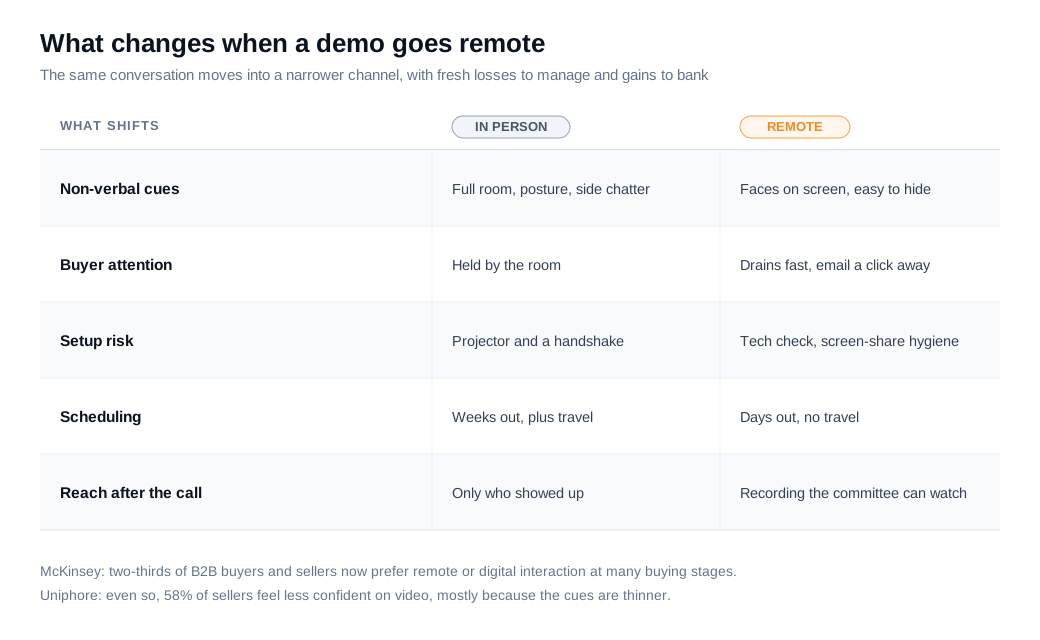
What changes is bandwidth. A video call strips out most of the peripheral signals you relied on in person, compresses the buyer's attention, and hands them quiet ways to disengage that you cannot see. The demo did not get easier or harder. The channel got narrower.
Buyers made this shift on purpose and have no plans to reverse it. McKinsey's research on B2B sales found that two-thirds of buyers and sellers now prefer remote or digital interactions to in-person ones at many stages of a purchase, and that hybrid selling, done well, can drive up to 50 percent more revenue than a single-channel approach. McKinsey also describes a rough rule of thirds: about a third of buyers want in person, a third want a remote call, and a third want to serve themselves, so your remote demo competes for that middle third.
The catch is that sellers feel the loss even when buyers prefer the format. In Uniphore's 2023 Virtual Selling Report, which surveyed more than 640 B2B buyers and sellers, 58 percent of sellers said they feel less confident selling over video, largely because they cannot read the non-verbal cues that used to tell them how a room was reacting.
There is an upside to bank in return. A remote demo records itself, so the five stakeholders who missed the call can watch later. It schedules in days instead of weeks. And a screen share shows your product at full fidelity, which a projector in a conference room never did. The job is to keep those gains while rebuilding the read you lost.
How do you prepare and set up for a remote demo?
You prepare for a remote demo by removing every technical and cognitive risk before the call, so the buyer spends the whole session on your product and none of it on your bandwidth. The first ninety seconds set the tone, and a frozen screen or a permission pop-up spends them on the wrong thing.
Run the boring checklist every time. Test your camera, microphone, and connection on the actual platform the buyer will use. Close every application and browser tab you will not need, silence notifications at the system level, and sign out of personal accounts that might surface a message mid-share. Load a clean demo environment with realistic data, not a test account full of "asdf" records.
Prepare the content, not only the machine. Send a short agenda ahead of time so the buyer knows the call has a shape, and confirm who will actually attend, because a demo built for one champion lands differently when their skeptical VP joins uninvited. Map the two or three workflows tied to what the buyer told you in discovery, and cut the rest. A tour of every menu is the fastest way to lose a remote audience that can open email in another window.
Have a fallback ready. If screen sharing fails, know how you will keep talking without it, whether that is a backup recording or a second device already signed in. Buyers forgive a hiccup. They remember a demo that stalled for four minutes while a rep restarted the call.
How do you keep remote demos engaging?
You keep a remote demo engaging by running it as a fast conversation rather than a presentation: short segments, frequent check-ins, and the buyer's own hands on the product, because attention over video drains faster than it does in a shared room. A monologue that survives in person dies on a video call.
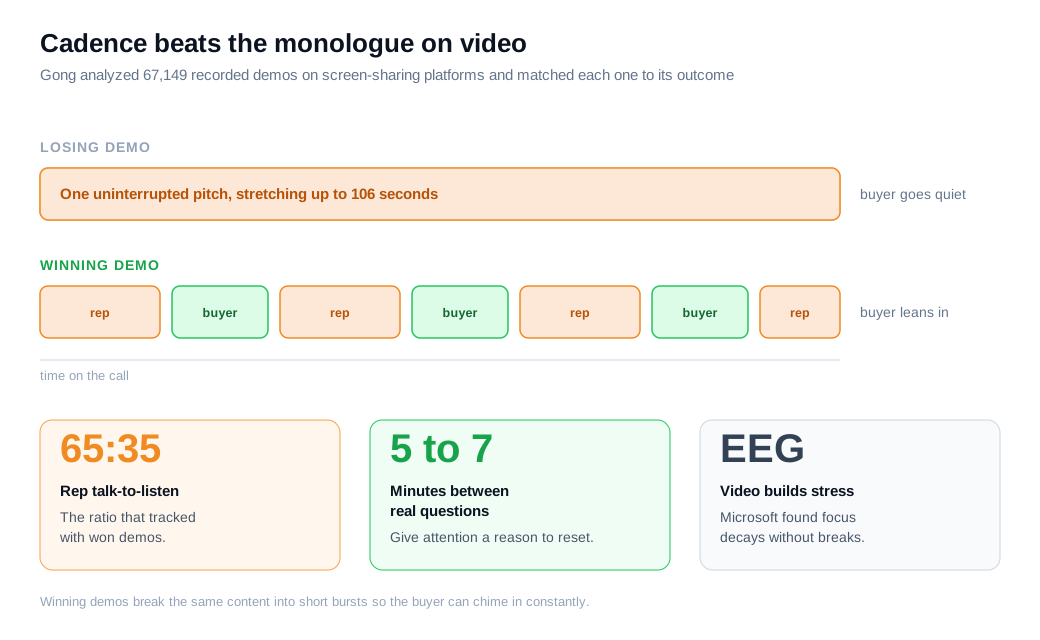
The reason is physical. Microsoft's Human Factors Lab wired up participants with EEG caps during back-to-back video meetings and found that the effort of processing other people through a screen builds measurable stress over time, while short breaks restored the brainwave patterns linked to focus and engagement. Attention on a call is a depleting resource, so front-load the point that matters most while the buyer is freshest, and give their mind a reason to re-engage every few minutes.
Cadence is the mechanism. Gong's analysis of 67,149 recorded demos, all run on screen-sharing platforms like Zoom, found that losing demos contained long uninterrupted monologues, some stretching to 106 seconds, while winning demos broke the same content into short bursts that let the buyer chime in constantly. The talk-to-listen ratio that tracked with won demos sat near 65:35 in the rep's favor, though the rhythm mattered more than the raw ratio.
Make interaction structural rather than optional. Ask a real question every five to seven minutes, and not a rhetorical one. Hand the buyer control for a moment and let them click through a workflow themselves, which turns a passive viewer into a participant. Ask for cameras on where the relationship allows, because a demo to a wall of gray initials is a demo you are giving blind.
How do you handle screen sharing well?
You handle screen sharing well by showing only what serves the buyer's problem, at a size they can read, with everything else on your machine out of sight. The screen is the demo in a remote call, so its hygiene is the difference between looking sharp and looking chaotic.
Share a single application window rather than your entire desktop. That hides your other tabs, your notifications, and the personal clutter that pulls focus and occasionally leaks something private. Turn off pop-ups before you start, and quit the chat apps that love to surface a message the moment a prospect is watching.
Make it legible. Zoom the interface to 125 or 150 percent so a buyer squinting at a laptop can follow along, because text sized for your 27-inch monitor is unreadable on their screen. Move your cursor deliberately and use it as a pointer, narrating where to look, since buyers cannot follow your eyes the way they could across a table. Slow down. Pause after you reveal something and give the room a beat to absorb it before you click again.
Use realistic data that reflects the buyer's world, an account named like their company rather than "Test Customer 3," so the workflow feels like theirs. When it fits, hand over control and let the buyer drive part of the walkthrough. Platforms that put live video and screen share directly on your website make that handoff simple, letting a visitor take the wheel inside the product without installing anything or booking a separate call.
How do you read the room virtually?
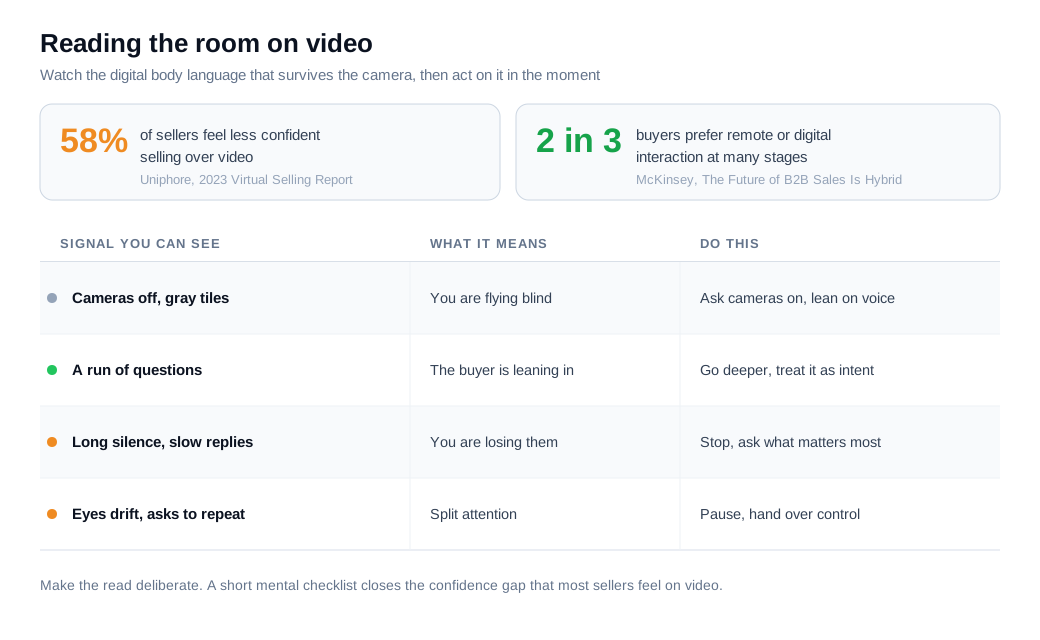
You read the room virtually by tracking digital body language, the signals that survive the camera: faces on screen, how often the buyer asks questions, how quickly they respond, and where the conversation goes quiet. The cues are thinner than in person, but they are still there if you decide to watch for them.
Start by getting faces on the call. A polite "do you mind turning cameras on, it helps me pace this to you" is worth asking for, because expressions and posture shifts are the richest signal you have left. When cameras stay off, lean harder on the audio and behavioral cues that remain.
Count questions and measure silence. Gong's demo research consistently shows that engaged buyers ask more questions, so a buyer peppering you with them is leaning in, while a call that has gone silent for ten minutes is a warning even if the screen share looks fine. Watch response latency too, since a crisp answer reads very differently from a long pause followed by "yeah, maybe."
Notice split attention. A buyer whose eyes keep drifting off-camera, who asks you to repeat a question, or who has clearly muted to handle something else is telling you the demo has lost them, and the fix is to stop presenting and ask what matters most to them right now. This is exactly the read that Uniphore found sellers struggle with over video, so making it a deliberate habit is what closes the confidence gap that 58 percent of reps report.
How do you close a remote demo and book the next step?
You close a remote demo by naming the next step out loud and booking it live before anyone leaves the call, because momentum decays by the hour once the tab closes. Remote makes the next step easy to schedule and just as easy to skip, and hope is a poor substitute for a held calendar slot.
The speed data is one-sided. Harvard Business Review's audit of 2,241 companies found the average first response to an inbound lead took 42 hours, and that firms replying within an hour were about seven times likelier to have a meaningful conversation with a decision-maker. The MIT and InsideSales Lead Response Management study, which examined more than 15,000 leads, found that reaching a lead within five minutes rather than thirty made qualification roughly 21 times likelier. The same decay applies after a demo, so put the next meeting on the calendar while screens are still shared.
Then send a same-day recap the buyer can forward, and attach the recording. That recording is a genuine advantage of selling remotely, because buying-committee members who never joined can watch the exact walkthrough instead of reading a summary. For teams running demos off inbound interest, wiring up lead routing and notifications so the right rep is alerted the moment a high-intent visitor appears is what makes a fast, sometimes same-session, next step realistic. That speed is the spine of a modern inbound sales motion, where a live conversation started while the buyer is still on your site beats a callback three days later.
What do better remote demos look like in numbers?
Better remote demos show up as a higher demo-to-close rate and a rising share of calls that end with a booked next step, and the math compounds quickly. Here is a worked example.
Take a rep who runs 40 remote demos a month and closes 22 percent of them, which is about 9 deals. Their calls are competent but front-load a feature tour, run long on monologue, share a cluttered full desktop, and end on "I'll send over some times." Now rebuild the same 40 demos on the practices above. They open with the one workflow tied to the buyer's stated pain, keep the pitch in short bursts with a real question every few minutes, share a single clean window at readable zoom, watch for disengagement and adjust, and book the next step live on the call. The close rate moves to 30 percent.
That is 12 deals from the same 40 demos, so roughly three extra closes a month with no new pipeline and no added ad spend. At a $6,000 average deal, that is about $18,000 in new monthly revenue, or roughly $216,000 a year, from changing how the demos run rather than how many you book. Track two numbers to know it is working: demo-to-close rate as the outcome, and the share of demos that end with a scheduled next step as the leading signal, since a remote demo that produces no next step almost never becomes revenue.
Key takeaways
- Remote narrows the channel, so rebuild for it. McKinsey found two-thirds of B2B buyers and sellers now prefer remote or digital interaction, yet Uniphore found 58 percent of sellers feel less confident on video because the cues are thinner.
- Cadence beats the monologue. Gong's study of 67,149 demos found losing calls ran pitches up to 106 seconds while winning ones used short bursts near a 65:35 talk-to-listen ratio, so trade the floor every few minutes.
- Set up so nothing breaks. Test the platform, close tabs, silence notifications, load clean demo data, and keep a fallback ready, because the first ninety seconds set the tone.
- Treat the screen as the demo. Share one window, zoom to 125 or 150 percent, use realistic data, and hand over control so the buyer drives part of the walkthrough.
- Read digital body language on purpose. Get cameras on, count questions, watch response latency and silence, and stop presenting the moment attention drifts.
- Book the next step live. Responding within an hour makes a decision-maker conversation about seven times likelier, so schedule the follow-up on the call and send the recording the committee can watch.
TAGS

Written by
Daniel SemeckyCo-founder & CEO
Daniel is the co-founder and CEO of Glimpze. He spends his days talking to revenue teams about how to catch high-intent visitors before they bounce, and writes about inbound sales, lead conversion, and building a motion where marketing and sales actually share a number.


