
On this page
- What is live chat for sales?
- How does sales chat differ from support chat?
- How do you spot buying signals in chat?
- How do you route hot chats to reps?
- How do you qualify a chat without turning it into an interrogation?
- How do you measure chat-sourced revenue?
- What are the most common live chat sales mistakes?
- Key takeaways
- Sources
A visitor lands on your pricing page, opens the chat, and types: "does this integrate with Salesforce, and what does the team plan actually cost at 40 seats?" That is a buyer in the middle of a decision, telling you exactly what stands between them and a purchase. If a support agent answers with a help-doc link and a cheerful "let me know if you need anything else," the moment closes and the visitor goes back to comparing tabs.
Same widget, same question, and a completely different result depending on who is watching the queue and what they were trained to do. Most companies install chat to deflect support tickets, then wonder why it never appears in the revenue report. The channel can do both jobs. Your setup decides which one you get.
This guide covers what live chat for sales means, how a sales chat differs from a support chat, how to read buying signals inside a conversation, how to get a hot chat to a rep in seconds, how to qualify without stalling the momentum, how to measure the revenue chat sources, and the mistakes that keep chat parked in the support column.
What is live chat for sales?
Live chat for sales is using your website chat to start and advance buying conversations in real time, so a high-intent visitor gets a human answer while interest is peaking, well before they would fill out a contact form and wait a day. Same widget, different job: the aim is to move a deal forward while it is live, which is a separate skill from closing a support ticket.
The commercial case is well documented. Adding live chat to a site raises conversion rates by roughly 20% on average, and 79% of businesses say chat has had a positive effect on sales and revenue, according to LiveChat's roundup of industry data. Visitors who engage in chat convert at a much higher rate than those who never do, and buyers who chat before purchase tend to spend more per order, per Talkative's review of chat conversion studies.
There is a catch most teams miss. Only a small share of visitors, often cited around 5 to 10%, will ever click a chat bubble on their own, which means a purely reactive widget leaves most of the intent untouched. A tool like live chat earns its keep on sales when it reaches out at the right moment, reads the context of the visit, and puts a person into the conversation before the buyer drifts away.
How does sales chat differ from support chat?
Sales chat and support chat differ in their goal, and that single difference cascades into who staffs them, how they open, and which numbers you use to judge them. Support optimizes for fast, low-cost resolution. Sales optimizes for advancing a buyer toward a decision.
A support chat is reactive by design. Someone has a problem, they come looking, and success means solving it quickly, cheaply, and with a high satisfaction score. Deflection is a reasonable aim there, because every question the system handles on its own is one a human did not have to. ZoomInfo's guidance on conversational metrics makes the point that deflection should free people for the conversations that need real expertise, and treating it as the end goal in a sales context works against you.
A sales chat runs the other way. The best moment to engage is often before the visitor asks anything, on a pricing or product page where intent is high but the person has not committed. Success means learning fit, answering the question that unblocks the deal, and setting up a clear next step such as a demo or a call. The skills gap is real. As Intercom describes in its work on chat as the next frontier for sales, and as Social Intents spells out in its live chat for sales guide, support agents are trained to assist and resolve, which is a different muscle from qualifying and closing.
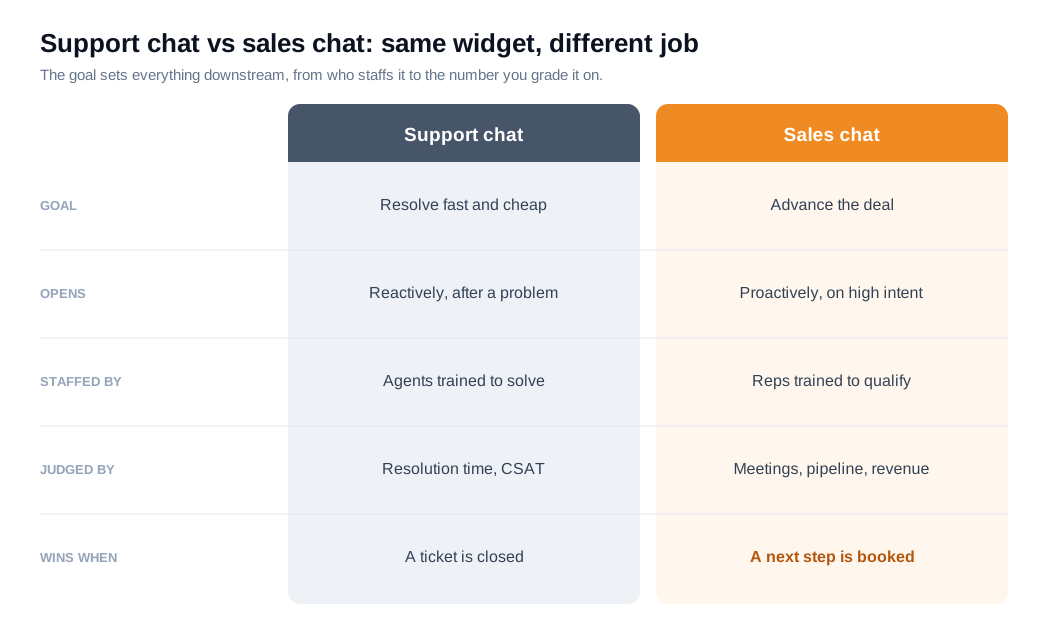
The practical takeaway is blunt. If the same team, trained the same way and graded on the same dashboard, handles both, the sales job quietly loses. It gets measured as support, and it gets staffed as support.
How do you spot buying signals in chat?
Spot buying signals by reading two layers at once: what the visitor says in the chat, which is the explicit signal, and what they did to get there, which is the implicit signal. Explicit signals are direct statements of intent. Implicit signals are behavior that suggests intent without stating it.
ZoomInfo's breakdown of real-time buying signals is a useful frame. Explicit, high-intent signals are things like a pricing question, an integration question, a contract or security question, or a request about implementation timelines. When someone types "can we do a demo next week" or "what does this cost for 40 users," they have self-identified and are asking to be sold to. The pricing page itself gets called the clearest intent indicator there is, because anyone reading your prices has already put you on a shortlist.
Implicit signals need interpretation. A visitor who returns three times in a week, lingers on the pricing and case-study pages, and circles back to the integrations doc is comparing you against alternatives even if they never type a word. Those are the visitors a proactive prompt is built for.
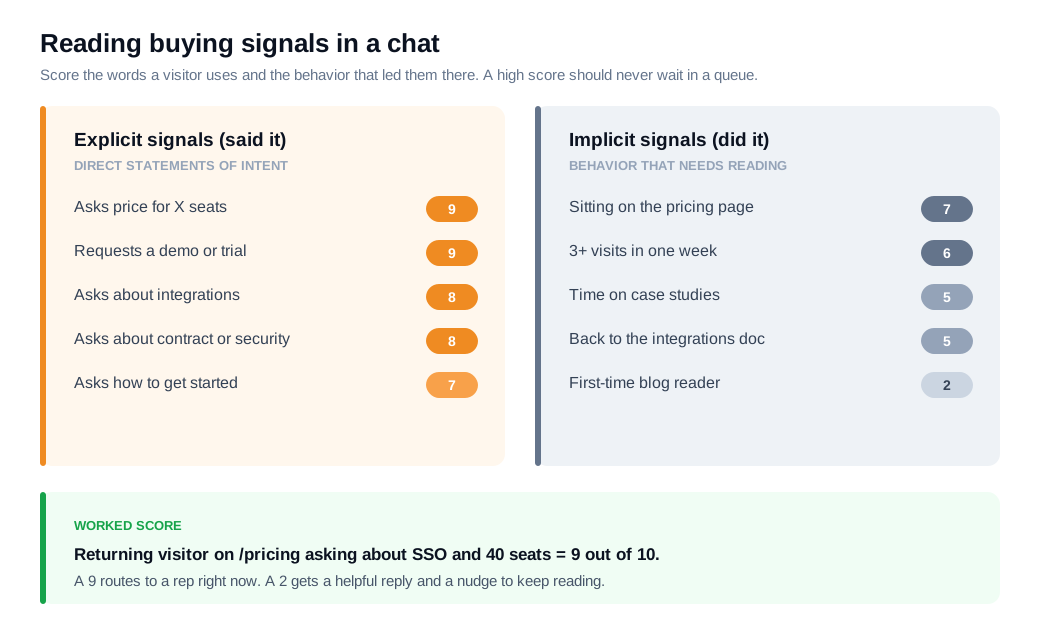
Score it, roughly. Give a visitor points for the page they are on (pricing beats blog), for return visits, for time on commercial pages, and for the words they use. A first-time reader skimming a blog post is a 2. A returning visitor on the pricing page asking about single sign-on and 40 seats is a 9, and a 9 should never sit in a queue. Wiring these behaviors into automatic prompts is what a proactive outreach setup handles, so the chat opens itself at the score where a human should step in.
How do you route hot chats to reps?
Route hot chats by sending them straight to an available sales rep the instant the signal fires, skipping the shared queue entirely, because speed to first response is the strongest lever on whether a web lead ever converts. A buyer on your pricing page should never wait in the same line as a password reset.
The response-time research is hard to argue with. Harvard Business Review's study of 2,241 companies and more than a million leads found that firms which tried to reach a lead within an hour were nearly seven times more likely to qualify it than those that waited an hour longer, and more than 60 times more likely than those that waited a day. The same audit put the average first response at 42 hours, with 23% of companies never replying at all. The MIT and InsideSales lead-response work is sharper still: reaching a lead within five minutes made firms 21 times more likely to qualify it than waiting 30. Chat can collapse that window to seconds, but only when the routing sends the conversation to a person who can actually talk.
So build a sales fast lane. A rule that fires on pricing, demo, or enterprise pages, or on a matched target account, should route to an available account executive and ping them in Slack at the same time, so a rep can jump in within seconds. Configuring those conditions and alerts is the job of your routing and notifications setup. When a serious buyer needs more than text, escalating in the same thread to live video and screen share turns a stalled chat into a working demo. For inbound sales, that pairing of instant routing and a live human is most of the advantage.
How do you qualify a chat without turning it into an interrogation?
Qualify by asking two or three high-signal questions inside a genuinely helpful exchange, so you learn fit and timing while the buyer keeps moving toward a next step. The failure mode is a wall of questions that reads like a form, which drains the momentum chat is supposed to create.
Keep the list short and load-bearing. Most sales-chat playbooks land on three: role, company or team size, and use case, sometimes with a fourth on timeline or current tool. YouCanBook.me's lead-qualification guide frames it as starting with intent, then fit, then urgency, and warns that overlong discovery upfront overwhelms prospects. Ask only what changes your next move.
A worked flow keeps it concrete. Visitor: "Does this work for a 40-person sales team?" Rep or assistant: "It does, that is a common size for us. Are you replacing an existing tool or setting this up fresh?" That one answer tells you whether the deal is competitive or greenfield. Follow with "want me to show you the routing setup on a quick call this week?" and you have confirmed fit and booked a next step in three messages.
An AI chat assistant can carry the opening rounds around the clock, ask those same two or three questions, and hand a warm, tagged conversation to a rep or straight to a calendar. A little friction before the calendar, a couple of real questions, tends to improve demo show-rates, because the people who bother to book are the people who qualify.
How do you measure chat-sourced revenue?
Measure chat-sourced revenue by tagging every chat-generated lead in your CRM and following it through to closed-won, then reporting a plain funnel: chats, chat leads, chat sales, and dollars. Attribution only means something once CRM integration and consistent lifecycle tagging are in place, which is the step most teams skip.
Ruler Analytics' work on tracking live chat conversions lays out the simple model to start with: monthly chat leads equal total chats times the chat-to-lead rate, monthly chat sales equal chat leads times the lead-to-sale rate, and gross profit equals chat sales times gross profit per sale. ZoomInfo's guide to chatbot metrics that drive pipeline adds the sales-side numbers worth watching: meeting conversion rate, pipeline attributed to chat, and an ROI figure tracked over a rolling 90-day window, since chat-sourced deals often take weeks to close.
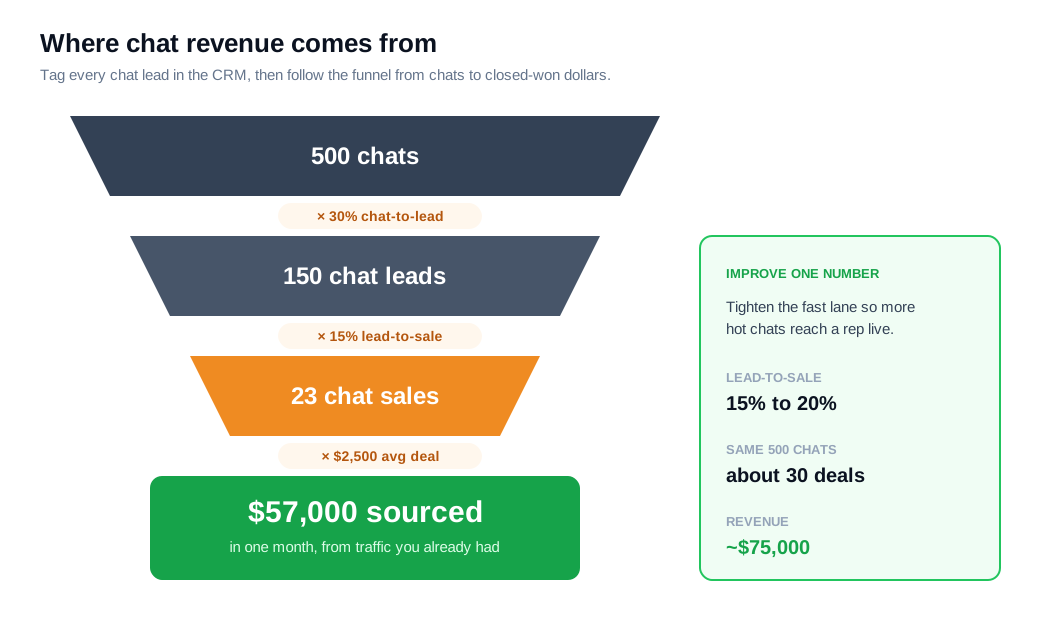
Run the math on one month. Say a pricing and product section produces 500 chats. At a 30% chat-to-lead rate you get 150 qualified leads, and at a 15% lead-to-sale rate that is about 23 deals. At an average deal of $2,500, chat sourced roughly $57,000 that month from traffic you already had. Now improve one number: tighten the fast lane so more hot chats reach a rep live and the lead-to-sale rate climbs to 20%, and the same 500 chats produce about 30 deals and roughly $75,000. Nothing changed except who answered and how fast.
Pick an attribution window that fits your cycle, 24 to 48 hours for ecommerce and several weeks for B2B, then hold it steady so the numbers stay comparable month to month. Most platforms, including Glimpze, offer a free tier, so you can wire up tagging and watch a real funnel form before committing any budget.
What are the most common live chat sales mistakes?
The most common mistake is running a sales channel on a support playbook: staffing it with agents trained to resolve, grading it on resolution time, and waiting for the buyer to start the conversation. Each of those choices quietly caps what chat can produce.
A few specific traps show up again and again. Handing sales chats to support agents is the big one, since, as Social Intents points out, service agents are trained to solve problems, which is a different job from moving a deal to a decision. Staying purely reactive is another, because most visitors never click the bubble, and Forrester's often-cited comparison put proactive chat's return far above a reactive setup's, per giosg's summary of the research. Slow response undoes everything else, given the five-minute and one-hour cliffs above. Over-qualifying with a long form kills the momentum. And skipping attribution means chat never earns budget, because no one can point to what it closed.
The fix is not complicated. Give sales chats to people who sell, open proactively on high-intent pages, answer fast, ask two or three questions, escalate to video when it helps, and tag every lead so the revenue is visible. Do that and chat stops being a cost center with a smiley-face rating and starts showing up in the pipeline.
Key takeaways
- Chat is a sales channel only when you set it up as one. The same widget can deflect tickets or source revenue, and the difference is who staffs it, when it opens, and which metrics you track.
- Read explicit and implicit signals together. A pricing question is a direct ask, while repeat visits and time on commercial pages reveal intent the visitor never stated, and both should raise a chat's priority.
- Speed is the biggest lever. Reaching a lead within five minutes made firms 21 times more likely to qualify it, so route hot chats straight to an available rep and skip the shared queue.
- Qualify with two or three questions, never a form. Ask role, size, and use case inside a helpful exchange, then offer a concrete next step before the momentum fades.
- Tag every chat lead and follow it to closed-won. A plain funnel of chats, leads, sales, and dollars, held to a steady attribution window, is what turns chat into a line item.
- Most failures are support habits in disguise. Support-trained staff, reactive-only widgets, slow replies, over-long qualifying, and missing attribution are the recurring ways sales chat gets capped.
TAGS

Written by
Nilas MylerCo-founder & CTO, Glimpze
Nilas is the co-founder and CTO of Glimpze, an inbound sales tool that turns high-intent website visitors into live conversations. A former SEO consultant for some of the largest companies in Denmark, he writes about speed-to-lead, inbound sales, and conversion rate optimization — the technical and operational mechanics of turning traffic into pipeline.


