
On this page
A rep opens an account thirty seconds before a call and finds three records for the same company. Two list a phone number that rings to a former employee. The email bounces. The title still says "VP of Ops" for someone who left more than a year ago. The rep guesses, dials, and the call goes nowhere. None of that showed up in a report, because bad data does not announce itself.
Multiply that by a few hundred records a week and you get a tax that every team pays and no one budgets for. CRM data hygiene is the work of keeping that tax near zero. Done well, it is invisible. Skip it, and the CRM slowly turns from a source of truth into a source of doubt that reps route around with their own spreadsheets.
This post covers what CRM data hygiene is, what dirty data actually looks like, why it drains revenue, how bad data gets in, how to clean and dedupe records, how to keep them clean, and how to measure whether any of it is working.
What is CRM data hygiene?
CRM data hygiene is the ongoing practice of keeping the records in your customer database accurate, complete, consistent, and current, so every team can trust what the CRM tells them. It works as continuous maintenance, because a database that was clean in January decays on its own by March.
Three activities sit under the term. Cleansing corrects or removes records that are wrong, duplicated, or broken. Enrichment fills in the fields that are missing, like a job title or a company size. Validation checks that a value is real, so an email address actually resolves and a phone number has the right number of digits. Cognism frames data hygiene as this continuous cycle across contact, account, and opportunity records rather than a one-time scrub.
The distinction that matters is between a cleanup and hygiene. A cleanup is a rescue: you hire a contractor or run a batch job, fix a mess, and move on. Hygiene is the habit that means you never need the rescue again. Companies that only ever run cleanups end up running them forever, because nothing changed at the point where the bad data enters.
What does dirty data actually look like?
Dirty data is any record that is inaccurate, incomplete, duplicated, outdated, or inconsistent enough to mislead the person or the automation that reads it. Those five failure modes cover almost everything a hygiene program has to catch, and most real records carry more than one at once.
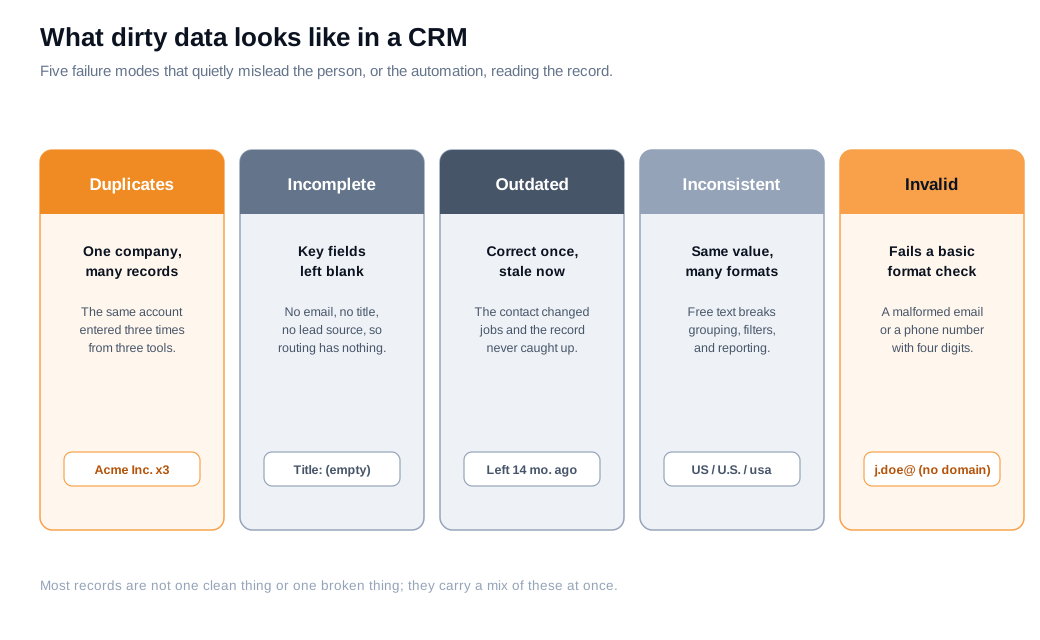
Duplicates are the same account or contact stored more than once, usually because a lead came in through a form, an import, and an integration without any of them checking for a match. Incomplete records are missing a field that something downstream needs, so a lead with no title and no source has nothing for a routing rule to act on. Outdated records were correct once and never caught up, which is what job changes and company moves produce at scale. Inconsistent records hold the same value in a dozen shapes, so "United States," "US," "U.S.," and "usa" all count separately in a report. Invalid records fail a basic check outright, like an email with no domain.
The reason this matters more than it looks: dirty data is silent. A blank field does not throw an error. A duplicate does not stop a workflow. The record just quietly tells the wrong story, and the cost lands somewhere no single dashboard is watching.
Why does dirty data hurt revenue?
Dirty data hurts revenue because it wastes the two things a revenue team cannot make more of, selling time and accurate decisions, and it does both continuously. The numbers here are large and well documented.
Gartner estimates that poor data quality costs the average organization $12.9 million a year in wasted resources, missed opportunities, and operational drag. That figure sounds abstract until you convert it into rep hours. Research cited by ZoomInfo found that sales departments lose roughly 550 hours of selling time per rep each year to poor prospect data, about 27% of the time a rep has to sell in the first place.
Decay makes it worse without anyone lifting a finger. HubSpot's database decay model puts B2B contact data loss at about 2.1% a month, which compounds to roughly 22.5% a year. So a database you cleaned perfectly today is measurably wrong by next quarter, and badly wrong by next summer.
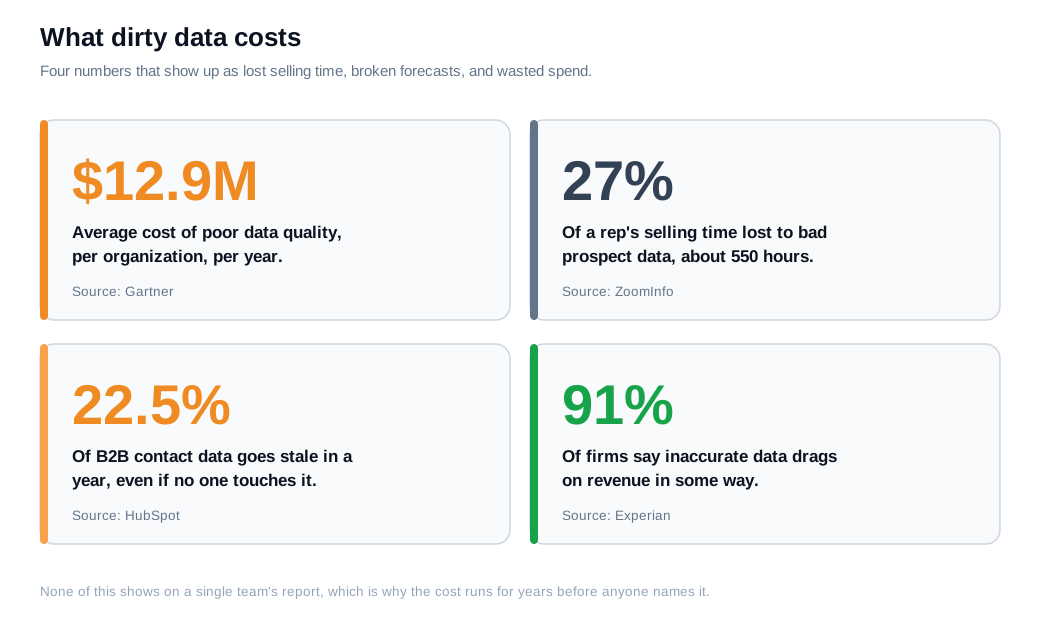
The lost hours are only one part of it. Experian's data quality research found that 91% of organizations believe inaccurate data hurts revenue through wasted spend, lost productivity, or missed opportunity, and US organizations estimated that around a third of their data was inaccurate. When the underlying records are wrong, so is everything built on them: the forecast, the territory plan, the lead score, and the follow-up.
Here is a worked example. Take a team of 12 reps, each losing the 550 hours a year that the ZoomInfo research describes. That is 6,600 hours across the team, roughly the equivalent of three full-time reps who do nothing but fight their own data. If a rep is fully loaded at $90,000 a year for about 2,000 working hours, those 6,600 hours represent close to $297,000 in salary spent not selling. No competitor took that money. The CRM did.
Speed compounds the loss. When a hot inbound lead lands with a dead phone number and a misspelled name, the rep either wastes the window fixing the record or skips it, and speed to first contact is where inbound deals are won. Clean data is what lets an inbound sales motion actually move fast instead of stalling on a bad email.
How does bad data get into your CRM?
Bad data gets into a CRM mostly at the point of entry, through manual typos, skipped fields, form spam, and imports no one checks, and then it decays on its own as people change jobs and companies move. Prevention starts with understanding which of those doors is open.
Manual entry is the biggest source. A rep in a hurry abbreviates a company name, guesses a title, or leaves the lead source blank because the form did not require it. Multiply that across a busy week and the database fills with small, individually harmless errors that add up to an unreliable whole. Bulk imports are the second big source, because a spreadsheet of a few thousand rows can inject duplicates and format mismatches in a single click.
Integrations create duplicates in a different way. When a marketing tool, a chat widget, and a form all write to the CRM without a shared match key, the same person arrives three times under three slightly different spellings. Capturing information through a real conversation instead of a raw form fill helps here, since a rep or an assistant on live chat can confirm the spelling of a company and the correct email while the visitor is still on the page, rather than storing whatever the form captured and hoping.
Then there is decay, which no data-entry discipline can stop. People change jobs every few years, companies get acquired, domains switch, and phone numbers move. A record can be entered perfectly and still be wrong within months, which is why hygiene has to be continuous rather than a single event.
How do you clean and dedupe records?
You clean and dedupe records with a repeatable sequence: audit, standardize, deduplicate and merge, validate, enrich, then archive, run in that order because each step sets up the next. Deduplicating before you standardize, for example, means your matching misses "IBM" and "I.B.M." as the same account.
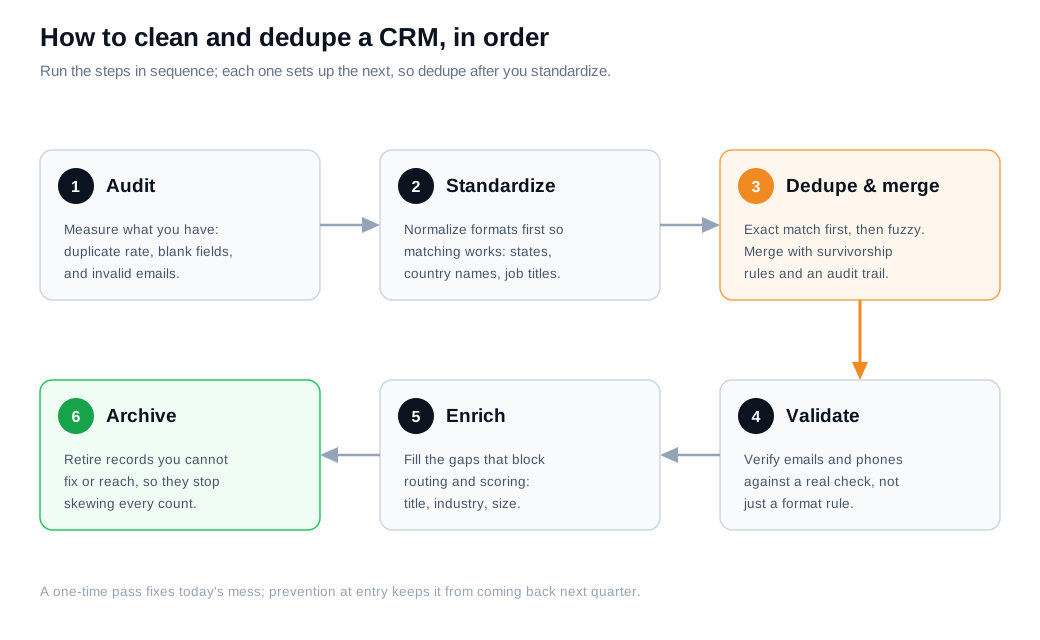
Start with an audit so you fix the right things. Measure the duplicate rate, the share of records missing a key field, and the count of invalid emails, so you have a baseline and can prove the cleanup worked. Then standardize formats, normalizing country names, states, and job titles, because consistent values are what make matching reliable in the next step.
Deduplication is the step teams get wrong most often. The reliable approach is layered: run strict exact matching first to catch obvious duplicates, then apply fuzzy matching to the rest to catch near-misses like "Acme Inc" and "Acme, Inc." When you merge, use survivorship rules that say which field wins from which record, keep the most recent value for things like title and the most complete value for an address, and preserve consent and do-not-contact flags no matter what. Always keep an audit trail and preview a merge before you run it, because a bad merge destroys data instead of fixing it.
Validation comes after the merge, so you verify emails and phone numbers on the records you are actually keeping. Enrich the gaps that block routing and scoring, like industry or company size. Finally, archive the records you cannot fix or reach, so dead data stops inflating your counts.
Here is a worked example. Say an audit of 50,000 records finds a 12% duplicate rate (6,000 duplicate records), 18% missing a job title, and 8% with an invalid email. Merging the duplicates alone brings the real record count down to about 44,000, which immediately corrects every per-account report that was double counting. Validate and archive the 8% of dead emails and you are left with roughly 40,500 records you can actually use, instead of 50,000 records you half trust.
How do you maintain CRM data hygiene?
You maintain CRM data hygiene by preventing bad data at the point of entry and running a fixed cleaning cadence, so records stay clean instead of needing a full rescue every year. Prevention is the half most teams skip, and it is why data goes dirty again within a quarter of a big cleanup.
Prevention lives in the CRM's own controls. Validation rules reject a malformed email or a phone number with the wrong length before the record saves. Picklists replace free-text fields so a country is always "United States," never four spellings of it. Required fields by stage force the essentials to be filled as a deal advances, and a dedupe-on-create check stops a new lead from becoming the fourth copy of an existing account.
Cadence handles the decay that prevention cannot. A practical rhythm, drawn from guides like ZoomInfo's data hygiene best practices, is a full data quality audit each quarter, a deduplication pass each month, and an email verification run before any major campaign. Put a name next to each of those jobs, because a cadence no one owns is a cadence that does not happen.
Governance ties it together. Agree on naming standards and required fields, write them down, and train reps on why the standards exist rather than just enforcing them. Clean data is also what makes the rest of the revenue stack work, since accurate account and owner fields are exactly what lead routing and notifications depend on to send the right lead to the right rep in time.
How do you measure whether it is working?
You measure CRM data hygiene with a data quality score built from a few dimensions, tracked over time so you can see the number move. The common dimensions are completeness, accuracy, consistency, uniqueness, and timeliness, and scoring them turns a vague sense that "the data is bad" into something you can manage.
Each dimension answers a question. Completeness asks what share of records have their required fields filled. Accuracy asks whether the values are actually correct, usually sampled by verifying a subset against a real source. Consistency asks whether the same value is stored the same way everywhere. Uniqueness asks how few duplicates remain. Timeliness asks how recently records were updated or last verified.
Roll those into one score and you have a dial the whole team can watch. Suppose completeness is 85%, accuracy is 78%, consistency is 90%, uniqueness is 92%, and timeliness is 70%. Weight them equally and the composite data quality score is 83%. The point is less the exact number and more the trend: if that 83% drifts down month over month, prevention is failing somewhere, and you fix the door rather than mopping the floor again. When the score holds steady after a cleanup, hygiene is working.
Key takeaways
- Hygiene is a habit, not a project. CRM data hygiene keeps records accurate, complete, consistent, and current on an ongoing basis, because a database that is clean today decays on its own within months.
- Dirty data has five shapes. Duplicated, incomplete, outdated, inconsistent, and invalid records all mislead quietly, and most real records carry more than one problem at once.
- The cost is real and measured. Gartner puts poor data quality at $12.9 million a year for the average organization, and bad prospect data wastes roughly 27% of a rep's selling time.
- Clean in a fixed order. Audit, standardize, dedupe and merge with survivorship rules, validate, enrich, then archive, because deduplicating before standardizing misses matches.
- Prevention beats cleanup. Validation rules, picklists, required fields, and dedupe-on-create stop bad data at entry, which is the step that keeps a cleanup from becoming an annual ritual.
- Score it to manage it. Track completeness, accuracy, consistency, uniqueness, and timeliness as one data quality score, and watch the trend rather than any single snapshot.

Written by
Daniel SemeckyCo-founder & CEO
Daniel is the co-founder and CEO of Glimpze. He spends his days talking to revenue teams about how to catch high-intent visitors before they bounce, and writes about inbound sales, lead conversion, and building a motion where marketing and sales actually share a number.


