
On this page
- What is lead routing?
- What is the difference between lead routing and lead assignment?
- How does lead routing work?
- What are the common lead routing rules (round-robin, territory, and account-based)?
- Why does routing speed matter?
- What are the lead routing best practices?
- How do you automate lead routing?
- Key takeaways
- Sources
A visitor books a demo at 9:12 a.m. and the form data hits your CRM a second later. From that instant, two questions decide the deal. Who should own this lead, and how quickly can that person reach it. Lead routing answers the first question and largely controls the second.
Get it right and the lead lands with the rep who owns the account, knows the product, and has room to work it, all within seconds. Get it wrong and the same lead sits in a shared queue, gets claimed by someone who has never sold to that industry, or waits untouched until Monday. The mechanics are unglamorous. The revenue difference between those two paths is large.
This guide defines lead routing, separates it from lead assignment, walks through how a routing engine actually runs, compares the common rules, explains why speed decides deals, and lays out the best practices and automation that let it run without a person babysitting the queue.
What is lead routing?
Lead routing is the automated process of sending each incoming lead to the sales rep, team, or queue best positioned to win it, based on rules you define. The system reads the lead the moment it arrives, checks its data against your criteria, picks an owner, and hands the lead over, ideally in real time instead of on a nightly batch.
The inputs vary by team. Common ones include geographic territory, company size or revenue band, industry, the product a prospect asked about, the campaign or page the lead came from, and whether that company already exists in your CRM as an open opportunity or a current customer. A routing engine weighs those signals to answer a single question: of everyone who could take this lead, who should?
You will also see this called lead distribution, and setting up the rules usually falls to sales operations or revenue operations, working from the way the team is segmented and paid. Done well, routing does four things at once, the pattern that vendors like ZoomInfo describe in their routing guidance. It shortens response time, puts the right expertise on each lead, spreads volume fairly across reps, and stops a single prospect from being worked by three people or by nobody.
What is the difference between lead routing and lead assignment?
Lead assignment is the single act of attaching one lead to one owner, while lead routing is the whole decision system that determines which owner, in what order, and how fast. Most teams use the words interchangeably, and treating them as synonyms will rarely cause a problem.
The distinction becomes useful when you evaluate tools. A CRM can assign a lead with one static rule, such as "everything from California goes to Priya." A routing engine chooses between competing rules, resolves the edge cases, alerts the owner, and reassigns the lead if that owner never acts. Assignment is the output. Routing is the logic and the timing that produce it. When a product claims to route leads but only stamps an owner on the record, the hard parts of the job are still yours.
How does lead routing work?
Lead routing works by running each new lead through a short pipeline: capture, enrich, match to an account, apply your rules in priority order, assign an owner, and notify that person, all inside a few seconds. Every step you leave manual is a place where minutes stack into hours.
Capture is the entry point. A lead arrives from a web form, a chat conversation, an event scan, a paid campaign, or an inbound call, and lands in the system that holds your routing logic. Enrichment fills the gaps, because a raw form rarely carries everything a rule needs. Enrichment tools append firmographic fields such as company size, industry, and headquarters location, then match the email domain against your existing accounts so a signup from a known customer is recognized as one.
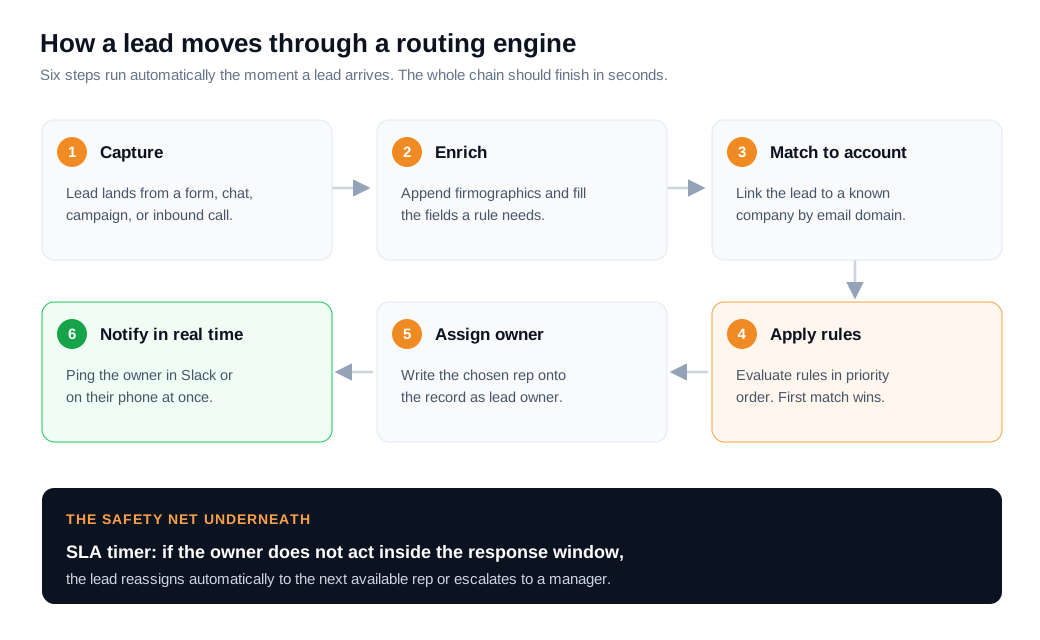
Matching is where the rules fire. Most engines evaluate rules as a cascade, testing the highest-priority condition first and stopping at the first match, the way Salesforce assignment rules do. A lead tied to a named account gets routed to its owner before the round-robin rule ever runs. Assignment then writes the owner onto the record, and notification pings that person somewhere they actually watch, whether a CRM task, an email, a Slack message, or a phone alert. A lead assigned to a rep who never learns it exists has not really been routed. Every step depends on clean data underneath it, because one missing country field or one duplicate account will send a lead to the wrong place with total confidence.
What are the common lead routing rules (round-robin, territory, and account-based)?
The three rules you will meet most often are round-robin, territory-based, and account-based, with weighted, skills-based, and product-based variants layered on for teams that need them. Mature setups almost always combine several rather than relying on one.
Round-robin hands leads to reps in a rotating order so each person gets a roughly equal share. Lead one goes to rep A, lead two to rep B, lead three to rep C, then the cycle repeats. It is simple, it feels fair, and it is the default on most teams for exactly those reasons. The weakness is that plain round-robin ignores lead value, rep expertise, and current workload, so a strategic account can land on a brand-new hire purely because the rotation pointed there. Weighted round-robin softens that. Imagine a three-person pool where you want your senior rep to carry more volume. Set weights of 3, 2, and 1, and across every six leads the senior rep takes three, the mid-level rep takes two, and the new hire takes one, which LeanData documents as a standard distribution pattern.
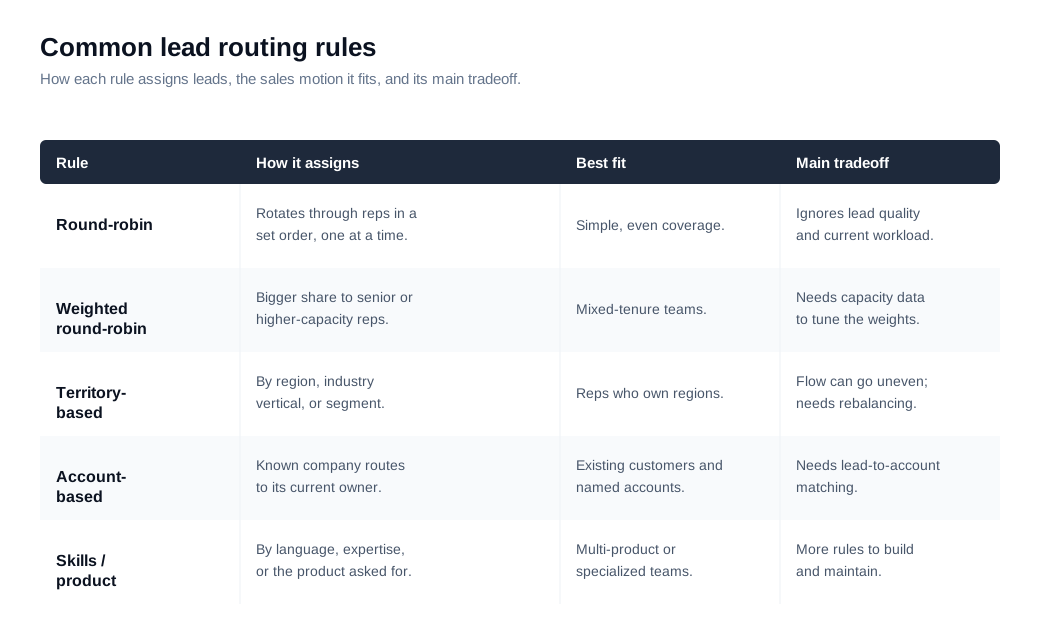
Territory-based routing assigns leads by geography, industry vertical, or segment, and it pairs naturally with a comp plan where reps own defined regions. Its main risk is uneven flow, since one territory can flood while another goes quiet, so it needs periodic rebalancing. Account-based routing protects existing relationships. If a new lead matches a company that already has a named owner, it goes straight to that owner instead of the general pool. This depends on strong lead-to-account matching, which compares the lead against known accounts by email domain, company name, website, and phone at once, so it still catches the link when someone signs up with a personal Gmail address. Skills-based and product-based rules route by language, industry knowledge, or the specific product a buyer asked about. None of these is complete alone, so the practical answer for most B2B teams is a hybrid cascade: match to existing accounts first, then split by territory, then round-robin inside each pool, so rotation sits underneath a layer of judgment.
Why does routing speed matter?
Routing speed matters because a lead's value decays by the minute, and most of the delay between arrival and first reply comes from handoffs between systems and people rather than from the selling itself. A lead is warmest the instant it raises its hand, and routing decides how fast a qualified human can act on that heat.
The research here is unusually consistent. The Lead Response Management study led by Dr. James Oldroyd at MIT, which analyzed more than 15,000 leads and over 100,000 call attempts, found that calling a lead within five minutes rather than thirty made a team roughly 100 times more likely to make contact and about 21 times more likely to qualify it. The 2011 Harvard Business Review audit The Short Life of Online Sales Leads submitted test leads to 2,241 companies and found the average first response took 42 hours, that 23 percent of companies never responded at all, and that firms reaching a lead within the first hour were about seven times more likely to have a meaningful conversation with a decision-maker than those who waited even an hour longer, and 60 times more likely than those who waited a full day.
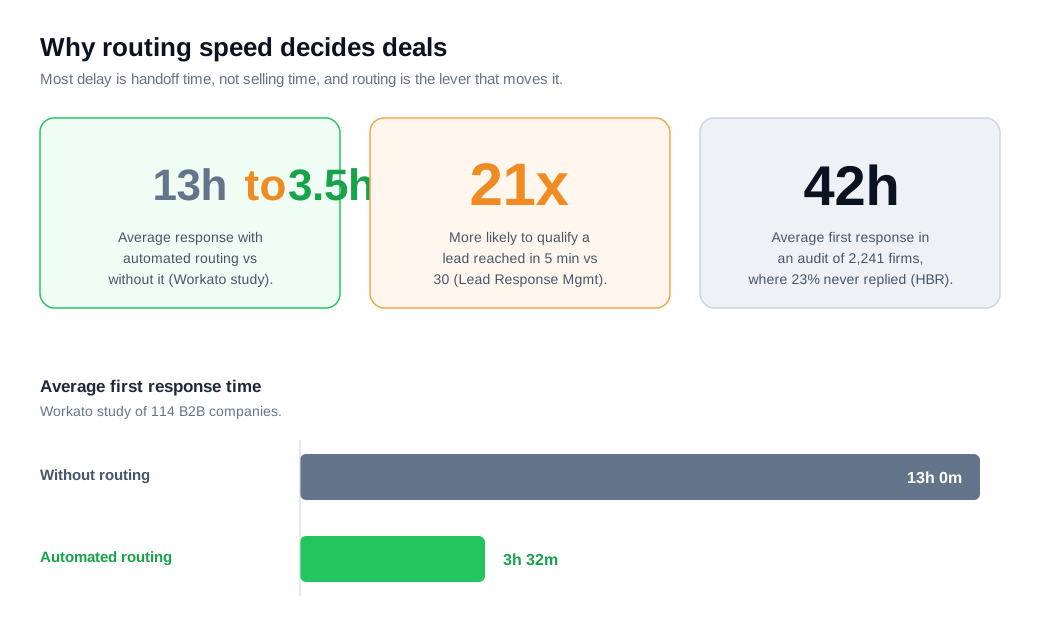
Routing is the lever that moves this number, because the delay is mostly waiting, not working. A Workato study of 114 B2B companies found that teams using automated lead routing responded in about 3 hours and 32 minutes on average, against roughly 13 hours for teams without it. That is close to a fourfold improvement with no change in how a single rep behaves. The same study is a useful reality check on how far most teams sit from the target: not one of the 114 companies called a lead within five minutes, and only 31 percent tried calling at all.
Here is the math on a single month. Say you generate 300 inbound demo requests, and when the right rep engages within five minutes you book 30 percent of them into a meeting, so 90 meetings. The decay research says contact and qualification rates fall by more than half once you slip past the 30-minute mark, so a team sitting at a multi-hour median might book closer to 14 percent, or 42 meetings. Same 300 leads, same ad spend, roughly 48 fewer meetings, and the only thing that changed was how quickly the right rep saw the lead.
What are the lead routing best practices?
The best practices reduce to five moves: route in real time, match before you rotate, protect existing accounts, enforce an SLA with automatic reassignment, and keep your CRM data clean. Each one closes a specific gap that quietly costs deals.
Route in real time rather than on a batch. If your system processes leads every fifteen minutes, you have surrendered the speed advantage before a rep lifts a finger. Match before you rotate, which means running account and territory rules first so high-value and named-account leads never drop into a generic round-robin pool. Protect existing accounts by sending any lead from a known company to its current owner, so two reps never call the same buyer and the account history stays intact.
Enforce an SLA with a safety net underneath it. Give each lead an owner and a response window, and if that window passes untouched, reassign the lead automatically to the next available rep or escalate it to a manager. Leads land on people who are in meetings, on PTO, or already buried, and a reassignment rule keeps a hot one from dying in an idle inbox. Discipline here compounds: one 2026 benchmark from Digital Applied found teams with a formal response-time SLA hit a fifteen-minute target far more often than teams without one, roughly 55 percent of the time versus about 30 percent. Pair every assignment with an instant alert, since a guide to routing and notifications that pings the owner in Slack or on their phone is what turns a database write into an action. Finally, treat data quality as part of routing itself, because duplicates and blank fields cause wrong assignments, and audit your rules on a schedule as territories, headcount, and product lines shift.
How do you automate lead routing?
You automate lead routing by connecting your lead sources to an engine that enriches, matches, assigns, and notifies the moment a lead lands, with no one touching the record. The engine watches for new leads, runs them against your rules in real time, writes the owner, and alerts that person where they already work.
Most teams start inside their CRM. Salesforce, for example, offers assignment rules for criteria-based routing at lead creation, Flow Builder for more complex logic including basic round-robin, and Apex for fully custom routing. These native tools work, and they hit limits quickly. They tend not to handle workload balancing, capacity-aware distribution, or SLA-based reassignment, and their rules run in a static linear cascade, so the moment you want to reroute after a missed SLA you are either bending Flow Builder into shapes it resists or reaching for a dedicated routing layer that plugs into the CRM.
Notifications are half the automation, and they usually ride your existing stack. Wiring routing into your integrations so a new lead posts to the right Slack channel or DMs the assigned rep is often the single change that collapses response time, because it removes the wait for someone to refresh a list. The most direct form of routing skips the queue entirely and catches the buyer while they are still on the page. Offering live chat on high-intent pages lets a routed rep answer in the moment interest peaks, and moving a serious buyer into a live video or screen-share call turns a warm visitor into a real conversation without a scheduling round trip. Platforms in this space, Glimpze among them, pair a live view of who is on your site with smart routing to the right rep, Slack alerts, and a one-line install, and a free tier lets you baseline your current speed before you commit. Whatever you build on, the order stays the same: capture every lead, match it to the right owner in real time, notify that person where they already look, and give them a fast way to reply while the lead is still warm.
Key takeaways
- Lead routing sends each new lead to the rep best positioned to win it, using rules you define. It reads the lead, matches it against your criteria, assigns an owner, and alerts that person, ideally within seconds of arrival.
- The common rules are round-robin, territory-based, and account-based, plus weighted, skills, and product variants. Strong setups combine them in a cascade: match to accounts first, split by territory, then round-robin inside each pool.
- Speed is the payoff, and routing is the lever that controls it. Automated routing cut average response from about 13 hours to roughly 3.5 in a 114-company study, and reaching a lead in five minutes rather than thirty makes qualification about 21 times likelier.
- Match before you rotate, and protect existing accounts. Running account and territory rules ahead of round-robin keeps high-value and named-account leads out of a generic queue and stops two reps from working one buyer.
- Enforce an SLA with automatic reassignment, and keep your data clean. A reassignment rule stops a hot lead from stalling in an idle inbox, and duplicates or missing fields send leads to the wrong rep with full confidence.
- Automation is assignment plus real-time notification. Native CRM rules get you started, dedicated routing tools handle capacity and SLAs, and a Slack or on-page alert is what turns an assignment into a reply.
TAGS

Written by
Daniel SemeckyCo-founder & CEO
Daniel is the co-founder and CEO of Glimpze. He spends his days talking to revenue teams about how to catch high-intent visitors before they bounce, and writes about inbound sales, lead conversion, and building a motion where marketing and sales actually share a number.


