
On this page
- What is an AI copilot?
- What is AI autopilot?
- What is the real difference between a sales copilot and an autopilot?
- How much autonomy should you give AI?
- When is each appropriate?
- What are the risks of putting sales on autopilot?
- How do you roll out an AI copilot and autopilot without losing control?
- Key takeaways
- Sources
A VP of sales flips on an autonomous AI sales development rep on a Monday. By Friday it has sent 4,000 cold emails, booked a handful of meetings, and quietly gotten the company's main sending domain flagged as spam. The tool did exactly what it was told. Nobody was reading the work.
That Monday decision was really a question about autonomy. Do you want AI that hands your reps faster judgment, or AI that takes the wheel? A copilot keeps a person in the chair and speeds up their decisions. An autopilot runs the workflow itself and taps a human only on exceptions. The same models sit underneath both, so the choice comes down to how much rope you hand over.
This post defines both models, shows where the real line sits, works through how much autonomy each task can absorb, and lays out when a copilot beats an autopilot plus how to roll either one out without losing control.
What is an AI copilot?
An AI copilot is an assistant that researches, drafts, scores, and suggests, while a human reviews and decides before anything reaches a customer. The rep stays in control of every outbound move. The AI just gets them there faster.
In a sales workflow, a copilot writes the follow-up email, summarizes the discovery call, scores the inbound lead, and proposes the next step. The rep reads it, edits it, and sends it. The checkpoint sits before the action, every time, which is what keeps the judgment human and the mistakes contained.
The productivity case for this model is well documented. Salesforce reports that sellers spend only about 30 percent of their time actually selling, with the rest lost to research, admin, and data entry, according to its 2026 State of Sales research. A copilot attacks that 70 percent. Salesforce found sellers expect AI to cut prospect research time by 34 percent and email drafting by 36 percent once it is fully in use. That time goes back into conversations a machine should not be having on its own.
Website chat is a familiar version of the pattern. An AI chat assistant can answer routine questions and draft a reply, then leave the rep to approve or reshape it before it goes to a live buyer. The bot clears the busywork. The person still owns the relationship.
What is AI autopilot?
AI autopilot is an agent that runs a workflow end to end and executes actions on its own, escalating only the cases that fall outside its rules. There is no rep checkpoint on the routine work. The agent acts, then reports.
An autonomous AI sales development rep runs the full outbound loop: it finds prospects, researches them, writes the messages, and dispatches them without a human pressing send. It can book meetings, update the CRM after a call, and enrich records automatically. The human role shifts from doing the work to supervising it, reviewing exceptions and aggregate outcomes rather than individual sends.
Adoption is climbing fast. Salesforce found that 54 percent of sellers say they have already used AI agents, and nearly 9 in 10 plan to by 2027. Gartner has predicted that AI agents will handle a large share of routine outbound within a couple of years. The technology is real, and for the right tasks it is genuinely useful. The question is which tasks those are, and where the human still needs to sit.
The dividing line between the two models is simple to state. On a copilot, the human checkpoint comes before the send. On an autopilot, it comes after, or only when the agent is unsure, as vendors like Unify lay out in their copilot versus autonomous comparison.
What is the real difference between a sales copilot and an autopilot?
The real difference is decision authority: a copilot recommends and a person commits, while an autopilot commits within set boundaries and reports the exceptions. Both can run on the same underlying model with the same data. What separates them is who holds the authority to act.
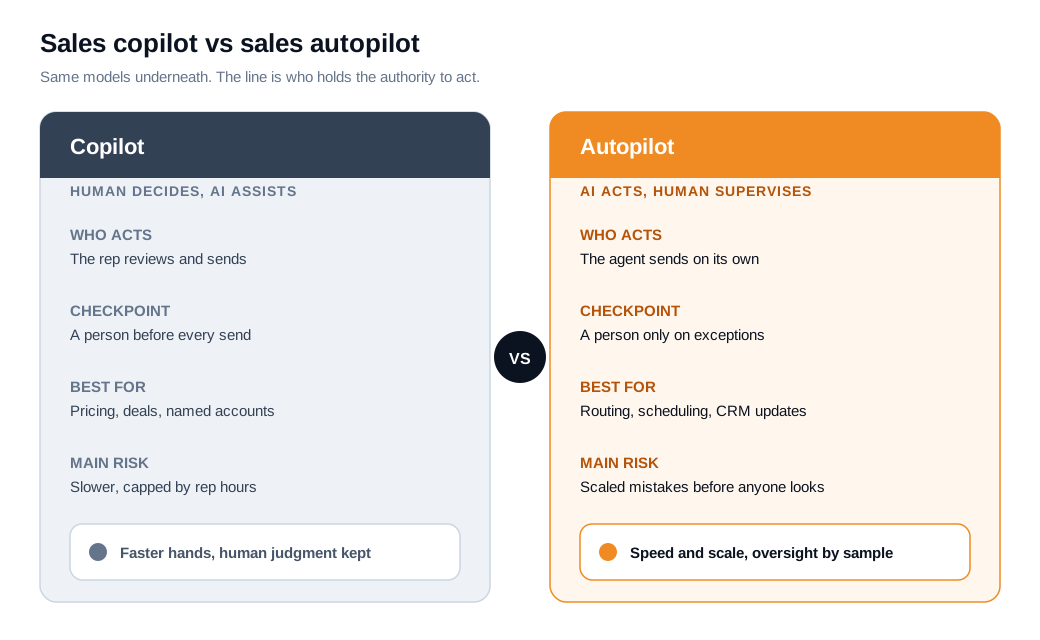
Outreach frames the split the same way in its guide to copilot and autopilot deployment patterns: the distinction is about who gets to decide, not about how clever the model is. A copilot surfaces the insight, drafts the message, and flags the opportunity, and your team decides what to act on. An autopilot makes and executes those calls itself, escalating when its confidence drops or a situation falls outside its parameters.
That framing matters because it stops the conversation from being about hype. Acting alone does not make a tool more advanced. It just means the tool holds more authority, and that authority is exactly what you want to hand out carefully. The rest of this post is about how carefully.
How much autonomy should you give AI?
Give AI as much autonomy as the task can safely reverse, and no more. Treat autonomy as a dial you turn up gradually, not a switch you flip once at launch.
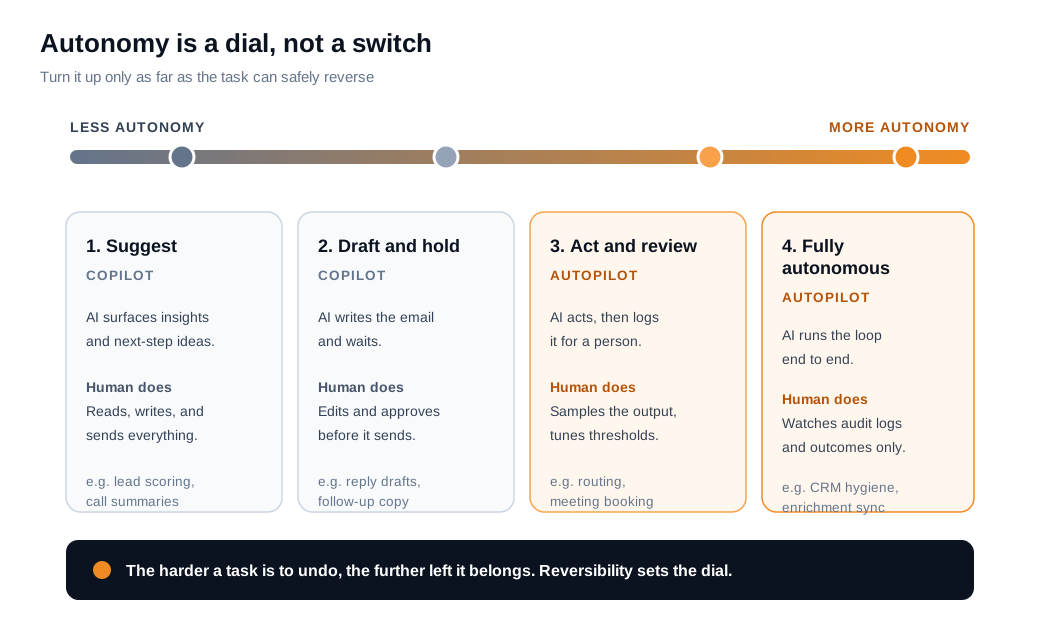
Think of four settings along that dial. At the low end, the AI only suggests, and the human writes and sends everything. One notch up, it drafts and holds, so a person edits and approves before the message leaves. Further along, it acts and then logs the action for review. At the far end, it runs the loop fully and the human only watches audit logs and outcomes. The right setting for any given task depends on two things: how much damage a mistake does, and how hard that mistake is to undo.
A wrong CRM field is trivial to fix, so record hygiene can sit near the top of the dial. A tone-deaf email to your biggest target account cannot be unsent, so account outreach belongs near the bottom. Reversibility, more than sophistication, decides where the pointer goes.
Two findings should keep you honest about turning the dial too far, too fast. Gartner has predicted that more than 40 percent of agentic AI projects will be canceled by the end of 2027, citing escalating costs, unclear value, and weak risk controls. In the same research, Gartner warned about "agent washing," estimating that only around 130 of the thousands of vendors claiming agentic AI actually deliver it. Gartner has separately cautioned that applying one uniform level of governance across every agent leads to failure, because a low-risk task and a high-risk one need different amounts of oversight. The dial exists for exactly that reason.
The practical rule practitioners keep landing on is a human-in-the-loop default: let software handle the routine majority and keep a person's authority over the risky, hard-to-reverse minority, as one autonomy playbook for production agents puts it. You set a confidence threshold, and below it the agent stops and asks. You tune that threshold against real transcripts, not a guess made on day one.
When is each appropriate?
Use a copilot for anything touching pricing, deal strategy, or a named account, and an autopilot for narrow, high-volume, low-risk tasks like lead routing, meeting scheduling, and CRM updates. The closer a task gets to money or a specific relationship, the more the human checkpoint earns its keep.
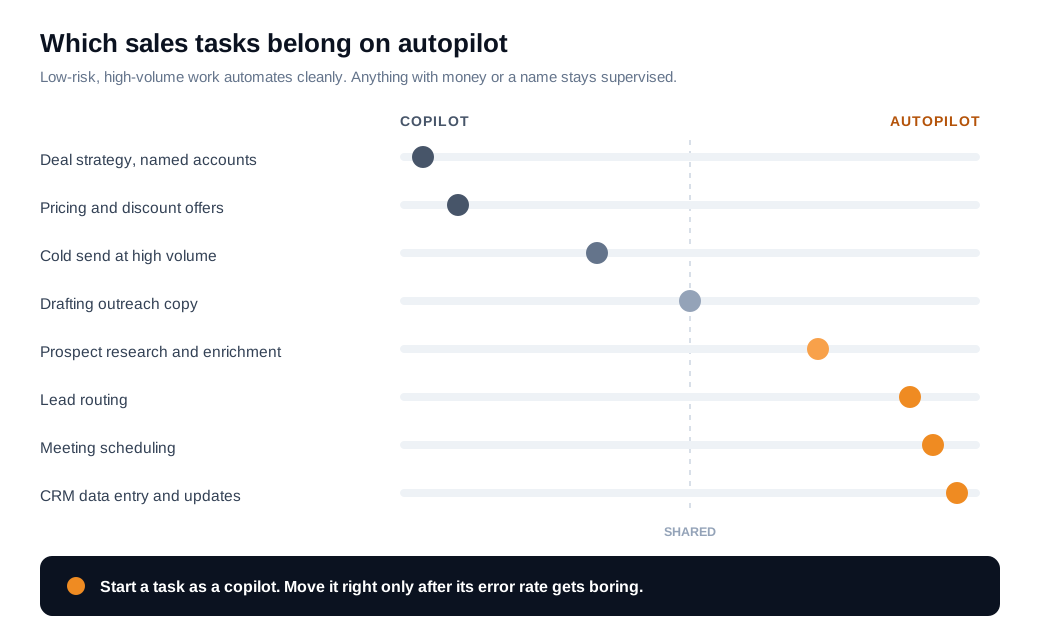
Qualified's guidance matches this split. It suggests the copilot model fits most teams under roughly 20 reps or in brand-sensitive markets, while fully autonomous setups suit narrow, high-volume, top-of-funnel tests, in its breakdown of how to choose between a sales autopilot and a copilot. Lead routing, scheduling, and record updates are safe to automate because a mistake is cheap and easy to correct. Discount approvals and strategic account outreach are not, because a mistake there can cost a deal.
Here is a worked example on the tempting middle case: high-volume cold email. Say a team wants to send 8,000 cold emails a month. A 100,000-email analysis of AI outbound found AI-written emails got spam-flagged around 8 percent of the time versus about 3 percent for human-reviewed sends, with inbox placement near 71 percent for AI versus 86 percent for human.
Run the math on both settings. On full autopilot at 8 percent, roughly 640 of those 8,000 emails draw spam flags, and only about 5,680 land in an inbox at all. On a copilot setup where a rep reviews batch samples before each sequence runs, the flag rate drops toward 3 percent, about 240 emails, and inbox placement climbs to roughly 6,880 delivered. That gap of 1,200 extra inboxes, and 400 fewer spam complaints, is the difference between protecting your domain reputation and slowly torching it. The volume looks like a job for autopilot. The reputation risk pulls it back toward a copilot with sampled review.
Inbound is the cleaner autopilot story on the routing side, because speed matters more than deliberation. When a high-intent visitor is on your pricing page, an autonomous layer can greet them, qualify, and route them to the right rep in seconds, which is where a lead routing and notifications setup does real work. The routing is automatic. The actual sales conversation still belongs to a person.
What are the risks of putting sales on autopilot?
The main risks are brand damage, deliverability collapse, and paying for a tool that was never really autonomous to begin with. Each one compounds at volume, which is exactly what autopilot is built to produce.
Brand voice is the first casualty. Autonomous outbound at scale tends toward superficial personalization, the kind that restates a prospect's title back at them and reads as machine-written within seconds. Buyers pattern-match that style fast, and so do spam filters. That is how you get the deliverability problem from the worked example above, where AI sends flag at 8 percent against 3 percent for reviewed ones. Push send volume high enough on an unwarmed domain and reputation damage shows up within weeks.
Trust is the quieter risk. Research covered by CX Dive found that 41 percent of customers are less likely to buy from a company that uses AI for service, rising to 53 percent when there is no option to reach a human. An autopilot with no visible human path does not just risk a bad email. It risks the relationship behind it.
Then there is the buying risk. Gartner's "agent washing" warning means a real share of tools marketed as autonomous are rebranded chatbots and scripts that cannot handle the autonomy they promise. If you hand full authority to one of those, you have automated a process nobody is actually watching. The fix for all three risks is the same underlying move: keep a person in the loop until the agent has earned its way out.
How do you roll out an AI copilot and autopilot without losing control?
Start every task as a copilot, measure its outputs against real conversations, and move a task to autopilot only once its error rate has become boring. A staged rollout keeps you from discovering a problem at 8,000 emails that a person would have caught at eight.
- Start supervised, always. Run each new task at the draft-and-hold setting first, with a human approving before anything sends. You learn where the agent is weak while the stakes are low.
- Graduate one task at a time. Move routing or scheduling to autopilot before you touch anything that writes to a customer. Uniform autonomy across every task is the failure mode Gartner flagged.
- Keep a visible human path. Buyers engage more freely when they know they can reach a person, so never hide the exit behind an autonomous layer.
- Set and tune confidence thresholds. Below the threshold, the agent stops and escalates. Read the escalations weekly and adjust against what it actually got wrong, using your AI assistant setup to define the rules.
- Log everything for audit. You cannot supervise what you cannot see. Keep transcripts, actions taken, and escalation reasons so review is possible after the fact.
- Judge it on outcomes, not activity. Reply quality, deliverability, and win rate tell you whether the autonomy is paying off. Volume alone does not.
Do this and the copilot-to-autopilot progression stops being a leap of faith. It becomes a series of small, reversible promotions, each earned by a task that proved it could be trusted with a little more rope.
Key takeaways
- The line is decision authority, not model sophistication: a copilot recommends and a person commits, while an autopilot commits within boundaries and escalates the exceptions.
- Autonomy is a dial, not a switch, and reversibility sets it, so the harder a task is to undo, the less autonomy it should get.
- Copilots fit money and relationships, meaning pricing, deal strategy, and named-account outreach, while autopilot suits routing, scheduling, and CRM updates.
- High-volume cold email is a trap, since AI sends flag as spam near 8 percent versus 3 percent for reviewed ones, which pulls that task back toward sampled human review.
- Autopilot's risks compound at scale, across brand voice, deliverability, and trust, and Gartner expects over 40 percent of agentic AI projects to be canceled by the end of 2027.
- Roll it out in stages, starting every task supervised, graduating one at a time, and promoting to autopilot only once the error rate is boring.
TAGS

Written by
Nilas MylerCo-founder & CTO, Glimpze
Nilas is the co-founder and CTO of Glimpze, an inbound sales tool that turns high-intent website visitors into live conversations. A former SEO consultant for some of the largest companies in Denmark, he writes about speed-to-lead, inbound sales, and conversion rate optimization — the technical and operational mechanics of turning traffic into pipeline.


