
On this page
A visitor on your pricing page opens the chat widget and types one line: "does this work for a 300-seat rollout with SSO?" That is an enterprise deal raising its hand. If the message lands in a shared inbox that three people half-watch, or with a rep who only handles self-serve trials, the answer comes late or generic, and the buyer clicks away.
Routing decides who catches that message and how fast. Get it right and the enterprise question reaches an account executive who owns that logo, the support question reaches support, and the browser gets a helpful link instead of a rep's afternoon. Get it wrong and good conversations leak out the bottom while reps stay busy on the wrong ones.
This guide covers what conversation routing is, why it matters to pipeline, how to route by intent and by account, how routing speed changes outcomes, how to set up routing rules step by step, and the mistakes that quietly break a routing setup.
What is website conversation routing?
Website conversation routing is the set of rules that decides which team or person handles each incoming chat, call, or message on your site, based on who the visitor is, what they want, and who is available. It is the traffic control layer between a raised hand on a web page and the rep who answers it.
A routing rule reads signals attached to a conversation, then sends it somewhere. The signals can be the page the visitor is on, an answer to a pre-chat question, firmographic data about their company, CRM ownership, or the topic detected in their first message. The destination can be a specific rep, a team queue, an automated answer, or a self-serve resource.
The mechanics sit close to lead routing, the older discipline of assigning form-fill leads to sales reps. What changes is timing. A form lead can wait in a queue for an hour and still convert. A live conversation is a person sitting on your page right now, so routing has to happen in seconds, and the visitor watches it happen. That is why a fast live chat setup and clean routing have to work as one system rather than two separate projects.
Why does conversation routing matter?
Conversation routing matters because a misrouted conversation is usually a lost one, and misrouting is common. LeanData estimates that one in four leads is routed incorrectly, and each wrong turn adds a delay, a hand-off, or a dead end where the buyer gives up.
The failure mode has a name: lead leakage. LeanData describes it as leads that go unworked because they were assigned to the wrong person, stuck in a queue, or lost during a hand-off. On a website widget, leakage looks like a pricing question sitting in a support queue, or a hot enterprise account chatting with a rep who cannot speak to enterprise terms.
Routing also protects rep time in both directions. Without rules, reps either fight over every conversation or ignore the widget because most chats feel low-value. With rules, a good-fit buyer reaches a real person quickly, and a browser or a job seeker gets a useful pointer that never costs a rep an interruption.
There is a revenue number attached. When Zoom tightened routing with LeanData, it cut average routing time by 39 percent, from over three minutes to under 1.5 minutes, and its lead-to-opportunity conversion rate rose from 11 percent to 17 percent. Same leads, better routing, more pipeline. Routing is one of the few levers that lifts conversion without adding a single visitor to the top of the funnel.
How do you route by intent or account?
You route by intent or account by reading two kinds of signal off each conversation, what the visitor wants (intent) and who they are (account), then sending the conversation to the team that matches. Most strong setups use both, with account taking priority when a conversation matches a known company.
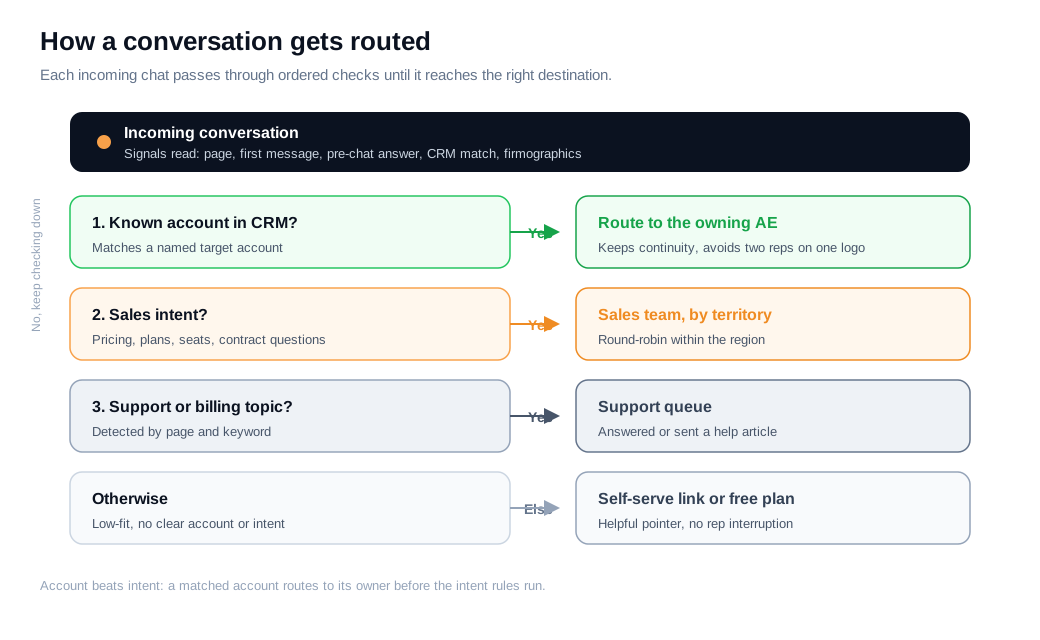
Intent-based routing keys off what the person is trying to do. The clearest source is the page plus the first message. A visitor on a documentation page asking "how do I reset a webhook" is a support conversation. A visitor on the pricing page asking about seats and contracts is a sales conversation. A pre-chat menu with two or three options (Sales, Support, Billing) captures intent explicitly when the message alone is ambiguous, and HubSpot's conversations inbox routes on exactly these inputs, sending chats to a team or a specific owner based on the page, the answer, or the contact record.
Account-based routing keys off the company behind the visitor. When a conversation matches a known account in your CRM, the rule sends it straight to the account owner, so a rep who already knows the relationship catches it. Qualified describes this as identifying target accounts as they arrive and routing them to the assigned rep in real time, which keeps two reps from working the same logo and preserves continuity across deals.
The two signals combine into a priority order. A practical version: if the conversation matches a named account, route to the account owner regardless of page; if not, route by intent to the right team; within a team, sort by territory or fit. ReWork's guidance on routing from chat context suggests a two-layer method that fits this well, where you tag intent signals during the conversation, then use those tags as routing inputs, so the rule sharpens as the exchange unfolds. An AI chat assistant can do the tagging and the first-line qualification, then hand a scored conversation to the routing rule instead of a rep guessing.
How does routing speed affect outcomes?
Routing speed affects outcomes more than almost any other factor, because the value of a conversation decays by the minute once a buyer raises a hand. Slow routing is the most common reason a fast-looking widget still produces slow replies.
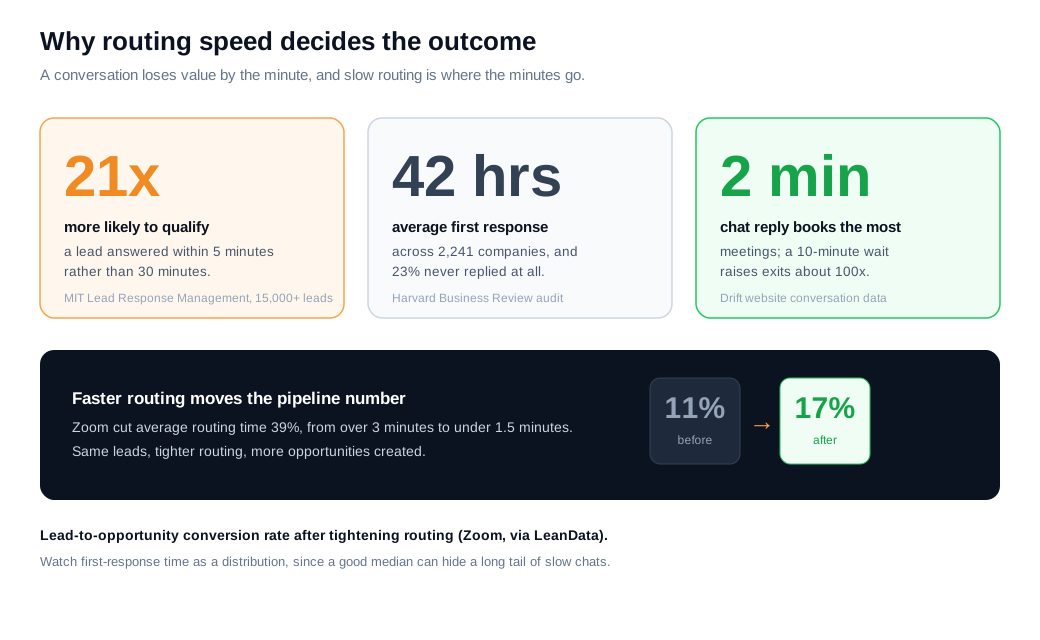
The evidence is old and consistent. The MIT Lead Response Management study of more than 15,000 leads found that contacting a lead within five minutes rather than thirty made a rep about 100 times more likely to reach the person and 21 times more likely to qualify them. Harvard Business Review's audit of 2,241 companies found the average first response took 42 hours, with 23 percent of firms never responding at all, and that answering within an hour made qualification about seven times more likely than waiting even sixty minutes longer.
Live chat compresses the window further. Drift's analysis of website conversations found that agents who replied within two minutes of a visitor engaging booked the most meetings, while waiting five minutes raised the chance the visitor left by roughly ten times and ten minutes by about a hundred. The same data noted that 41 percent of meetings booked through Drift happened outside 9 to 5, so coverage matters as much as raw speed.
Routing is where speed is won or lost. LeanData argues that slow follow-up is usually a routing failure rather than a rep failure, because a rep cannot answer fast if the conversation never reaches them fast. That is the case for routing to a specific available person rather than dropping every chat into a shared inbox that everyone assumes someone else is watching.
How do you set up routing rules?
You set up routing rules by writing an ordered hierarchy, most specific rule first and most general last, then wiring it to instant notifications and a fallback for every branch. The order is what stops two reps from working the same account and keeps any conversation from landing nowhere.
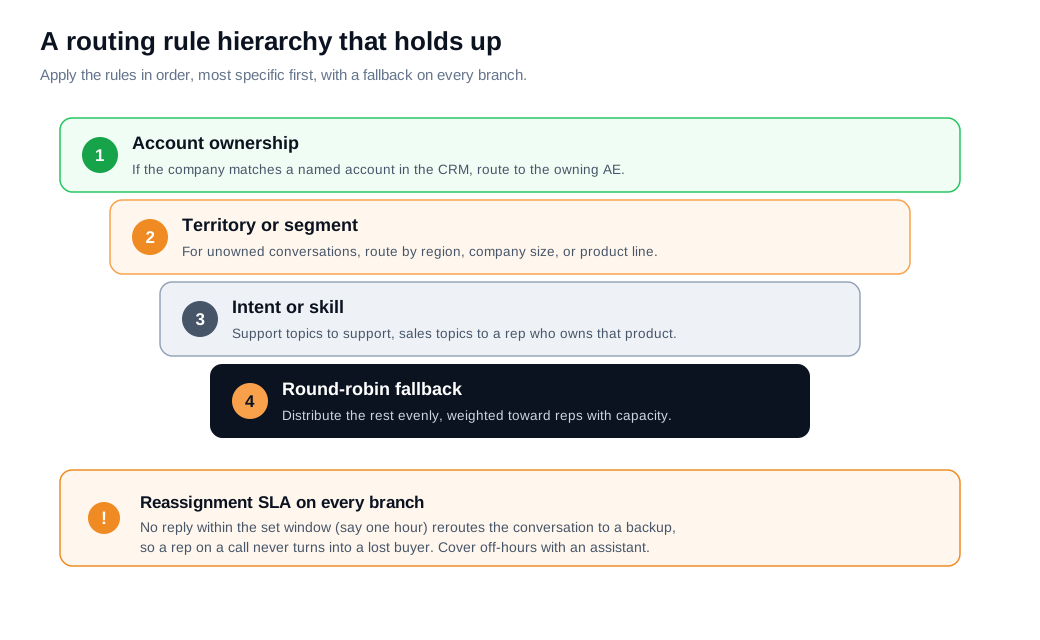
A reliable hierarchy for a B2B site runs in four tiers, mirroring what LeanData and others recommend for lead routing:
- Account ownership. If the visitor's company matches a named account in the CRM, route to the account owner.
- Territory or segment. For everyone else, route by region, company size, or product line to the right team.
- Intent or skill. Within a team, send support topics to support and sales topics to a rep who can handle that product.
- Round-robin fallback. Distribute the remaining unowned conversations evenly, weighting toward reps with capacity so no one drowns while others idle.
The build itself is short:
- List your teams and what each one handles, plus who is available in each time zone.
- Decide which signals you can read: page, pre-chat answer, CRM match, firmographic data.
- Write the four-tier hierarchy into your tool, most specific first.
- Set instant notifications so the assigned rep is pinged in the channel they live in, usually Slack, the moment a conversation routes to them. Getting routing and notifications wired tightly is what turns a good median response into a good worst case.
- Add a reassignment rule: if the first owner does not respond within a set time, reroute to a backup. LeanData's time-based routing does this automatically, rerouting after an hour of silence.
- Cover off-hours with an assistant or an offline path so nothing dead-ends when the team is asleep.
Here is the math with numbers. Say a B2B SaaS site handles 300 website conversations a month, and CRM matching plus firmographic data sorts them. Thirty match named enterprise accounts and route to the owning AE. Ninety are mid-market sales questions with no existing owner, split across three AEs by region. One hundred twenty are support or billing topics detected by page and keyword, sent to the support queue. The last sixty are low-fit (students, job seekers, tiny teams) and get a self-serve link or the free plan, with no rep involved.
Before routing, all 300 hit one shared inbox, first response averaged 25 minutes, and roughly 8 percent booked a meeting, about 24 meetings a month. After the hierarchy, the 120 sales conversations reach a rep in under two minutes, the meeting rate on them climbs to 18 percent, and that is about 22 booked meetings from sales conversations alone, before counting support handled cleanly and the reps who no longer burn time on the 60 low-fit chats. The routing added no traffic. It moved the same conversations to the people who could convert them, which is the whole point.
What are the most common conversation routing mistakes?
The most common conversation routing mistakes are the ownerless shared inbox, the missing fallback, and rules that never get audited. Each one leaks conversations in a way that is easy to miss because the widget still looks like it is working.
The shared inbox is the biggest one. When every conversation lands in a pool that the team watches collectively, no single person owns the reply, and the median response time hides a long tail of chats no one picked up. Routing to a named, available rep closes the accountability gap.
The missing fallback is the quiet killer. A rule that routes enterprise chats to one AE works right up until that AE is on a call, and then the conversation just sits. Every branch needs a backup and a time-based reassignment, so silence triggers a reroute rather than a lost buyer.
Stale rules are the slow leak. Territories change, reps leave, products launch, and a routing tree written a year ago starts sending conversations to people who no longer own them. Audit the rules quarterly, and watch first-response time as a distribution rather than an average, because the tail is where pipeline actually leaks. Speed on your highest-intent pages is where this pays off, which makes routing a core part of any serious inbound sales motion where the deal often goes to whoever answers first.
Key takeaways
- A misrouted conversation is usually a lost one. LeanData puts about one in four leads on the wrong path, and website chat magnifies the cost because the buyer is live on the page and will not wait.
- Route by account first, then intent. Match a conversation to a known account and send it to the owner, otherwise route by what the visitor wants, so a matched logo never gets treated like a cold browser.
- Speed is the metric routing controls. MIT found a five-minute reply is 21 times likelier to qualify a lead than a thirty-minute one, and Zoom lifted conversion from 11 to 17 percent mostly by routing faster.
- Write an ordered hierarchy with a fallback. Account ownership, then territory, then intent or skill, then round-robin, each branch backed by a reassignment rule so no chat dead-ends.
- Notify the right rep instantly. A conversation that routes silently into an inbox is only half-routed, so pin the assigned rep in Slack the moment a chat lands and reroute on silence.
- Audit the rules on a schedule. Territories and headcount drift, so review routing quarterly and track first-response time as a distribution to catch the slow tail before it costs pipeline.

Written by
Daniel SemeckyCo-founder & CEO
Daniel is the co-founder and CEO of Glimpze. He spends his days talking to revenue teams about how to catch high-intent visitors before they bounce, and writes about inbound sales, lead conversion, and building a motion where marketing and sales actually share a number.


