
On this page
- What is an async video demo?
- Why do async video demos work?
- When should you send an async video demo?
- How long should an async video demo be?
- How do you record an effective async video demo?
- How do you track engagement on an async video demo?
- How do you turn an async video demo into a live conversation?
- Key takeaways
- Sources
A buyer asks for a demo on Tuesday afternoon. Your first open slot is the following Monday. By the time you meet, they have watched two competitor walkthroughs, read a review roundup, and half decided without you.
An async video demo closes that gap. You record a short, tailored walkthrough, send a link, and the buyer watches it in the ten minutes they actually have, at 6 a.m. or 11 p.m., before anyone books a call.
The recording does the first pass of the pitch, and your calendar stops being the bottleneck.
This post covers what an async video demo is, why the format works, when to send one, how long it should run, how to record one that holds attention, how to track who watched, and how to turn a viewed demo into a live conversation.
What is an async video demo?
An async video demo is a pre-recorded product walkthrough that a buyer watches on their own schedule, with no live call to coordinate, usually a screen recording of your product paired with your voice and a small webcam view of your face.
The word async is the key. A live demo is synchronous: two people in the same call at the same minute, both blocking out the time. An async demo drops that requirement, so the buyer watches when it suits them and replies when they are ready.
Video keeps the part of a live call that plain email loses, because tone, pacing, and a face on camera still carry through a recording, as Atlassian points out in its breakdown of synchronous versus asynchronous communication.
The term covers a spectrum. At the simple end sits a sixty-second Loom-style recording where a rep talks over a few product screens for one specific prospect. At the polished end sits a produced walkthrough with edited cuts and captions, or an interactive click-through the buyer drives themselves.
They share one trait: the buyer presses play whenever they want, and no one has to be online for it to work.
Why do async video demos work?
Async video demos work because they match how buyers already prefer to learn and because they reclaim time a live call cannot buy back. Most of a purchase now happens before a rep is in the room, and a recording is how you show up in that window.
Buyers lean toward video when they want to understand a product. In Wyzowl's annual survey, 63% said a short video was their first choice for learning about a product or service, against 12% who picked a text-based article, and 78% said they prefer to learn about a product through short-form video.
Trust rides on quality too, with 89% saying video quality affects how much they trust a brand. A rough, rushed recording can cost you more than it earns, so the bar is real.
Then there is the math of attention. Gartner's research on the B2B buying journey found that buyers spend only about 17% of their total purchase time meeting with potential suppliers, and that slice is split across every vendor in the running, so any single rep gets a sliver.
Gartner's 2025 sales survey adds that 61% of B2B buyers prefer a rep-free experience for at least part of the journey.
An async demo works inside the other 83% of buying time, the self-directed research a rep never sees, which is exactly where a well-made recording earns a place on the shortlist.
Consistency is the quiet advantage. Every viewer of a recorded demo sees your sharpest version, with the best framing and no rep having an off day, and the same recording travels to the four other people on the buying committee who quietly decide the deal.
When should you send an async video demo?
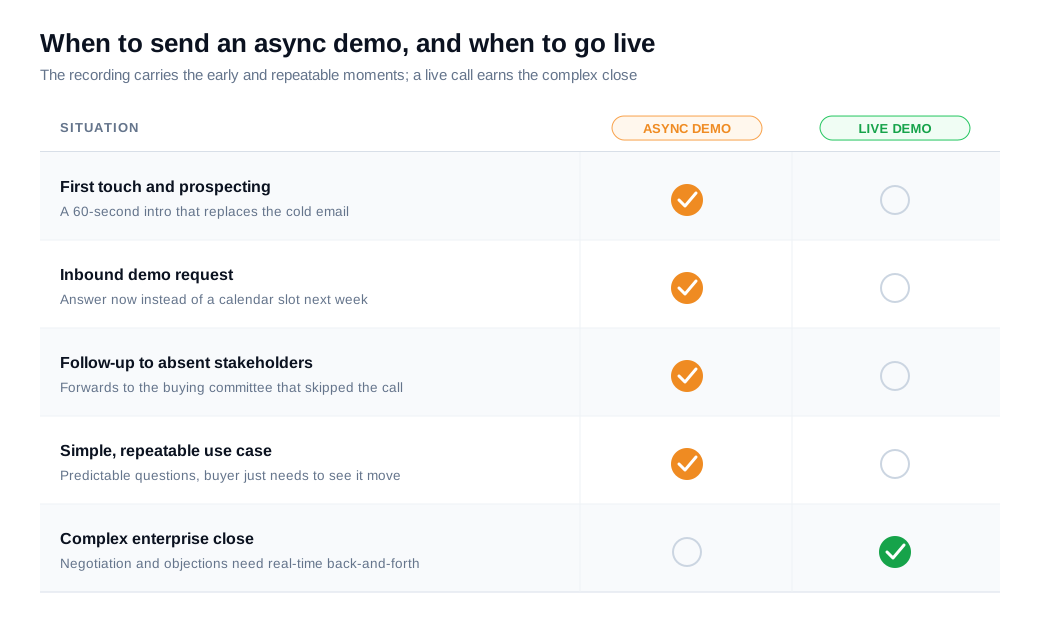
Send an async video demo when a live call would add delay without adding much value: early-stage research, simple or repeatable use cases, follow-ups after a call, and reaching the stakeholders who never joined the meeting.
The format is strongest when the questions are predictable and the buyer mostly needs to see the product move. A few concrete moments fit well:
- As a first touch, a sixty-second walkthrough that replaces the "can I show you around?" cold email.
- To answer an inbound demo request on the spot, instead of making the buyer wait for a calendar slot.
- As a follow-up that recaps what a live call covered, so the recording can be forwarded to people who were never on the call.
- To unblock a stalled thread, where a short "here is the thing you asked about" video restarts a conversation faster than another paragraph of text.
Loom's own rundown of sales use cases lands on the same list: intros, quick demos, proposal walkthroughs, and a final-nudge recap.
There are times to skip it. A complex, high-value enterprise deal in its closing stage needs the live back-and-forth, because discovery and negotiation depend on reading reactions in the moment and answering the objection no script saw coming.
Send the async demo to earn that meeting, then run the hard conversation live.
How long should an async video demo be?
Keep an async video demo to 60 to 90 seconds for a first touch, and under about five minutes for a full feature walkthrough, because completion rate drops sharply as the runtime grows. Attention is the budget you are spending, and short videos spend it well.
Vidyard's business video benchmark data shows the pattern clearly. Videos under 60 seconds hold a majority of viewers to the end, with completion around the mid-50% range, while videos past the twenty-minute mark keep closer to 16%.
Most of the drop happens early, so the first ten seconds decide whether the rest gets watched at all.
Length should track the job. A prospecting nudge earns a reply in under a minute. A demo that answers three specific questions from a live call can run two to four minutes. A deep walkthrough for a technical evaluator can go longer, as long as it is chaptered so the viewer can jump to the section they care about instead of sitting through a full tour.
When in doubt, cut. A tight ninety-second demo that gets finished beats a thorough ten-minute one that gets abandoned at minute two.
How do you record an effective async video demo?
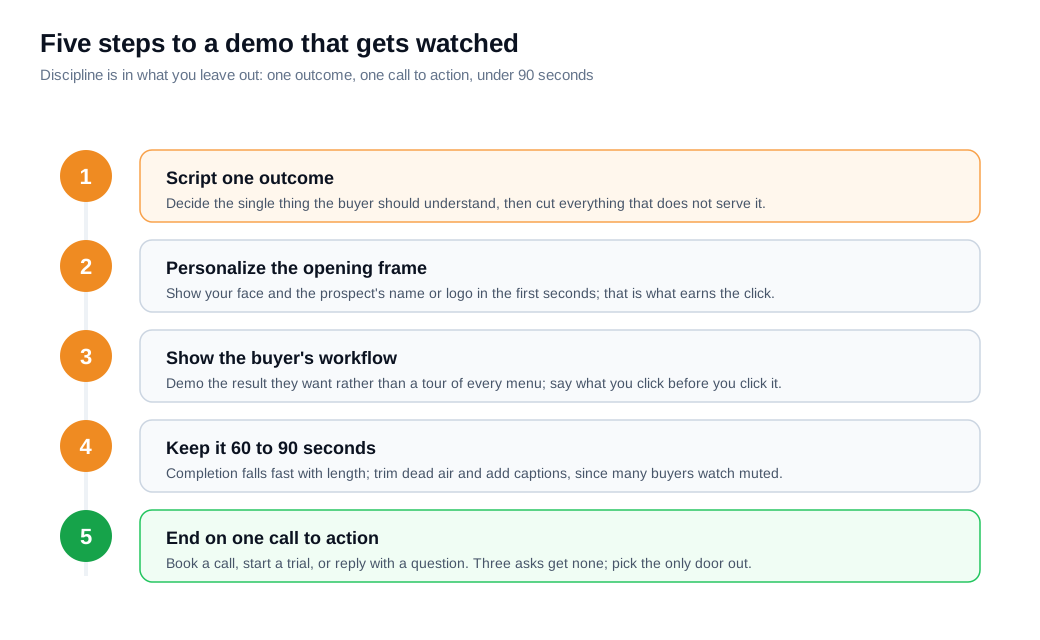
Record an effective async video demo by scripting one clear outcome, personalizing the first few seconds, showing the product doing the buyer's job rather than touring every menu, and closing with a single next step.
A tight recording beats a long one, and the discipline is in what you leave out.
Start with the outcome. Decide the one thing the buyer should understand by the end, then cut anything that does not serve it.
Open on camera with the prospect's name or company on screen, because a personalized first frame is what earns the click, a point HubSpot's guide to using video in sales and Vidyard's video prospecting guide both stress.
Narrate the buyer's workflow rather than your feature list, so the demo shows the result they want instead of the settings page. Keep your cursor calm, move deliberately, and say what you are about to click before you click it.
End on one call to action. A recording with three asks usually gets none of them, so pick the next step (book a call, start a trial, reply with a question) and make it the only door out.
If your tool supports it, add captions, since plenty of buyers watch muted, and a title card that names the video so it looks intentional in the inbox. Editing helps here: a quick trim of dead air and a zoom on the moment that matters can turn a rambling take into something worth two minutes of a busy buyer's day.
How do you track engagement on an async video demo?
Track engagement with the four metrics a video host records automatically: view rate (did they open it), watch rate (how far they got), drop-off points (where they stopped), and click-through on the call to action.
Together they turn a silent send into a readable signal about interest, the core set Vidyard's guide to video analytics lays out.
- View rate tells you whether your subject line and thumbnail earned the play.
- Watch rate, the percentage of the video a viewer completed, tells you whether the content held them, and a viewer who reaches 90% is a warmer lead than one who bailed at 10%.
- Drop-off, often shown as a heatmap, marks the exact second attention fell off, so a cliff at the pricing slide or a re-watch of one feature tells you where to aim the follow-up.
- Click-through closes the loop by showing who took the next step.
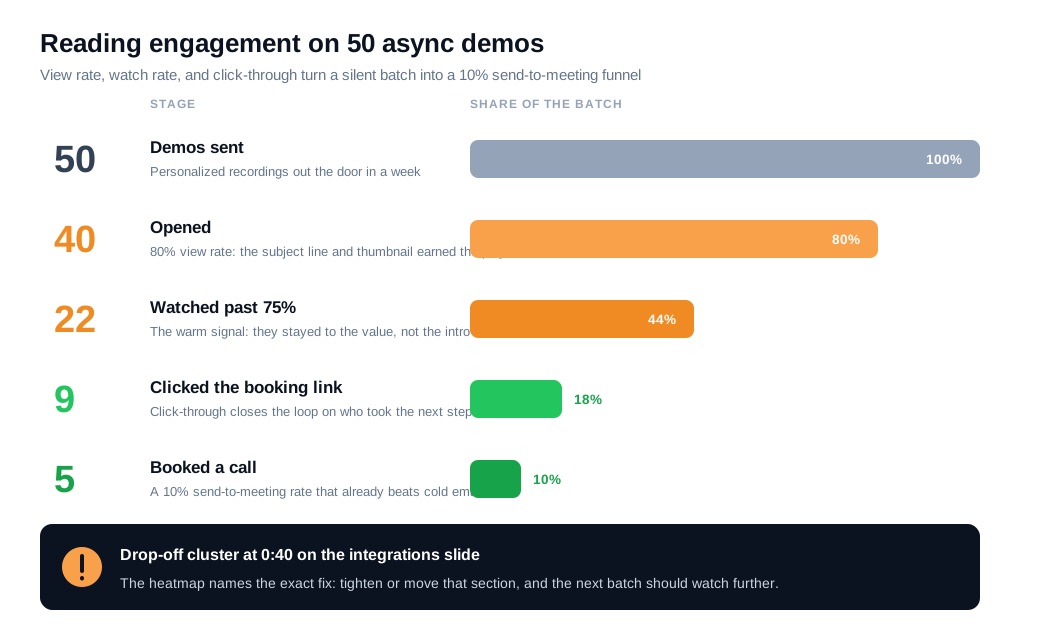
Here is a worked example. An SDR sends 50 async demos in a week. Of those, 40 are opened, an 80% view rate. Twenty-two viewers watch past the 75% mark, and the drop-off heatmap shows a cluster of exits around the 40-second point, right on an integrations slide.
Nine viewers click the booking link, and five book a call. That is a 10% send-to-meeting rate, which already beats most cold email, and the 40-second cliff is a specific fix: tighten or move the integrations section and the watch rate should climb.
Without the analytics, the SDR sees five meetings and no reason for the other 45. With them, the next batch is a targeted revision instead of a guess.
Segment the numbers before you draw conclusions. A demo sent to warm inbound leads will out-watch the same video sent cold, so compare like with like, and track which version of a demo produced the most booked calls rather than the most views. Views feel good; meetings pay.
How do you turn an async video demo into a live conversation?
Turn a watched async demo into a live conversation by treating a high watch rate as an intent signal and offering a real-time option the moment the buyer finishes, while the product is still on their screen and the interest is still warm.
The recording earns the attention, and a fast human handoff converts it.
The trigger is behavior. A viewer who finishes the demo, re-watches a feature, or clicks through to your pricing page has raised a hand, and the value of that hand decays by the hour.
When it fires, route the buyer to whoever is available in seconds rather than a shared inbox nobody checks, which is the whole point of tight routing and notifications. A proactive nudge that appears when a returning viewer lands back on the site can offer a walkthrough without making them hunt for a Contact Sales link.
The offer should meet the intent where it is. A buyer who just watched a two-minute demo rarely wants to fill out another form, so give them a way to start a live video call or a chat on the spot, screen shared, questions answered, while the recording handled the setup.
For teams turning site traffic into pipeline, this recorded-to-live handoff is the backbone of an inbound sales motion, and an async demo is a clean way to fill the top of it without burning a single calendar slot.
Key takeaways
- An async video demo is a recording the buyer watches on their own time. It keeps the tone and pacing of a live walkthrough while dropping the scheduling, so your calendar stops gating the first pitch.
- The format works because it matches buyer behavior. Wyzowl found 63% would rather learn about a product from a short video than any other format, and Gartner puts rep meetings at just 17% of buying time.
- Send it early and for follow-ups, keep it live for the close. Async fits research, simple use cases, and reaching absent stakeholders, while complex closing conversations still belong on a live call.
- Keep it short. Completion holds near the mid-50% range under a minute and collapses past twenty, so aim for 60 to 90 seconds on a first touch and chapter anything longer.
- Record for one outcome and one call to action. Personalize the opening, show the buyer's workflow instead of your menu tree, and offer a single next step.
- Read the engagement data, then act on it. View rate, watch rate, drop-off, and click-through turn a send into a signal, and a high watch rate is the cue to route the buyer into a live conversation fast.
TAGS

Written by
Daniel SemeckyCo-founder & CEO
Daniel is the co-founder and CEO of Glimpze. He spends his days talking to revenue teams about how to catch high-intent visitors before they bounce, and writes about inbound sales, lead conversion, and building a motion where marketing and sales actually share a number.


