
On this page
A buyer lands on your homepage wanting to see the product before she books anything. You have two ways to show it without a rep on the call. One walks her down a fixed path with tooltips pointing at each feature in order. The other drops her into a working copy of the product and lets her click wherever she likes.
Both get called interactive demos. One of them also gets called a guided demo, and the labels blur together enough that teams ship the wrong format for the buyer in front of them. The distinction looks small on the surface and shows up large in the results.
This post defines an interactive demo and a guided demo, shows where the two terms overlap, walks through how a buyer experiences each, covers which one converts better and when, and lays out how to gate them and pair them with a live rep.
What is an interactive demo?
An interactive demo is a clickable, self-serve copy of your product that a buyer navigates on their own, with no rep and no scheduled call. Instead of watching someone share a screen, the buyer clicks real buttons, moves through real screens, and stops when they have seen what they came for.
The demo is a captured replica of the product, embedded on a website or sent as a link. The buyer drives. They skip ahead to the part they care about, replay a step, and leave when they are done. That hands-on control is what separates an interactive demo from a passive video, and it is why buyers move through them.
The engagement gap is stark. Arcade measured a 23% average click-through rate across more than 20,000 published interactive demos, roughly 7.2 times the 3.21% average click-through rate that Vidyard recorded across 1.7 million videos. Storylane's analysis went further downstream and found that prospects who engaged with an interactive demo in their journey reached a 10.1% deal conversion rate, about 3.2 times the 3.1% baseline. Buyers will click through a good one, and clicking correlates with buying.
The format grew because buyers now expect to look before they talk. Gartner's 2026 sales survey found that 67% of B2B buyers prefer a rep-free experience, which an interactive demo is built to serve. "Interactive demo" is the umbrella term, and "guided demo" describes one common way of building one.
What is a guided demo?
A guided demo is an interactive demo built as a linear, step-by-step path, where hotspots, tooltips, and short captions lead the buyer through a set sequence of screens. The buyer still clicks, but the demo decides the order and points to what matters next.
Storylane describes a guided demo as a self-paced experience made of a sequence of steps, hotspots, and annotations, often with presenter video or voiceover layered on top. The pulsating hotspot draws the eye, the tooltip explains the click, and a backdrop dims everything else so the buyer cannot get lost. The goal is to teach the product on the buyer's own time without a person in the room.
The phrase carries a second, older meaning worth naming. In some sales teams a "guided demo" is a live session where a rep walks the buyer through the product in real time, reading the room and reordering the pitch on the fly. Gong's analysis of 67,149 recorded SaaS demos found the ones that closed ran about 30.5% longer, near 47 minutes versus 36, with plenty of back-and-forth rather than a monologue. That is a valuable format, but it is a scheduled human meeting. This article uses "guided demo" in the sense most people mean when they set it against an interactive demo: the self-serve, tooltip-led tour.
Are an interactive demo and a guided demo the same thing?
They overlap so heavily that the terms are often used interchangeably, because a guided demo is the most common form of interactive demo. Chameleon notes that most interactive demos are guided, with a curated path and annotations at each step, so treating the two as separate categories misreads how the field actually works.
The comparison people are usually reaching for is guided versus unguided. An unguided demo, often called a sandbox or exploratory demo, hands the buyer a full replica of the product with no set path and lets them click anywhere in any order. Both are interactive. The difference is who decides where the session goes: the demo, or the buyer.
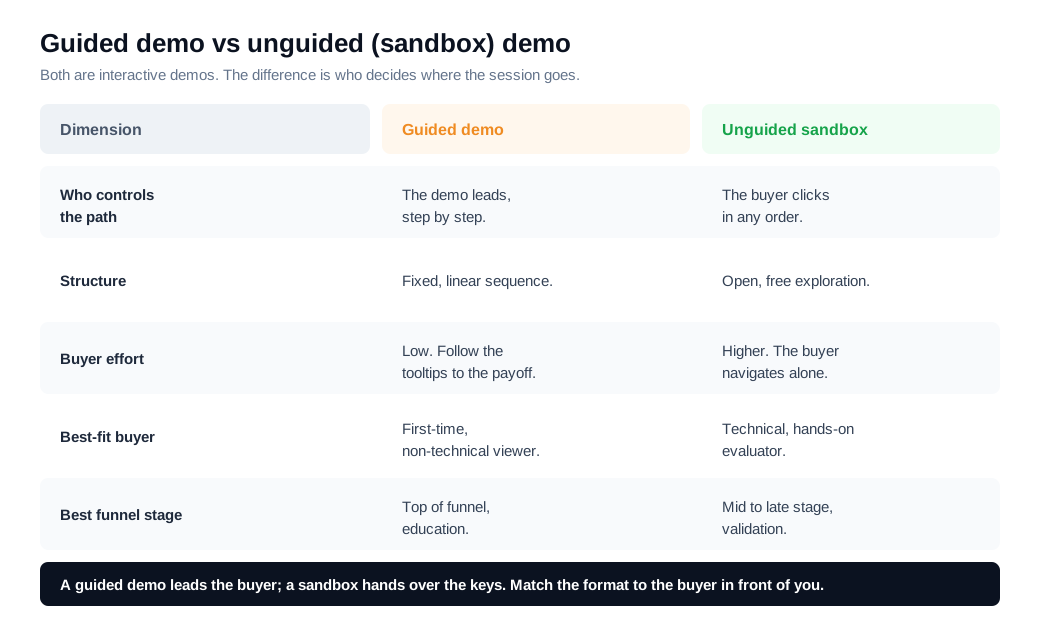
So the honest answer is that a guided demo sits inside the interactive-demo category rather than opposite it. When a competitor page pits "interactive vs guided," it usually means guided (a fixed tour) against unguided (open exploration), and that is the fork that changes how a buyer behaves and how the demo converts.
How do buyers experience each?
A buyer experiences a guided demo as a tour on rails and an unguided demo as an open room. The guided version reduces every decision to "next, next, next," while the sandbox hands over the keys and expects the buyer to already know where the value lives.
That difference matters most for a first-time viewer. Someone meeting your product for the first time has no map, so a guided path lowers the effort of finding the three screens that prove the point. Structure keeps them moving. Navattic's benchmark data shows the effect of good structure: multi-flow demos completed at rates 48% higher than single-flow demos, and the top quartile of interactive demos held a 50.1% engagement rate with a 28.9% completion rate. A demo that leads the buyer somewhere gets finished more often than one that dumps them at a login screen.
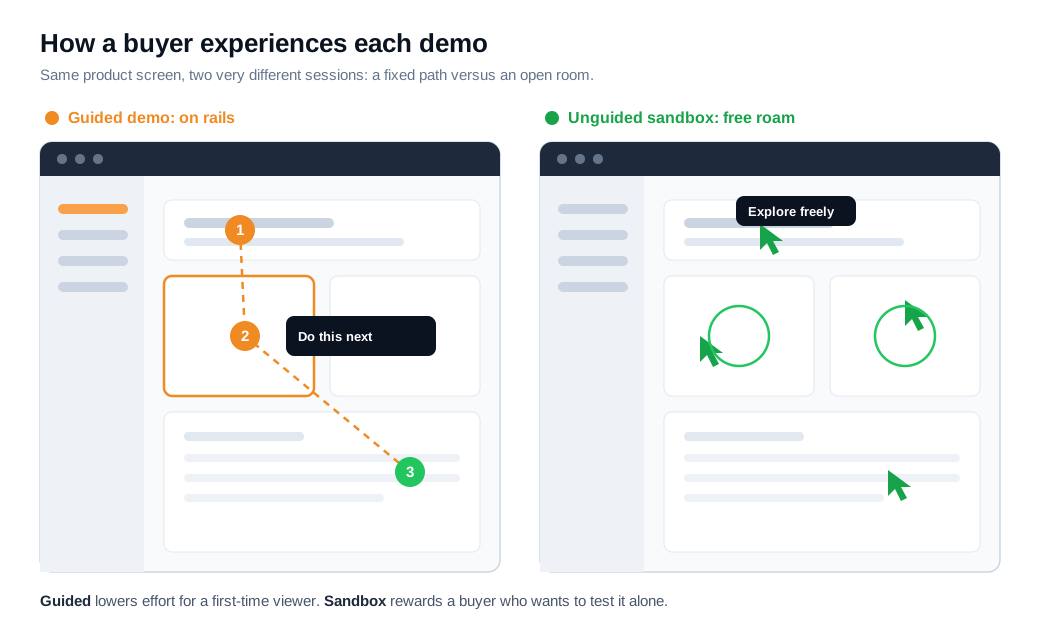
The sandbox flips the tradeoff. A technical evaluator late in a deal does not want to be led. They want to poke the corners, try their own workflow, and confirm the product survives contact with a real question. For that buyer, a fixed tour feels like a leash and free exploration feels like proof. The same open format that overwhelms a newcomer reassures an expert.
Time-on-demo reflects this. Guided and gated experiences tend to hold buyers slightly longer per session because the path keeps them engaged, while open, ungated experiences pull far more people in for shorter, self-directed looks. Neither pattern is better in the abstract. Each fits a different buyer at a different moment.
Which converts better, and when?
Guided demos usually convert better at first touch and top of funnel, while unguided sandbox demos convert better with technical, late-stage buyers who want hands-on validation. The right choice depends on how much the buyer already knows and how much they need to prove.
Guided wins early because it removes friction for someone who has no idea where to click. It carries the buyer to the payoff before they lose patience, which is why structured, multi-flow tours finish more often. Personalization sharpens that edge: Storylane found personalized demos convert 37% higher than non-personalized ones, and a guided path is where personalization is easiest to script. Unguided wins later because an evaluator trusts what they can break themselves, and a sandbox lets them run their own test instead of watching yours.
The pipeline evidence favors having a demo at all. Walnut's analysis of B2B deals found that deals where the buyer engaged with an interactive demo closed 46% of the time, versus 38% with no demo, and the pattern held in 14 of 20 pipelines analyzed. Format decides how the demo performs, and both formats beat no demo.
Here is the arithmetic. Say 2,000 buyers a month reach a product or pricing page. Put a gated "request a demo" form there and roughly 9% engage with anything, about 180 people, and a chunk of those abandon at the form before they see a screen. Swap in an ungated guided tour and engagement runs closer to 24%, about 480 buyers who actually click into the product. If that guided flow completes at the top-quartile 28.9%, roughly 139 of them finish the whole path with your key features in hand, compared with maybe 50 under the gated form. Those 139 arrive at a sales conversation already educated, which is a better use of a rep's hour on both sides.
Storylane's own guidance lines up with this split: use click-through guided demos for marketing and early sales, and a sandbox when technical buyers need hands-on validation. Match the format to the stage and you stop forcing a newcomer to explore or an expert to sit through a tour.
Should you gate an interactive or guided demo?
Gating trades reach for contact details, and the right call depends on where the demo sits in the funnel. An ungated demo lets anyone click in, which lifts engagement and impressions, while a gated demo asks for an email first, which shrinks the audience but captures a lead.
The engagement cost of a gate is real. Navattic's benchmarks put ungated embedded demos near a 24% engagement rate against roughly 9% for gated ones. A form in front of a top-of-funnel demo filters out most of the curious buyers you were trying to reach, and curiosity is the whole point at that stage.
The practical pattern is to ungate the front and gate the middle. Let the buyer into an early guided tour with no form, then place a soft email capture after three to five steps, once they have seen enough value to want to trade an address for the rest or for a personalized version. That keeps the top of funnel wide while still turning genuine interest into a named lead. Reserve hard gates for high-intent, late-stage sandbox access where the buyer already expects to identify themselves.
How do you use guided and unguided demos together?
You use them together by matching the format to the buyer's intent and handing off to a person the moment intent spikes. A guided tour, a sandbox, and a live rep each answer a different question, so the strongest setup runs all three rather than picking one.
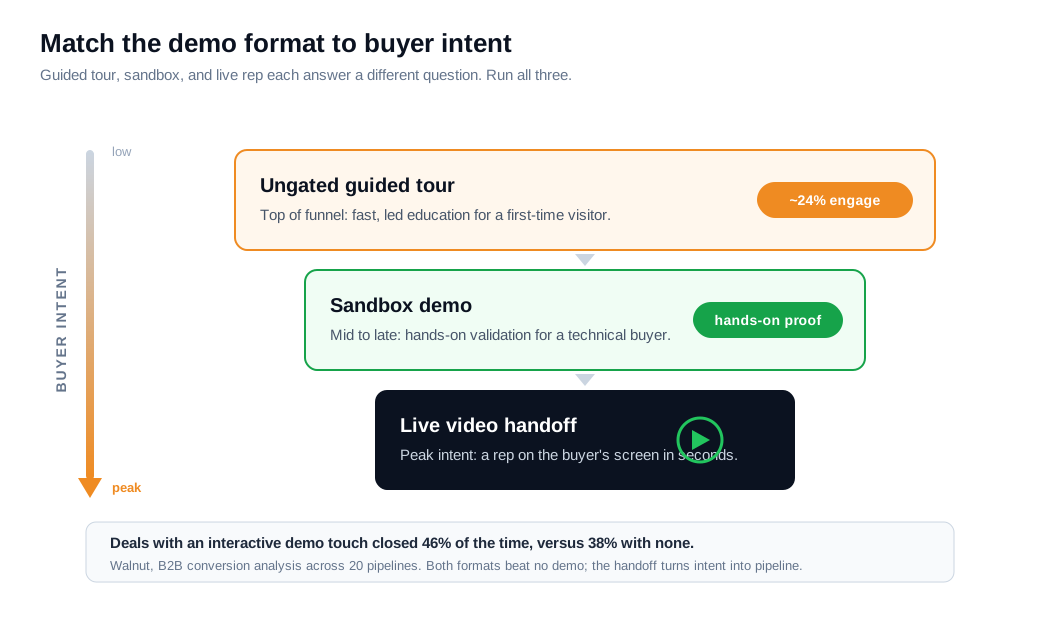
Map it to the journey. A guided tour lives on your homepage and feature pages for the first-time visitor who wants a fast, led look. A sandbox sits deeper, on a solutions or security page, for the technical buyer who needs to run their own test. An AI layer can sit between them: an AI chat assistant can answer questions and walk a visitor to the right screen at 2 a.m. when no rep is online, which extends coverage across every time zone.
The handoff is where most teams break the chain. A buyer who finishes a guided tour and clicks "talk to someone," only to hit a contact form and a next-day reply, has been taught that self-serve was a dead end. Tools that spot a high-intent visitor in real time and open a live video call or screen share right in the browser close that gap, and pairing the signal with smart lead routing and Slack alerts puts the request in front of the right rep before the buyer clicks away. A lighter-touch live chat sits alongside for the buyer who wants a quick answer before committing to a call.
Done this way, the rep enters already ahead. For an inbound sales team, a buyer who explored a guided tour, tested a sandbox, and then raised a hand is several steps past a cold scheduled demo. The self-serve layers handle reach and education, and the human handles judgment and trust. Most tools in this category, including a free tier on the Glimpze pricing plan, let you test the live-handoff motion before you commit budget to it.
Key takeaways
- A guided demo is a type of interactive demo rather than its opposite. Interactive demo is the umbrella for any clickable self-serve product experience, and guided describes the most common way of building one: a linear, tooltip-led path.
- The real fork is guided versus unguided. A guided tour decides the order and leads the buyer, while a sandbox hands over full access and lets them explore freely, and that single variable drives how each performs.
- Guided fits newcomers, sandbox fits experts. A first-time visitor needs the friction removed by a set path, while a technical late-stage evaluator trusts what they can test themselves, so structured tours finish more often up top and sandboxes prove more down low.
- Both formats beat no demo. Walnut found deals with an interactive demo touch closed 46% of the time versus 38% with none, and Storylane tied demo engagement to a 10.1% deal conversion rate against a 3.1% baseline.
- Gate the middle, not the front. Ungated demos engage near 24% against roughly 9% for gated ones, so let buyers in free and place a soft email capture after three to five steps of value.
- Combine the layers and obsess over the handoff. Run a guided tour, a sandbox, and a live rep by intent level, and route the "talk to someone" click to a person in seconds so self-serve never dead-ends in a form.
TAGS

Written by
Daniel SemeckyCo-founder & CEO
Daniel is the co-founder and CEO of Glimpze. He spends his days talking to revenue teams about how to catch high-intent visitors before they bounce, and writes about inbound sales, lead conversion, and building a motion where marketing and sales actually share a number.


