
On this page
A customer hits a snag at checkout and needs one answer: why was my card declined twice? On a ticket-based help desk, they fill out a form, get an auto-reply with a case number, and wait. By the time an agent writes back the next morning, the customer has either given up or bought somewhere else.
Conversational support closes that gap. The customer asks in a chat window or a message thread, gets a first response in seconds from an assistant or an agent, and keeps the same thread open until the problem is actually solved. The mechanics are simple. The effect on resolution time and trust is large.
This guide defines conversational support, contrasts it with ticketing, explains why teams are switching to it, shows how bots and humans split the work, walks through the metrics that matter with a worked example, and lays out how to start.
What is conversational support?
Conversational support is a way of running customer service as ongoing, real-time conversations across channels like live chat, messaging apps, and social DMs, instead of as a queue of one-off tickets. The customer talks to a business the way they text a friend, and the same thread carries them from question to resolution, whether an assistant, a person, or a handoff between the two does the answering.
The defining trait is continuity. A conversation keeps its history, so a customer who followed up on yesterday's billing issue does not start from a blank form. The context, the account, and the prior messages stay attached, and the person or assistant on the other side picks up where things left off.
Intercom, which coined much of the vocabulary here, frames modern support as a funnel with three layers that work together: proactive support that heads off known problems, self-serve support that answers repeat questions automatically, and human support that resolves the complex cases one-on-one, as it lays out in its conversational support funnel guide. The point of the model is that a fast, personal answer should be the default, at whatever scale a growing business needs.
The channel matters less than the format. A conversation can run in a website live chat widget, a WhatsApp thread, an Instagram DM, or a voice assistant. What ties them together is a live back-and-forth that adapts to the individual, in place of a static form that treats every request as a fresh, faceless case.
How does it differ from ticketing?
The core difference is state: a ticket is a static record that opens, waits, and closes, while a conversation is a living thread that stays with the customer and their context across every interaction. A ticket is designed around the issue. A conversation is designed around the person.
That distinction shows up everywhere. In a ticket system, a customer submits a request, receives a case number, and re-explains the problem each time a new agent picks it up. In a conversational system, the assistant or agent already has the thread, so the customer answers a question once and never repeats an order number. RingCentral describes the two as serving different goals: tickets track and route work, while conversations build a relationship in real time.
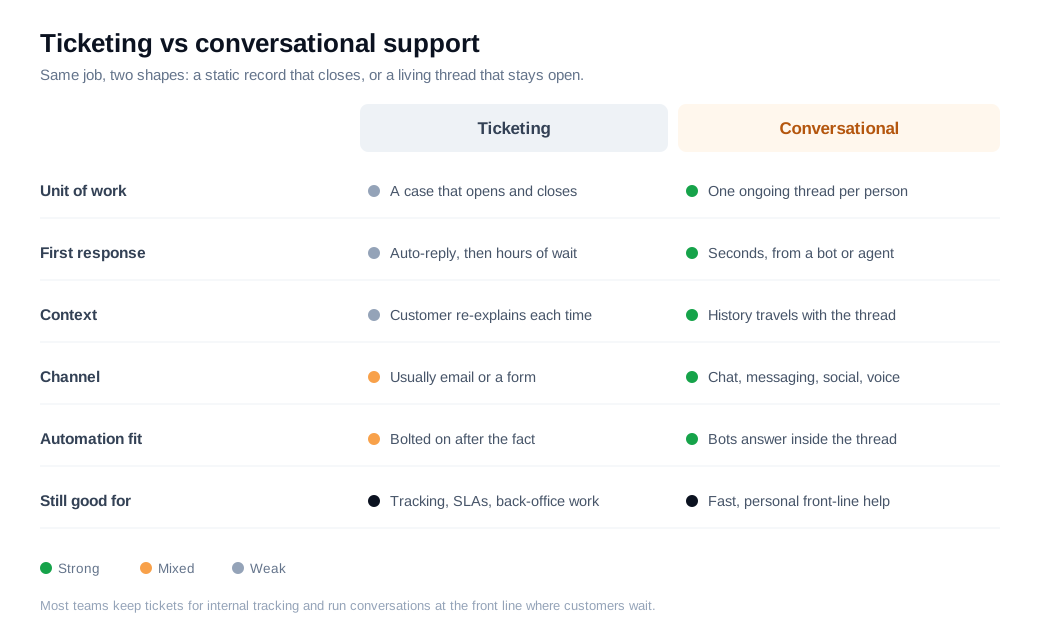
The switch changes the customer's experience of speed. A ticket queue front-loads an auto-reply and back-loads the real answer by hours. A conversation front-loads a real first response, often in seconds, because an assistant can start immediately and a person can jump in without a new case being opened.
None of this makes ticketing obsolete. Tickets are still the right tool for tracking service-level agreements, routing work across a large team, and coordinating a back-office fix that spans days. Most mature teams keep a ticketing backbone for internal tracking and run conversations at the front line, where the customer is actually waiting. The two coexist, each doing the job it is built for.
Why are companies moving to conversational support?
Companies are moving to conversational support because customers now expect to reach a business the way they message friends, and slow, siloed ticket queues quietly lose those customers. The behavior shifted first, and support is catching up to it.
The expectation data is consistent. Gorgias reports that 72 percent of customers expect to reach an agent through their channel of choice, and that 66 percent say they are likely to switch brands if they feel treated like a number rather than an individual, in its guide to conversational customer service. Zendesk's 2025 CX Trends Report, drawn from more than 10,000 consumers and leaders, found that 76 percent of consumers would choose a company that lets them drop text, images, and video into one continuous thread without starting over, per its summary of the research.
The economics push the same direction. Automation has become good enough that a large share of routine questions can be resolved without an agent, which frees expensive human time for the conversations that actually need it. Gartner predicts that conversational AI in contact centers will cut agent labor costs by 80 billion dollars in 2026, with roughly one in ten agent interactions automated by then, up from an estimated 1.6 percent, in its forecast on the technology.
Put the two together and the case is straightforward. Customers want faster, more personal, more continuous help, and the tools to deliver it at scale have arrived at the same time. A ticket queue that answers in a day has become a real competitive liability rather than a mild annoyance.
How do bots and humans share the work?
Bots and humans share the work in layers: automation handles the high-volume, repeatable questions, and people take the complex, high-stakes, or emotional conversations that need judgment. The goal is to filter volume down so agents spend their hours only where a human genuinely helps.
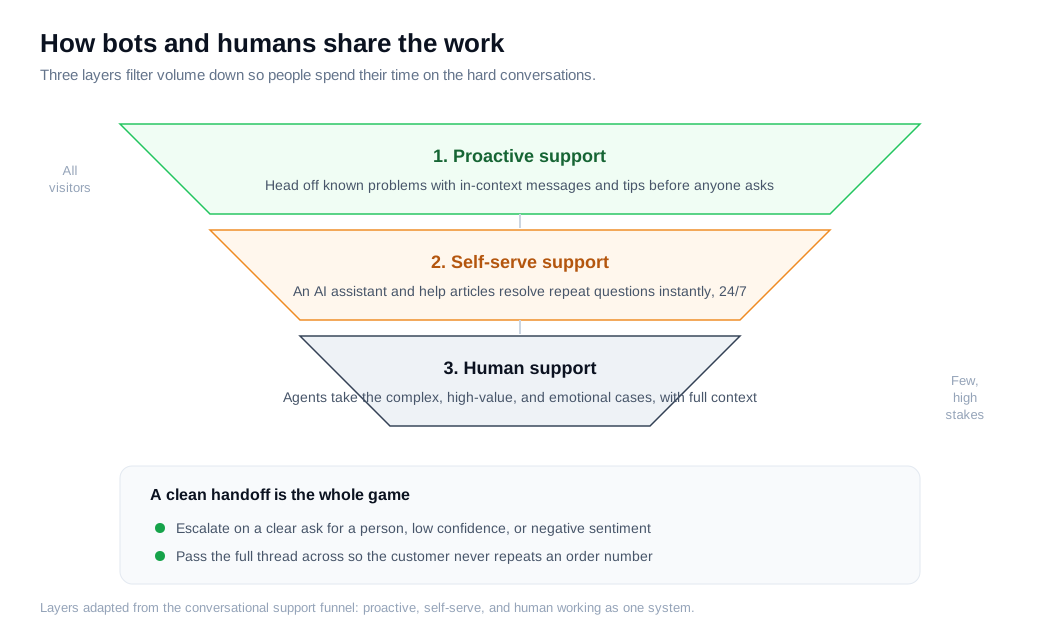
The top layer is proactive. A well-timed in-context message, a tooltip on the step where people get stuck, or a status banner during an outage heads off a question before the customer has to ask it. The second layer is self-serve. An AI chat assistant grounded in your help content answers the repeat questions instantly and around the clock, and it hands off cleanly when it reaches the edge of what it knows. The third layer is human. Agents take the cases that carry nuance, money, or emotion, arriving with the full thread already attached.
The handoff is where this succeeds or fails. An assistant should escalate on a few clear triggers: the customer asks for a person, the assistant's confidence is low, the topic touches billing or security, or the sentiment turns negative. When it escalates, it has to pass the entire conversation across so the customer does not repeat what they already typed. Losing that context is the single fastest way to sour a conversation that automation had going well.
Klarna's rollout shows the scale automation can reach and the limit it runs into. In the AI assistant's first month it handled 2.3 million conversations, about two-thirds of the company's chat volume and the equivalent of roughly 700 full-time agents, and it cut average resolution time from 11 minutes to under 2 while scoring on par with humans on satisfaction, according to Klarna's own report. Klarna later reintroduced human agents for its harder cases, a reminder that the layers work as a system and that a bot with no clean exit to a person becomes a trap for your most valuable conversations. The lesson is not to automate less. It is to route by conversation type and keep the door to a human open.
How do you measure support conversations?
You measure support conversations with a compact set of metrics: first response time, resolution rate or first contact resolution, automated resolution rate (also called deflection), and customer satisfaction. Each one answers a different question, and reading them together stops any single number from lying to you.
First response time tells you how long a customer waits for a real reply, and conversational setups win here because an assistant can answer in seconds. First contact resolution tells you how often an issue gets solved in one interaction without a follow-up. SQM Group, which has benchmarked hundreds of North American contact centers, puts a good FCR standard at 70 to 79 percent and a world-class rate at 80 percent or higher, and notes a roughly one-to-one link between FCR and satisfaction, where each 1 percent gain in FCR tends to lift CSAT by about 1 percent, in its benchmark analysis.
Automated resolution rate measures the share of conversations your assistant closes on its own. It is the metric most likely to mislead, because a high containment rate paired with a falling CSAT means the assistant is deflecting people rather than helping them. Read it alongside satisfaction, always.
Here is a worked example with round numbers.
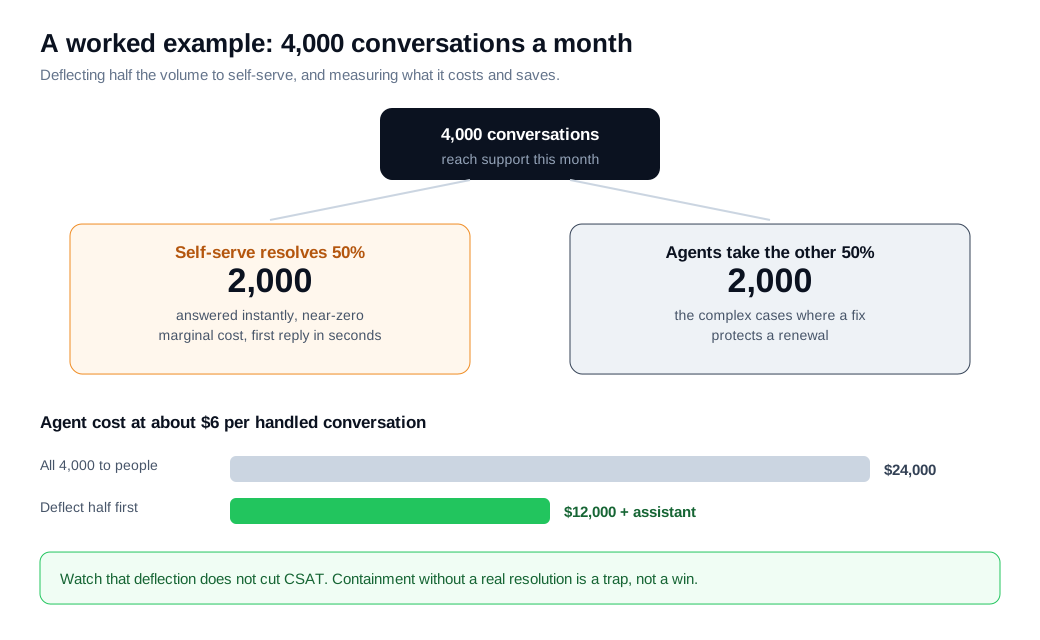
Suppose a SaaS support team fields 4,000 conversations a month. A self-serve assistant resolves half of them, 2,000, instantly and at near-zero marginal cost, leaving 2,000 for agents. At a commonly cited 6 dollars of agent time per handled conversation, routing all 4,000 to people would cost about 24,000 dollars a month. Deflecting half cuts the agent bill to roughly 12,000 dollars plus the cost of the assistant. First response time on the deflected half drops from hours in a queue to seconds, and the 2,000 conversations that still reach agents are the complex ones where a resolved issue can protect a renewal worth far more than the handling cost. Change any input and the totals move, but the lever holds: let automation carry the repeatable volume, and point human hours at the conversations that pay for them.
Two guardrails keep the numbers honest. Track CSAT on the automated conversations separately, so a rising deflection rate cannot quietly hide a worse experience. And watch reopen rate, because an issue marked resolved that comes back a day later was never resolved at all. Zendesk's research found that 75 percent of CX leaders expect most interactions to be resolved without human intervention within a few years, which makes measuring automated resolution honestly more important, not less.
How do you get started with conversational support?
You get started with conversational support by putting live chat on your highest-traffic help pages, connecting an assistant to your existing help content, and writing clear rules for when a conversation goes to a person. It is a launch you can run in a week, not a quarter.
- Start where the questions already land. Put chat on your pricing, onboarding, and top help pages first, where customers most often get stuck, and leave low-traffic pages for later so every conversation that opens is worth handling.
- Feed the assistant real answers. Point an AI chat assistant at your existing help articles and docs through a knowledge base so its replies are grounded in facts you have already written, rather than guessed.
- Write the handoff rules before you launch. Decide the exact triggers that send a conversation to a person: a direct request, low assistant confidence, a billing or security topic, or negative sentiment. Make the human handoff carry the full thread.
- Route each conversation to the right person fast. Wire up routing and notifications so a Slack alert reaches the right agent the moment a conversation needs a human, which is what keeps response times measured in seconds instead of hours.
- Staff honestly and cover the gaps. Let the assistant carry off-hours volume and capture anything it cannot resolve, and be honest with an away state when no one is available. A channel that pretends to be staffed and then goes silent does more damage than an honest "we are offline."
- Measure, then tune. Track first response time, first contact resolution, automated resolution rate, and CSAT from day one, and move your prompts, coverage, and handoff rules toward whatever resolves conversations without dragging satisfaction down.
Start narrow, keep the first answer fast and the handoff clean, and expand as the setup earns trust. Conversational support rewards a resolved question far more than a clever greeting.
Key takeaways
- Conversational support runs service as a live, ongoing thread, across channels like chat, messaging, and social, with the same context carried from the first question to the resolution.
- The difference from ticketing is state, a static case that opens and closes versus a living conversation that stays with the customer, though most teams keep tickets for internal tracking and SLAs.
- Customer expectations are driving the shift, with 72 percent expecting their channel of choice and 76 percent preferring a business that keeps everything in one continuous thread.
- Bots and humans work in layers, proactive messages and self-serve automation absorbing the repeatable volume so agents can spend their time on complex, high-value, and emotional cases.
- The handoff makes or breaks it, so escalate on clear triggers and pass the whole thread across, because a bot with no exit to a human traps your hardest conversations.
- Measure with a few metrics together, first response time, first contact resolution, automated resolution rate, and CSAT, and never let a rising deflection rate hide a falling satisfaction score.

Written by
Daniel SemeckyCo-founder & CEO
Daniel is the co-founder and CEO of Glimpze. He spends his days talking to revenue teams about how to catch high-intent visitors before they bounce, and writes about inbound sales, lead conversion, and building a motion where marketing and sales actually share a number.


