
On this page
A visitor lands on your pricing page, compares two plans, scrolls down to the FAQ, and sits there for a full minute. They have a question. They are not going to click the little chat bubble in the corner to ask it, because almost nobody does. A moment later they close the tab, and your team never knew they were there.
Proactive chat is built for that exact moment. Instead of waiting for a visitor to raise a hand, the site watches behavior and opens a relevant conversation when interest is highest. Handled with care, it lifts conversions and satisfaction at the same time. Handled carelessly, it reads as a popup and gets dismissed on reflex. This post covers what proactive chat is, how it works, how it differs from reactive chat, the trigger rules worth using, whether it annoys people, how to set it up, and how to tell if it is actually working.
What is proactive chat?
Proactive chat is a live chat message that your website sends to a visitor automatically, based on rules about their behavior, before the visitor asks for help. The widget stops being a passive button and starts acting like an attentive person on the shop floor who notices someone hovering and says, "Looking for anything in particular?"
Microsoft's own product documentation frames it the same way. Proactive chat, per Dynamics 365 Customer Service, lets a team "engage with customers by automatically inviting them to a chat conversation based on the configured rules," using "information about the user journey, time spent on a web page, and more" to decide when to reach out.
There are two ways it shows up in practice. The first is rule-based, where a message fires on its own when a visitor matches a set of conditions. The second is manual, where a rep watching a live feed of who is on the site picks a promising visitor and reaches out by hand. Both are proactive, and most teams end up using a mix: rules for coverage at scale, human judgment for the highest-value accounts.
How does proactive chat work?
Proactive chat works by pairing a small tracking script with a rules engine that watches visitor signals and fires a chat invitation the instant a set of conditions is met. The mechanics are simple once you break them into steps.
First, a snippet of JavaScript loads on your pages and records signals as the visitor moves around: the page URL, time on page, scroll depth, how they arrived (an ad, an email, organic search), whether they are new or returning, and, on ecommerce sites, cart value. Second, a rules engine checks those signals against the triggers you defined. Third, when a rule matches, the widget shows a message instead of sitting silent. Fourth, the visitor either replies or ignores it, and if they ignore it the invitation quietly closes on its own after a short delay. Fifth, an accepted chat routes to the right person or an AI assistant.
Two constraints are worth knowing up front. A proactive message can only fire on pages where the chat widget is actually installed, so coverage follows your embed. And the invitation is a lightweight nudge, not a full takeover of the screen, which is what keeps it from behaving like an interstitial ad. Once a visitor accepts, live chat behaves exactly as it would if they had opened it themselves, and good setups hand the conversation to the correct rep through routing and notifications so nobody sits waiting.
What is the difference between proactive and reactive chat?
The difference is who starts the conversation. Reactive chat waits for the visitor to notice the widget and click it. Proactive chat has the site make the first move based on what the visitor is doing.
That single distinction changes the economics. Only a small slice of visitors, usually in the range of 5 to 10 percent, ever open a reactive widget on their own, so a reactive-only setup talks to the people who were already determined to talk to you and stays silent for everyone else. Proactive chat reaches the much larger group who have real questions but would never click first.
Forrester's analysis in The ROI of Interactive Chat put numbers on the gap. It found that investment in reactive chat tends to produce a modest return on investment of about 15 percent, while adding proactive capability produces an incremental return of roughly 105 percent on top of that. The report also credited proactive prompts with raising average order value in the 10 to 20 percent range on ecommerce sites, largely by catching people at the point of hesitation.
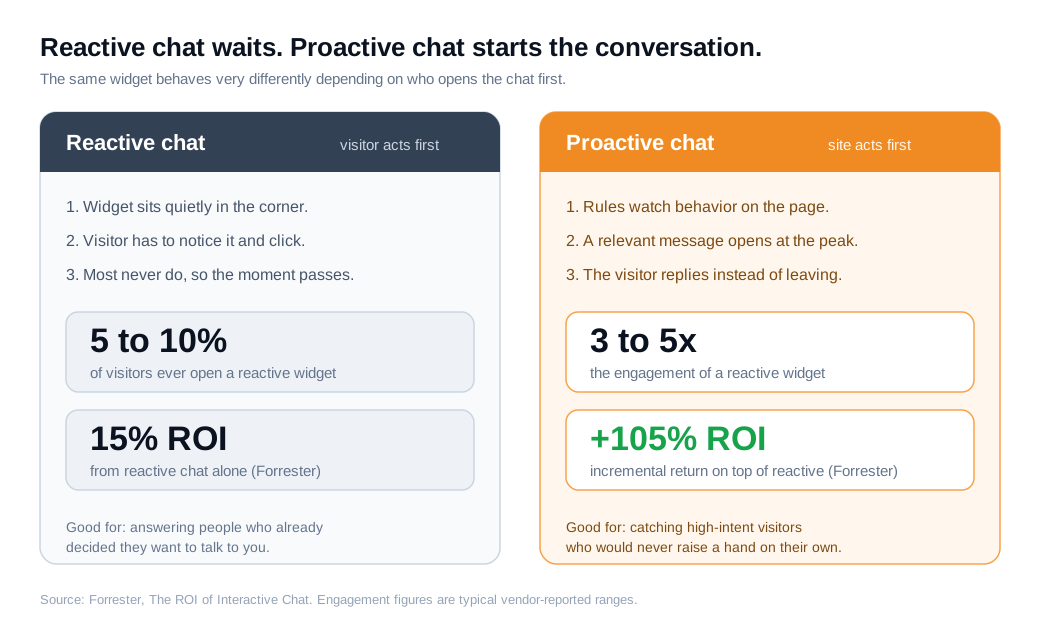
The honest framing is that these two modes work together. Reactive chat handles people who already decided they want help. Proactive chat surfaces the intent you were otherwise blind to. Turning off one to run the other leaves conversions on the table either way.
What are the best proactive chat trigger rules?
The best triggers connect a specific behavior to a specific need, on a page where interest is already high, and only after the visitor has had a few seconds to get their bearings. A generic "Need help?" that fires on every page two seconds after arrival is the fastest way to train people to ignore you.
Six triggers do most of the useful work:
- Time on page. Fire after 30 to 60 seconds on high-consideration pages like pricing, product, or demo. Lingering there usually means comparison, and comparison is where a question gets asked.
- Exit intent. Detect the cursor moving toward the close button or the back control, then offer help on checkout, signup, and cart pages where leaving equals lost revenue.
- Returning visitor. Someone on their second or third session has shown intent that a first-timer has not. A short welcome-back message meets them where they left off.
- Repeat views of the same page. A visitor who has loaded your pricing page three times is weighing a decision. That is a strong moment to ask what is holding them up.
- Cart or deal value over a threshold. On ecommerce, trigger when the cart crosses a value you care about. In B2B, trigger inside a quote builder or a plan that signals a larger deal.
- Campaign match. When a visitor arrives from a specific ad or email (read from the UTM parameters), greet them with a message that matches the promise that brought them, after a 20 to 40 second pause.
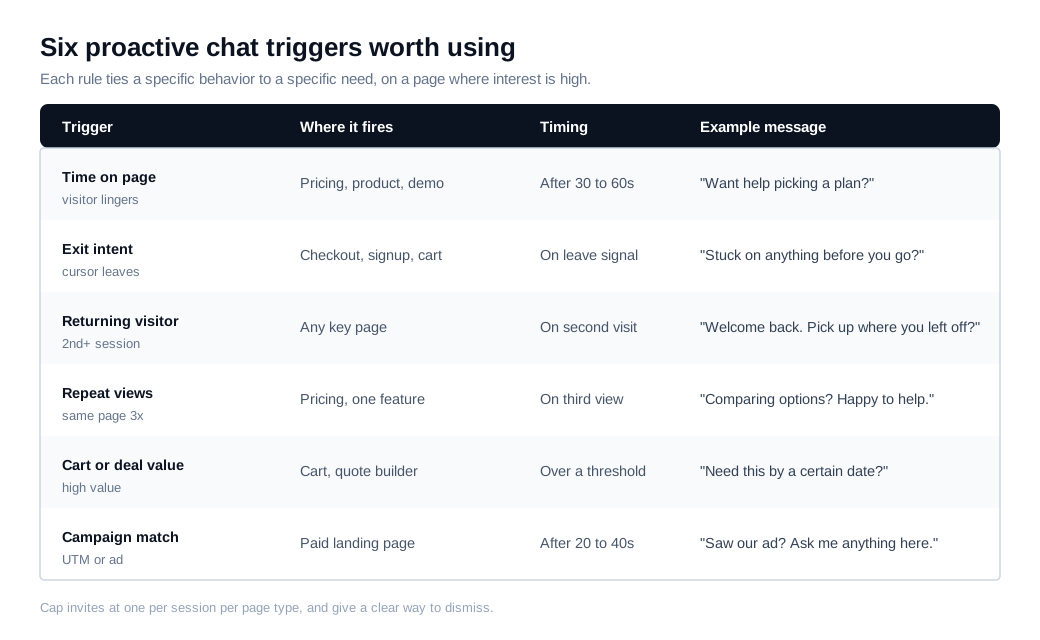
Notice what these share. Each one waits for evidence of intent, targets a page where a conversation can move a decision, and carries a message tied to the visitor's actual situation. Broad guides on proactive outreach push the same principle: the trigger and the copy have to match, or the whole thing reads as noise.
A worked example
Say your pricing page gets 1,500 visitors a month. With a reactive widget only, about 5 percent open it, which is 75 chats. If a fifth of those chats turn into a booked demo, that is 15 demos a month.
Now add one proactive trigger on that page: a message that fires at 45 seconds, capped at one per session. Engagement on the page climbs to roughly 15 percent, which is 225 chats. Even if the proactive conversations convert a little worse per chat, at 16 percent, that is 36 demos.
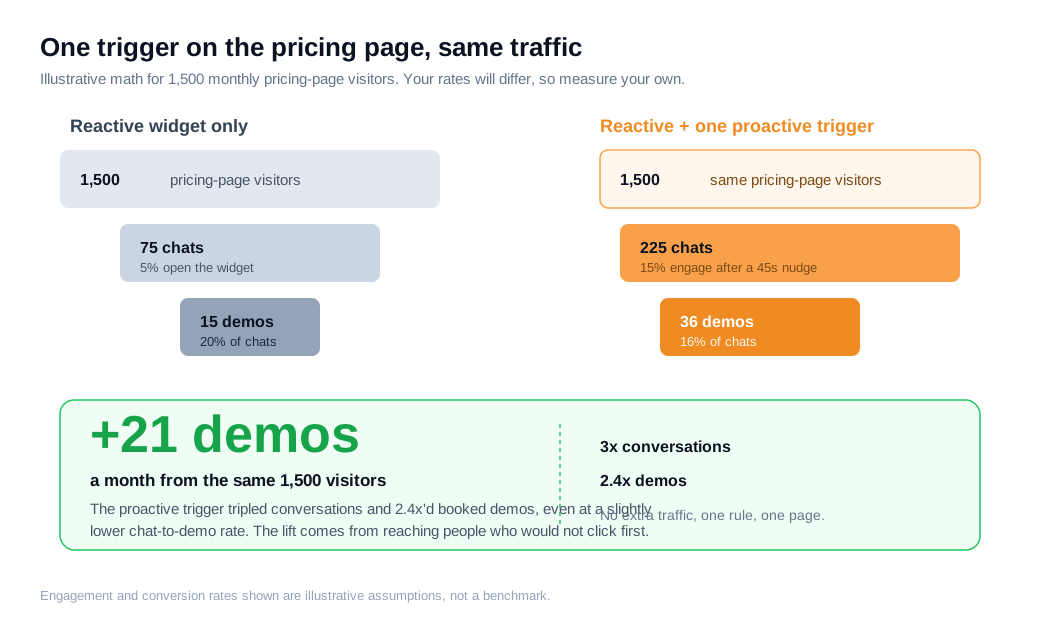
Same 1,500 visitors, no extra ad spend, one rule on one page, and the result is 21 additional demos a month. The lift does not come from squeezing the people who were already chatting. It comes from reaching the ones who would have left without a word. Those percentages are assumptions to illustrate the shape of the math, so treat your own measured rates as the real answer.
Does proactive chat annoy visitors?
It can, and it will if you fire too fast, too often, or with a message that has nothing to do with the page. The annoyance is real, but it comes from bad configuration rather than from the idea itself. When the timing and copy are right, people welcome it: survey data cited across the live chat industry consistently finds that around 89 percent of customers contacted proactively rate the experience as positive.
A few guardrails keep proactive chat on the welcome side of that line:
- Give people time to read. Wait at least 30 seconds on most pages before saying anything. Firing in the first couple of seconds feels like an ambush. The exception is a support or FAQ page, where someone arrived already looking for help.
- One invite per session, per page type. If a visitor dismisses your message, do not pop up again on the next scroll. Wait for a genuinely new high-intent signal before trying once more.
- Make the copy page-specific. "Want help choosing a plan?" on the pricing page beats a generic "Hi, can I help?" every time, because it proves you noticed where they are.
- Make dismissal effortless. A visible close control and a message that shrinks back into a normal widget respects the person who is just browsing.
- Define when not to show. The strongest programs write rules for silence as deliberately as rules for engagement. No message during a checkout error, no message to someone who just closed a chat, no message on a page where you have nothing useful to add.
The pattern is straightforward. Relevance plus restraint reads as service. Frequency without relevance reads as spam.
How do you set up proactive chat?
You set up proactive chat by installing the widget, picking one or two high-intent pages, writing a specific message, defining the trigger and its limits, then measuring before you expand. Starting narrow is the whole trick, because it lets you learn what works before it can annoy anyone at scale.
A practical sequence:
- Install the widget. Most tools, including live chat, drop in with a single line of code across your site. The widget setup guide covers placement and appearance so the invitation matches your brand.
- Choose one or two pages. Pricing and a top product or demo page are the usual first bets, because intent there is easy to read.
- Write the message for that page. Tie it to the decision the visitor is making. Draft it as if a helpful rep were standing behind them.
- Set the trigger and its guardrails. Pick the condition (time on page, exit intent, and so on), the delay, and a frequency cap of one invite per session.
- Decide who answers. Route accepted chats to the right rep, or let an AI chat assistant handle first response and after-hours coverage, then hand off when a human is needed.
- Launch to a slice of traffic and watch. Roll out to part of your audience, read the results, and only then widen or add rules.
Resist the urge to switch on ten triggers at once. You will not know which rule moved the number, and a bad one can quietly depress the page it sits on.
How do you know if proactive chat is working?
You know it is working by comparing pages or visitor groups with the trigger against a holdout without it, and watching whether the page's real conversion rate goes up rather than only the raw count of chats. More conversations is easy to produce and easy to misread. The question is whether those conversations end in the outcome you care about.
Track a short list of metrics. Invitation rate tells you how often the trigger fires. Acceptance rate tells you whether the timing and copy resonate. Chat-to-conversion tells you whether accepted chats end in a demo, a signup, or a sale. Above all, compare the conversion rate of the triggered page against a control version with the trigger off. If chats climb but conversions stay flat, the trigger is interrupting rather than helping, and it needs new timing, new copy, or removal.
Treat every trigger as a test with a hypothesis, run it against a control, keep the rules that lift the outcome, and cut the ones that only add noise. That discipline is what separates a proactive program that compounds from one that slowly wears out its welcome.
Key takeaways
- Proactive chat starts the conversation for you. It uses behavioral rules to open a relevant message at the moment of peak interest, reaching the 90 percent-plus of visitors who never click a reactive widget.
- Relevance and timing decide everything. Fire after 30 to 60 seconds on high-intent pages with copy tied to that page, and the same tool that would annoy people becomes genuinely helpful.
- The best triggers map behavior to need. Time on page, exit intent, returning visitors, repeat views, cart or deal value, and campaign match cover most high-value moments.
- Cap frequency and respect a no. One invite per session per page type, an easy dismiss, and explicit rules for when to stay silent keep proactive chat on the welcome side of the line.
- Start narrow, then measure against a control. Launch one trigger on one page, compare the triggered page to a holdout, and expand only what actually lifts conversion.
- Proactive and reactive belong together. Reactive chat serves people who already want to talk; proactive chat surfaces the intent you were otherwise missing, and Forrester tied that combination to a large incremental return.
TAGS

Written by
Nilas MylerCo-founder & CTO, Glimpze
Nilas is the co-founder and CTO of Glimpze, an inbound sales tool that turns high-intent website visitors into live conversations. A former SEO consultant for some of the largest companies in Denmark, he writes about speed-to-lead, inbound sales, and conversion rate optimization — the technical and operational mechanics of turning traffic into pipeline.


