
On this page
- What is AI customer service?
- How does AI customer service work?
- What are the benefits of AI customer service?
- What are the risks and limits of AI customer service?
- AI vs human support: which does what better?
- Will AI replace human customer service reps?
- How do you set up AI customer service well?
- Key takeaways
- Sources
A customer lands on your help page at 11pm with a question about a payment that failed. No agent is online. In a world built around contact forms, they wait until morning, and a share of them never come back. AI customer service changes what happens in that gap. The question gets an answer in seconds, at any hour, in plain language, from a system that has read your docs.
That is the promise. The reality is more mixed. The same system that resolves a routine question in two seconds can also describe a refund policy that does not exist, and a 2024 survey found that most customers would rather companies did not use AI for support at all. Whether it helps or hurts comes down to where you point it and how you set it up.
This guide covers what AI customer service is, how it works, what it does well, where it breaks, how it compares to human agents, whether it replaces them, and how to set it up so it builds trust instead of eroding it.
What is AI customer service?
AI customer service is the use of artificial intelligence, mainly natural language processing and machine learning, to understand customer questions and respond to them with little or no human involvement. Google Cloud describes the software behind it as apps or interfaces that "carry on human-like conversation using natural language understanding (NLU) or natural language processing (NLP) and machine learning (ML)," and it draws a line between these systems and older chatbots by noting that the AI versions run on "large language models (LLMs)" instead of the "traditional conversation flows and pre-programmed responses" a scripted bot depends on.
That distinction is the whole point. A scripted bot can only return lines a designer wrote in advance. An AI system reads the exact question in front of it and composes a reply, including phrasings it has never seen. The same page lists what it can do in a service setting: act "as the sole point of customer contact," "support human agents at call centers," "recommend answers generated on the fly," and "field frequent customer inquiries."
In practice, AI customer service spans channels (chat, email, and voice) and jobs (answering common questions, triaging tickets, routing to the right team, and assisting live agents behind the scenes). On a website, the front door is often a chat widget backed by an AI chat assistant that answers product and pricing questions in the moment, then steps aside when a person is the better fit.
How does AI customer service work?
It works by reading what a customer wrote, working out what they mean, finding the relevant facts, generating a reply, and then deciding whether to resolve the issue or hand it off. The intelligence sits in the three middle steps.
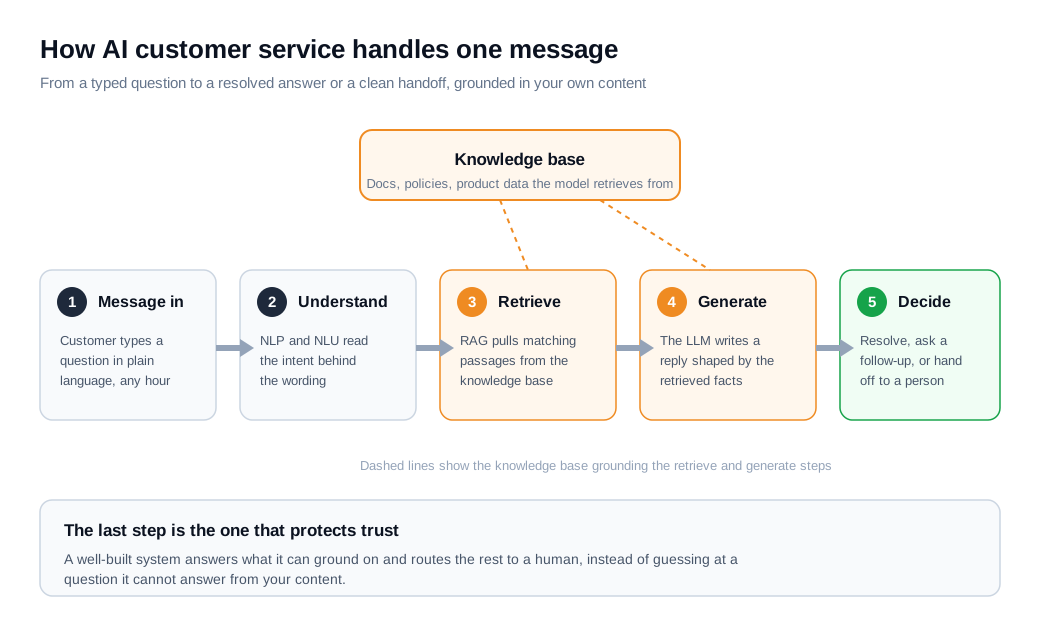
Start with understanding. When someone types "why was my card declined," the system runs the text through natural language processing, which Google Cloud defines as using "machine learning to reveal the structure and meaning of text." A subtopic, natural language understanding, works out what the message actually means, so "card got rejected," "payment won't go through," and "declined at checkout" all land as the same request.
Next comes retrieval. A well-built system does not answer from the model's memory alone. Many use retrieval augmented generation, which Google Cloud says lets a bot "search through external knowledge bases and documents relevant to the user's query," such as "internal wikis, product documentation, or even publicly available information." That step ties the answer to your current content rather than whatever the model absorbed during training, and it is the difference between a reliable assistant and a confident guesser. Curating that source is a project of its own, covered in the AI knowledge base guide.
Then generation. The language model writes the reply on the fly, shaped by the retrieved passages and the last few messages of context. Finally the system decides what to do next: send the answer, ask a clarifying question, take an action like checking an order, or route the conversation to a person. That last decision is where a good deployment protects itself, by handing off anything it cannot ground on instead of inventing a response.
What are the benefits of AI customer service?
The benefits are speed, round-the-clock availability, consistency, a lower cost per contact, and freeing human agents to spend their time on the work that needs a person. These are the jobs where being fast and tireless beats human judgment.
Speed and availability come first. A grounded assistant answers routine questions in seconds, on nights and weekends, with no queue. Because it reads free text, it fields the same question worded fifty ways and holds a coherent thread across a few turns, which a keyword menu cannot.
Consistency is the quiet benefit. Every customer who asks about your return window gets the same accurate answer, pulled from the same source, without the drift that creeps in across a large team. AI also does useful work behind the scenes: sentiment analysis can flag a frustrated message, and an assist layer can suggest answers to human agents in real time so they resolve tickets faster.
Here is the math in one month. Picture a support inbox with 4,000 conversations. The AI assistant resolves 2,400 of them on its own (order status, password resets, "do you integrate with X," a shipping question it answers from the knowledge base). Another 1,000 are triage chats where it asks a question or two and routes the customer to the right queue. That leaves 600 it should not finish alone, and it escalates them with the full transcript attached. If a human-handled contact carries roughly six dollars of agent time and an AI-handled one a small fraction of that, deflecting 2,400 contacts frees a meaningful slice of the team's hours, and the 600 escalations reach a person already briefed on the issue. The assistant closed nothing complex by itself. What it did was absorb the repetitive volume and hand the hard cases up with context intact.
What are the risks and limits of AI customer service?
The main risks are confident wrong answers, tone-deaf replies in sensitive moments, privacy and compliance exposure, and customers who resent being kept from a person. The headline failure is the hallucination.
Google Cloud defines hallucinations as "incorrect or misleading results that AI models generate," and traces them to causes including flawed training data and, critically, "a lack of proper grounding." Without grounding, it warns, a model can "generate outputs that, while seemingly plausible, are actually factually incorrect, irrelevant, or nonsensical," a problem that "can even extend to fabricating links to web pages that never existed." A fluent wrong answer does more damage than an honest "I cannot help with that," because the customer believes it and acts on it.
This is not hypothetical. In 2024, a Canadian tribunal ordered Air Canada to honor a bereavement discount that its website chatbot had described to a customer, a policy the airline said did not exist. The company was held to what its bot made up. Grounding narrows the gap, which is why the source content is the main lever on accuracy, but no amount of it removes the risk entirely.
The softer limits matter too. A model pattern-matches rather than understands, so sarcasm, indirect phrasing, and a customer venting during a cancellation can all trip it up, and a scripted "I understand your frustration" often lands worse than a real person would. There are compliance stakes as well: anything that touches personal data, payments, or regulated advice needs tight boundaries. And there is the trust cost. The top concern customers report about AI in service is that it will make reaching a human harder, so a system that traps people in a loop actively repels the buyers you want.
AI vs human support: which does what better?
AI wins on speed, availability, and volume, while humans win on empathy, judgment, and messy exceptions, which is why most teams run a hybrid rather than choosing one. The trick is matching each job to the side that handles it well.
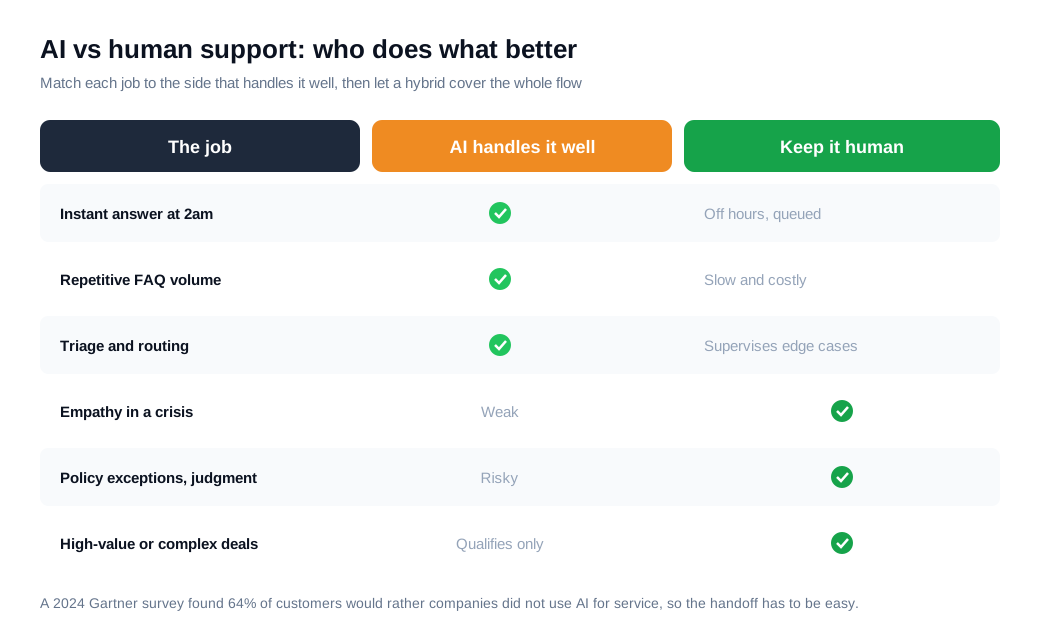
The case for automation is strongest on high-volume, low-stakes work: instant off-hours answers, repetitive questions, and triage. The case for a person is strongest wherever a wrong answer is expensive or a human touch changes the outcome, such as a complaint, a policy exception, or a complex, high-value deal.
Customer sentiment is a real constraint here, not a footnote. A 2024 Gartner survey found that 64% of customers would prefer that companies did not use AI in their customer service, and that 53% would consider switching to a competitor if they learned a company was going to use AI for support. The lesson points the other way: deploy AI where it genuinely helps, and keep the path to a person short and obvious, so the automation feels like a faster front door rather than a wall.
On a sales site, the balance tips even further toward speed to a human. A high-intent visitor is an opportunity, so the right move is often to qualify in a few seconds and then connect them to a rep, sometimes escalating straight to a live video call or screen share without the visitor leaving the page.
Will AI replace human customer service reps?
Not in the near term. The evidence points to AI absorbing routine volume while human agents shift toward higher-value work, not disappearing from the org chart.
Gartner has reported that 85% of customer service and support leaders are expanding the responsibilities of their human agents as AI takes on more of the repetitive contact volume. The pattern is a rebalancing. The bot clears the easy tickets, and the people it frees up handle the complaints, the judgment calls, and the deals where a human relationship moves the needle. Teams that treat AI as a way to fire the support desk tend to learn the hard way that the hard 15% of conversations are exactly the ones customers remember. The durable model keeps people in the loop and points them at the work that rewards their attention.
How do you set up AI customer service well?
Set it up by scoping the jobs it should own, grounding it in a clean knowledge base, writing guardrails, defining clear handoff triggers, and measuring the results. The order matters, because each step boxes in the risk that the next one could introduce.
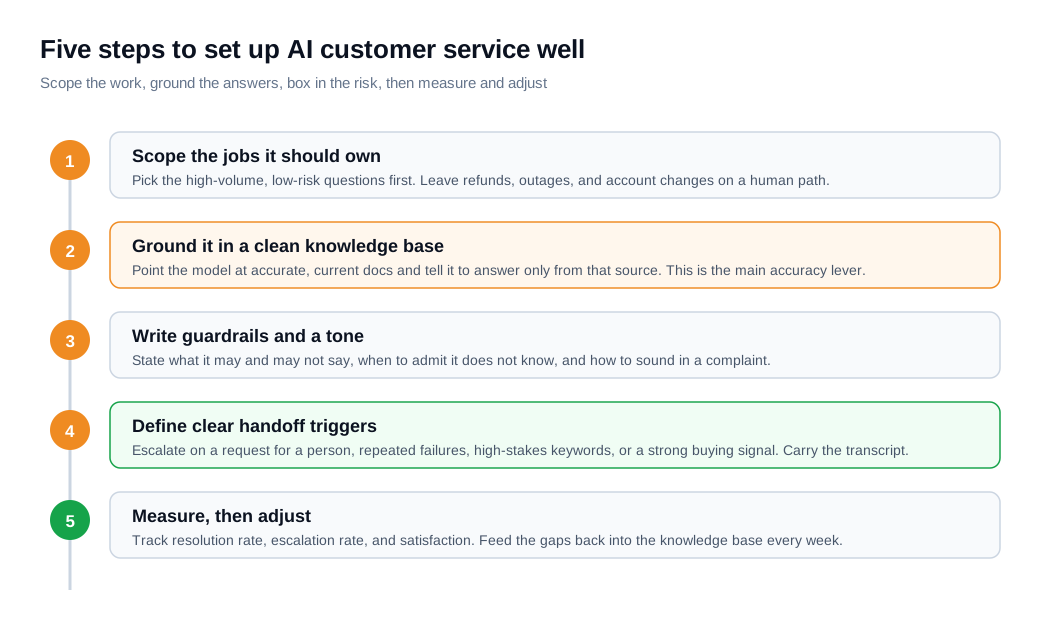
Start narrow. Pick the high-volume, low-risk questions the assistant should own, and deliberately leave refunds, outages, and account changes on a human path until you trust the system. A bot that does five things well beats one that does twenty things unevenly.
Then ground it. Point the model at accurate, current documentation and instruct it to answer only from that source. Google Cloud's guidance on avoiding hallucinations reinforces this: "train your AI with only relevant and specific sources," give it a template to follow, and "tell your AI what you want and don't want." Stale or contradictory docs are where wrong answers come from, so treat the knowledge base as the product. The mechanics of wiring this up are covered in the AI assistant setup guide.
Next, write the guardrails and the tone. State plainly what the assistant may and may not say, when it should admit it does not know, and how it should sound during a complaint. Then define the handoff. Escalate on a direct request for a person, two failed replies in a row, high-stakes keywords, or a strong buying signal, and always carry the transcript across so the customer does not repeat themselves. Getting the right conversation to the right person fast is its own discipline, covered in the routing and notifications guide.
Finally, measure. Track resolution rate, escalation rate, and satisfaction, and read a sample of real transcripts every week. When you find a question the assistant fumbled, the fix is usually a gap in the knowledge base, not a new model. Setup runs as a weekly loop rather than a one-time launch.
Key takeaways
- AI customer service generates its answers, using NLP, machine learning, and a large language model to compose a reply for the exact question, where a scripted bot can only return lines written in advance.
- Grounding is the accuracy lever. Retrieval from a curated, current knowledge base ties answers to your real content, and a system answering from the model's memory alone is where invented facts creep in.
- The signature risk is the confident wrong answer. Hallucinations sound right and are false, and as the Air Canada ruling showed, a company can be held to what its bot made up.
- AI and humans break in opposite ways, so the durable setup is a hybrid: AI for instant, high-volume, low-stakes work, and people for empathy, judgment, and complex cases.
- Customer trust is a design constraint. Most customers say they would rather companies did not use AI for support, so keep the path to a person short, obvious, and fast.
- Treat setup as an ongoing loop. Scope narrow, ground the answers, set guardrails and handoff triggers, then measure and feed the gaps back into the knowledge base every week.

Written by
Nilas MylerCo-founder & CTO, Glimpze
Nilas is the co-founder and CTO of Glimpze, an inbound sales tool that turns high-intent website visitors into live conversations. A former SEO consultant for some of the largest companies in Denmark, he writes about speed-to-lead, inbound sales, and conversion rate optimization — the technical and operational mechanics of turning traffic into pipeline.


