On this page
A customer opens your support chat on a Saturday night: "Where is my order? Tracking says delivered but nothing is here." Two things can happen next.
An automated system reads the message, pulls the shipment record, sees the carrier dropped it at a parcel locker, and sends back the locker code and a photo of the drop-off, all in about thirty seconds. Or the message lands in a queue behind forty others and gets a reply on Monday.
The first path is what AI support automation is built for. The trap is assuming it should also handle the next message, the one where a customer is furious because a delayed part shut down their small business for two days.
Automation earns its keep on the first kind of request and quietly costs you customers on the second, so the real job is drawing the line between the two and building a clean handoff across it.
This guide covers what AI support automation is, which tasks to hand it, which to keep with people, how to design the escalation path between them, how to measure whether any of it is working, and where over-automating starts to backfire.
What is AI support automation?
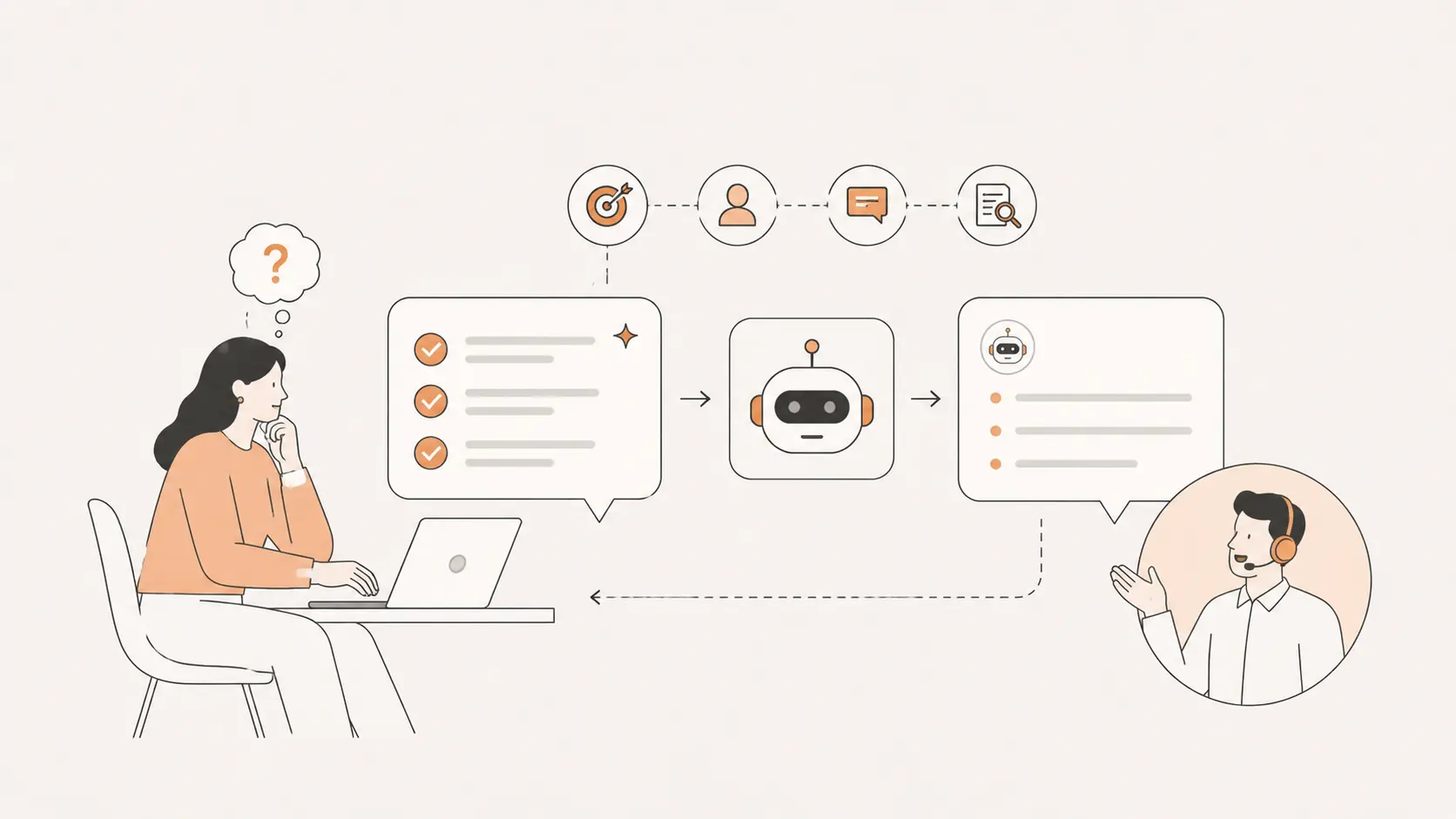
AI support automation is software that reads a customer request, decides how to handle it, and either resolves it or routes it to a person, without a human doing the routine steps in between.
It spans a range: at one end, deflecting a question with the right help article, and at the other, completing the task, such as looking up an order and sending the tracking detail inside the chat.
On a website, the front door is usually a chat widget backed by an AI chat assistant, with the logic and your knowledge base sitting behind it.
The pressure to install one is real. Gartner found that 91% of customer service leaders are under executive pressure to implement AI in 2026, which is why the technology is spreading faster than the results are landing.
Those results are uneven. In a Gartner survey of 5,728 customers, only 14% of customer service issues were fully resolved in self-service.
The lesson is not to automate less. It is to automate the right things well, so the 14% climbs on the tasks that suit it while a person still catches everything that does not.
What support tasks should you automate?
Automate the tasks that repeat, follow clear rules, and have one correct answer: order status and tracking, shipping questions, password resets, FAQs, appointment booking, refund status, plan changes within policy, and simple account updates.
These requests share a shape. They come in constantly, the right answer looks the same every time, and finishing one takes a fixed set of knowable steps.
The economics are the loudest argument. In a Gartner poll of thousands of customer journeys, live channels such as phone, chat, and email cost an average of $8.01 per contact, while self-service cost about $0.10, and 70% of customers already chose a self-service channel first.
When a routine question gets answered by software, you save close to $8 and the customer gets an instant answer at 2 a.m. instead of waiting for business hours.
The direction of travel backs this up. Gartner expects self-service and live chat to surpass traditional phone and email as the most valuable customer service technologies by 2027, based on a survey of 265 service leaders. Customers reach for the fast digital option, so the routine volume is exactly where automation belongs.
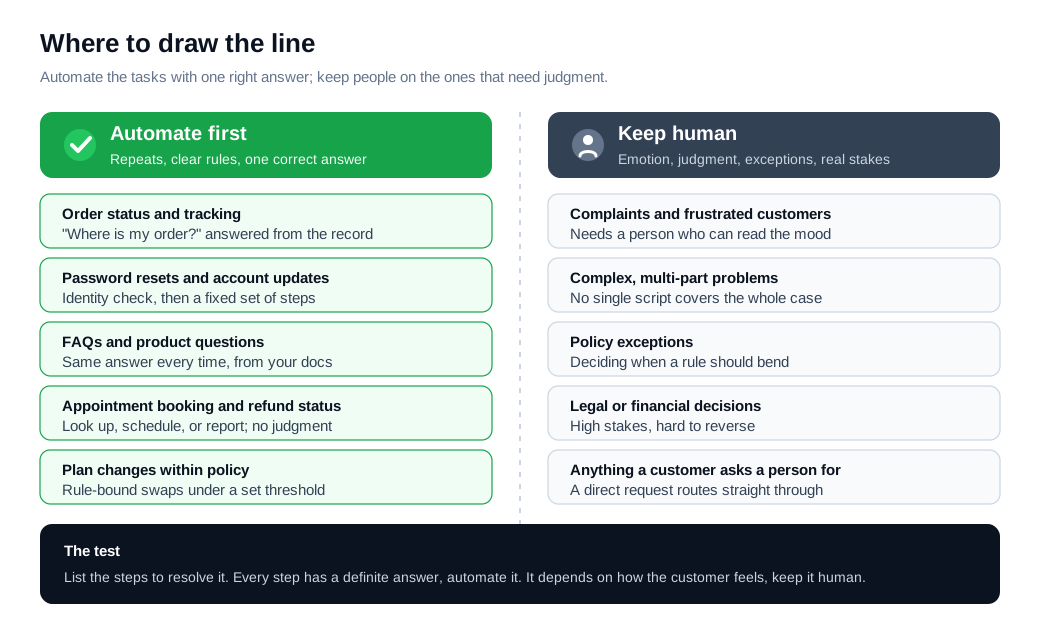
There is a simple test for whether a task belongs on the automated side. Write down the steps to resolve it. If you can list every step and every step has a definite answer, automation can run it. If resolving it depends on how the customer feels, or on a judgment call about whether to make an exception, it belongs with a person.
What should stay human?
Keep humans on anything that turns on emotion, judgment, a rule that needs bending, or real stakes: frustrated or grieving customers, complaints, complex multi-part problems, policy exceptions, and any decision carrying legal or financial weight.
These are the requests where a scripted or pattern-matched answer reads as cold at the exact moment a person needs to feel heard.
Empathy is the clearest boundary. An AI model reduces a messy human situation to fixed parameters, which works for an order lookup and fails for a customer whose problem is as much about frustration as facts.
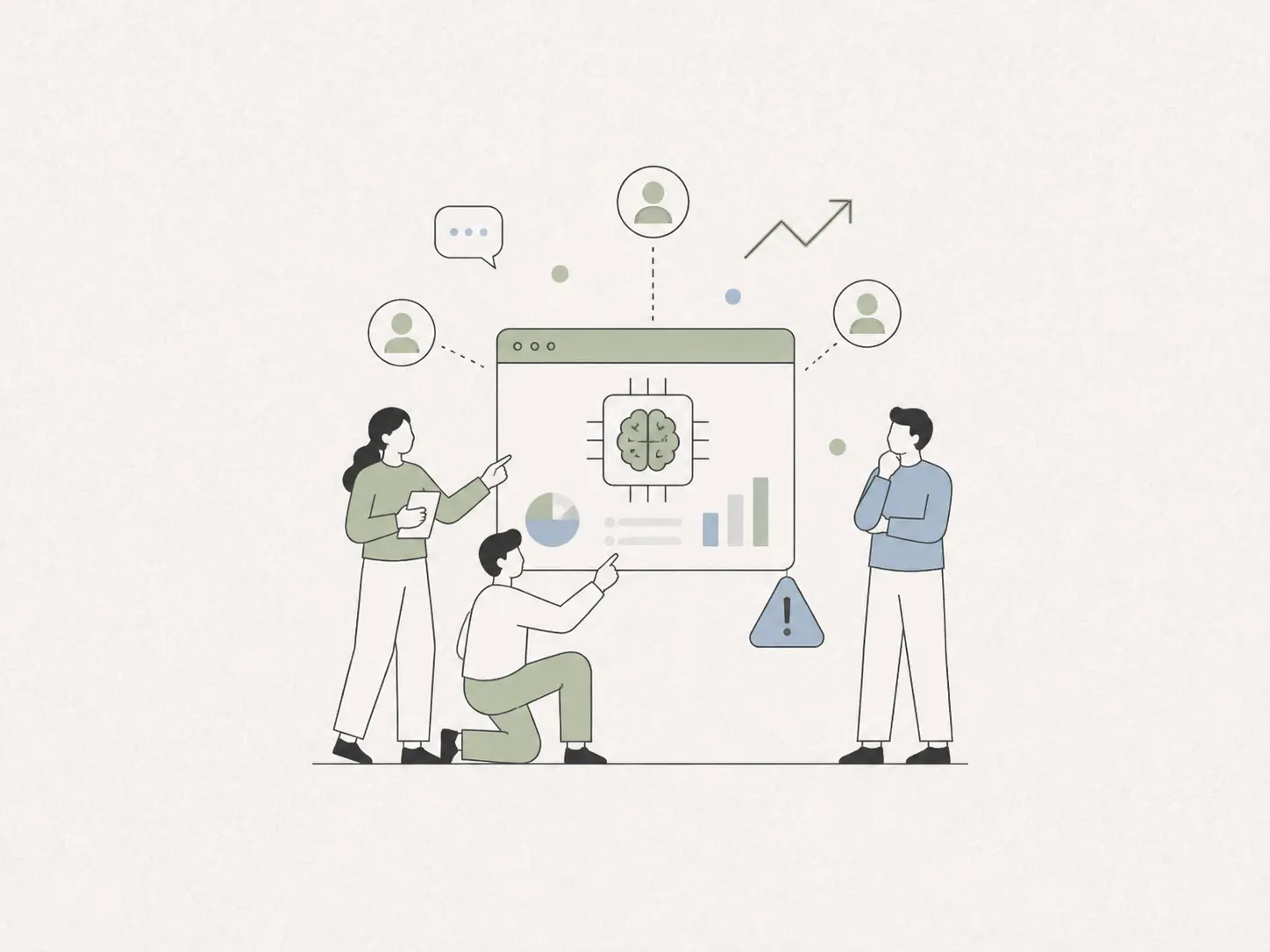
McKinsey and most practitioners land on the same hybrid split: let AI carry the high-volume routine work and reserve people for the complex, emotional, and high-stakes cases where judgment matters.
Customers feel strongly about keeping that door open. Gartner found that 64% of customers would prefer companies did not use AI in customer service at all, and their top concern was that it would get harder to reach a person.
That worry has a price attached. Research covered by CX Dive found 41% of customers are less likely to buy from a company that uses AI for service, rising to 53% when there is no way to reach a human, while more than half said they trust AI service when a clear path to a live agent exists against only about a quarter when it does not.
A visible human path is a requirement, not a courtesy.
How do you design escalation paths?
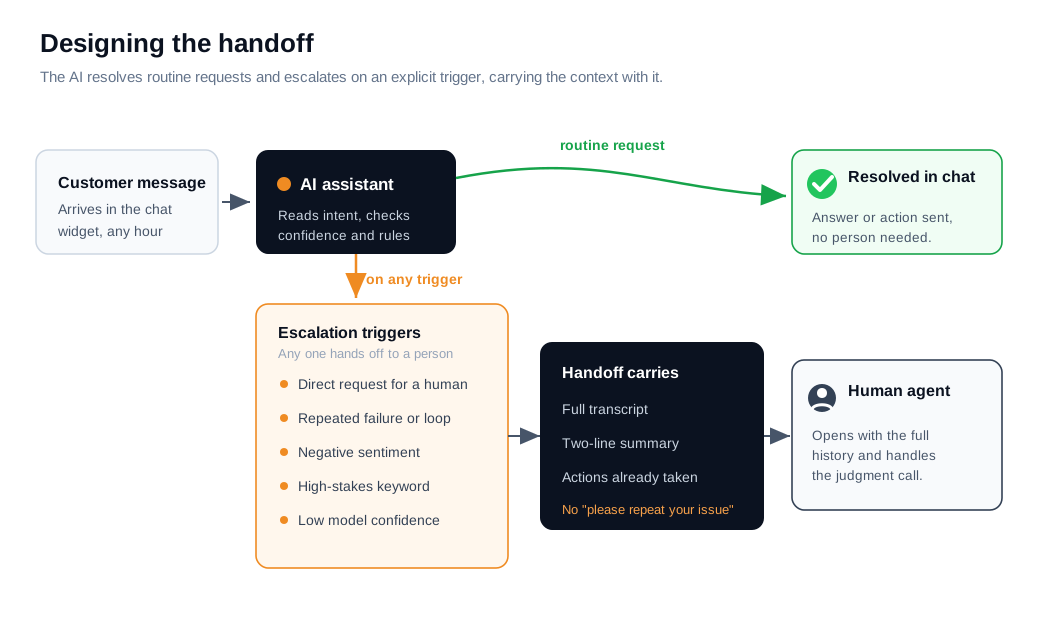
Design escalation on explicit triggers, so the AI hands off the instant it hits a request it should not finish, and make the handoff carry full context to the person who takes over.
An escalation path has two halves: knowing when to stop, and passing the conversation cleanly so the customer never repeats themselves.
Five triggers cover most of it:
- A direct request for a human, which should route immediately, since a customer asking for a person is signaling frustration.
- Repeated failure, where the same question loops twice with no resolution.
- Negative sentiment, when the language turns angry or distressed.
- High-stakes keywords, such as cancel, complaint, legal, or a refund above your auto-approve threshold.
- Low confidence, when the model itself is unsure of the answer.
The handoff is where most setups fall down. The person picking up the chat needs the full transcript, a short summary of what the customer wants, and a list of any actions the AI already took, so they open the conversation already knowing the history.
Modern tools summarize long threads specifically so context survives the transfer. Getting the right conversation to the right rep quickly is its own discipline, covered in the routing and notifications guide.
Here is a worked example. A customer types: "This is the third time I have asked, just cancel my account."
The AI catches three triggers at once: the phrase "third time" flags a repeated attempt, "cancel my account" is a high-stakes keyword, and the tone reads as frustrated.
Instead of trying to process the cancellation, it stops, writes a two-line summary, attaches the three prior turns and the account record it already pulled, and routes to a retention specialist. The specialist opens the chat knowing the full story and does not ask the customer to explain anything again. Handoff time: a few seconds, with no dead end and no "please repeat your issue."
How do you measure automation success?
Measure it with a small set of paired metrics: resolution or containment rate for volume, CSAT and first contact resolution for quality, escalation rate for graceful failure, and cost per contact for the money.
No single number tells the truth on its own, because the easiest one to move is also the easiest to fake.
Start by separating two terms that often get blurred. Deflection rate counts conversations that never reached a human, including help-article clicks and people who simply gave up. Resolution rate counts conversations where the issue was actually solved.
Fin's analysis notes that deflection-focused metrics can overstate AI value by 30 to 50%, because many deflected customers still needed help and came back through another channel.
Track resolution rather than deflection alone, and always read it next to CSAT from the same set of conversations. If containment looks great and CSAT on those chats is sliding, the bot is winning by wearing people down.
Here is a worked example with numbers. Say 10,000 support conversations arrive in a month. The AI contains 55% of them, so 5,500 close without a human and 4,500 escalate.
Using Gartner's benchmark of about $8.01 for a live contact and $0.10 for self-service, each contained conversation saves roughly $7.90, so 5,500 contained chats save about $43,000 that month.
Now the check: pull CSAT on those 5,500. If a fifth of them were actually customers abandoning rather than resolving, that is 1,100 people who left unhappy and may return angrier, which no cost saving covers. The savings are real only when the resolution behind them is real.
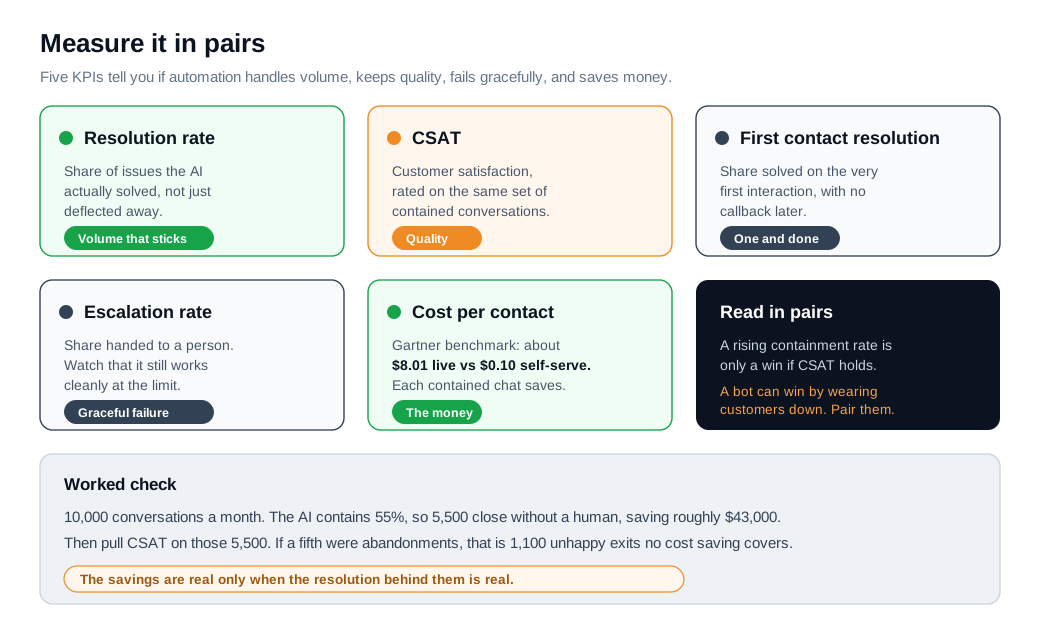
Set targets that respect the pairing. A rising resolution rate is only good news if CSAT holds and escalation still works cleanly when the bot hits its limits. Review the numbers weekly at first, and expand automation onto a new task only after the current set holds its quality.
What are the risks of over-automating support?
The main risks are hiding the human, confidently wrong answers, and gaming a metric while satisfaction quietly falls. Each one scales with the volume automation is built to produce, which is what makes them dangerous rather than merely annoying.
Hiding the human is the costliest. When 64% of customers already prefer you did not use AI and their top fear is a lost path to a person, a support flow with no obvious exit to a human confirms the worst suspicion and, per the CX Dive data, pushes the share who would walk from 41% to 53%.
Confident wrong answers are the second risk. A model can state a policy or a refund rule that does not exist and say it with full assurance, so grounding the assistant in verified docs and a curated knowledge base matters as much as any feature.
The third risk is chasing a containment number by making the human hard to reach, which looks like a win on a dashboard and reads as a trap to the customer.
The pattern behind failed rollouts is scope, not technology. Gartner predicts that more than 40% of agentic AI projects will be canceled by the end of 2027, citing unclear value and weak controls, even as it expects agentic AI to autonomously resolve 80% of common service issues by 2029.
Both forecasts point the same way: automate a tight set of routine tasks, keep a fast route to a person, and grow the automated side only where the quality metrics earn it.
On a sales-driven site, the same instinct applies, where a quick jump from a bot to a live person on live chat tends to convert better than trapping a high-intent visitor in a loop. Wiring up that first careful version is a project in itself, walked through in the AI assistant setup guide.
Key takeaways
- Automate the tasks with one right answer. Order status, password resets, FAQs, refund status, and simple account changes repeat and follow clear rules, and Gartner's benchmark of $8.01 versus $0.10 per contact makes each one worth automating.
- Keep humans on emotion, judgment, and stakes. Complaints, frustrated customers, policy exceptions, and legal or financial calls stay with people, and 64% of customers would rather you did not use AI at all than lose the path to one.
- Design escalation on explicit triggers. Hand off on a human request, a repeat loop, negative sentiment, a high-stakes keyword, or low confidence, and pass the transcript, a summary, and any actions taken so the customer never repeats themselves.
- Measure resolution over deflection. Deflection alone can overstate AI value by 30 to 50%, so track real resolution beside CSAT from the same conversations to catch customers who abandoned rather than got helped.
- Read every metric in pairs. A rising containment rate is only a win if CSAT holds and escalation still works, because the easiest number to move is also the easiest to fake.
- Over-automating has a real cost. Hiding the human pushes the share of customers who would walk from 41% to 53%, and Gartner expects over 40% of rushed agentic projects to be canceled, so scope tight and keep a person one click away.
TAGS

Written by
Nilas MylerCo-founder & CTO, Glimpze
Nilas is the co-founder and CTO of Glimpze, an inbound sales tool that turns high-intent website visitors into live conversations. A former SEO consultant for some of the largest companies in Denmark, he writes about speed-to-lead, inbound sales, and conversion rate optimization — the technical and operational mechanics of turning traffic into pipeline.