
On this page
A visitor lands on your pricing page at 11pm, reads for two minutes, and has one question standing between them and a signup. The only way to ask it is a contact form that promises a reply "within one business day." They close the tab. By morning they have booked a call with a competitor whose site answered on the spot.
A website AI assistant exists to catch that moment. It sits in a chat widget, reads the question in plain language, answers from your own content, and either resolves the visitor or routes a hot one to a person while their interest is still warm. Adding one has gotten simple enough that the install is the easy part. The work is in the content you feed it and the handoff you design.
This guide covers what a website AI assistant can actually do, how to set one up, how to train it on your content, when it should hand off to a human, how to measure whether it works, and what it costs.
What can a website AI assistant do?
A website AI assistant answers visitor questions in plain language, qualifies and captures leads, books meetings, and routes high-intent buyers to a person, all day and in any language. It replaces the form-and-wait pattern with an answer in the moment someone asks.
The core job is understanding intent. A scripted widget scans for a keyword and offers a menu. An AI assistant reads the sentence, works out what the person actually wants, and pulls the answer from your documentation. Ask "does this work with Salesforce," "is there an SFDC integration," or "can I sync my CRM," and it treats all three as the same question.
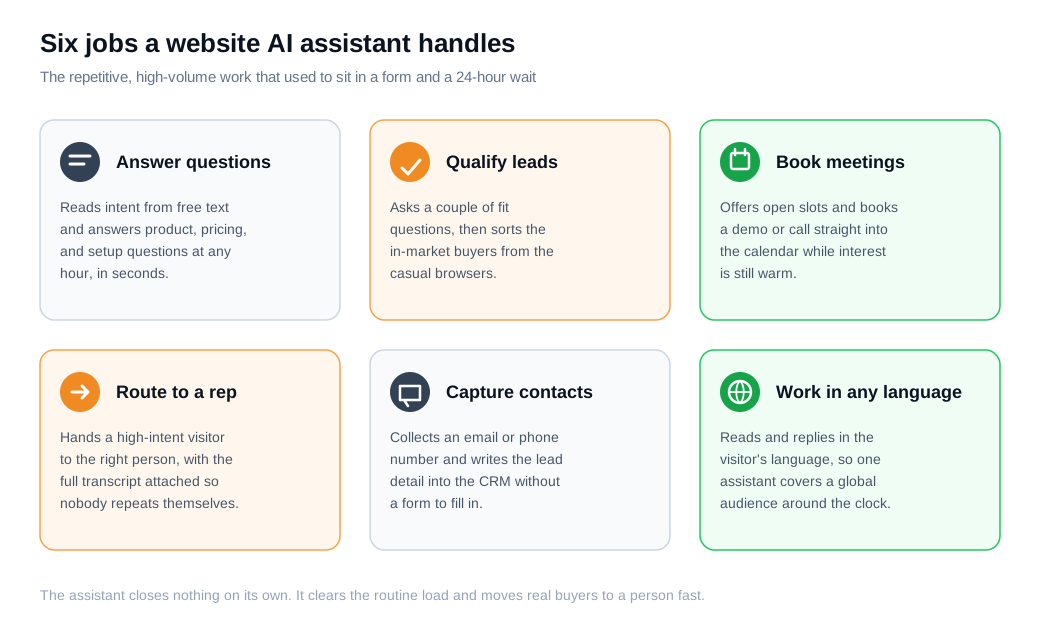
The payoff shows up in the numbers. A Glassix study reported that websites using AI chatbots saw conversion rates rise by 23 percent compared with sites that did not, alongside a 71 percent successful resolution rate on the questions the bots handled. The gain comes from two directions at once: the assistant answers the routine questions that used to go unanswered overnight, and it moves the serious buyers toward a conversation before they drift.
For most businesses the highest-value use is not support deflection but sales. An assistant that greets a visitor, answers a pricing question, and offers a slot on a rep's calendar is working the exact window where inbound sales is won or lost. That is where an AI chat assistant earns its place on a marketing site.
How do you set one up?
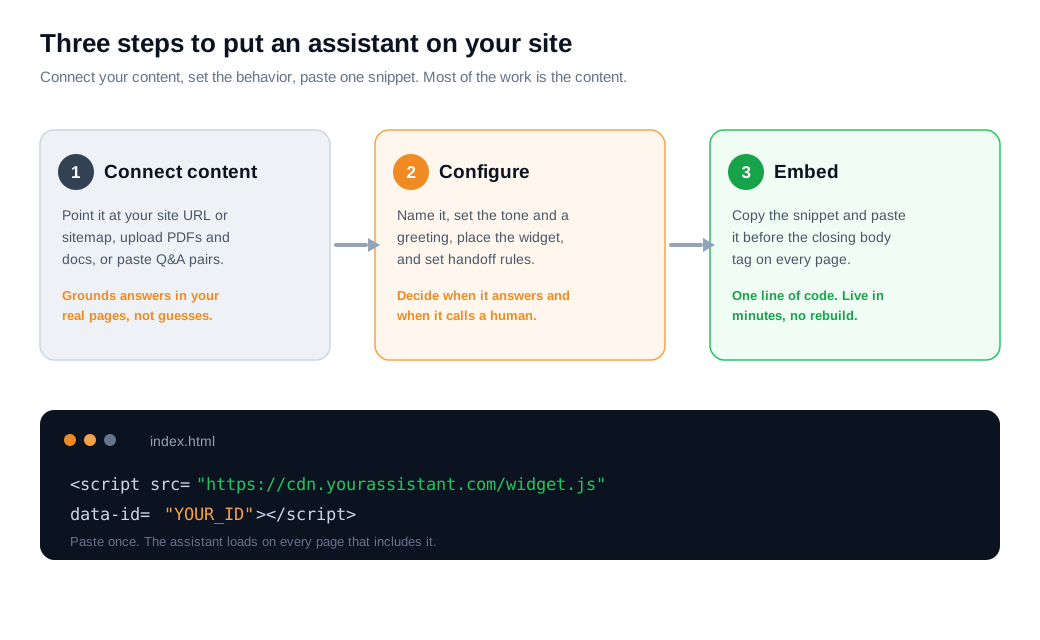
Setting up a website AI assistant comes down to three steps: connect it to your content, configure its behavior and appearance, then paste one snippet of code onto your site. Most platforms handle all three from a single dashboard, and none of it requires a developer.
The first step is content, and it does most of the heavy lifting. Elfsight's setup guide describes the common options: paste your site URL or sitemap so the tool crawls your pages (some pull up to 200 automatically), upload files like PDFs and DOCX, or add Q&A pairs and raw text blocks for anything not written down yet. This is what the assistant will read from when it answers.
The second step is configuration. You give the assistant a name and a greeting, set the tone so it matches your brand, choose where the widget appears, and define the rules for when it should stop answering and call a human. The third step is the embed. You copy a single snippet and drop it in before the closing body tag, and the widget loads on every page that includes it.
Put a clock on it. Say a two-person team wants an assistant live by end of day. They point it at their 80 help-center articles and the pricing page, which takes half an hour to review. They spend another half hour on the greeting, tone, and a rule that hands off any billing question. Pasting the snippet takes five minutes. They then run 20 real questions through it before flipping it on. Live the same afternoon, with the widget install guide covering the placement details.
How do you train it on your content?
You train a website assistant mostly by grounding it: you point it at your own pages and documents so it reads the right passage before it answers, rather than teaching the model new facts. The technique behind this is retrieval augmented generation, which AWS describes as "the process of optimizing the output of a large language model, so it references an authoritative knowledge base outside of its training data sources before generating a response," and it works "without the need to retrain the model."
That framing changes what your job is. You are not running a training job. You are curating a library and making sure the assistant consults it. The model brings the fluent language. Your content brings the facts, which means the quality of the answers tracks the quality of what you feed in.
Feed it the canonical, customer-facing material you already maintain: product and setup docs, help center and FAQ articles, pricing and plan details, and policies on refunds, security, and privacy. Keep out the noise. Internal notes, draft copy, outdated campaign pages, and duplicate answers that contradict each other all pull the assistant toward wrong replies. If two pages describe your return policy and one is stale, the retriever has roughly even odds of citing the wrong one.
Grounding is also the main defense against the confident wrong answer. A Forbes Technology Council piece on retrieval augmented generation frames it as a leading way to curb hallucination by tying each response to trusted source material instead of the model's general memory. Grounding lowers the risk, though it does not remove it, so testing stays part of the job.
Testing is the step teams skip. Write down 30 to 50 questions your sales and support people actually get, with the correct answer for each taken from your own docs, and run all of them through the assistant before launch. Count how many replies are faithful and on-topic. The failures become your content worklist. The AI assistant setup guide walks through connecting sources and tuning behavior, and the AI knowledge base guide covers structuring the content so the right passage is findable.
When should the AI hand off to a human?
The assistant should hand off the moment a question turns high-stakes, the visitor asks for a person, it fails twice on the same request, or a clear buying signal appears, and on a sales site that last trigger is the one that pays. A good handoff carries the full transcript, so the customer never repeats themselves.
The buying-signal case is worth dwelling on because speed decides it. A classic Harvard Business Review audit of online sales leads found that firms which tried to contact a prospect within an hour were nearly seven times likelier to qualify the lead as those that waited even 60 minutes, and more than 60 times likelier than those that waited a day or more. The same study measured an average first-response time of 42 hours, and 23 percent of companies never responded at all.
An assistant is built to close that gap. When a visitor on the pricing page asks about enterprise seats or annual billing, that is not a support ticket. It is a buyer signaling intent, and the right move is to put a person in front of them in seconds rather than route them into a queue. This is where the assistant and a live team work as one system, which is what the routing and notifications guide is built around.
The handoff can escalate the channel too. A routine question stays in chat. A high-intent buyer with a complex question can be moved straight into a live video call or screen share with a rep, which is a faster path to a decision than another round of typing. The rule that keeps this working: design the triggers before launch, and pass context every time.
How do you measure its impact?
Measure impact with a small set of paired metrics: containment rate, CSAT on the same conversations, conversion lift, and cost per resolved chat. Read them together, because any one of them can lie on its own.
Containment rate is the share of chats the assistant closes without handing off. A guide to containment versus deflection notes that most chatbots contain only 20 to 40 percent of conversations while leaders reach 70 to 90 percent, and it warns never to chase that number alone. Push containment too hard by making a human hard to reach, and satisfaction falls even as the dashboard looks green. That is why CSAT belongs beside it. The Comm100 Live Chat Benchmark Report 2025, drawn from more than 220 million interactions, found that chats fully resolved by a bot earned a 87.58 percent satisfaction rating, slightly ahead of the 85.8 percent for chats that had to be transferred to an agent.
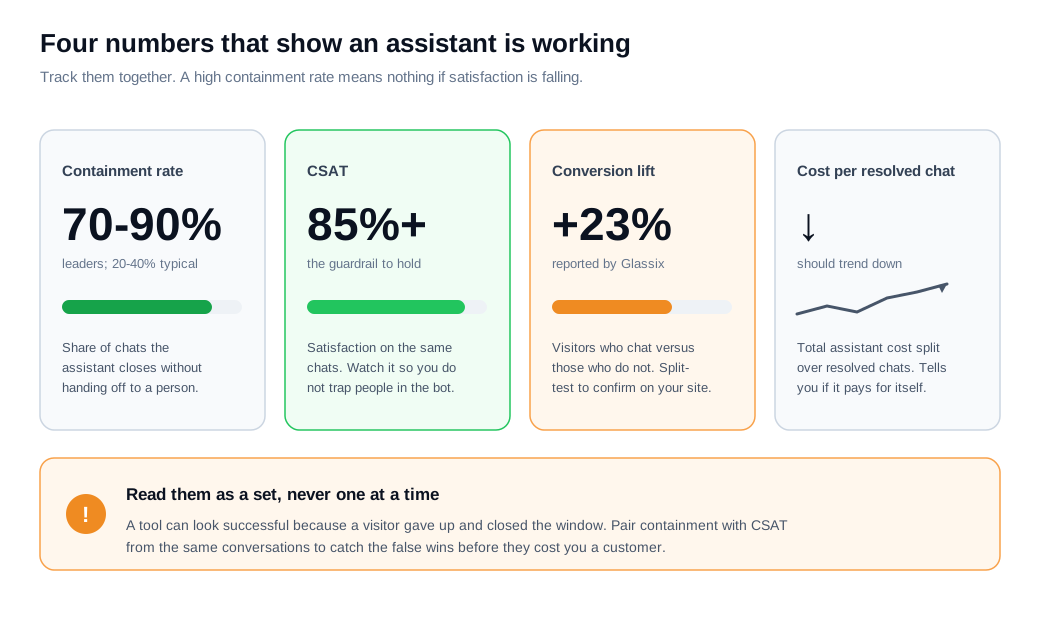
Watch for the false win. Your analytics may mark a chat "resolved" simply because the visitor stopped replying, not because the answer landed. Pairing containment with CSAT from the same cohort of conversations is how you catch those before they cost you a customer.
Now the worked example. Say the assistant handles 1,000 chats in a month. It contains 720 of them on its own, a 72 percent containment rate, and CSAT on those chats holds at 88 percent. Of the 280 it hands off, 160 carry buying signals and reach a rep within seconds. Run a split test and the visitors who chat convert 23 percent higher than those who do not. If the assistant costs $79 for the month and resolves 720 chats, that is about 11 cents per resolved chat, against the far higher cost of a person answering each one. Now you have four honest numbers instead of a vibe.
How much does it cost to add an AI assistant?
Costs range from free widgets to usage-based plans, and the real figure depends on your chat volume and how much you ask the assistant to do beyond answering. The install itself is close to free on most platforms. The pricing lever is scale and capability.
Three models are common. Free tiers let you embed a basic assistant and test it with real traffic before paying anything. Flat monthly plans charge a predictable fee for a set of features and a usage ceiling, which suits most small and mid-size sites. Usage-based pricing charges per resolved conversation or per seat, which can be cheaper at low volume and more expensive as chats climb.
For a rough budget, a small team running a few hundred chats a month often lands on a free or low flat plan, while a high-traffic site pushing thousands of qualified conversations moves to usage-based or enterprise terms. Glimpze, for example, has a free plan and a flat Pro plan at $79 a month, with enterprise pricing for larger volumes, and the current tiers are on the pricing page. Whatever the model, price the assistant against the alternative: the cost of a person answering the same routine questions, and the revenue from buyers you would have lost to a slow form.
Key takeaways
- A website assistant answers, qualifies, and routes in the moment. It reads intent from free text, resolves routine questions at any hour, and moves high-intent buyers to a person, which is where a Glassix study tied AI chatbots to a 23 percent conversion lift.
- Setup is three steps, and content is the hard one. Connect your pages and docs, configure the behavior and placement, then paste one snippet before the closing body tag to go live.
- Training means grounding, not retraining. Retrieval augmented generation points a stock model at your own canonical content and has it read the right passage before answering, then you test on 30 to 50 real questions.
- Design the handoff before launch. Escalate on high-stakes topics, direct requests, repeated failure, and buying signals, because HBR found firms that reply within an hour are nearly seven times likelier to qualify a lead.
- Measure with paired metrics, never one alone. Track containment rate, CSAT on the same chats, conversion lift, and cost per resolved chat, so a high containment number cannot hide falling satisfaction.
- Costs scale with volume, not install. Free tiers, flat monthly plans, and usage-based pricing cover the range, and the honest comparison is against the cost of answering those chats by hand.
TAGS

Written by
Nilas MylerCo-founder & CTO, Glimpze
Nilas is the co-founder and CTO of Glimpze, an inbound sales tool that turns high-intent website visitors into live conversations. A former SEO consultant for some of the largest companies in Denmark, he writes about speed-to-lead, inbound sales, and conversion rate optimization — the technical and operational mechanics of turning traffic into pipeline.


